
AI video for restaurants and cloud kitchens: menu clips from one dish photo
One good photo of a dish can become a 5-second clip with steam, a slow push-in and a warm table light. Here is how restaurants and cloud kitchens turn menu photos into Reels and listing videos, with weekly costs in rupees.
· 5 min read · 904 views · by the Cortex Digital Hub team
Upload your best dish photo as the first frame and describe only the steam, light and camera move. From ₹24 a clip · no watermark · runs in your browser
Animate a dish → → Opens AI Video Generator · runs in your browser
AI video for restaurants starts with a photo you already have: a dish shot on a clean plate in good light becomes a 5-second clip with steam, shimmer and a slow push-in. Upload it to the AI Video Generator as the first frame, describe only the motion, and you have a menu clip for Reels, WhatsApp or a Status in a few minutes. This post covers the prompts, the settings and what a week of clips costs for a restaurant or cloud kitchen.
Start with the dish photo, not a prompt
Image to video keeps your dish on screen exactly as photographed, so the biryani still looks like your biryani. Text to video would invent a plate. For menu items that is the wrong trade.
Choose a photo with a clear plate, a plain background and light from one side. Take it from slightly above the plate level rather than straight down, because a 45-degree angle gives the camera room to move. Avoid heavy filters; the model reads colour as it finds it. If the photo has a busy counter behind the dish, cut the background with the free remove background tool and place the plate on a clean surface first. The photo-to-video basics apply here too.
Steam and sizzle prompts that work
Describe the effect you can see, one at a time, and keep the camera to one move. Examples you can paste and edit:
- Curry or dal:
Thin steam rising from the gravy, oil shimmering at the edge, slow push-in, warm side light. - Dosa or paratha:
Fresh butter melting on the surface, wisp of steam, slow tilt down to the plate, soft morning window light. - Pizza or burger:
Cheese stretching as a slice lifts slightly, gentle steam, slow orbit to the right, warm restaurant light. - Dessert:
Cold mist drifting off the glass, a drizzle of syrup settling, static frame, soft candle glow. - Chai:
Steam curling from the glass, gentle swirl in the milk, slow pull-out, cool dawn light.
Say "steam" rather than "smoke", and keep adjectives about motion, not taste. If you want sizzle ambience, turn Sound on, because sound models add effects that match the motion. If you will lay a trending track over it, switch Sound off.
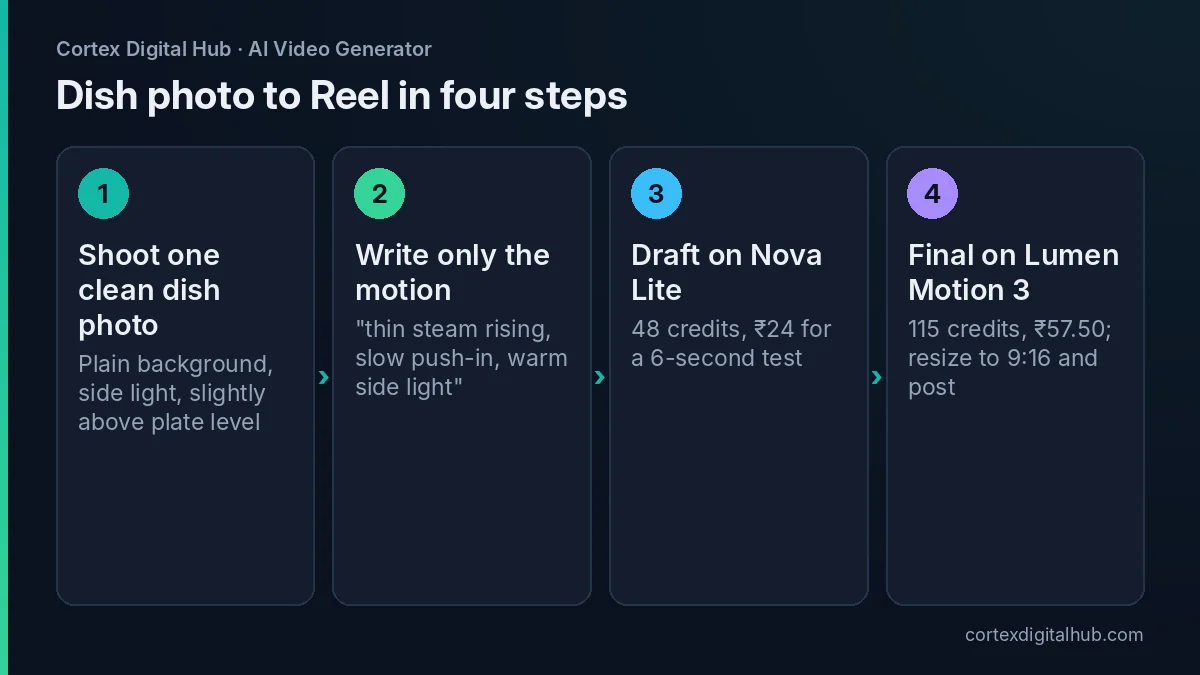 Four steps from dish photo to a Reel-ready AI video for restaurants.
How much does AI video for restaurants cost a week?
Work in two stages: a cheap draft to test the prompt, then one final per dish. Say a cloud kitchen in Bengaluru wants six dish clips a week.
| Stage | Model | Per clip | Six dishes |
|---|---|---|---|
| Draft | Nova Lite, 6 s | 48 credits, ₹24 | ₹144 |
| Final | Lumen Motion 3 Standard, 5 s | 115 credits, ₹57.50 | ₹345 |
| Full week | Draft + final | ₹81.50 | ₹489 |
If you skip drafts and trust your prompts, six finals are ₹345. If you want sharper detail for a signage screen, a 5-second Nova 2K clip is 175 credits, ₹87.50. Prices are as of October 2026, and the exact total shows on the Generate button before you start. Credits come back if a clip fails.
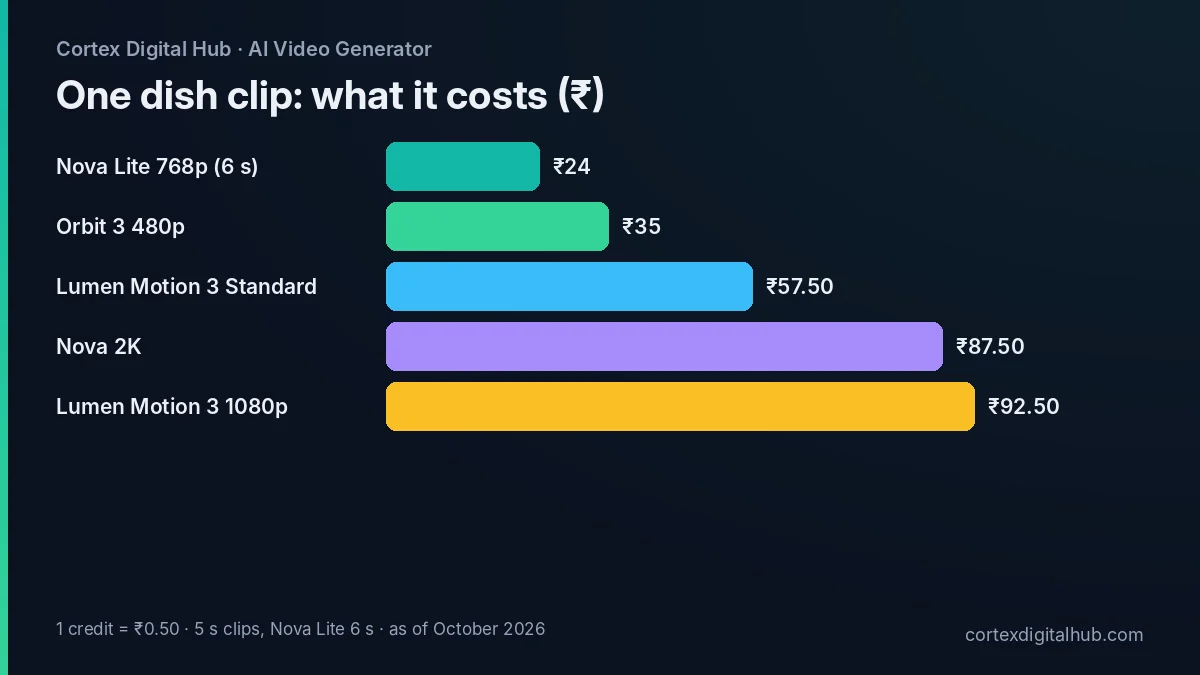 What one dish clip costs on each model, in rupees, as of October 2026.
Where the clips go: Reels, Status and listings
Reels and WhatsApp Status are where short dish clips earn their keep. Set the Format to 9:16 before you generate, or fix it after with the video resizer. The Reels resize guide shows the safe areas, so your captions do not sit under the buttons.
For WhatsApp broadcasts to regular customers, shrink the file with the video compressor and read the WhatsApp compression guide if the file is still too large. For aggregator listings, rules on video change, so check each platform's help page for its current format, length and size limits before you upload. As of 2026, treat listing video as something to verify, not assume.
Keep the clip true to the plate
The clip is advertising, so it must match what arrives at the table. Do not show garnish you do not serve, a portion size you do not plate or ingredients that are not in the dish. If the model adds extra elements, such as a second sauce bowl, discard the clip and add "no extra items" to the Avoid box. Use the Seed field if you want to reproduce a result you liked.
Do not animate staff or customers without clear written consent, and do not use children's faces. A dish, an empty table or a kitchen pass is enough for menu content, and it is safer.
Cloud kitchens: one look across many brands
A cloud kitchen often runs several virtual brands from one stove, and each brand needs its own feed. Image to video helps because every clip starts from a real photo, so the look follows the brand's plating and props rather than a random model choice. Keep a fixed recipe for each brand: the same light direction in the prompt, the same camera move, the same ending frame. Say a Hyderabad kitchen runs a biryani brand and a dessert brand. The biryani clips can all use a slow push-in with warm steam, while the dessert clips use a static frame with cool mist. Viewers then recognise the brand before they read the name.
If you need a recurring jar, cup or logo on screen, add it as a reference image with the @ Tag button, so it stays consistent between clips. The reference images guide explains how two to four references hold a product steady.
What not to expect
AI video will not replace a shoot of your kitchen, your chef or your dining room. It animates what the photo already shows, and small details such as printed menu text on a tray, a brand logo on a cup or fine garnish can wobble or blur. Keep text out of the frame and add it afterwards in your editing app. If a clip shows odd motion at the edge of the plate, trim the last second with the free trim tool rather than paying for another attempt.
A simple weekly rhythm
- Monday: photograph the week's special and two best-sellers in the same light.
- Draft all three on Nova Lite and fix the prompts.
- Run finals on Lumen Motion 3 Standard and download them; History keeps clips for 7 days.
- Resize, compress and post one Reel, one Status and one broadcast.
Key takeaways
- Use image to video for menu items so the dish stays exactly as photographed.
- Prompt for one visible effect and one camera move: steam, shimmer, slow push-in.
- Draft on Nova Lite at ₹24, then make the final on Lumen Motion 3 Standard at ₹57.50.
- Six dishes in a week cost about ₹489 with drafts and finals included.
- Check listing-video rules on each platform's help page before uploading.
- Keep the clip true to the plate and avoid real people without consent.
Frequently asked questions
Can AI make a video of my restaurant dish from a photo?
Yes. Use the dish photo as the first frame in image to video, then describe only the motion, such as rising steam, a slow push-in and warm light. The photo fixes the look, so the dish stays recognisable.
How much does an AI video for a restaurant cost?
A 6-second draft on Nova Lite is 48 credits, which is ₹24. A 5-second final on Lumen Motion 3 Standard is 115 credits, or ₹57.50. Ten dishes at final quality therefore cost about ₹575, as of October 2026.
Will the AI clip look like the food I actually serve?
It should, because your own photo is the first frame. Still, check the clip against the real plate. Do not show garnish, portions or ingredients you do not serve, and discard any clip that exaggerates the dish.
Can I use AI videos on Zomato and Swiggy listings?
Listing rules for video change, so check each platform's help page or partner dashboard before uploading. As of 2026, most listing work still starts with photos, and short clips are more often used on Reels and WhatsApp.
What prompt gives realistic steam and sizzle?
Describe the visible effect, not the sound: 'thin steam rising from the gravy, oil shimmering, slow push-in, warm side light'. Keep one subject and one camera move. Turn sound on if you want a sizzle ambience.
Should I turn sound on for food videos?
Turn it on if you want the clip to carry sizzle or kitchen ambience on its own. Turn it off if you plan to add a trending track in your editing app, so the two do not clash.
What size should a restaurant Reel be?
Vertical 9:16 at 1080 x 1920 is the usual size for Reels and Status. Set the Format before you generate, or fix it afterwards with the free video resizer and then compress the file if you send it on WhatsApp.
How many dish clips can I make for ₹249?
The ₹249 pack is 520 credits. That is about four 5-second finals on Lumen Motion 3 Standard, or about ten 6-second drafts on Nova Lite at 48 credits each, as of October 2026.
Is it safe to put customers or staff in an AI clip?
Do not animate real people unless they have agreed in writing, and avoid children's faces altogether. For menu content, keep the dish, the kitchen or an empty table as the subject and there is nothing to worry about.