
Old photo to video AI: bring a family portrait to life, gently and respectfully
An old photo to video AI tool can add a slow breath, a drifting curtain or a soft change of light to a family portrait. This guide covers scanning, gentle motion prompts, consent and what the result will and will not be.
· 5 min read · 654 views · by the Cortex Digital Hub team
Upload your scanned photo as the first frame and describe only a slow, small movement. From ₹24 a clip · no watermark · runs in your browser
Animate a photo → → Opens AI Video Generator · runs in your browser
An old photo to video AI workflow takes a scanned print and adds a few seconds of quiet movement: a slow breath, a soft blink, a curtain stirring in the window. Upload the scan to the AI Video Generator as the first frame, write one gentle motion, and you get a short clip for a family WhatsApp group. It animates the picture; it does not recover real memories, and it should never invent them.
First, ask the family
Before you scan anything, decide whose photo it is and who should agree. For a grandparent's portrait, check with the closest relatives. For a photo of someone who has passed away, many families find a gentle animation moving, and some do not, and both responses are fair. Agree in advance what is acceptable: a breath and a smile, yes; speech, no.
Two firm rules. Do not animate real children's faces. If a group photo includes a child, keep the clip to a still frame or animate only the background. And do not make any person say, do or wear something they never did. The aim is a quiet moment, not a new story.
Scan the photo properly
The model can only work with what the scan shows. Faint faces, glare and creases turn into drifting features.
- Scan flat at 600 dpi if you have a scanner. If not, photograph the print by a window in daylight, straight on, with no flash.
- Switch off the phone's beauty filter. Crop the border and the album page.
- If your iPhone saved the photo as HEIC, convert it with the guide to HEIC to JPG on iPhone.
- Lift contrast and remove dust spots in the free photo editor, and keep the faces natural rather than smoothed.
- If the file is huge, shrink it with the image resizer to around 2,000 pixels on the long side.
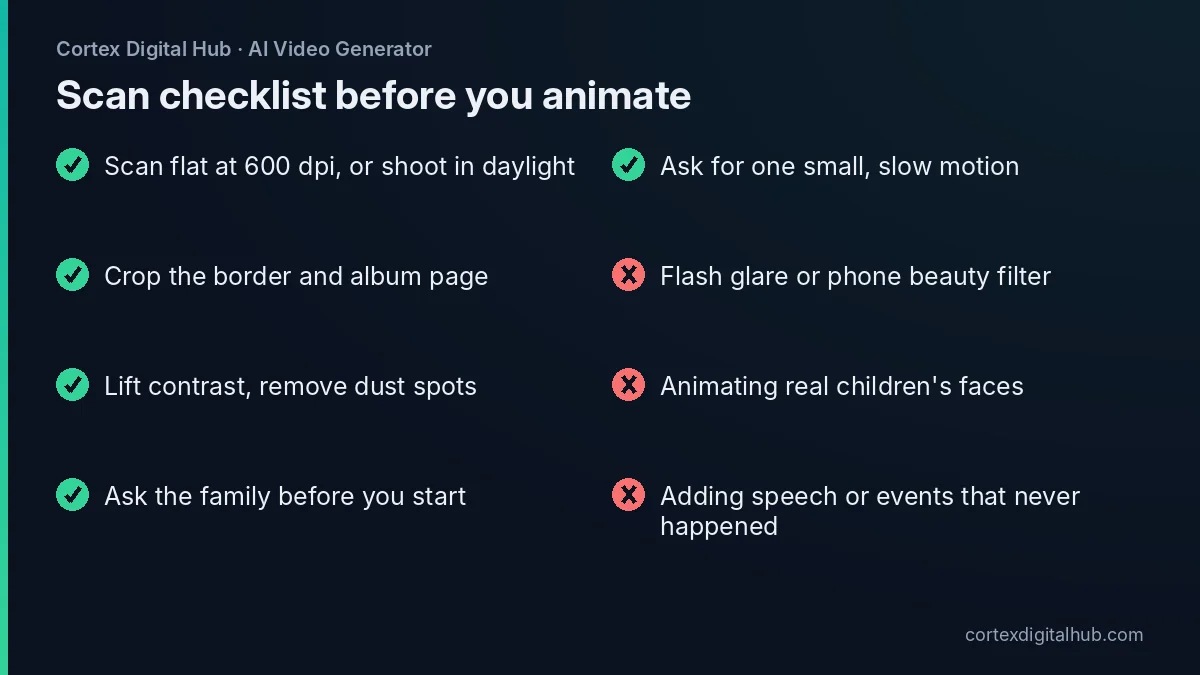 What to do, and what to avoid, before an old photo goes into the generator.
What to expect from old photo to video AI
Set expectations early. The AI invents motion that looks plausible, nothing more. A portrait will usually gain a slow breath and a soft blink. Hair or a dupatta may move slightly. A background with trees or curtains will drift. It will not recover the real way a person walked or laughed, and it will not know what was outside the frame.
| Request | Likely result | Advice |
|---|---|---|
| Breath, blink, slight head tilt | Natural, quiet | Best starting point |
| Fabric or curtain moving | Usually convincing | Name the fabric in the prompt |
| Big smile or laugh | Often unnatural | Avoid for faces that are faint |
| Walking or waving | Face may drift | Skip it |
| Speaking | Not the aim here | Do not clone a voice |
The prompt: small, slow and locked
Write the motion only. The photo already supplies the look, so there is no need to describe the face. Use a static camera, because camera movement makes faces change.
Subtle breathing, a soft natural blink, the end of her saree pallu moving slightly in a light breeze, static camera, soft warm window light.
For a landscape or a house photo, leaves moving gently, soft cloud shadows passing, static camera works well and carries no consent problem about faces. Use the Avoid box under Advanced for changing face, extra people, text, warping. If the first try looks stiff, lower the Prompt strength a little from the default 0.5. You can also ask the Speak button to take your prompt by voice in Hindi, Marathi or another supported language.
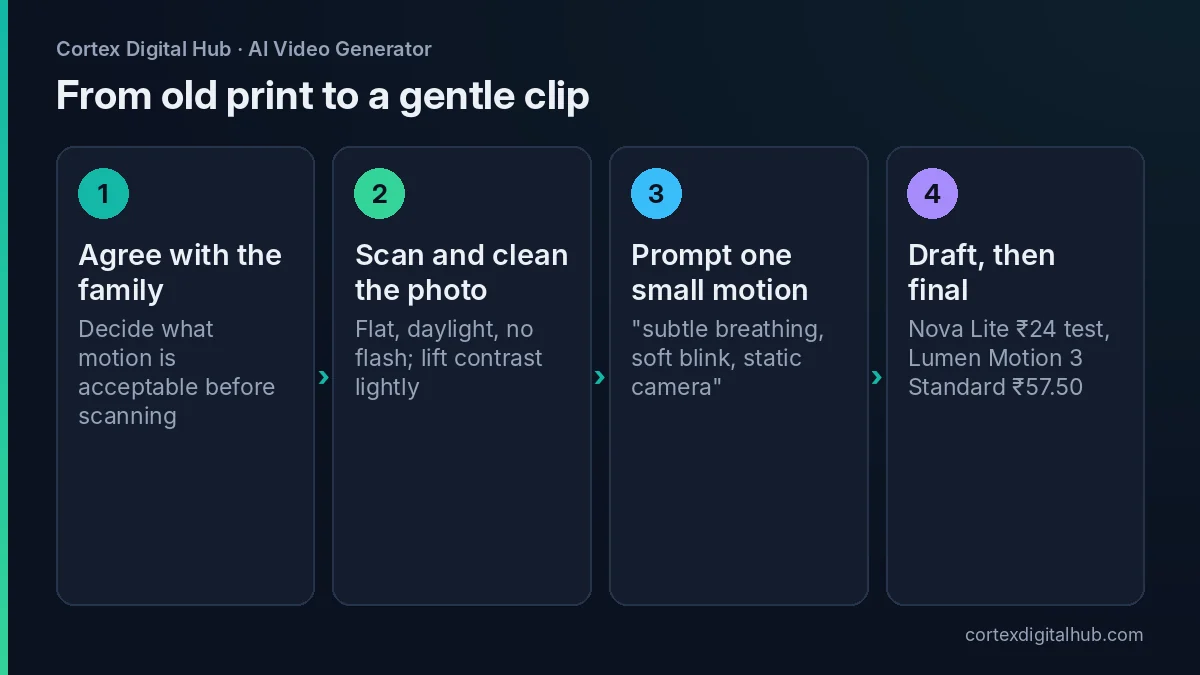 From scan to a short clip in four steps, with the family's agreement first.
What it costs
Test on a cheap model before paying for the final. On Nova Lite a 6-second clip is 48 credits, ₹24. A 5-second final on Lumen Motion 3 Standard is 115 credits, ₹57.50, and the same length on Spark 1.5 at 480p, a model that does image to video only, is 215 credits, ₹107.50. Prices are as of October 2026, and the total appears on the Generate button before you start. If a clip fails, the credits are returned.
Three tries on Nova Lite and one final on Lumen Motion 3 Standard come to ₹129.50 in total. The cost guide lists every model.
Which old photos animate well?
Not every print is a good candidate. Photos with a large, clear face, a plain background and even light give the model the most to hold on to. Studio portraits from a wedding or a graduation usually work better than a tiny face in a crowded group picture. A faded colour print can still work if you lift the contrast first, while a photo that is blurred by movement will stay blurred.
Choose a photo where the person is looking roughly at the camera and the head is not cut off. Leave a little space above the head, because the model needs room for a small movement. If the original is a small studio print, scan at the highest setting and avoid enlarging it much afterwards.
A good test is to look at the face at full size on your screen. If you can see the eyes, the nose and the mouth clearly, you have enough detail. If you cannot, restore the scan first or animate something else in the picture, such as a garden, a lamp or a curtain.
Restore first, animate second
Animation does not repair damage. Scratches, torn corners and stains are carried into every frame, and a moving stain looks odd. Spend a few minutes in the photo editor on dust spots and obvious tears before the photo goes into the generator, and save a fresh copy so the original stays untouched.
Share it, keep the original
Finished MP4s stay in History for 7 days, so download them at once. Keep the original scan in a separate folder, since the animation never replaces the photograph. To send the clip on WhatsApp, follow the WhatsApp compression guide. For where files go and how long they are kept, read about watermark, storage and privacy.
Label the clip so that no one mistakes it for a recording. A caption such as "a gentle AI animation of Nani's 1978 photo" is clear and kind. For the broader method, the image to video basics cover framing and prompts for any photo.
Key takeaways
- Ask the family first, and agree what motion is acceptable before you start.
- Do not animate real children's faces, and never add speech or events that did not happen.
- A good scan matters most: flat, daylight, no flash, cropped and cleaned.
- Prompt one small motion with a static camera, such as breath, blink or fabric.
- Test on Nova Lite at ₹24, then make the final on Lumen Motion 3 Standard at ₹57.50.
- Download within 7 days and keep the original scan separately.
Frequently asked questions
Can AI turn an old photo into a video?
Yes. Upload a scan or a clear photograph of the print as the first frame in image to video and describe a small movement, such as a slow breath, a soft blink or a curtain moving. The result is a short animation, not a recording of the real person.
How do I scan an old photo for AI video?
Scan the print flat at 600 dpi if you have a scanner, or photograph it by a window in daylight without flash, straight on, so there is no glare. Crop the border and save as JPG or PNG.
What prompt works best for animating an old family photo?
Keep it gentle: 'subtle breathing, a soft natural blink, a slight movement of the saree pallu, static camera, soft warm light'. One small motion and a locked camera usually look more natural than big gestures.
Is it okay to animate a photo of someone who has passed away?
Many families find it moving, but ask the closest relatives first and agree what is acceptable. Keep the motion gentle and dignified, and do not make the person say or do things they never would.
Can AI add voice to an old photo video?
Sound models generate ambience and music that match the motion, but a voice only appears if the prompt asks for speech, and Lumen Motion 2.6 is the dialogue model. Do not clone or invent a real person's voice.
How much does it cost to animate an old photo?
A 5-second clip on Lumen Motion 3 Standard is 115 credits, which is ₹57.50. A 6-second test on Nova Lite is 48 credits, or ₹24. Prices are as of October 2026 and the total shows before you generate.
Why does the face change in my animated old photo?
Faint, scratched or low-resolution faces give the model little to hold on to, so details can drift. Restore contrast first, use the sharpest scan you have, keep the motion small and try a second seed.
Can I animate a photo of a child?
It is better not to. Do not animate the faces of real children. For a family photo that includes a child, keep the clip to a still frame or animate only the background, such as light or leaves, with the child's face unchanged.
How long are the animated clips kept?
Finished MP4s stay in History for 7 days, so download the ones you want to keep straight away. Save the original scan separately, because the animation is a new file and does not replace the photograph.