
AI video for jewellery brands: sparkle, macro orbits and slow turntables
AI video for jewellery works when you animate light, not the piece itself: a slow orbit, a drifting highlight, a gentle turntable. Here are prompts, lighting words and costs for turning catalogue photos into Instagram and WhatsApp clips.
· 5 min read · 1.4K views · by the Cortex Digital Hub team
Upload one clean photo of the piece as the first frame and prompt only the light and the camera. From ₹24 a clip · no watermark · runs in your browser
Animate a piece → → Opens AI Video Generator · runs in your browser
AI video for jewellery works best when you animate the light and the camera, not the piece itself. Upload one clean product photo to the AI Video Generator as the first frame, then describe a slow orbit, a drifting highlight or a gentle turntable. The design stays fixed by your photo, the stones catch moving light, and you get a 5-second clip for an Instagram Reel or a WhatsApp catalogue in a few minutes.
Start with a photo that does the work
The photo decides most of the result. A good jewellery frame has a sharp piece, even light, no fingerprints and a plain background, ideally dark velvet, a matte stone slab or soft grey. Leave a margin around the piece so the camera has room to move, and keep the whole item in the frame, including the clasp or the earring post.
If the background is cluttered, use the free remove background tool and put the piece on a clean colour. If you sell on marketplaces too, the product photo requirements for Amazon, Flipkart and Meesho are a useful check for sizes and backgrounds. The wider method is in AI product video from one photo.
Lighting words that matter
For jewellery, light is the subject. Name it clearly:
- Soft box light or soft window light for gentle highlights.
- Specular highlights travelling across the stones for sparkle that moves.
- Warm rim light for gold, cool white light for silver and diamonds.
- Dark velvet background or black reflective surface for contrast.
- Shallow depth of field and soft bokeh for a premium feel.
Avoid vague praise words like "luxury" and "stunning" on their own. They give the model no information about movement.
AI video for jewellery: three prompts to copy
Each prompt keeps one piece, one camera move and one light.
| Shot | Prompt | Best for |
|---|---|---|
| Sparkle | A gold necklace with red stones on dark velvet, small highlights travelling across the stones, static camera, soft box light. |
Necklaces, rings |
| Macro orbit | Macro shot of a diamond ring, slow orbit to the right, specular highlights shifting, shallow depth of field, cool white light. |
Rings, studs |
| Slow turntable | A pair of jhumka earrings on a small rotating stand, slow turntable rotation, warm rim light, dark background. |
Earrings, pendants |
For more on camera words such as orbit and push-in, see the camera move glossary in text to video prompts that work. Type the exact phrase, and keep it slow.
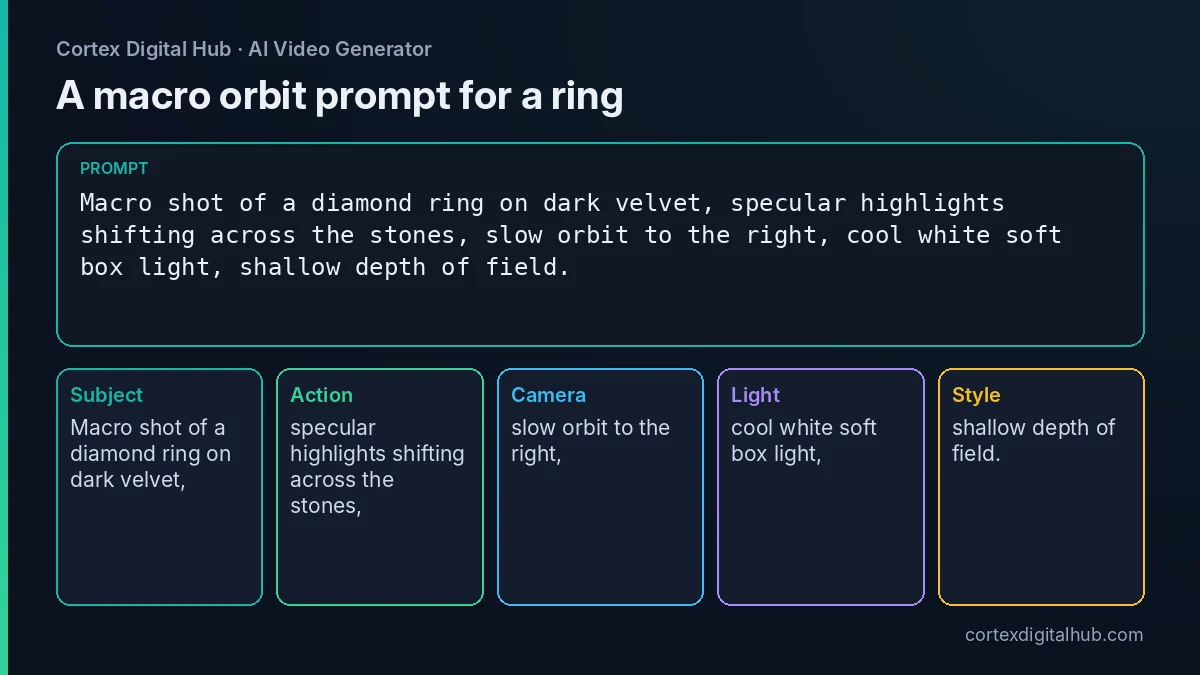 A macro orbit prompt for a ring, split into the parts the model reads.
Which model and what it costs
Draft first, final once. A 5-second jewellery clip costs the following. Prices are as of October 2026 and the exact total shows on the Generate button.
| Model | Credits for 5 s | Price | Use it for |
|---|---|---|---|
| Orbit 3, 480p | 70 | ₹35 | Drafts |
| Lumen Motion 3 Standard | 115 | ₹57.50 | Everyday finals |
| Nova 2K | 175 | ₹87.50 | Sharpest detail |
| Lumen Motion 3, 1080p | 185 | ₹92.50 | Reels finals |
Nova Lite makes a 6-second draft for ₹24. Say a jeweller in Surat has 20 new pieces. Twenty finals on Lumen Motion 3 Standard cost ₹1,150. Add a ₹24 draft for each piece and the total is ₹1,630. Choose Nova 2K for the six hero pieces and the standard model for the rest.
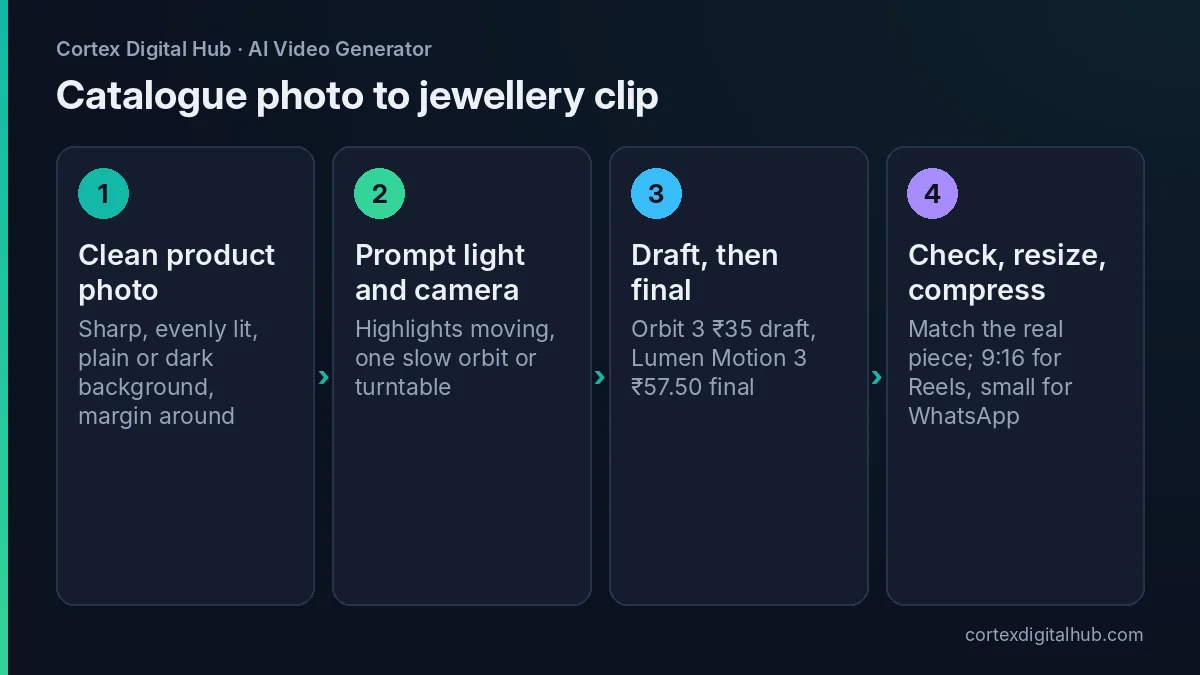 Four steps from catalogue photo to a clip you can post.
Choosing the shot for each kind of piece
Different pieces need different moves, and the wrong move wastes a clip.
Rings and studs suit a macro orbit, because the stone is small and the facets show well when the angle changes. Keep the orbit under a quarter turn in 5 seconds.
Necklaces and chokers suit a static camera with moving light, or a very slow push-in. An orbit around a necklace laid flat can bend the chain, so avoid it unless the piece is on a bust.
Earrings and jhumkas suit a slow turntable or a gentle sway. Say "hanging earring swaying slightly, static camera" and the drops move naturally.
Bangles and sets suit a slow pan across the group, which shows the range without needing the camera to travel far.
For a bridal set, shoot one clip per piece rather than one clip for the whole set. Short clips are cheaper to retry, and you can join them afterwards in any editing app.
Using reference images for a full set
If you sell a matching set, you may want the same velvet, the same lighting and the same stand in every clip. Models that accept reference images let you tag two to four pictures with the @ Tag button so the look stays consistent from one clip to the next. The reference images guide explains the method. Pick a model from the list that supports references, such as Nova 2K, and keep the same references for the whole catalogue.
Keep the piece accurate
Fine detail such as filigree, small stones, chains and engraved patterns can drift in motion. Check every clip against the real piece. If a stone count changes, a chain merges or a pattern blurs, discard the clip and shorten the move. Keep the motion slow, and add warped, extra stones, melted metal to the Avoid box.
Your caption, not the clip, carries claims about metal, purity, hallmark and price. Keep those accurate, and follow the advertising rules that apply to your business. If you show a model wearing the piece, use someone who has agreed, or a product-only setup; do not use real children or celebrities.
Catalogue, Reels and WhatsApp
For Instagram, set the Format to 9:16 before you generate, or fix it afterwards with the video resizer. The Reels resize guide covers safe areas. For WhatsApp, make sure the file is small enough to send; the WhatsApp compression guide shows how. Catalogue rules differ by platform, so check each platform's help page as of 2026.
If you will add a festive track, turn Sound off at generation. Turn it on only if you want a soft chime or ambience made to match the motion.
Key takeaways
- Animate the light and the camera, not the piece, and keep the motion slow.
- Use a sharp, evenly lit photo on a plain or dark background.
- Name the light: soft box, rim light, specular highlights, shallow depth of field.
- Draft on Orbit 3 or Nova Lite, then finish on Lumen Motion 3 Standard (₹57.50) or Nova 2K (₹87.50).
- Check every clip against the real piece and keep claims in the caption accurate.
- Resize to 9:16, compress for WhatsApp and download within 7 days.
Frequently asked questions
Can AI make a video of my jewellery from a photo?
Yes. Use a clean product photo as the first frame in image to video and describe only the movement, such as a slow orbit and drifting highlights. Your photo fixes the design, so the piece stays recognisable.
What prompt makes jewellery sparkle in AI video?
Describe the light, not the shine: 'soft window light, small highlights travelling across the stones, slow orbit, dark velvet background'. Moving light gives a natural sparkle without the piece changing shape.
Which model is best for jewellery clips?
Nova 2K gives the sharpest single frame at 35 credits a second, which is ₹87.50 for 5 seconds. Lumen Motion 3 at 1080p is ₹92.50 for 5 seconds. Draft on Orbit 3 or Nova Lite first.
Will the AI change my jewellery design?
It can, slightly, especially on fine filigree, stones and chains. Check each clip against the real piece, discard any that alters the design, and use short, slow motion to reduce drift.
How much does a jewellery catalogue of AI clips cost?
Twenty pieces at one 5-second final each on Lumen Motion 3 Standard cost about ₹1,150, since each is ₹57.50. With a ₹24 Nova Lite draft for every piece, the total is about ₹1,630. Prices are as of October 2026.
What photo should I upload for jewellery?
Use a sharp, evenly lit photo on a plain or dark background, with the whole piece in frame and a little space around it. Avoid heavy reflections, fingerprints and cropped edges.
Can I use the clips on WhatsApp catalogue and Instagram?
Yes, after resizing. Use 9:16 for Reels and Status and compress the file for WhatsApp. Platform video rules change, so check each platform's help page as of 2026 for catalogue limits.
Can I show a model wearing the jewellery?
You can, but only with a person who has agreed, or with a generated or illustrated figure. Do not use real people without consent or children's faces. Many brands prefer product-only clips on velvet or a bust.
Is it fine to say the clip shows real gold and diamonds?
Describe only what you can stand behind. The clip is an animation of your photo, so keep hallmark, purity and price claims in the caption accurate and follow the rules that apply to your business.