
Diwali video maker: make festival greeting clips with AI for WhatsApp and Reels
A Diwali video maker should give you a warm, short clip you can send before the festival rush. Here is how brands and families turn a diya, rangoli or fireworks idea into a greeting with AI, with prompts, sound choices and rupee costs.
· 5 min read · 510 views · by the Cortex Digital Hub team
Describe one festive scene, pick Lumen Motion 3 Standard and set the format to 9:16 for WhatsApp and Reels. From ₹24 a clip · no watermark · runs in your browser
Make a Diwali clip → → Opens AI Video Generator · runs in your browser
A Diwali video maker should give you a warm, short clip you can send before the rush, and the AI Video Generator does that from a one-line idea such as "a diya flickering beside a rangoli, slow push-in, warm light". Choose a 5-second clip at 9:16, wait two to four minutes, and you have a greeting for WhatsApp Status, a family group or a brand Reel. Dates for the festival change every year, so plan your clips a week early.
What makes a good Diwali video maker prompt?
A festive scene needs three things: a clear subject, a gentle movement and warm light. Then keep the camera simple.
- Subject: a brass diya, a rangoli, a plate of mithai, a string of fairy lights, an empty doorway with torans.
- Movement: flame flickering, petals drifting, sparkle shimmering, smoke curling from incense.
- Camera: slow push-in, static frame or slow tilt up toward the lights.
- Light: warm low light, golden hour, bokeh lights, dark evening sky.
Avoid asking for text, greetings or shop names inside the clip. AI video often distorts lettering. Add the words afterwards in any editing app.
Prompts to copy for diyas, rangoli and fireworks
| Scene | Prompt |
|---|---|
| Diya | A brass diya on a rangoli floor, flame flickering gently, fairy lights glowing in soft bokeh, slow push-in, warm low light. |
| Rangoli | Top-down view of a colourful flower rangoli, marigold petals drifting slowly in, static camera, soft morning light. |
| Fireworks | Fireworks blooming over a quiet apartment skyline at dusk, gentle drift of smoke, slow tilt up, deep blue sky. |
| Sweets | A silver plate of laddoo and kaju katli beside a lit diya, soft steam of incense, slow orbit to the right, warm light. |
| Doorway | A decorated front door with a marigold toran and diyas on the step, light breeze moving the flowers, static camera, evening glow. |
Start with the diya, which is the easiest and most reliable. Fireworks and crowds are harder, so keep them distant and simple. If you already have a photo of your shop front, your product or your rangoli, use image to video: upload the photo as the first frame and describe only the movement. The image to video basics show how.
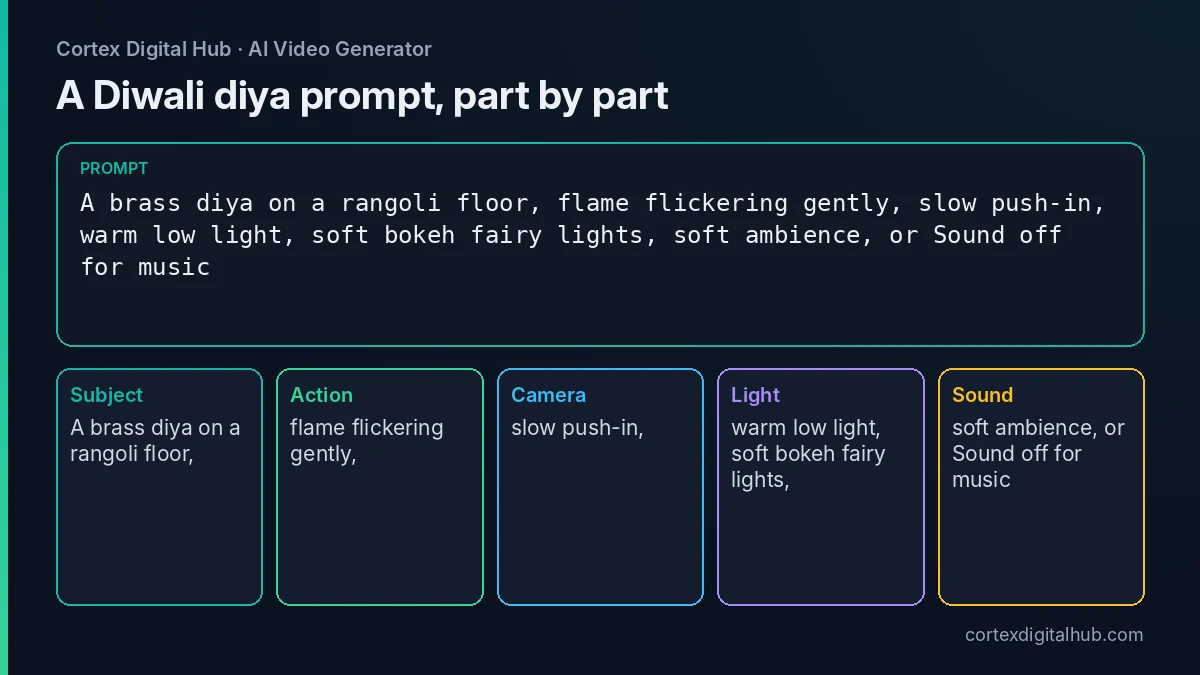 A diya prompt split into the parts the model reads.
Sound on or trending music?
Sound models generate ambience, effects and music that match the motion, but they do not add voice-over unless your prompt asks for speech. For a quiet diya clip, a soft ambience can feel right. For a brand Reel you may prefer a trending track, which you add in the Instagram app or an editing app.
| Choice | Use when | Setting |
|---|---|---|
| Sound on | WhatsApp greeting that should stand alone | Sound on |
| Sound off | You will add a trending song or a family voice note | Sound off |
If you add a song, check the platform's music rules for business accounts as of 2026, because licences for commercial use can differ.
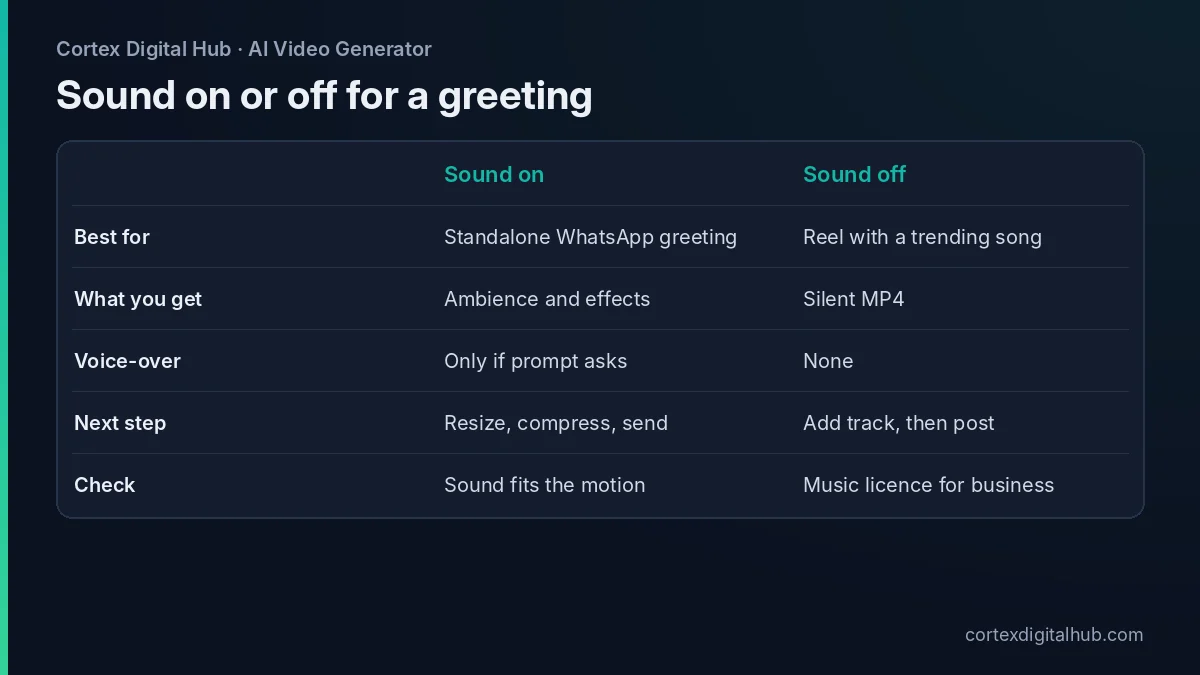 Pick sound on for a standalone greeting and sound off when you will add a track.
What does a Diwali greeting cost?
Credits are billed per second, and one credit is ₹0.50. Prices are as of October 2026.
- Nova Lite, 6 seconds, for a test: 48 credits, ₹24.
- Lumen Motion 3 Standard, 5 seconds: 115 credits, ₹57.50.
- Lumen Motion 3 Standard, 10 seconds: 230 credits, ₹115.
- Five different 5-second greetings for a brand: 575 credits, ₹287.50.
The ₹249 pack gives 520 credits, about four 5-second clips. The total shows on the Generate button before you start, and credits come back if a clip fails. Draft on Nova Lite, then make the final on the standard model.
A greeting plan for a small brand
A small brand does not need a long film. It needs a few consistent clips that run across the festival week. Say a sweet shop in Indore plans five greetings:
- A diya and rangoli clip for the first Status.
- A plate of mithai with a slow orbit for the product post.
- A decorated doorway for the "we are open" message.
- A fairy-lights clip for the evening Reel.
- A short thank-you scene for the day after.
Use the same colours and the same warm light in every prompt, so the five clips feel like a set. Draft each on Nova Lite for ₹24, fix the wording, then make the finals. Total for five drafts and five finals at standard quality: ₹120 plus ₹287.50, which is ₹407.50. Put the shop name, address and offer in the caption or in a text overlay added afterwards.
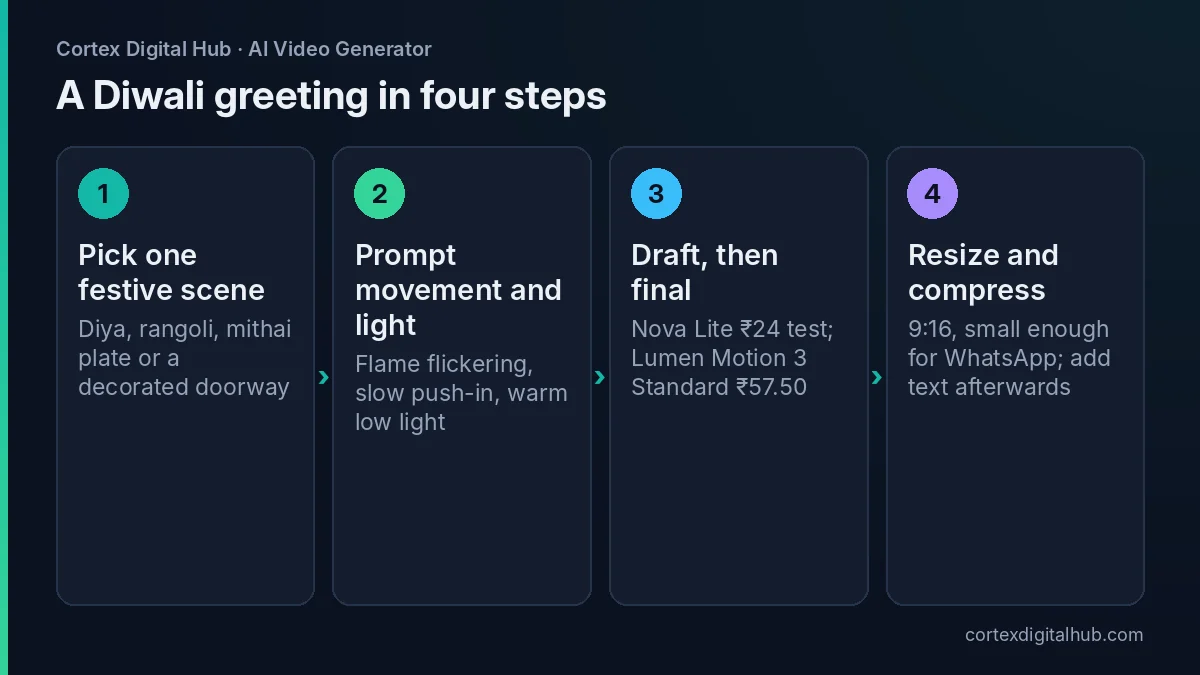 Four steps from a festive idea to a greeting you can send.
Family greetings from a photo you own
For a family message, a photo you took of your own rangoli, your decorated home or a plate of sweets makes a lovely first frame. Upload it and describe the movement only: "lights twinkling softly, a diya flame flickering, static camera". The result stays close to your photo, so it feels personal rather than generic.
If an adult relative is in the photo, ask them first. Avoid animating children's faces, and keep the movement in the scenery. You can also make the clip a little longer for a family group, say 10 seconds, which costs ₹115 on the standard model.
Make it WhatsApp-ready
Set the Format to 9:16 before you generate. If you made a clip in another shape, use the free video resizer, or the one-click 1080x1920 resizer. Then shrink the file. The video compressor and the guide to compressing video for WhatsApp help you stay under size limits. If your family group sits on a slow network, a smaller file will arrive faster.
For business use, see AI video for WhatsApp Status and business for ideas on length and posting rhythm.
Keep it respectful and kind
Festival content should feel warm. Treat religious symbols with care: do not distort idols, mix them into jokes or place them in odd settings. If you are unsure, the diya, rangoli, lights and sweets say Diwali without any risk.
Do not animate real people without their consent, and do not use children's faces. Avoid offers and price claims inside the clip, since they date quickly and should live in your caption, where you can check them. Make clips a week before the festival so that you have time to retry and resize.
Key takeaways
- Describe one festive scene: subject, gentle movement, camera and warm light.
- Start with a diya or rangoli; keep fireworks distant and simple.
- Add shop names and offers afterwards, because AI lettering can distort.
- Sound on suits a standalone greeting; sound off suits a trending track.
- A 5-second greeting costs ₹57.50 on Lumen Motion 3 Standard, and a test costs ₹24.
- Resize to 9:16 and compress before sending on WhatsApp.
Frequently asked questions
How do I make a Diwali video with AI?
Describe one festive scene, such as a diya flame beside a rangoli, choose a model, set the format to 9:16 and press Generate. A 5-second clip takes two to four minutes and costs ₹57.50 on Lumen Motion 3 Standard.
What prompt works for a Diwali diya video?
Try: 'A brass diya on a rangoli, flame flickering gently, fairy lights glowing in the background, slow push-in, warm low light'. Keep one subject and one camera move for the cleanest result.
Should I keep sound on for a Diwali greeting?
Keep it on if you want soft ambience, such as a flame crackle or distant celebration. Turn it off if you will add a trending track or a family song in your editing app, so the two do not overlap.
What size should a Diwali WhatsApp Status video be?
Use vertical 9:16, usually 1080 x 1920. Keep the clip short and the file small. The free video resizer fixes the shape and the compressor helps with WhatsApp's file-size limits.
How much does a Diwali greeting clip cost?
A 5-second clip is ₹57.50 on Lumen Motion 3 Standard and ₹24 for a 6-second test on Nova Lite. A set of five different brand greetings costs about ₹287.50 at standard quality, as of October 2026.
Can I add my shop name to the AI clip?
Add text afterwards in an editing app rather than asking the model to write it. AI video often distorts lettering, so keep names, offers and phone numbers out of the prompt.
Can I put family members in a Diwali AI video?
Only with their clear consent, and avoid children's faces. A diya, rangoli or sweets plate carries the festival without showing anyone. If you use a photo of an adult relative, ask them first.
Are there rules about showing deities in an AI video?
Treat religious imagery with care. Avoid humour, distortion or odd settings around idols and symbols, and keep the clip respectful. If you are unsure, show diyas, rangoli, lights and sweets instead.
When should I post my Diwali video?
Dates move each year and differ by region, so check the festival calendar for your area. Make the clips a week early, since renders take minutes, and schedule them so your greeting arrives before the busy day.