
Birthday video maker with photo: animate a birthday wish for WhatsApp
A birthday video maker with photo lets you turn a picture of a cake, balloons or an adult friend who agrees into a short animated wish. This guide covers prompts, sound, adding the name, consent and sending it on WhatsApp for about ₹57.
· 5 min read · 641 views · by the Cortex Digital Hub team
Drop in a photo as the first frame, describe the motion, and check the credit total on the Generate button before you start. From ₹24 a clip · no watermark · runs in your browser
Make a birthday video → → Opens AI Video Generator · runs in your browser
A birthday video maker with photo works like this: you upload one picture as the first frame, describe the motion, and the AI Video Generator returns a short clip in two to four minutes, with balloons drifting, candles flickering or confetti falling. Add the name and message in an editor and send it on WhatsApp. A 5-second clip costs ₹57.50 on Lumen Motion 3 Standard.
Which photos work for a birthday video?
The photo is the first frame, so it decides the look. Good choices are:
- A cake. A clean top-down or three-quarter photo with candles ready to light.
- Balloons or a decorated room. Bright colours and simple shapes animate well.
- A gift or a table spread. Think samosas, a cake and a banner on a dining table.
- An illustration. A cartoon animal, a handmade card or a sketch of the birthday person.
- A photo of an adult who has agreed. A friend, sibling or parent who is happy to be animated.
Do not animate photos of children's faces, and do not use someone's face without their consent. For a child's birthday, a cake, balloons or a toy gives the same warm feeling with no face at all, and the name on the screen makes it personal.
How do I make a birthday video with a photo?
- Choose image to video and upload your photo as the first frame.
- Write a prompt that describes only the motion and the mood.
- Set the format to 9:16 for status and Reels, or leave 16:9 for a family screen.
- Pick Lumen Motion 3 Standard, 5 seconds, and read the total on the Generate button.
- Generate, preview, and download the MP4 from History.
- Add the name, age and message in an editor, then compress if needed.
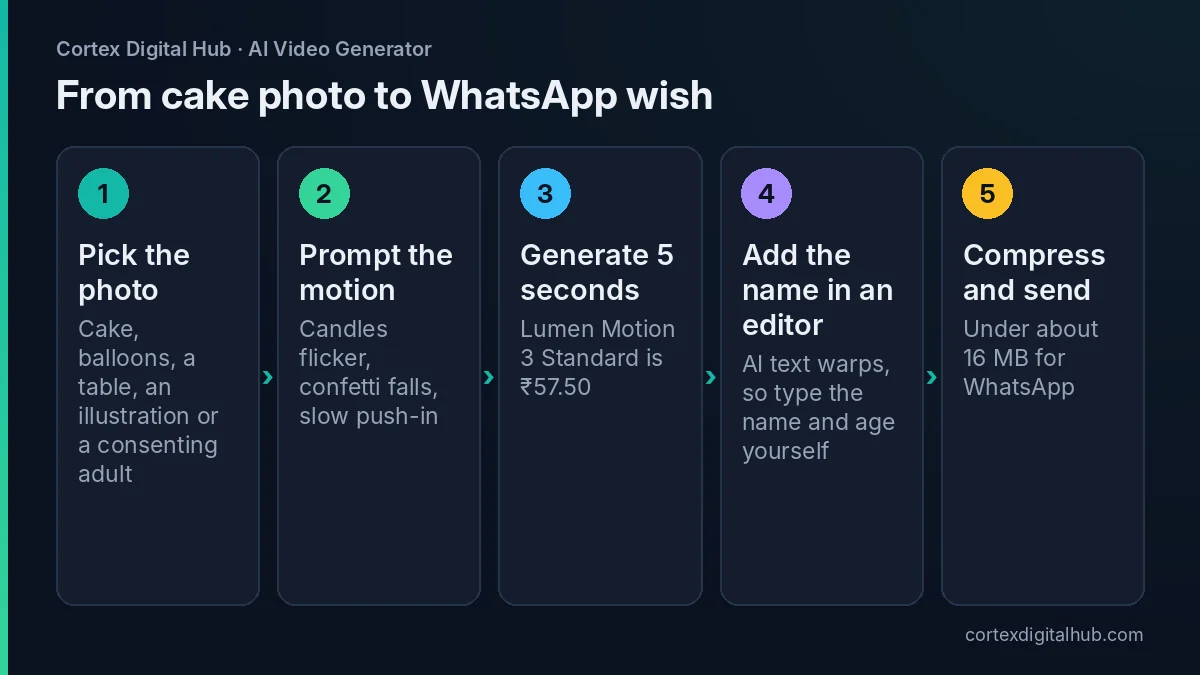 Start from a photo, prompt the motion, generate, then add the name and compress for WhatsApp.
The post on image to video explains how the start frame works.
Birthday prompts you can copy
Describe what moves, then the camera, then the light.
Candles on a chocolate cake flicker gently, a few confetti pieces float down, slow push-in, warm cosy light, soft background bokeh, festive mood
Colourful balloons rise slowly past a decorated wall, streamers sway, gentle upward camera tilt, bright daylight, cheerful mood
A cartoon bear in a party hat waves and blows out a candle, soft studio light, locked camera, playful style
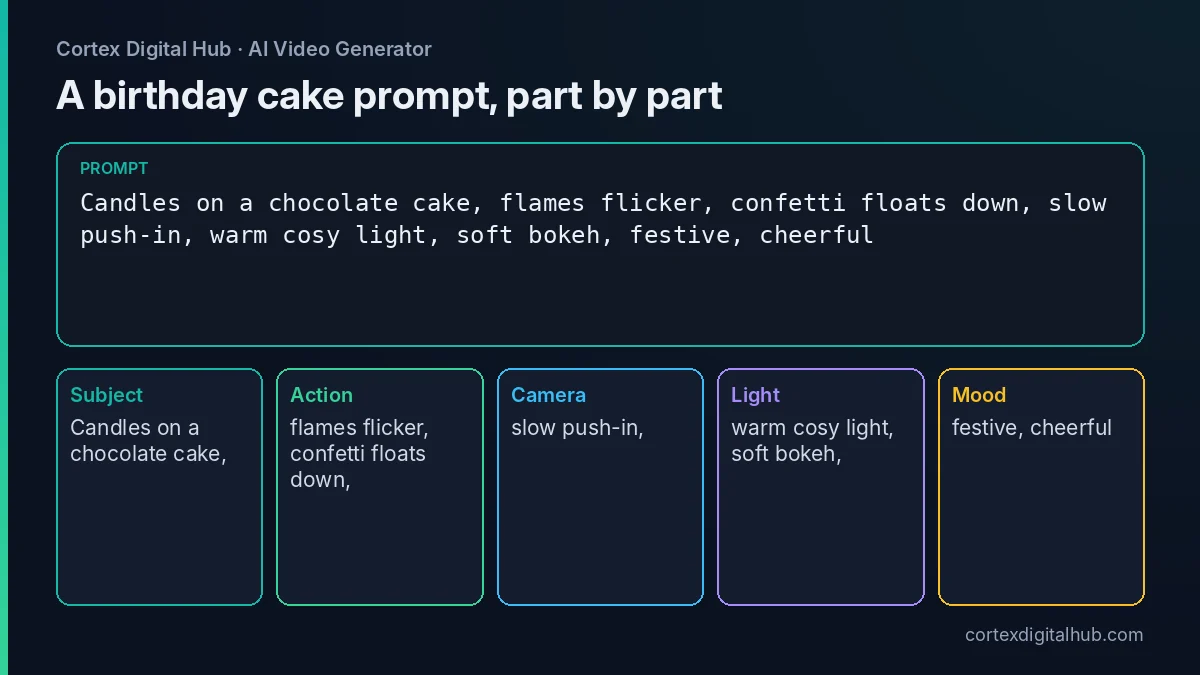 A birthday prompt names what flickers, what floats, one camera move and a warm light.
Keep the motion gentle. Big, fast movement is what makes images wobble. If you want help, press Improve to polish the prompt, or Ideas for starters. Speak lets you dictate in English, Hindi, Telugu, Tamil, Kannada or Marathi.
How do sound and music work?
Models with sound generate ambience, effects and music to match the motion, which for a party clip can mean a soft celebration bed or the crackle of a candle. They do not speak a message unless your prompt asks for speech, and Lumen Motion 2.6 is the model built for dialogue and sound. A spoken "Happy birthday" from a model may not sound like what you intended, so for a personal wish record your own voice instead.
Turn Sound off if you plan to add a favourite song. Read AI video with native sound and music for more. If you post the clip publicly, check the licence of any song you add.
How do I add the name and message?
Add text after the video is made. Video models draw letters from scratch every frame, so a name such as "Ananya" can turn into something close but wrong. In any editor, place the name and age over the last two or three seconds, with a short message such as "Happy 30th, Ananya!" Choose a large, simple font. If you are writing in Hindi, Telugu or another Indian script, type it in your editor so the spelling is yours.
What does a birthday video cost?
Credits are billed per second at 1 credit = ₹0.50, and the exact total shows before you start. As of October 2026:
| Clip | Model | Credits | Cost |
|---|---|---|---|
| 5 s draft | Orbit 3, 480p | 70 | ₹35 |
| 5 s wish | Lumen Motion 3 Standard | 115 | ₹57.50 |
| 8 s wish | Lumen Motion 3 Standard | 184 | ₹92 |
| 10 s wish | Lumen Motion 3, 1080p | 370 | ₹185 |
The ₹249 pack (520 credits) covers about four 5-second clips on Lumen Motion 3 Standard, enough for a family's birthdays across a few months. If a clip fails or the model declines the prompt, the credits come back automatically.
Ideas beyond the cake
The same method suits more than a family birthday. A pet's photo makes a fun clip: say a golden retriever in a party hat with confetti drifting past. A shop or small business can mark its own anniversary with a photo of the storefront and a line of thanks to customers. A friend's milestone birthday works well with a photo of a place they love, such as a hill station view at sunset, animated with drifting clouds and warm light.
For a group wish, collect the messages in a chat, and read them out in your own recorded voice over a single calm clip. One clear scene and a heartfelt voice beat five busy clips with nothing to say.
Sending it on WhatsApp
WhatsApp limits file size, so check the clip before you send it. As of 2026, look at WhatsApp's help page for current limits. The free video compressor shrinks an MP4 on your device, and the compress video to 16 MB tool targets the common limit. The guide to compressing video for WhatsApp has the details. Use the video resizer if you want a vertical version for status, and see AI video for WhatsApp status and business for more ideas. Finished clips stay in History for 7 days, so download the final before then.
Key takeaways
- Upload a photo of a cake, balloons, a table or an illustration as the first frame, and prompt only the motion.
- Animate a person only when they are an adult who has agreed; never animate children's faces.
- Add the name, age and message in an editor, since AI text often warps.
- Sound models give party ambience and music; record your own voice for a personal message.
- A 5-second clip is ₹57.50 on Lumen Motion 3 Standard; compress under about 16 MB for WhatsApp.
Frequently asked questions
How do I make a birthday video from a photo?
Choose image to video, upload the photo as the first frame, and describe the motion: balloons floating, candles flickering, confetti falling. Generate a short clip, add the name and message in an editor, and send it on WhatsApp.
Can I animate a photo of a person for their birthday?
Only an adult who has agreed, such as a friend or family member who is happy with it. Do not animate children's faces, and never use a photo of a celebrity or someone who has not agreed.
What can I use instead of a person's photo?
A photo of the cake, a bunch of balloons, a decorated table, a gift or an illustrated character. These avoid face problems, work for children's birthdays and still feel personal when you add the name.
Can the video say Happy Birthday out loud?
Sound models create ambience, effects and music matching the motion, but not speech unless your prompt asks for it. Lumen Motion 2.6 is built for dialogue and sound. For a reliable message, record your own voice and add it in an editor.
How much does a birthday video cost?
A 5-second clip on Lumen Motion 3 Standard costs 115 credits, which is ₹57.50, and an 8-second one is ₹92. A 5-second draft on Orbit 3 at 480p is ₹35. Prices are as of October 2026.
Why shouldn't I write the name in the prompt?
Video models often warp letters, so a name may come out misspelled or melted. Make the visual first, then add the name, age and message as text in a video editor where you control the spelling.
How do I send the birthday video on WhatsApp?
Keep the file under about 16 MB. If it is larger, shrink it with the free video compressor or the compress-to-16-MB tool, which run on your device. Check WhatsApp's current file limits as of 2026.
Should I keep the sound on or add my own music?
Keep Sound on for a soft ambient bed with party sounds, or turn it off and add a favourite track in an editor. For a clip you will post publicly, check the music licence for the platform.