
Uncle Carlos wanted the wedding song as his ringtone: make a ringtone from any chorus in a minute
After his son's wedding in São Paulo, Carlos wanted the song from the couple's entrance as his ringtone, without the app full of adverts. How a free ringtone maker finds the chorus on its own, how to fine-tune it on the waveform, and how to set it on Android and iPhone.
· 5 min read · 976 views · by the Cortex Digital Hub team
Drop a song, a voice note or a video. Ringtone 30 s jumps to the loudest stretch, usually the chorus; drag the handles to fine-tune, add a soft fade and save an MP3. Free · up to 30 files at a time · nothing uploaded
Make a ringtone → → Opens MP3 Cutter & Ringtone Maker · runs in your browser
Carlos's son got married in São Paulo on a Saturday in December. The couple walked in to a song the bride had chosen, and by Monday Carlos had decided it would be his ringtone for the rest of his life. He asked his niece Beatriz, who installed a ringtone maker app on his phone. It played an advert before opening, another after choosing the song and a third before saving, and then asked for access to his contacts. Beatriz deleted it and did the job in a browser in about a minute. This is that minute, and how to make yours.
What makes a good ringtone
A ringtone has a short, specific job. It needs to be recognisable in the first two seconds, because most calls are answered before the song gets going. It needs to be loud enough to hear in a bag. And it should start and end softly, so it does not jump out of silence or stop with a click.
That usually means the chorus: the loudest, most familiar 20 to 30 seconds of the song, with a short fade at each end.
How the ringtone maker finds the chorus
The MP3 Cutter & Ringtone Maker draws each song as a waveform, the wavy line that shows how loud each moment is. Ringtone 30 s looks along it for the loudest 30-second stretch. In most pop songs that is the chorus, sung with the full band behind it. One tap and the handles jump there.
It is a good first guess, not magic. In some songs the loudest part is a dance break or a long instrumental, so always press play and listen before you save.
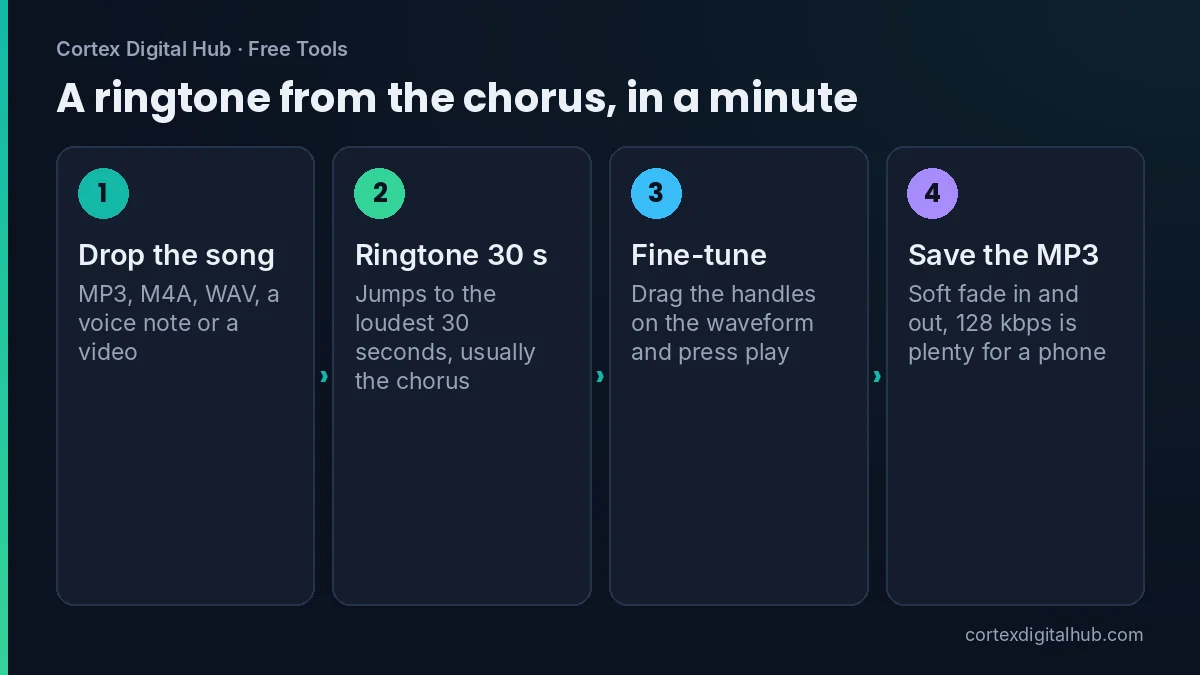
Using the ringtone maker, step by step
Beatriz did this on her laptop, with the MP3 the bride's sister had sent in the family chat:
- Opened the tool and dropped in the song. MP3, M4A, WAV, FLAC, OGG and WhatsApp voice notes all open, and so does the sound inside a video: MP4, MOV, MKV, WebM or 3GP.
- Left Keep on Ringtone 30 s, which is selected from the start. The handles jumped to the chorus.
- Pressed play on the selection. It started half a second into the first line, so she dragged the left handle back slightly.
- Left Soft fade in and out ticked, as it is by default for ringtones, and Even out volume ticked, which raises a quiet song so its loudest moment sits just below the maximum without clipping.
- Switched quality from 192 to 128 kbps, plenty for a phone speaker, and pressed Cut MP3.
- Sent the file to her uncle's phone.
If you drag a handle by mistake, double-click the waveform to select the whole file again.
Picking the quality and sound settings
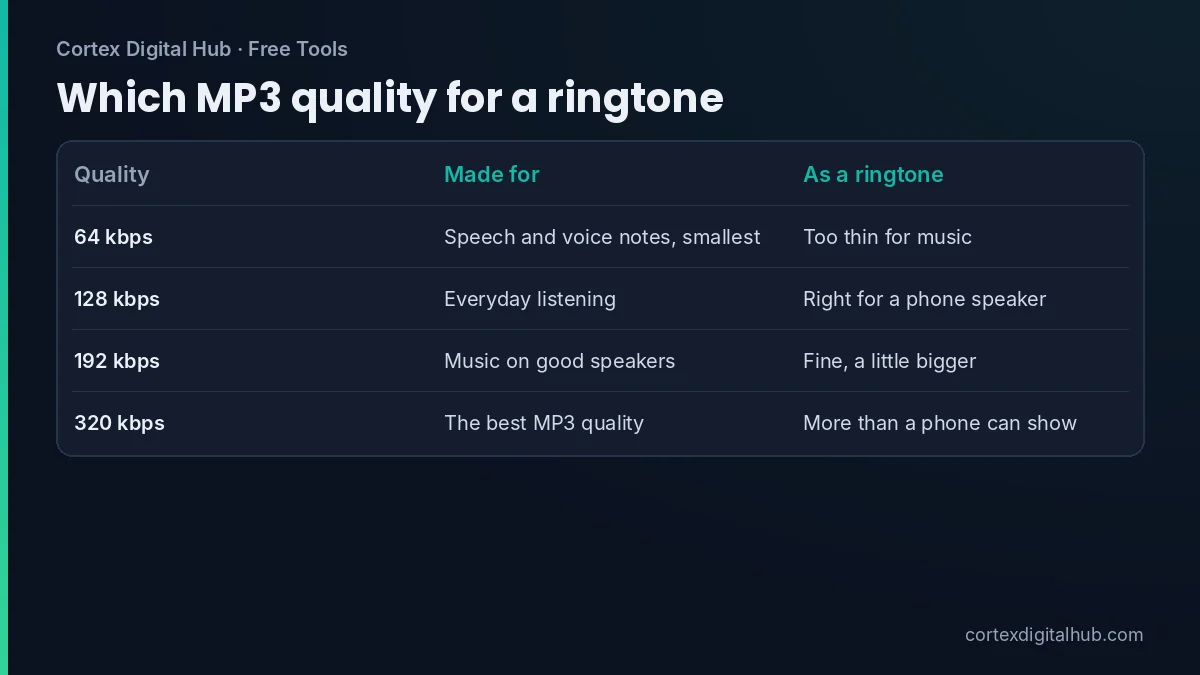
The tool offers four qualities. For a ringtone, the middle ones are right.
| Quality | Best for | For a ringtone |
|---|---|---|
| 64 kbps | Speech, voice notes, smallest files | Too thin for music |
| 128 kbps | Everyday listening | Right for a phone speaker |
| 192 kbps | Music on good speakers | Fine, a little bigger |
| 320 kbps | The best MP3 quality | More than a phone speaker can show |
Under Sound, Stereo keeps the song as recorded, and Mono halves the size. A phone ringing in a pocket gains nothing from stereo, so Mono is a sensible choice for a ringtone.
Short or long: how much of the chorus to keep
Thirty seconds is the default because most calls are answered or go to voicemail within that time. For a message tone or an alarm, shorter is better: drag the handles in to the hook line, often five to ten seconds. For an alarm, a soft fade in matters more than anything else, so you wake to a song rising rather than a blast. For a contact ringtone, such as a special song for one person, pick the line that makes you think of them; it does not have to be the loudest part.
Setting it as your ringtone
On Android: copy the MP3 to the phone, if it is not already there. Open Settings, Sound, Ringtone and pick it from your files. On many phones you can also long-press the MP3 in the file manager and choose to set it as a ringtone. Menu names differ a little between phone brands; look for Sound or Sounds and vibration.
On iPhone: iPhones do not take an MP3 as a ringtone. They need an .m4r file, made in GarageBand on the phone or in iTunes on a computer. You can still cut the exact part here as an MP3 first, then open it in GarageBand to save it as a ringtone. That way the fiddly cutting is done on a big waveform.
Carlos's phone is Android. It took him two minutes and a test call from his sister.
More you can do with the same cutter
- A Reel, TikTok or status clip. Choose Whole file, then drag the handles to the exact 15 seconds you want. The guide to the best video format for status and Reels covers lengths and sizes.
- A song from a video. If the only copy is the wedding video, drop it straight in, or pull out the full soundtrack first with Video to MP3.
- An instrumental ringtone. Want the tune without the voice? Make a karaoke version first with the Vocal Remover, then cut its chorus here.
- A clean voice ringtone. A grandchild saying "Grandpa, phone!" makes a lovely ringtone. If it was recorded under a fan, run it through the Noise Remover first.
- Many songs at once. Drop up to 30 files, set each one's part, and download all of them as one ZIP.
The song is cut inside your browser and never uploaded, which is why there are no adverts and no permission requests; there is more on that in why browser-based tools are safer than upload sites.
What to do next
- Clip a moment from the wedding video with Trim Video.
- Every audio and video tool is on the Video Tools page.
How it sounds now
Carlos's phone rang at another cousin's wedding two weeks later, in the middle of the speeches. Thirty seconds of the chorus, a soft fade in, the whole room laughing. He let it ring to the end before answering.
Frequently asked questions
Is this ringtone maker free?
Yes. There is no sign-up, no adverts in the middle of your work and no watermark sound. The song is cut and turned into MP3 inside your browser.
How does it find the chorus?
Ringtone 30 s finds the loudest 30-second stretch of the song, which is usually the chorus. If it picks the wrong spot, drag the handles on the waveform and press play to check.
How do I set the MP3 as my ringtone on Android?
Copy the MP3 to the phone, open Settings, Sound, Ringtone and pick it, or long-press it in the file manager and set it as ringtone. Menu names vary a little by phone brand.
Can I make an iPhone ringtone with it?
Not directly. iPhones need an .m4r file made in GarageBand or iTunes. You can cut the part here as an MP3 first, then bring it into GarageBand to save it as a ringtone.
Which quality should I choose for a ringtone?
128 kbps is plenty for a phone speaker. Choose 192 kbps if you will also use the clip on a good speaker, and 64 kbps only for speech.
Can I cut a song from a video?
Yes. Drop an MP4, MOV, MKV, WebM or 3GP file and the sound is taken from it. WhatsApp voice notes, M4A, WAV, FLAC and OGG work too.
Can I cut several songs at once?
Yes. Drop up to 30 files, set each one's part, then download them one by one or all together as a ZIP.