
AI Explainer Video for Small Business: A Script-First Workflow in 5 Steps
An AI explainer video for a small business starts with a three-point script, not a prompt. This guide turns that script into three to five clips plus captions, shows what an explainer costs in rupees and explains where AI clips beat a screen recording.
· 5 min read · 1.3K views · by the Cortex Digital Hub team
Write one prompt per scene from your script, run cheap drafts first, then make the finals and join them with captions. From ₹24 a clip · no watermark · runs in your browser
Make a clip → → Opens AI Video Generator · runs in your browser
An AI explainer video starts with a short script, not a prompt. Write three points, turn each into one 4 to 6 second scene, make the clips in the AI Video Generator, and add captions and a voice-over in your editor. A 20-second explainer typically needs three to five clips and costs a few hundred rupees.
What makes a good AI explainer video?
An explainer answers one question: "what is this, and why should I care?" It does that in a handful of scenes. Keep it to one problem, one solution and one action.
AI clips are good at the visual part: a crowded shop, a stressed owner, a calm dashboard in the background, a parcel arriving at a door. They are weaker at exact interface screens, small text and tables. That is why a good explainer mixes both: AI clips for the story, a screen recording or a real photo for proof.
How do you turn a three-point message into clips?
Start on paper. Say you run a GST filing service in Indore and want a 20-second video for WhatsApp.
- Problem: "Filing GST every month eats your weekend."
- Solution: "We collect your bills on WhatsApp and file for you."
- Action: "Send your first bill today."
Each point becomes one or two scenes. Write the scene as a short prompt with subject, action, camera and light. Our prompt guide explains the pattern.
| Script line | Scene idea | Prompt (shortened) |
|---|---|---|
| Problem | Tired owner at a desk piled with bills | "Shop owner in a small Indore office, stacks of paper bills, tired, slow push-in, warm lamp light" |
| Solution 1 | Phone receiving photos of bills | "Close-up of hands photographing a bill with a phone, soft daylight, steady camera" |
| Solution 2 | Calm owner relaxing | "Same owner smiling at a cafe table, sunlit window, slow dolly" |
| Action | Phone with a chat open | "Phone on a desk showing a chat window, gentle push-in, clean light" |
Keep the same character by attaching reference images with the @ Tag button, and describe clothing the same way in every prompt.
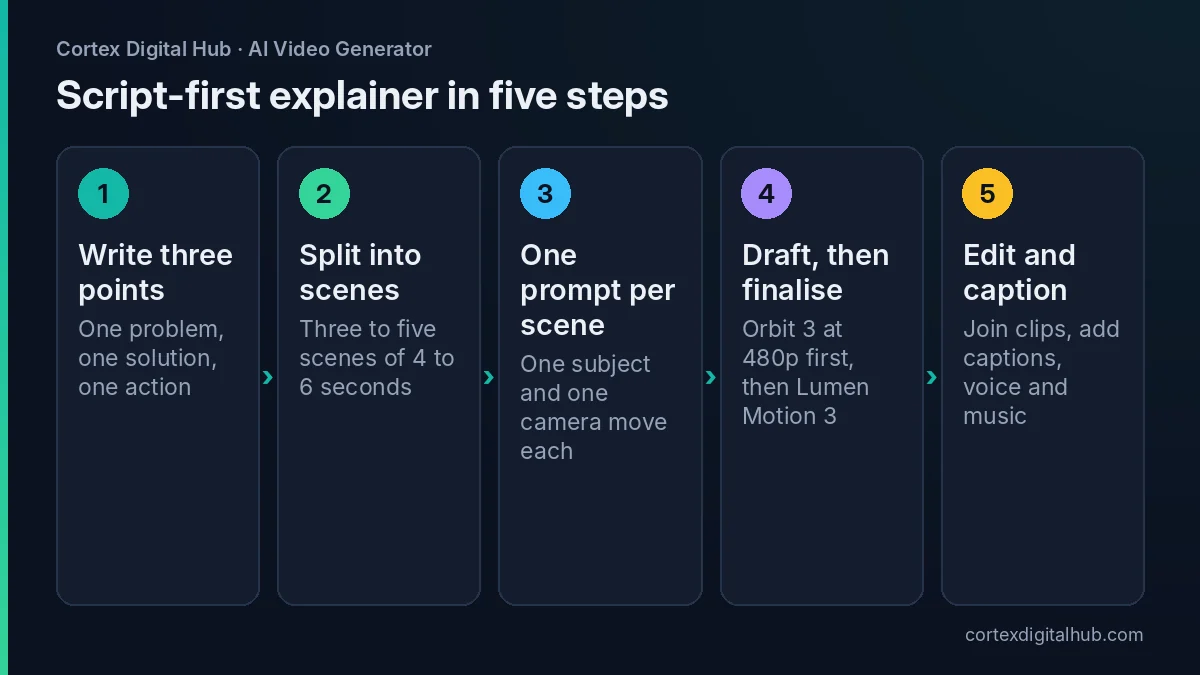
The script-first workflow, from three points to a finished explainer.
A five-step script-first workflow
- Write the three points. One sentence each, in plain words.
- Split into scenes. Three to five scenes of 4 to 6 seconds.
- Write one prompt per scene. One subject and one camera move each. Use the same character description throughout.
- Draft cheaply, then finalise. Run drafts on Orbit 3 at 480p or Nova Lite, then make finals on Lumen Motion 3 Standard or another model from the model guide.
- Edit. Join the clips, add captions, a voice-over or music, and export in the right shape for the platform.
Set Format to 9:16 for Reels and WhatsApp Status, and 16:9 for YouTube or a website. Turn Sound off in the generator if you plan to add your own music and voice.
Where do AI clips fit, and where do screen recordings win?
Use this to decide scene by scene.
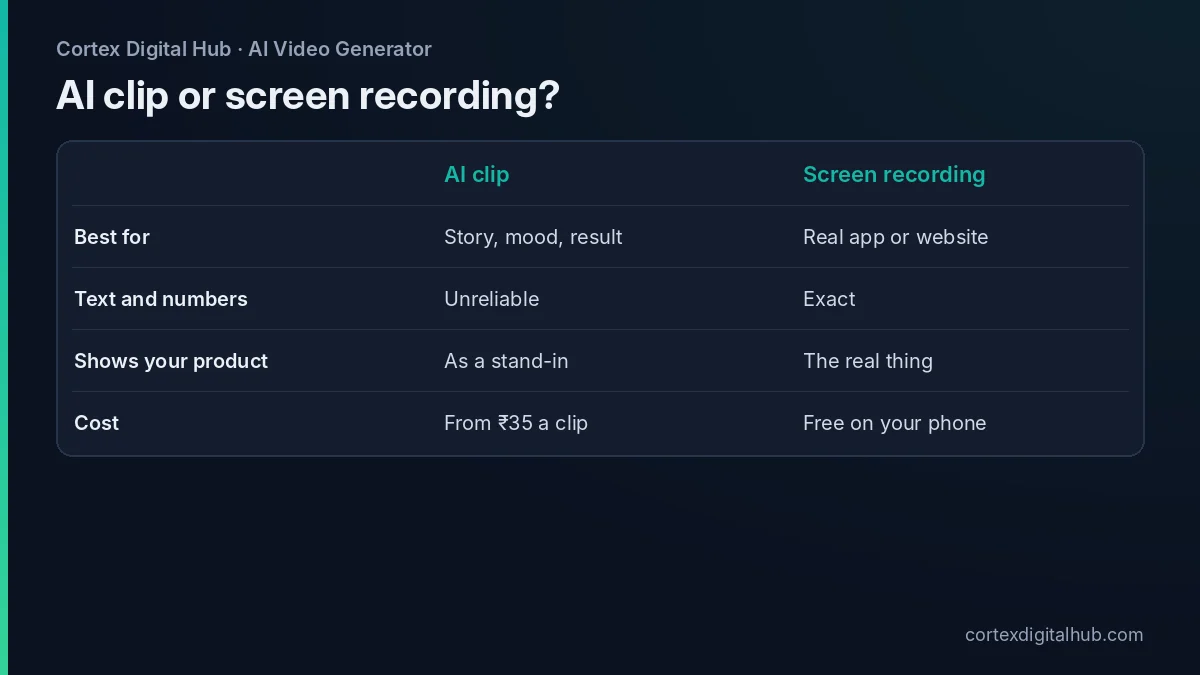
Pick AI clips for the story and screen recordings for the product.
- Use AI clips for the problem scene, the emotional moment, the metaphor and the result.
- Use a screen recording for any app, website or form where the viewer must read real buttons or numbers.
- Use a real photo or phone clip for your actual shop, team or product, since they build trust.
- Avoid AI for charts, prices and legal text. Type those in your editor.
If you have a real product photo, animate it instead of generating a stand-in. See image to video for how.
What does an explainer cost?
Credits are billed per second of finished video, 1 credit = ₹0.50, and the total shows on the Generate button before you start. Here is a four-clip explainer at 5 seconds a clip, as of October 2026.
| Setup | Credits | Cost |
|---|---|---|
| Nova Lite drafts, 4 clips of 6 s (48 credits each) | 192 | ₹96 |
| Orbit 3 480p, 4 clips of 5 s | 280 | ₹140 |
| Lumen Motion 3 Standard, 4 clips of 5 s | 460 | ₹230 |
| Lumen Motion 3 1080p, 4 clips of 5 s | 740 | ₹370 |
The ₹249 pack gives 520 credits, which covers a full four-clip explainer on Lumen Motion 3 Standard with 60 credits left. A cheaper habit is to draft all four on Orbit 3 (₹140), then re-run only the weak ones. Read the cost per clip breakdown for more.
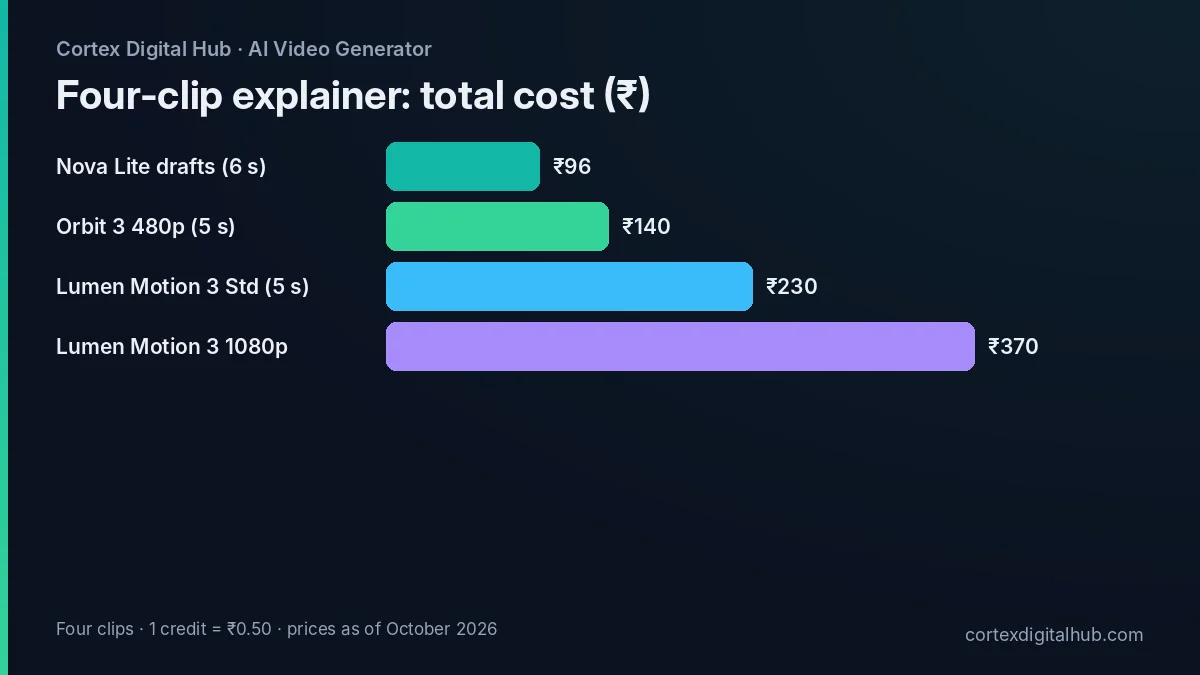
A four-clip explainer ranges from ₹96 in drafts to ₹370 at 1080p.
Captions, voice-over and finishing
Add captions in your editor, not in the prompt, because models can misspell words. Keep lines short, three to six words, in the middle of the frame and away from the bottom edge where app buttons sit.
For voice, record your own or use a clear text-to-speech voice in your editor. Lumen Motion 2.6 can generate dialogue and sound, but check that the speech matches your script. Always get consent before using anyone's voice or face.
Before posting, trim any extra seconds with the free Trim Video tool and shrink the file for sharing with the Video Compressor. Finished MP4s stay in History for 7 days, so download what you want to keep.
A worked example: a 20-second explainer for a tuition centre
Say a tuition centre in Nagpur wants parents to understand its weekend maths batches. The message has three points: marks drop when basics are weak, the centre rebuilds basics in small groups, and the first class is free to try.
The scenes:
- Problem (5 s). A student frowning over a notebook at a desk, soft lamp light, slow push-in.
- Solution (5 s). A small group around a whiteboard with a teacher, bright classroom, gentle pan.
- Result (5 s). The same student smiling and closing the notebook, window light, slow dolly.
- Action (5 s). A text card typed in the editor with the batch timing and WhatsApp number.
Avoid promising marks or ranks, and avoid showing real students unless the parents have agreed in writing. Keep the claims in your captions modest and factual. The first three scenes cost 345 credits on Lumen Motion 3 Standard, which is ₹172.50, and the fourth scene is just text.
Key takeaways
- Write the script first: one problem, one solution, one action.
- Turn each point into one 4 to 6 second scene with one subject and one camera move.
- Keep the same character with reference images and consistent descriptions.
- Use AI clips for story and mood, and screen recordings for real interfaces and numbers.
- A four-clip explainer costs about ₹230 on Lumen Motion 3 Standard, or ₹140 at 480p drafts.
- Add captions and voice-over in your editor, not in the prompt.
Frequently asked questions
What is an AI explainer video?
It is a short video that explains one idea, product or service, built from AI-generated clips, captions and often a voice-over. The AI makes the visuals; you write the script and decide the message. It works best for simple, visual ideas.
How long should an explainer video be?
For social media and WhatsApp, 15 to 30 seconds is a practical range. Cover one problem, one solution and one action. A website explainer can run longer, but each scene should earn its place.
How many clips do I need for an explainer?
Three to five clips of 4 to 6 seconds each is enough for a short explainer. Use one clip for the problem, one or two for the solution, and one for the call to action. Add captions and a voice-over in your editor.
Can AI show my app or software screen in an explainer?
Not reliably. Models can garble interface text and buttons. Use a screen recording for the real product and AI clips for the scene around it, such as the stressed owner, the busy shop or the happy result.
How much does an AI explainer video cost?
Four 5-second clips on Lumen Motion 3 Standard cost 460 credits, or ₹230. Drafts on Orbit 3 at 480p cost ₹35 per clip. Credits are 1 credit = ₹0.50, and the total shows on the Generate button before you start.
Do I need a voice-over?
Not always. Many social explainers work with captions and music. If you want speech, record your own voice or use a speech-capable model like Lumen Motion 2.6, which handles dialogue and sound. Always check that the speech matches your script.
How do I keep the same character across explainer scenes?
Use reference images. Attach 2 to 4 pictures of the character or product with the @ Tag button so it stays consistent, and keep the clothing and setting described the same in each prompt.
Where do I add captions to an AI explainer?
Add captions in your video editor or phone app, not in the prompt, because models can misspell text. Use short lines of three to six words, keep them in the middle of the frame, and avoid the bottom edge where app buttons sit.