
Construction update video AI: animate site photos without misleading buyers
A construction update video made with AI can turn real site photos into short, watchable clips for buyers. This guide shows what to animate, how to label it clearly, and how to send it on WhatsApp without exaggerating progress.
· 5 min read · 1.4K views · by the Cortex Digital Hub team
Upload a dated site photo, describe a slow camera move, and get a short clip for your next buyer update. From ₹24 a clip · no watermark · runs in your browser
Animate a site photo → → Opens AI Video Generator · runs in your browser
A construction update video made with AI can bring real site photos to life for buyers who cannot visit every week. You upload a dated photo, ask the AI Video Generator for one slow camera move, and label the clip as illustrative. The rule that matters: AI adds motion to what exists, it never shows progress that has not happened. Prices are as of October 2026.
What does a construction update video AI clip actually show?
A good clip shows the real structure from a real photo, with a little life added: drifting clouds, a slow push toward the tower, a gentle pan across the podium level. It does not show a finished facade, painted walls or landscaping that are not there yet.
That boundary protects you. Buyers make decisions on progress updates, and in many states a developer's communication about a project is regulated. As of 2026, check the rules of your state's real estate regulator and ask your legal adviser what wording and labels you need. This post is practical guidance, not legal advice.
How do you make a construction update video with AI?
Treat the process like a monthly routine, not a one-off project.
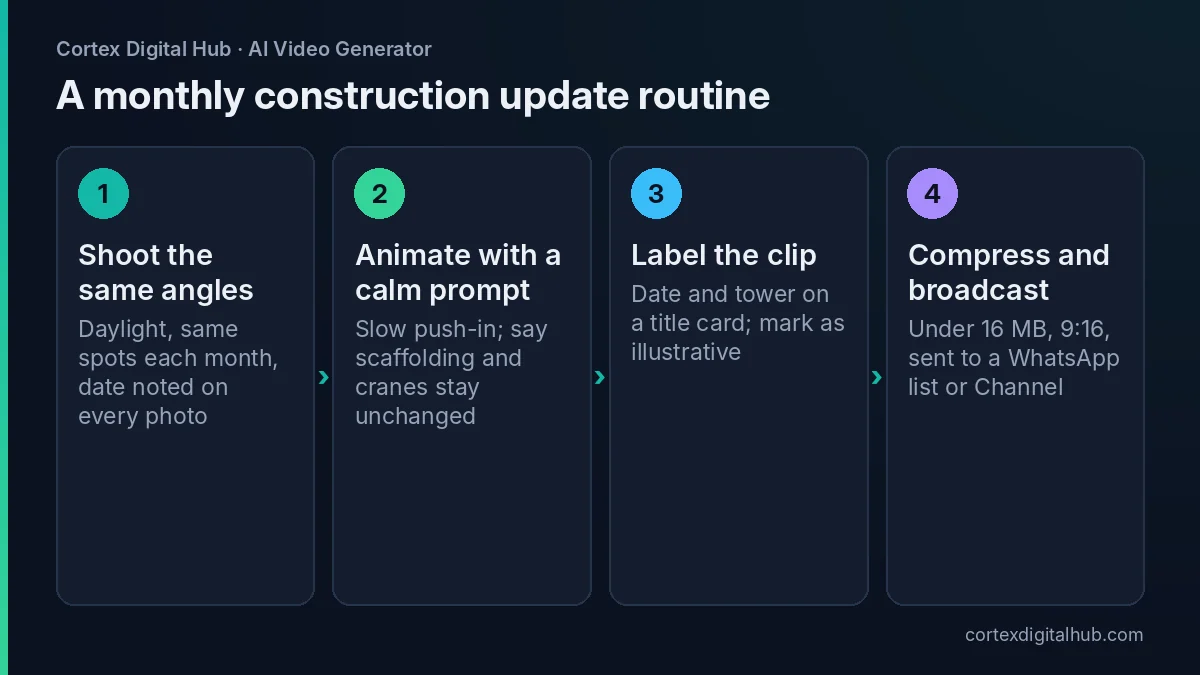 Real photo in, labelled clip out, and the plain photos always travel with it.
- Photograph the same angles each month, in daylight, with the date noted.
- Pick the sharpest photo of each tower or block.
- Upload it as the first frame and write only the motion.
- Add a caption card with the date, then compress and send.
A prompt that stays honest:
Slow push-in toward the concrete frame of a residential tower under construction, scaffolding and cranes unchanged, clouds drifting, bright afternoon light
The words "unchanged" and "scaffolding" help keep the model from tidying the site. Use the Avoid field for "finished facade, new windows, people, fake signage". The guide to animating a photo with AI covers the start-frame basics.
Which parts of an update should be AI, and which should stay real?
| Update element | Real photo or video | AI-animated clip |
|---|---|---|
| Slab, column and floor progress | Yes, always | Light motion only |
| Percentage complete, milestones | Text card | Not applicable |
| Brand intro or tower hero shot | Optional | Good fit |
| Finished look of the project | Render, labelled | Concept clip, labelled |
| Workers and visitors | Only with consent | Never generate fake ones |
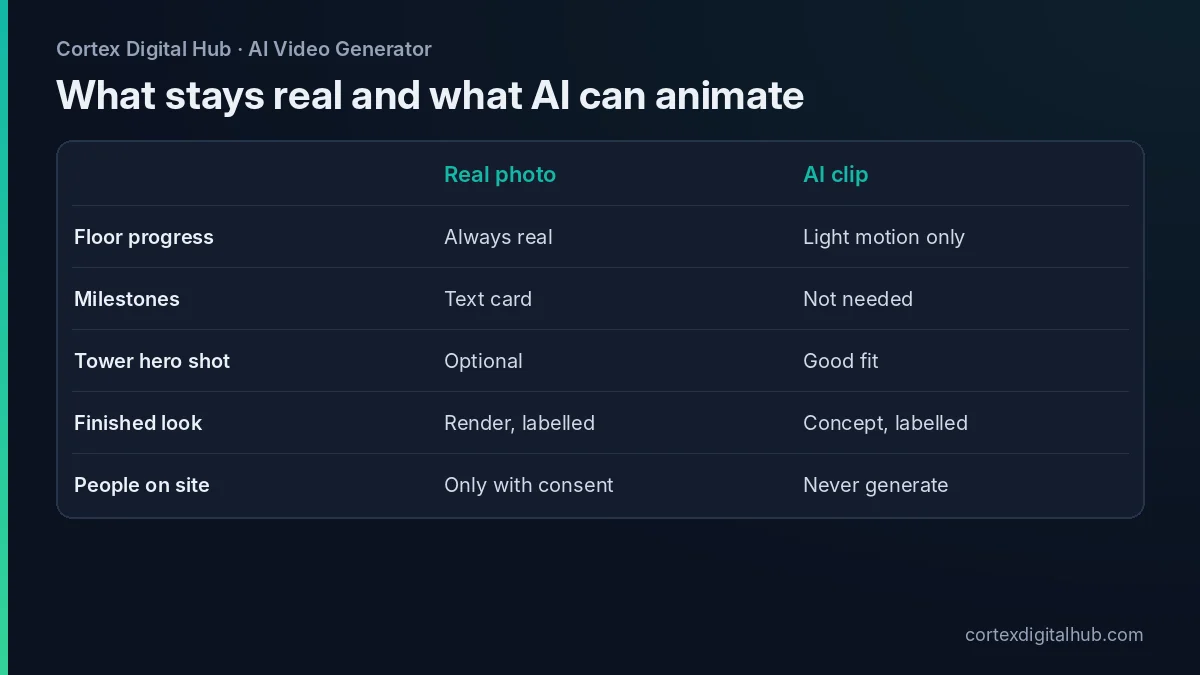 Keep evidence real and use AI for the opening shot and atmosphere.
If you want to show the finished look, use a render and say so. The 3D plan to video tool turns plans into walkthroughs, and the post on AI video for real estate marketing in India shows where concept clips fit.
Should you use first and last frame between two progress photos?
It is tempting: month one photo as the first frame, month two as the last. The model would fill the middle with invented construction that nobody photographed. For a buyer update, that is the wrong kind of "progress". A crossfade or side-by-side of the two real photos in any phone editor is more accurate, and takes a minute.
Keep first and last frame control for concept reveals, such as a plot photo to a rendered villa, with a label that says "artist's impression".
How do you send it on WhatsApp?
Most buyers will open the update on their phone, so build for that. Use 9:16 or 4:5, keep clips under 15 seconds, and put the date and tower name on the first card in large text.
Then shrink the file. WhatsApp has size limits that change, so as of 2026 check its help page. The guide to compressing video for WhatsApp and the free Video compressor run on your own device, so site footage is not uploaded to a third party. For longer files see how to send a video larger than 16 MB on WhatsApp.
Send through a broadcast list or a Channel, and include a short message: "Tower B, 9th floor slab complete. Photo dated 12 Oct. Animated clip is illustrative."
What should the caption and label say?
A label is only useful if buyers can read it. Put it on the first frame of the clip and repeat it in the WhatsApp message. Keep it short and factual:
- "Site photo dated 12 Oct 2026, Tower B, animated. Illustrative."
- "Concept render of the clubhouse. Artist's impression, not actual construction."
- "Actual progress photos attached below."
Avoid vague words such as "almost ready" or "nearing completion" unless your site engineer has confirmed them. If a buyer asks about a handover date, answer from your project records, not from the video. A good clip supports your honest update; it should never replace it.
Which prompts work for common site views?
Describe the camera and the weather, and tell the model what must not change.
- Tower from the road:
Slow upward tilt along the concrete frame, cranes still, clouds moving, golden hour light - Podium level:
Gentle pan across bare podium slab with rebar and shuttering unchanged, hazy sunlight - Aerial plot photo:
Slow drone-style push-in over a levelled plot with boundary markers, light dust drifting - Rainy day on site:
Static camera, light rain falling on exposed columns, puddles rippling
Run each on Nova Lite first. If the model "tidies" the site by adding cladding or windows, add those words to the Avoid field and re-run. The guide to text to video prompts that work explains how prompts are built.
What does a monthly update cost?
Say a builder in Hyderabad has four towers and makes one clip each.
| Item | Model | Credits | Cost |
|---|---|---|---|
| 4 drafts, 6 s each | Nova Lite | 192 | ₹96 |
| 4 finals, 5 s each | Lumen Motion 3 Standard | 460 | ₹230 |
| Total | 652 | ₹326 |
Skip the drafts for a repeat angle once your prompt is stable, and the month costs ₹230. A ₹249 pack (520 credits) covers about four clips on its own. Clips can be trimmed first with the free Trim video tool.
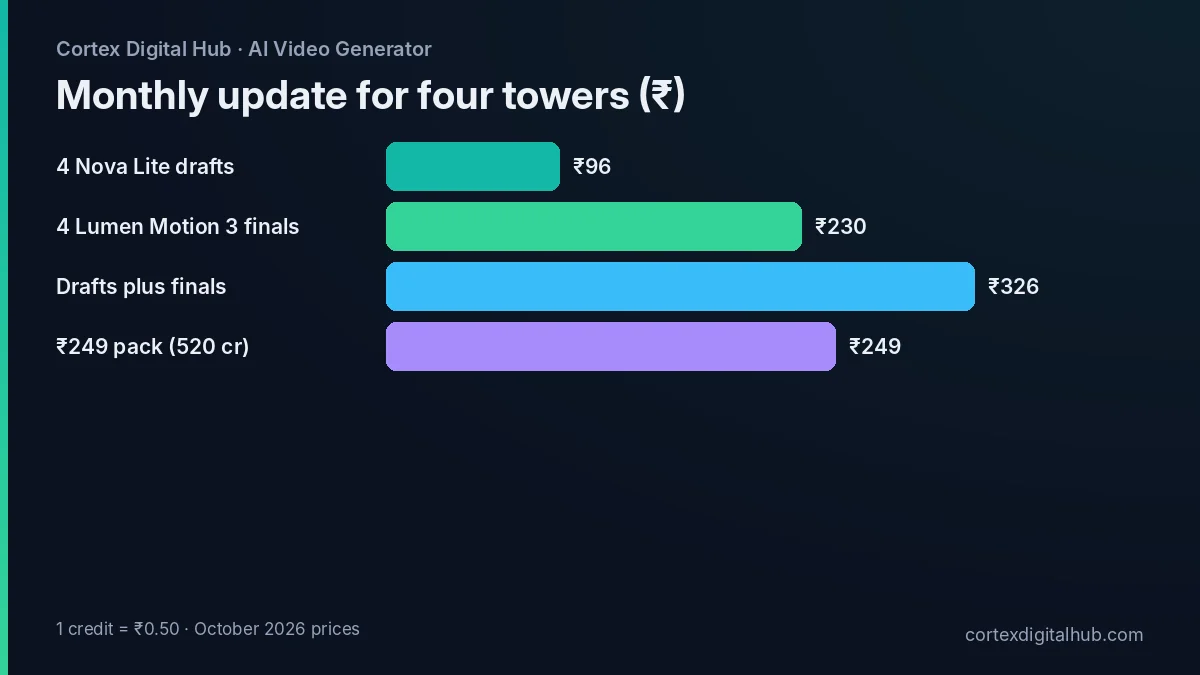 Drafts add ₹96 for four towers; a stable prompt lets you skip them next month.
Key takeaways
- A construction update video made with AI should start from real, dated site photos.
- Animate atmosphere and camera, never finished work that does not exist.
- Label each clip as illustrative, and send the plain photos alongside.
- Use crossfades of real photos to show true progress, not first and last frame.
- Compress for WhatsApp on your device and send via a broadcast list or Channel.
- Four clips a month costs about ₹230 on Lumen Motion 3 Standard.
Frequently asked questions
Can I use AI to make a construction progress video for buyers?
Yes, if you start from real, dated site photos and make clear the clip is an illustrative animation. AI should add motion to what exists, never show work that has not been done. Keep the plain photos alongside.
Should I label an AI construction update as illustrative?
Yes. Add a line such as 'Animated from site photo dated 12 Oct 2026; illustrative'. Real estate communication can be regulated, so as of 2026 check your state RERA rules and your legal adviser before sharing.
How do I send a construction update video on WhatsApp?
Keep clips short, compress them below 16 MB, and send as a broadcast list or a Channel post. Use the free Compress video for WhatsApp guide and tool to shrink the file without making it unwatchable.
What can AI animate in a site photo safely?
Clouds, light, a slow camera move across the structure and gentle atmosphere are low risk. Avoid adding finished facades, landscaping, balconies or people that are not actually there, because that implies progress that does not exist.
Can AI show how the building will look when finished?
It can make an illustrative concept clip from a render, labelled as an artist's impression. Do not blend it with real progress photos in a way that suggests the finished look is already built.
How much does a monthly construction update video cost?
Four 5-second clips on Lumen Motion 3 Standard cost 460 credits, which is ₹230. Add a few Nova Lite drafts at ₹24 each. The ₹249 pack of 520 credits covers about four clips. Prices are as of October 2026.
Can I use first and last frame control between two progress photos?
You can, but the model invents the frames in between, so the clip would show construction that was never photographed. A plain side-by-side or crossfade of real photos is more accurate for showing actual progress.
Should workers appear in the construction update video?
Avoid close-ups of identifiable workers or visitors without consent, and do not generate fake workers to make a site look busy. Wide shots of the structure and machinery are safer and more honest.
What format is best for a buyer update video?
Use 9:16 for WhatsApp status and Reels, and 16:9 for email or a project page. Keep clips to 5 to 10 seconds, add a text card with the date and tower name, and resize with the free Video resizer.