
AI Video for Travel Marketing: Destination Clips and Honest Homestay Reels
AI video for travel marketing lets a small agency or homestay show the mood of a place in seconds, from misty hill mornings to beach sunsets. This guide gives drone-style prompts, costs in rupees and clear rules for representing a real property fairly.
· 5 min read · 572 views · by the Cortex Digital Hub team
Describe the place and the camera move, or animate your own property photo, and get a Reel-ready clip with no watermark. From ₹24 a clip · no watermark · runs in your browser
Make a travel clip → → Opens AI Video Generator · runs in your browser
AI video for travel marketing gives a small agency or a family homestay a way to show the feel of a place without a drone crew: a misty tea estate, a quiet beach, a lit-up fort. Open the AI Video Generator, describe the shot, and use the clip as a mood opener beside real photos of what guests will actually get.
What AI video does well for travel (and where to stop)
Travel buyers choose on feeling first and facts second. A five-second clip of fog moving across a Coorg hillside tells them more about the trip than a paragraph.
Use AI clips for:
- Destination mood. Hampi boulders at sunrise, backwaters at dusk, a snowy road near Manali.
- Reel intros. A short opening that stops the scroll before your itinerary appears.
- Package posters. A "4 nights in Munnar" card with moving mist behind the text.
- Festival and season hooks. Monsoon in the Western Ghats, Diwali lights in Jaipur.
Stop at the line between mood and promise. If your homestay has a courtyard but no sea view, a clip with a sea view is an overpromise. Keep AI for the atmosphere of the region and keep real photos for the room, bathroom, food, parking and surroundings.
How do you write drone-style prompts?
A drone shot is a high camera moving smoothly. Ask for that movement in plain words, then say what is below it and how the light looks. One subject and one camera move per clip works best, as our prompt guide explains.
Slow aerial glide forward over a green tea estate in the Western Ghats at sunrise, rows of tea bushes, low mist in the valleys, warm golden light, a winding road in the distance, calm cinematic feel.
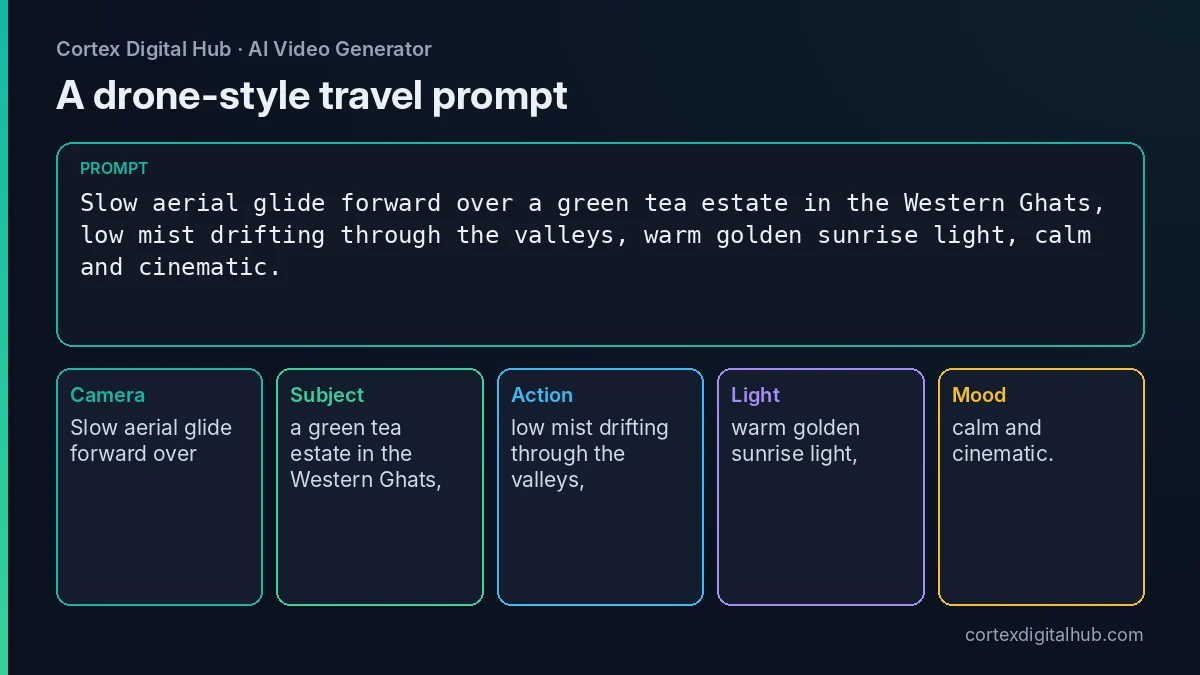
A drone-style travel prompt, broken into the parts the model reads.
The Camera and effect presets in the generator write the move into your prompt for you. If you want full control, choose "General" and type it yourself. Three variations that work for many places:
- Reveal: "Camera rises slowly over a ridge to reveal a lake town at golden hour."
- Orbit: "Slow circle around a hilltop temple under a soft pink sky."
- Ground level: "Gentle push-in along a palm-lined beach path at sunset, waves in the background."
Avoid listing six places in one prompt. Make one clip per scene and join them in your editor.
How can a homestay show its real property fairly?
Start with a real photo. Upload a clean picture of your courtyard, room or view, and use image to video so the photo is the first frame. The model animates what is already there, such as curtains moving, steam rising from a chai cup or trees swaying. Our guide to animating a photo with AI covers the details.
Then follow a few honest rules:
- Do not add features your property does not have: a pool, a bigger room, a different view.
- Keep the clip faithful to the photo. If the model changes the layout or adds furniture, discard it.
- Label mood clips of the surrounding area as such in the caption.
- Show real photos of bedrooms, bathrooms, kitchen and access road alongside the clip.
- Never animate a real guest's or a child's face without clear permission.
Consumer rules on advertising change, and platforms have their own. As of 2026, check the relevant guidelines and the platform's help page before running paid promotion.
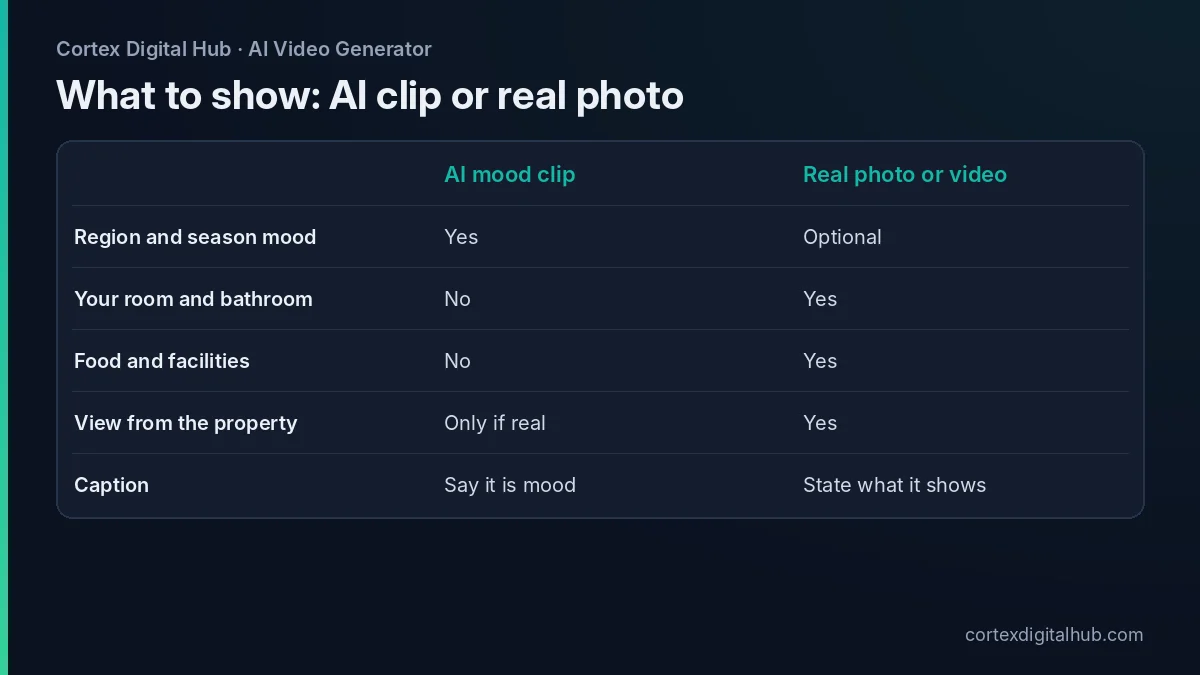
Use AI for mood and real footage for rooms, food and facilities.
What does a travel clip cost?
Credits are billed per second of finished video, 1 credit = ₹0.50, and the total shows on the Generate button before you start. Prices are as of October 2026.
| Job | Model | Length | Cost |
|---|---|---|---|
| Quick idea test | Nova Lite, 768p | 6 s | ₹24 |
| Cheap 480p draft | Orbit 3 | 5 s | ₹35 |
| Everyday Reel opener | Lumen Motion 3 Standard | 5 s | ₹57.50 |
| 15-second mood clip | Orbit 3, 480p | 15 s | ₹105 |
| Cinematic hero | Vela 2.5, 480p | 5 s | ₹192.50 |
The 15-second Orbit 3 line is 210 credits at 14 a second. The ₹249 pack gives 520 credits, which covers a draft and a few finals for one package. A travel desk in Kochi could build a whole weekend of posts from a single recharge. For rates across models, see the cost per clip breakdown.
Turning clips into a Reel or WhatsApp broadcast
A simple structure works for most travel posts:
- A 3 to 5 second mood opener, vertical 9:16.
- Two or three real photos or phone clips of the stay.
- A text card with the price, dates and your WhatsApp number, added in your editor.
- A short closing line such as "Message us to book".
If a clip runs long, trim it with the free Trim Video tool. Before sending on WhatsApp, shrink the file with the Video Compressor or follow the WhatsApp compression guide.
Want a longer clip? Orbit 3 and Vela 2.5 go up to 30 seconds, and Extend video continues a clip, though longer clips cost more and can take 8 minutes or more. Finished MP4s stay in History for 7 days, so download what you plan to keep.
A sample shot list for a three-night package
Say a small agency in Bengaluru sells a three-night Coorg homestay package. A short Reel needs only a handful of shots, and each one has a clear job.
- Arrival mood (AI clip, 5 s). Mist rolling over coffee plantations at sunrise. This sets the season and the feeling.
- The stay (real photo or phone clip, 3 to 4 s). The actual cottage, verandah and bed, shot by you.
- The experience (AI clip or real clip, 5 s). A cup of filter coffee steaming on a wooden railing, or a real clip of the plantation walk.
- The food (real photo, 3 s). What the kitchen really serves.
- The offer (text card). Dates, price per person and your WhatsApp number, typed in your editor.
That is two AI clips at about ₹57.50 each on Lumen Motion 3 Standard, or ₹115 in total, with everything else coming from your own phone. Because credits come back automatically if a clip fails or the model declines the prompt, a failed test never costs you.
Keep the clips vertical, with Format set to 9:16, and keep the main subject away from the bottom edge where captions and buttons sit.
Key takeaways
- Use AI video for travel marketing to show the mood of a destination, not to promise features you do not have.
- Write drone-style prompts as one high camera move plus the scene, the light and the mood.
- For a homestay, start from a real photo with image to video and discard any clip that changes the layout.
- Pair every mood clip with real photos of rooms, food and surroundings.
- A 5-second clip costs ₹35 to ₹57.50 on everyday models, or ₹24 on Nova Lite for a draft.
- Check advertising and platform rules as of 2026 before paid promotion.
Frequently asked questions
How can travel agencies use AI video?
Agencies can make short mood clips for destinations, such as hill mist, backwaters or festival streets, and use them as Reel intros, WhatsApp broadcasts and package posters. Pair them with real photos and clear itineraries so customers know what they are buying.
Can I use AI video to show my homestay?
Yes, but start from your real photos and keep the clip faithful to them. Use image to video so the photo is the first frame. Do not add a pool, view or room that you do not have, and say when a clip shows the mood of the area.
What is a drone-style prompt?
It is a prompt that asks for a high, moving camera, such as a slow aerial glide over a valley. The model simulates the look; no drone is involved. Say what the camera does, what is below it and what the light looks like.
How much does a travel AI video cost?
A 5-second clip on Lumen Motion 3 Standard is 115 credits, or ₹57.50. Orbit 3 at 480p costs ₹35 for 5 seconds, and Nova Lite starts at ₹24. Credits are 1 credit = ₹0.50, shown on the Generate button first.
Is it misleading to use AI footage of a destination?
It can be if the clip suggests the exact place, view or service you offer. Use AI footage for mood, label it where a viewer might assume it is real, and show real photos of rooms, food and surroundings for what the guest will actually get.
What aspect ratio is best for travel Reels?
9:16 vertical suits Reels, Stories and WhatsApp Status. For a YouTube trailer or website banner, 16:9 works better. Set Format before generating so the landscape is framed for the screen, not cropped afterwards.
Can AI video make a clip longer than 10 seconds?
Yes. Models such as Orbit 3 and Vela 2.5 can make clips up to 30 seconds, and Extend video continues a clip by 4 to 30 seconds. Longer clips cost more and can take 8 minutes or more to render.
Can I add festival or local music?
Sound models create ambience and music that match the motion. For a trending or licensed track, turn Sound off and add the music in your editor, and check the platform's help page on music rights before posting.