
AI b-roll for YouTube: make cutaway clips for talking-head videos
AI b-roll for YouTube means short 16:9 cutaway clips you generate from a prompt or a still, then lay over your voice-over. This guide covers prompts, a matching look across clips, costs in rupees and what to check about disclosure.
· 4 min read · 828 views · by the Cortex Digital Hub team
Set the format to 16:9, write one subject and one camera move per cutaway, and check the credit total on the Generate button before you start. From ₹24 a clip · no watermark · runs in your browser
Make b-roll → → Opens AI Video Generator · runs in your browser
AI b-roll for YouTube is a short cutaway clip, usually 3 to 5 seconds in 16:9, that you generate from a prompt or a still photo and lay over your voice-over. The AI Video Generator makes these from ₹24 a clip, with no watermark, so a talking-head video no longer needs a shoot for every line of the script. The trick is not the generating. It is keeping every clip in the same look and the same format.
What is b-roll, and where does AI fit?
B-roll is the footage you cut to while someone is talking: a street while you describe traffic, a laptop screen while you explain a tool, a plate of food while you read a recipe. It hides jump cuts and gives the viewer something to look at.
AI fits where a shot is hard or pointless to film. A drone view over a city you will never visit, a close-up of coins sliding across a desk, a time-lapse of clouds. It fits badly where the viewer needs the truth, such as your real product, your real shop or a real person.
How to make AI b-roll for YouTube, step by step
The fastest workflow is to script first, then list the cutaways, then generate them in one sitting so the look stays consistent.
- Read your script and mark every sentence that has no visual. Aim for one cutaway every 6 to 10 seconds.
- Write one prompt per cutaway. One subject, one camera move.
- Set Format to 16:9, Sound off, and a single model for the whole batch.
- Draft the batch on Nova Lite or Orbit 3 at 480p, then regenerate only the keepers at final quality.
- Download the MP4s from History within 7 days and drop them on your timeline.
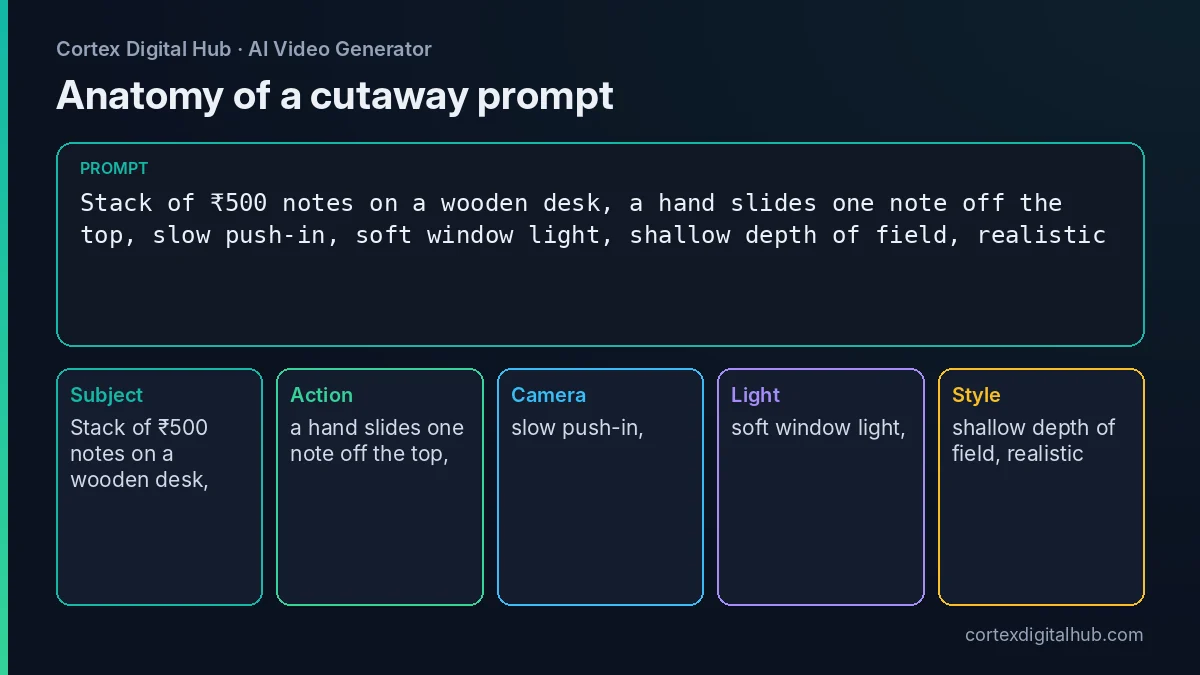 A cutaway prompt names one subject, one motion and one camera move, then repeats a shared style line.
A prompt that works for a finance explainer might read: Close-up of a stack of ₹500 notes on a wooden desk, a hand slides one note off the top, slow push-in, soft window light, shallow depth of field, realistic. For more on structure, see text-to-video prompts that work.
How do I keep the look the same across clips?
Mismatched b-roll is the first thing viewers notice. Three habits fix most of it.
- One style line. End every prompt with the same sentence, for example
natural daylight, muted colours, 35mm look, shallow depth of field. - One model and one resolution. Mixing Lumen Motion 3 Standard with a 1080p clip from another model shows up as a change in sharpness and colour.
- Reference images. When the same desk, product or character appears in several clips, tag 2 to 4 references so the model keeps it steady. The post on consistent characters with reference images explains how.
When you do not need a specific subject, fixing the style line is enough. When you do, start from a photo with image to video, which uses your picture as the first frame.
What does AI b-roll cost?
Credits are billed per second of finished video, at 1 credit = ₹0.50, and the total shows on the Generate button before you start. Prices are as of October 2026.
| Setting | Credits per second | 4-second cutaway | 12 cutaways |
|---|---|---|---|
| Nova Lite, 768p (smallest clip is 6 s) | 8 | ₹24 (6 s) | ₹288 |
| Orbit 3, 480p | 14 | ₹28 | ₹336 |
| Lumen Motion 3, Standard | 23 | ₹46 | ₹552 |
| Lumen Motion 3, 1080p | 37 | ₹74 | ₹888 |
| Orbit 3, 720p | 27 | ₹54 | ₹648 |
The saving comes from drafting. If you generate twelve cutaways on Orbit 3 at 480p to check composition, that is ₹336, and then you remake only the five you keep at 1080p for about ₹370. Compare the models in which AI video model to choose.
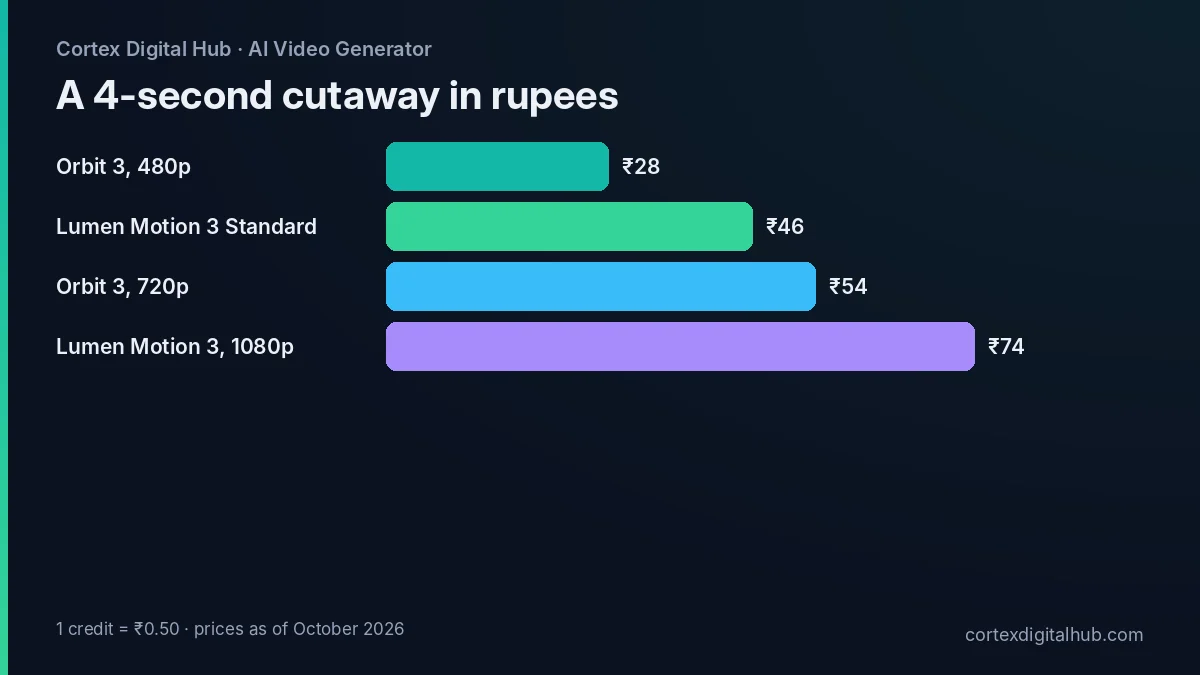 A 4-second cutaway costs between ₹28 and ₹74 depending on the model and resolution.
Should I add sound to AI b-roll?
For most talking-head videos, no. Your voice and music track already carry the audio, and clip ambience under a voice-over can sound like noise. Turn Sound off in the settings. If a cutaway is meant to stand alone, such as a quiet establishing shot before you speak, leave it on. More on this in AI video with native sound and music.
Do I need to disclose AI b-roll on YouTube?
Rules differ by platform and change often. As of 2026, YouTube has asked creators to label realistic content that is altered or synthetic in some situations, and clearly unrealistic or animated content is treated differently. Read YouTube's help page on the disclosure setting before you upload, and apply it plainly where your clips could be mistaken for real footage.
A sensible habit regardless of the rule: do not use AI b-roll to show a real event, a real person saying something, or a result you did not achieve. Use it for atmosphere and illustration.
Finishing the clips for your timeline
Generated clips come as MP4. If your editor prefers another format, the free video converter handles it on your device. Cut an overlong clip with the trim video tool, which can trim without re-encoding, and reframe a 16:9 cutaway for a Short with the video resizer. If a file is too big to share with an editor, the video compressor shrinks it.
Key takeaways
- Plan cutaways from your script: one visual every 6 to 10 seconds, each with one subject and one camera move.
- Set Format to 16:9, use one model and one resolution, and repeat a single style line to keep the look matched.
- Draft on Orbit 3 480p or Nova Lite, then remake only the keepers; a 4-second Lumen Motion 3 Standard clip is ₹46.
- Turn Sound off when you add a voice-over and music.
- Check YouTube's current disclosure guidance, and never use AI clips to show real events or results.
Frequently asked questions
Can I use AI b-roll in my YouTube videos?
Yes, clips you generate are yours to edit and upload, and they carry no watermark. Platform policies change, so as of 2026 check YouTube's help page on disclosing realistic altered or synthetic content before you publish.
What aspect ratio should AI b-roll be for YouTube?
Use 16:9 for standard long videos, so the cutaway fills the frame without cropping. Set the Format to 16:9 before you generate, and pick 9:16 only when the clip is meant for a Short.
How long should a b-roll clip be?
Most cutaways run two to five seconds, which is why a 4- or 5-second AI clip is usually enough. If you need longer, generate a 10-second clip and cut it in your editor.
How do I make AI b-roll clips look like they belong together?
Reuse one style line in every prompt, use the same model and resolution, and add reference images when the same product or place appears more than once. Changing only the subject keeps the look steady.
How much does AI b-roll cost in India?
A 4-second clip on Lumen Motion 3 Standard costs 92 credits, which is ₹46. At 1080p it is 148 credits, or ₹74. A dozen cutaways for one video is therefore roughly ₹550 to ₹900, as of October 2026.
Should I turn sound on for b-roll?
Usually off. Your voice-over and music already fill the audio track, and ambient sound from the clip can clash with them. Switch Sound off in the settings, or keep it on only if you want the clip's own ambience.
Can AI b-roll show a real place or product?
Not accurately from text alone. For a real product or location, start from your own photo with image to video, or add 2 to 4 reference images, so the clip uses what your subject actually looks like.
Can I make b-roll for a Short or a Reel?
Yes. Set the Format to 9:16 and keep the same prompts. The free video resizer can also reframe a finished 16:9 clip to 9:16 if you decide later to reuse it.