
AI wedding invitation video maker: save-the-date clips from a photo
An AI wedding invitation video maker can turn a couple's photo or an illustration into a short animated save-the-date for WhatsApp. This guide covers prompts, consent, adding names in an editor, file size and what a 10-second clip costs.
· 5 min read · 1.1K views · by the Cortex Digital Hub team
Upload the photo as the first frame, describe gentle motion such as falling petals and a slow push-in, and read the credit total before you start. From ₹24 a clip · no watermark · runs in your browser
Make an invite clip → → Opens AI Video Generator · runs in your browser
An AI wedding invitation video maker can turn one photo or illustration into a 10-second animated save-the-date: petals drifting, a slow push-in, lamps flickering. Upload the image as the first frame in the AI Video Generator, describe the motion, then add names and dates as text in an editor so they stay exactly as typed. A 10-second clip costs ₹115.
What is an AI wedding invitation video maker good for?
It is good for the part of an invitation that is mood: a couple's photo coming to life, a decorated mandap with lamps flickering, a floral frame opening. It is not good at the exact details, such as names, dates and venues, which belong on screen as text you control.
Typical uses in India include save-the-date clips for WhatsApp family groups, a short teaser before a card is sent, an animated invitation for the sangeet or reception, and a thank-you clip after the event.
How do I make an AI wedding invitation video from a photo?
- Choose a clear photo of the couple, well lit and facing the camera, with their consent. A phone photo is fine; avoid heavy filters.
- Choose image to video and set the photo as the first frame.
- Prompt only the motion. The image already supplies the look.
- Set the format to 9:16 for WhatsApp status and Reels, or 4:5 for a post.
- Draft cheaply, then finalise. Test on Orbit 3 at 480p (₹35), then make the final on Lumen Motion 3 Standard.
- Add text in an editor. Names, date, venue and a "Save the date" line go on top.
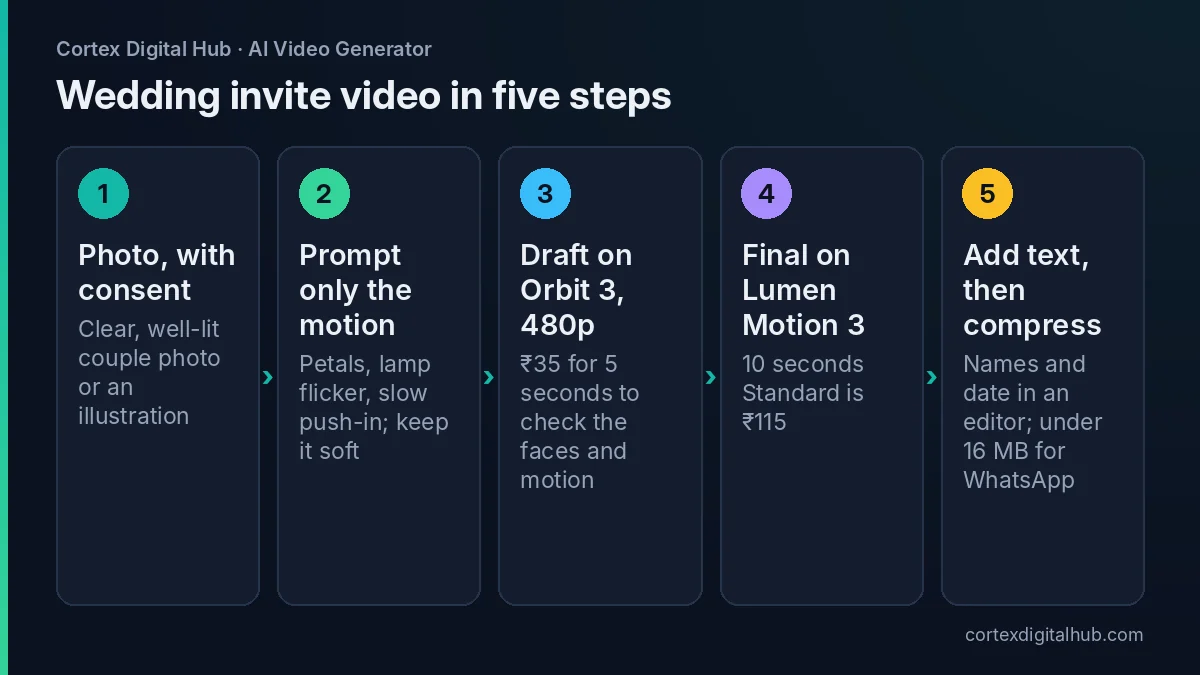 Photo in, gentle motion prompt, cheap draft, final clip, then names added in an editor.
Read image to video: animate a photo with AI for how the start frame behaves.
Prompts that suit a wedding invitation
Keep the motion slow and soft; faces warp when the motion is big.
Rose petals drift slowly through the frame, warm golden light, gentle slow push-in, soft focus background, romantic moodBrass lamps flicker on either side of a flower-draped mandap, subtle haze, slow camera tilt up, warm evening lightMarigold garlands sway gently in a breeze, shallow depth of field, soft morning light, locked camera
For an invitation with a first and last frame, such as an empty decorated stage that ends on the couple's photo, see first and last frame control. That lets the clip land on a photo you chose.
If a face looks wrong in a draft, shorten the clip, slow the motion, and put distorted face, flicker in the Avoid field.
How should I prepare the photo?
A good start frame decides most of the result. Pick a photo where both faces are sharp, lit from the front and not too small in the frame. Crop out other people with the free photo editor, and use the image resizer to match the portrait or square shape you will post. Leave some empty space above and around the couple, because that is where petals, light and your text will sit.
If the photo is busy, such as a crowded venue, a decor-only image or a plain background works better. You can also take the couple from a studio photo with the remove background tool and place them over a floral or palace backdrop before animating.
Consent, culture and good taste
An invitation involves real people and, often, religious symbols.
- Animate photos only of people who have agreed. For an invitation, that means the couple.
- Do not animate other guests or relatives, and do not put children's faces in a clip without a parent's consent.
- Do not make it look as though a celebrity, a politician or a religious figure is attending or blessing the wedding.
- Treat sacred symbols with respect. Ask the family what they are comfortable with, and avoid changing or distorting religious imagery. If a symbol looks wrong in a draft, leave it out.
Many families prefer an illustration instead of a photograph. A painted or sketched couple, or a motif such as flowers and lamps, avoids the face problem and often looks more elegant.
How do I add names and dates after the clip?
AI text is unreliable, so add the words yourself. In any video editor, place text over the last 3 to 4 seconds: the names, the date, the venue and a line like "Muhurat at 10:15 am" if that is the real time. Use a font that matches your invitation card, and keep the text large enough to read on a phone. If you do a Hindi, Telugu or Tamil invitation, type the script in your editor; models do not reliably draw Indic lettering.
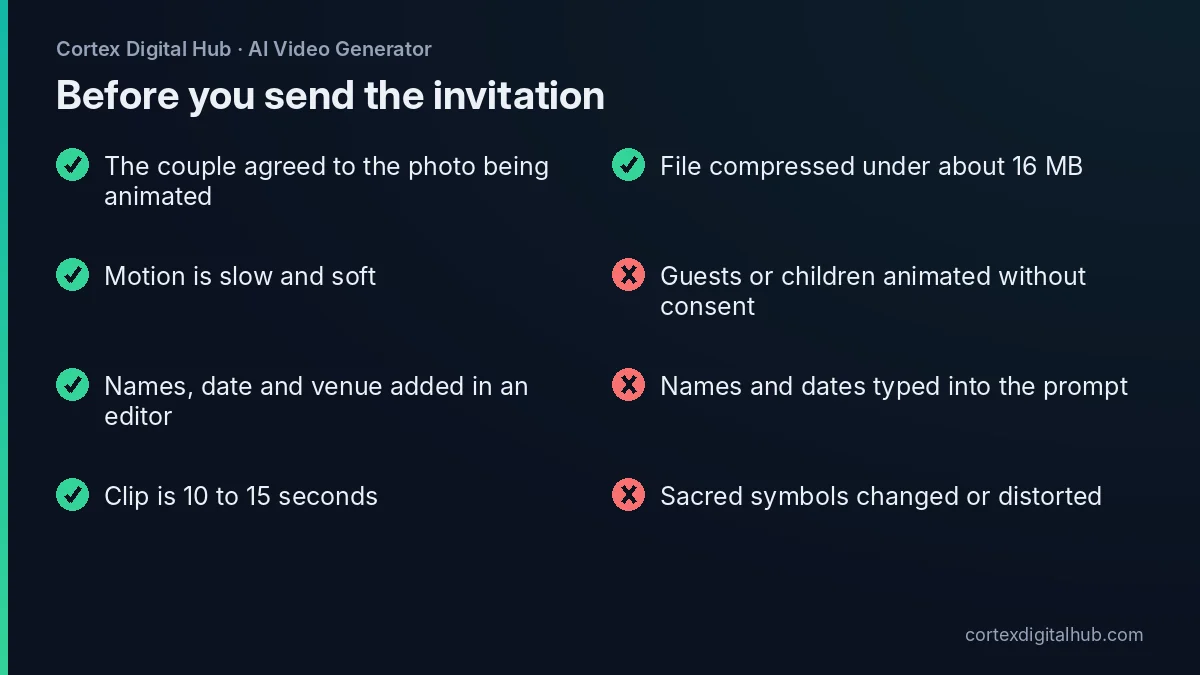 Consent first, gentle motion, text added in an editor, and a file small enough for WhatsApp.
What does it cost?
Credits are billed per second at 1 credit = ₹0.50, as of October 2026.
| Clip | Model | Credits | Cost |
|---|---|---|---|
| 5 s draft | Orbit 3, 480p | 70 | ₹35 |
| 5 s final | Lumen Motion 3 Standard | 115 | ₹57.50 |
| 10 s final | Lumen Motion 3 Standard | 230 | ₹115 |
| 10 s final | Lumen Motion 3, 1080p | 370 | ₹185 |
Two drafts plus one 10-second final is ₹185. Vendor quotes for animated invitations vary by city and by brief, and a designer will give you a result tailored to your card in a way this method cannot, so treat AI as the quick, low-cost option.
Sending the invitation on WhatsApp
WhatsApp limits file size, so compress if needed. As of 2026, check WhatsApp's help page for its current limits. The free video compressor shrinks an MP4 on your device. The compress video to 16 MB tool targets the usual limit. The guide to compressing video for WhatsApp explains the options.
Reframe with the video resizer and cut it to length with the trim video tool. For more distribution ideas, see AI video for WhatsApp status and business. Finished clips stay in History for 7 days, so download the final before then.
Key takeaways
- Use AI for the mood of an invitation; add names, dates and venue as text in an editor.
- Animate only a photo of the couple with their consent, or use an illustration or decor instead.
- Keep motion slow and soft, with petals, lamps and a gentle push-in, to avoid warping faces.
- A 10-second clip on Lumen Motion 3 Standard is ₹115; draft on Orbit 3 at 480p for ₹35.
- Compress under about 16 MB before sending on WhatsApp.
Frequently asked questions
Can AI make a wedding invitation video from a photo?
Yes. Use image to video with a clear photo of the couple as the first frame and describe gentle motion, such as petals falling or a slow push-in. Add the names, date and venue as text afterwards in an editor.
Do I need permission to animate a photo?
Yes. Only animate photos of people who have agreed, which at a wedding means the couple themselves. Do not animate other guests, relatives or children without their consent, and never impersonate celebrities.
Why shouldn't I put names and dates in the prompt?
Video models redraw letters in every frame, so names and numbers can warp or change. Generate the visual first, then add names, date and venue as text in a video editor, where they stay exactly as typed.
How much does an AI wedding invitation video cost?
A 10-second clip on Lumen Motion 3 Standard is 230 credits, which is ₹115. A 5-second clip is ₹57.50. Drafting on Orbit 3 at 480p is ₹35 per 5 seconds. Prices are as of October 2026.
What if I do not want to use a real photo?
Use an illustration, a painted couple, a mandap sketch or just decor, such as flowers, lamps and drapes. Animate it with image to video, or describe the scene in a text prompt for an abstract invitation.
How do I send the invitation on WhatsApp?
Keep it under about 16 MB and compress it if it is bigger. The free video compressor and the compress-to-16-MB tool run on your device. Check WhatsApp's current file limits as of 2026.
What length should a wedding invitation video be?
Ten to fifteen seconds is enough for a save-the-date. Longer than that and guests skip it. Generate 5 to 10 seconds, then add the names and details on screen for the last few seconds.
Can I add music or a song to the invitation?
Yes. Generate with Sound off and add your own licensed track in an editor, or leave Sound on for a soft ambient bed. For a famous film song, remember that copyright rules apply to shared videos.