
How Long Does AI Video Take to Generate? Real Wait Times (2026)
A normal 5 to 10 second clip at 1080p usually takes 2 to 4 minutes on the AI Video Generator. This guide shows what stretches that wait, what to do while it renders, and how to batch clips so you never sit watching a progress bar.
· 5 min read · 511 views · by the Cortex Digital Hub team
Start a clip, close the tab if you like, and come back to find it in History. The credit total shows before you press Generate. From ₹24 a clip · no watermark · runs in your browser
Make a video → → Opens AI Video Generator · runs in your browser
Most clips on the AI Video Generator finish in 2 to 4 minutes when they are 5 to 10 seconds long at 1080p. So how long does an AI video take in a real working day? Plan for about four minutes per normal clip and eight minutes or more for 4K or a 30-second render. You can leave the page while you wait, and the clip will be in History when you return.
How long does an AI video take to generate?
For the clips most people make, a 5-second product shot or a 10-second property pan, the wait is short. Press Generate, make a cup of chai, and the clip is usually ready by the time you are back.
Here is what to expect, with the cost of each so you can plan time and money together.
| Clip | Typical wait | Cost (1 credit = ₹0.50) |
|---|---|---|
| 5 s on Lumen Motion 3 Standard | About 2 to 4 minutes | 115 credits, ₹57.50 |
| 5 s on Lumen Motion 3 at 1080p | About 2 to 4 minutes | 185 credits, ₹92.50 |
| 10 s on Lumen Motion 3 at 1080p | About 2 to 4 minutes | 370 credits, ₹185 |
| 6 s draft on Nova Lite | Likely the same range or quicker | 48 credits, ₹24 |
| 5 s on Vela 2.0 at 4K | 8 minutes or more | 2,875 credits, ₹1,437.50 |
| 30 s on Orbit 3 at 480p | 8 minutes or more | 420 credits, ₹210 |
Treat these as ranges, not promises. The exact price shows on the Generate button before you start, which is the one number you can count on.
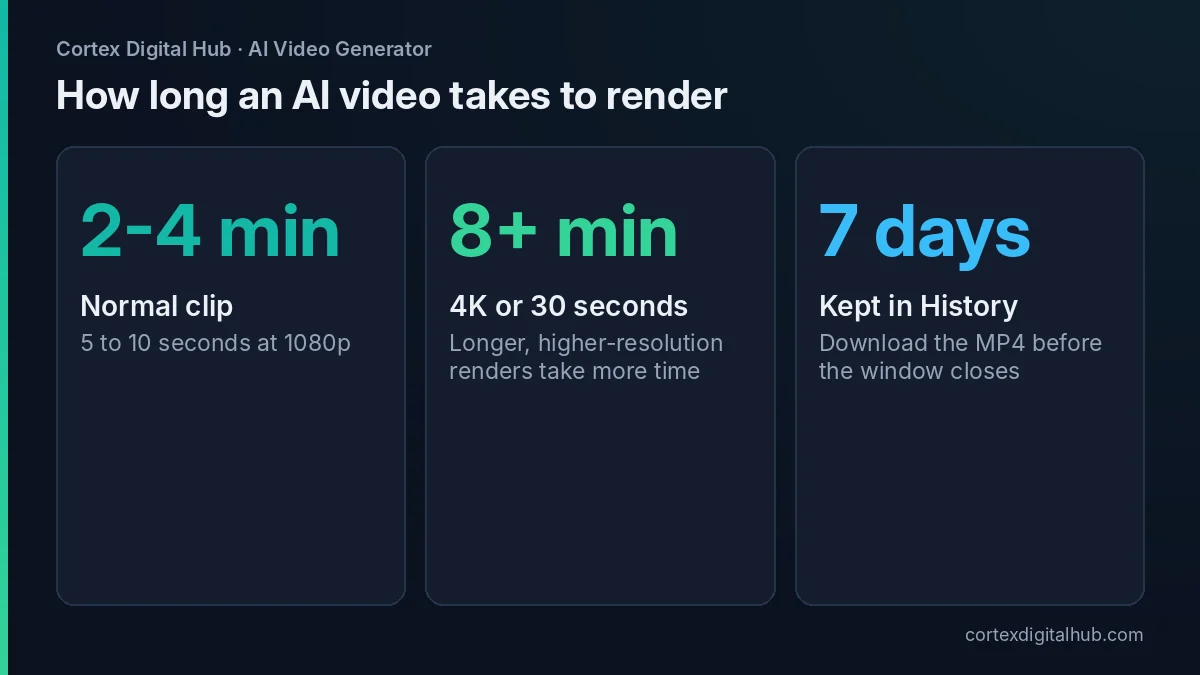 A normal clip takes minutes, a 4K or 30-second clip takes longer, and finished files wait in History for 7 days.
What makes an AI video take longer?
Three things push the wait up.
- Resolution. 4K asks the model to build far more detail in every frame than 480p does.
- Length. A 30-second clip is six times the footage of a 5-second one.
- Model choice. Bigger, more cinematic models such as Vela 2.5 or Director 4 are built for quality, so expect them to sit at the longer end of the range.
Prompt wording is rarely the cause of a slow render. If one feels slow, check the resolution and length first. Dropping from 1080p to 720p for a draft is the quickest speed-up you have.
What can I do while an AI video renders?
Almost anything else. You can leave the page, and in-progress clips finish without you. That makes the wait mostly free time rather than dead time.
Use it well:
- Write the prompt for your next clip in a notes app, or dictate it with the Speak button in Hindi, Telugu, Tamil, Kannada, Marathi or English.
- Prepare the photo for your next image-to-video job. The free Remove Background tool runs on your own device.
- Plan the caption and the WhatsApp message that will go with the clip.
When you come back, open History, play the clip, and download the MP4. Finished files stay in History for 7 days, so download what you want to keep.
How to batch AI videos so the waiting overlaps
Batching means you start a clip, move on, and review a set later. Say a jeweller in Surat wants four short Dhanteras clips for the week. A calm way to run it:
- Write four prompts, one subject and one camera move each.
- Draft all four on Nova Lite. Four 6-second drafts cost 192 credits, or ₹96.
- Start them one after another, then leave the page.
- Return, watch the drafts, and fix the prompts that missed.
- Make finals of the two best on Lumen Motion 3 at 1080p. Two 5-second finals cost 370 credits, or ₹185.
Total spend is ₹281 and most of the waiting happened while you were doing something else. If you start many clips together, check History instead of staring at one tab, because each finishes in its own time.
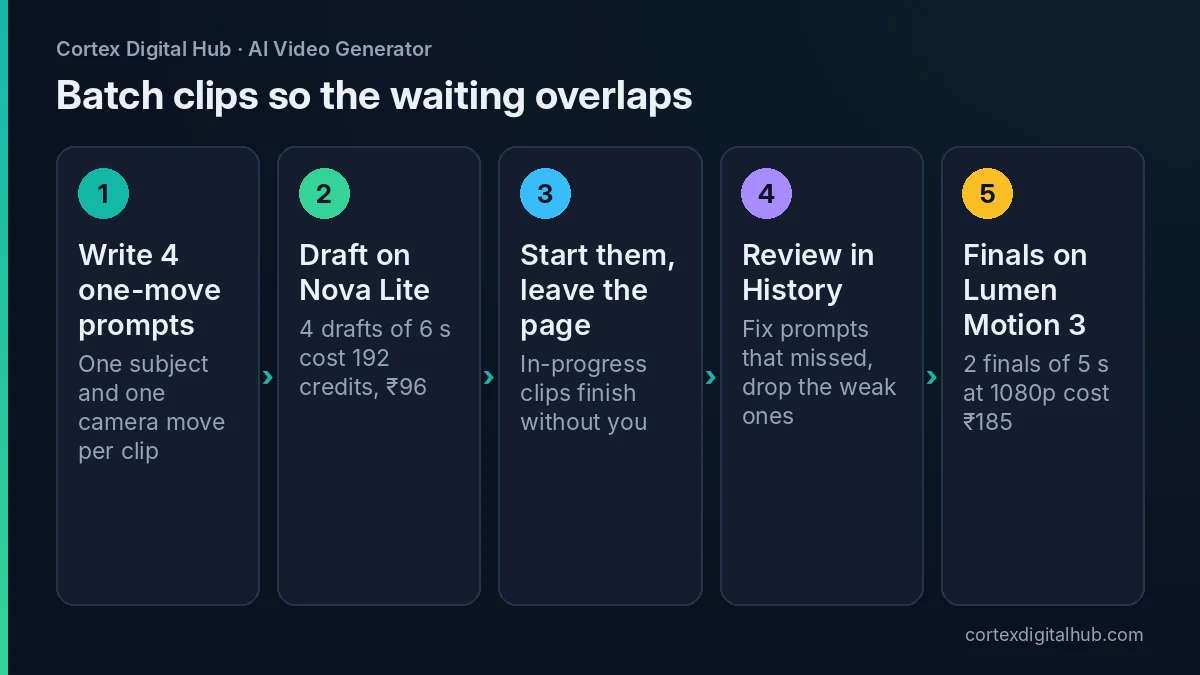 Draft cheap, start everything, leave the page, then spend on finals only for the clips that worked.
How much time should I plan for a real project?
Work backwards from the posting time, not forward from the first prompt. The render is the short part; the retries are what eat the afternoon.
Say a bakery in Pune wants a festive Reel to go out at 6 pm. A sensible plan: write the prompt by 1 pm, start two or three drafts by 1:15, review them by 2, start the final by 2:15, and have the finished clip downloaded by 3. That leaves three hours for trimming, adding a trending track, resizing to 9:16 and writing the caption. Even if the first final misses and you need a second, you are still early.
For a larger job, such as a 30-second brand clip at higher resolution, start it the day before. A render of 8 minutes or more is fine when nobody is waiting on it, and annoying when your client is on a call.
One more habit that saves time: keep the length short while you test. A 5-second draft shows you whether the subject, light and camera move work. Once the draft looks right, extend the idea to the final length instead of paying in minutes and rupees for a long clip that was wrong from the first frame.
What if the render fails or seems stuck?
Give normal clips 4 minutes and 4K or 30-second clips a full 8 minutes before you worry. If a clip fails, or the model declines the prompt, the credits come back automatically. You do not need to chase a refund.
If a clip was declined, rewrite the prompt with a plainer description of what moves and try again. Avoid pressing Generate repeatedly on the same prompt; each press starts a new clip and a new charge.
How do I finish the video faster once it arrives?
The wait is not over when the MP4 lands. Trimming, resizing and compressing take minutes, and all of them run free on your own device.
- Cut a few seconds off the start with Trim Video. The guide on trimming without re-encoding explains why quality stays intact.
- Set the right shape with the Video Resizer, or use the 1080x1920 resizer for Reels.
- Shrink it for chat with the video compressor and the WhatsApp compression guide.
For edit and extend jobs, trim first. They are billed on the length of the input video, so a shorter input is both cheaper and quicker to start.
Key takeaways
- A 5 to 10 second clip at 1080p usually takes 2 to 4 minutes.
- 4K and 30-second clips can take 8 minutes or more.
- You can leave the page, because in-progress clips still finish.
- Finished MP4s stay in History for 7 days, so download what you need.
- Draft cheap, batch your starts, and spend on finals only for the clips that worked.
- Failed or declined clips return your credits automatically.
Frequently asked questions
How long does an AI video take to generate?
Most clips of 5 to 10 seconds at 1080p finish in about 2 to 4 minutes on the AI Video Generator. Very large jobs, such as 4K or a 30-second clip, can take 8 minutes or more, so plan around that.
Why is my AI video taking so long?
The usual causes are a long clip, a high resolution such as 4K, or a heavier model. A 30-second clip at high resolution does far more work than a 5-second draft. Give it the full 8 minutes before worrying.
Can I close the page while my AI video is generating?
Yes. You can leave the page and in-progress clips still finish. When you return, open History and the finished MP4 will be there. Do not rely on the open tab to keep a render alive.
Where do I find my video after it finishes?
Finished MP4s appear in History. They stay there for 7 days, so download anything you want to keep to your phone or laptop before that window closes. Back it up the same day if the clip is for a client.
Do I pay if the AI video fails or never finishes?
No. Credits are deducted when the clip starts and are returned automatically if it fails or the model declines the prompt. You only keep the cost of clips that actually arrive.
Is a faster AI video model lower quality?
Not always, but cheaper and smaller settings usually mean less detail. Draft on a low-cost model such as Orbit 3 or Nova Lite, then make the final on a model such as Lumen Motion 3 or Nova 2K.
Can I make several AI videos at once?
You can start clips one after another and leave them rendering while you do other work. If you start many at once, expect each to finish in its own time, and check History rather than waiting on one tab.
Does a longer prompt make AI video slower?
Length and resolution matter far more to the wait than how many words you wrote. A tight prompt of two or three sentences works better than a long one anyway, so spend your effort on what moves, not on word count.
How long does it take to edit or extend an AI video?
There is no fixed figure to promise. Edit and Extend work on your input video and are billed on its length, so trim first with the free Trim tool. Shorter inputs cost less and are the quicker jobs to start.