
Seamless Loop AI Video: The First and Last Frame Trick Explained
To make a seamless loop AI video, use the same image as both the first and the last frame, then ask for gentle motion in between. This guide shows the exact steps, the models that support it, what to do when a loop jumps, and how to export a GIF.
· 5 min read · 636 views · by the Cortex Digital Hub team
Pick a first-and-last-frame model, use the same image for both ends, and describe a gentle motion that comes back to where it started. From ₹24 a clip · no watermark · runs in your browser
Make a looping clip → → Opens AI Video Generator · runs in your browser
A seamless loop AI video starts and ends on the same frame, so the clip repeats without a visible jump. The reliable way is the first and last frame trick: give the AI Video Generator the same image for both ends and ask for a gentle motion in between. It works for website backgrounds, shop screens, event walls and WhatsApp status.
How do I make a seamless loop AI video?
Follow these steps on a model with first and last frame control: Lumen Frames, Lumen Omni or Prism 6.
- Pick a strong still. A sharp 1080p image in the shape you need, such as 16:9 for a website or a screen.
- Open first and last frame mode and upload the image as the first frame.
- Upload the same image as the last frame.
- Write one gentle, cyclical motion. Steam drifting, a flame flickering, clouds moving, petals falling.
- Set a short length, 4 to 6 seconds.
- Draft, check the join, then make the final.
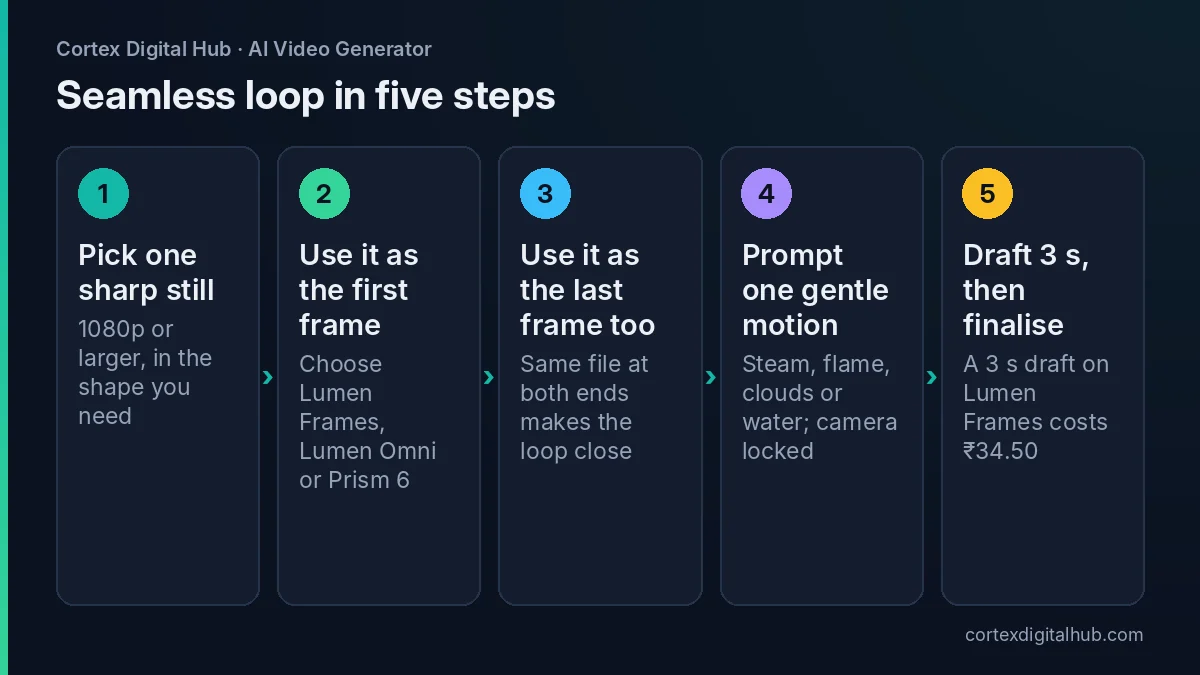 The same image at both ends gives the model one place to start and finish, which is the whole trick.
The model creates the path between the two matching frames. Because both ends are identical, the end of the clip meets the beginning when it plays again. Read the background in our guide to first and last frame control.
What prompt works for a loop?
Describe motion that naturally cycles, and keep the camera still or very slow. A prompt example:
Cup of masala chai on a wooden table, steam drifting upward in soft curls, gentle flicker of morning light from the window, camera locked, calm and warm
Good looping subjects:
- Steam, smoke and incense
- A diya flame or fairy lights
- Clouds, mist and light rays
- Water ripples and fountains
- Leaves, curtains and fabric swaying
- Slowly drifting dust or petals
Avoid walking, driving or anything with a clear beginning and end. In the Avoid box, add "camera shake, cuts, new objects appearing". For more image-to-video basics, see animating a photo with AI.
What makes a good starting image for a loop?
The still does most of the work, so spend a minute on it. Choose an image with clear subject, even light, and room for the motion to happen. A cup of chai with space above it for steam will loop better than a crowded flat-lay.
- Match the shape. Make the image the aspect ratio of the final loop. The free Image Resizer can crop it on your device.
- Keep it sharp. A blurry still gives a blurry loop.
- Leave negative space. Backgrounds for websites need calm areas where text can sit.
- Avoid text in the image. Letters can wobble when the frames are generated.
Say a Kochi homestay wants a looping hero for its website: a lamp-lit veranda at dusk with rain at the edge of the roof. A single still of that scene, a prompt asking for light rain and a flickering lamp, and a 5-second draft for ₹57.50 will show within minutes whether the join is clean. If you do not have a photo, make one with text to video first, pick the best frame, and then use it as both ends of the loop.
Test the loop before you publish it. Play the clip on repeat for a full minute and watch the moment it restarts. If you notice the seam, so will a visitor.
Which model should I use for loops, and what does it cost?
Prices are as of October 2026, at 1 credit = ₹0.50.
| Model | What it adds | 5 s loop | Cost |
|---|---|---|---|
| Lumen Frames | First + last frame, refs, 15 s, sound | 115 credits | ₹57.50 |
| Lumen Omni | First + last frame, refs, edit | 150 credits | ₹75 |
| Prism 6 | First/last frame, 1080p, sound | 260 credits | ₹130 |
Lumen Frames is the sensible starting point: lowest cost, and plenty for a background. Use Prism 6 when you need 1080p and will display the loop on a big screen.
A habit that saves money: draft the idea with a 3-second loop on Lumen Frames (69 credits, ₹34.50) to check that the join is clean, then make the final length. A shorter loop is also easier to keep seamless, since there is less time for the motion to drift.
Why does my AI loop jump, and how do I fix it?
Most jumps come from a few causes.
- Motion does not return. Something moves away and never comes back. Simplify to one cyclical movement.
- Lighting shifts. A sun that moves across the frame will not match at the end. Say "steady light".
- A new object appears. Add it to the Avoid box.
- Clip is too long. Shorten it to 4 to 6 seconds.
If a small jump remains, add a half-second crossfade between the end and the start in a video editor. You can trim the first and last frames cleanly with Trim Video, which keeps quality intact, as explained in the guide to trimming without re-encoding.
How do I use a loop on a website, a screen or WhatsApp?
- Website background. Export as MP4, keep it short and muted, and compress it with the Video Compressor. Switch Sound off before generating.
- Shop or event screen. Set the loop to repeat in the player on the screen. Use 16:9 and the highest resolution you need.
- WhatsApp status or Reels. Set Format to 9:16 at the start. Fix the shape later with the Video Resizer if needed.
- GIF. Use Video to GIF for chats and email, and read how to make a GIF from a video free. GIFs get large quickly, so keep the loop short.
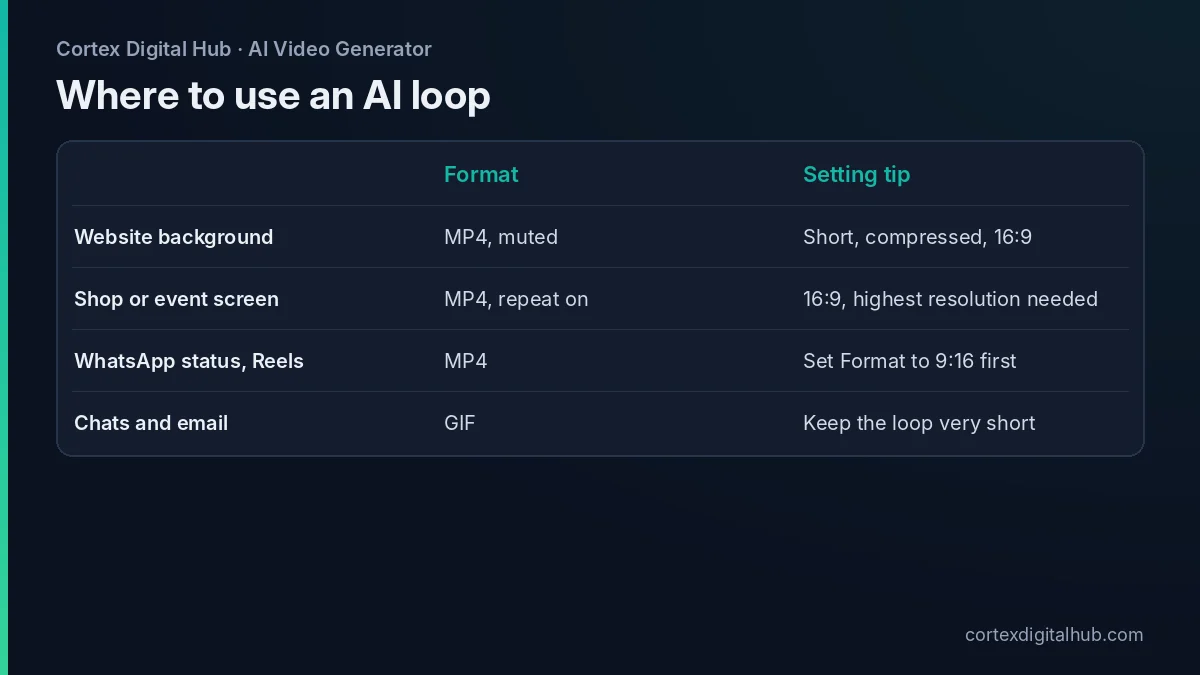 Choose MP4 for websites and screens, 9:16 for status and Reels, and GIF only for short loops in chats.
Key takeaways
- Use the same image as the first and last frame to get a seamless loop AI video.
- Lumen Frames, Lumen Omni and Prism 6 support first and last frame control.
- Describe gentle, cyclical motion: steam, flame, clouds, water, leaves.
- A 5-second loop costs ₹57.50 on Lumen Frames; draft shorter first.
- If the join jumps, simplify the motion, shorten the clip or add a crossfade.
- Turn Sound off for silent backgrounds, and export GIFs only for short loops.
Frequently asked questions
How do I make a seamless loop with AI video?
Choose a model with first and last frame control, such as Lumen Frames, and upload the same image as both the first and the last frame. Then describe a gentle motion that returns to its starting point.
Which models can make a looping AI video?
Lumen Frames, Lumen Omni and Prism 6 support first and last frame control, which is what the loop trick needs. Lumen Frames is the lowest cost of the three at 23 credits per second.
How much does a looping AI clip cost?
On Lumen Frames, a 5-second loop costs 115 credits, or ₹57.50. On Lumen Omni it is 150 credits, or ₹75. On Prism 6 it is 260 credits, or ₹130. The exact total shows on the Generate button.
What kind of motion loops best?
Cyclical, ambient motion: drifting steam, a flickering flame, clouds, falling petals, rippling water, swaying leaves. Avoid actions with a clear start and finish, such as someone walking across the frame.
Why does my AI loop jump at the end?
The motion probably does not return to the start pose, or the lighting changes between frames. Simplify the prompt to one gentle movement, shorten the clip, or add a short crossfade in an editor.
Can I turn an AI loop into a GIF?
Yes. Use the free Video to GIF tool on your own device. Keep the clip short and the size small, because GIF files grow quickly. For a website, an MP4 or WebM usually loads faster than a GIF.
How long should a looping video be?
Between 3 and 8 seconds is a good range for background loops. Short clips are cheaper, easier to keep seamless and lighter to load, and viewers rarely notice the repeat if the motion is subtle.
Can I loop a clip I already generated?
You can use a still frame from it as the first and last frame of a new generation. Or add a short crossfade between the end and the start in a video editor, which hides small differences.
Will the loop have sound?
Models with sound can generate ambience. For a looping background that plays muted, switch Sound off. Ambient audio rarely loops cleanly, and most websites and screens play loops without audio.