
Sign a rental agreement PDF without a printer or scanner
Lena had just moved to Toronto for graduate school, the landlord wanted the signed lease back by evening, and her shared apartment had no printer. How to sign PDF online free on a phone: draw, type or photograph your signature, place it on the line, add the date, and what this kind of signature is and is not.
· 5 min read · 715 views · by the Cortex Digital Hub team
Draw with your finger, type your name in one of four handwriting styles or use a photo of your signature. Drag it onto the line, pull the corner to resize, add today's date, download. Free · no sign-up · nothing uploaded
Sign your PDF → → Opens Sign PDF · runs in your browser
Lena Fischer had been in Toronto for nine days. Graduate school started in January, the sublet was temporary, and the apartment she wanted near campus had a landlord who moved fast. At eleven in the morning he emailed the lease: eight pages, initials on every page, full signature on the last one, back by six if she wanted the keys on Sunday. Her shared apartment had a sofa, a kettle and no printer. The campus print room was closed for the holidays. She searched for a way to sign PDF online free on her phone and, by lunch, the signed copy was back in the landlord's inbox.
The print, sign, scan loop nobody has time for
The old way is to print the PDF, sign each page in pen, scan or photograph every page, and stitch the photos back into one file. It needs a printer, a scanner or a steady hand with the phone camera, and half an hour. It also produces a file that is often crooked, grey and too large to email.
Signing the PDF itself skips all of that. You make your signature once, place it where the lines are, and download a clean copy with the text still sharp. Nothing is printed and nothing is scanned. The same goes for an offer letter in Lagos, a school trip form in Manchester or a freelance contract in Manila.
How to sign PDF online free, step by step
Lena did this in her phone's browser, sitting in a café.
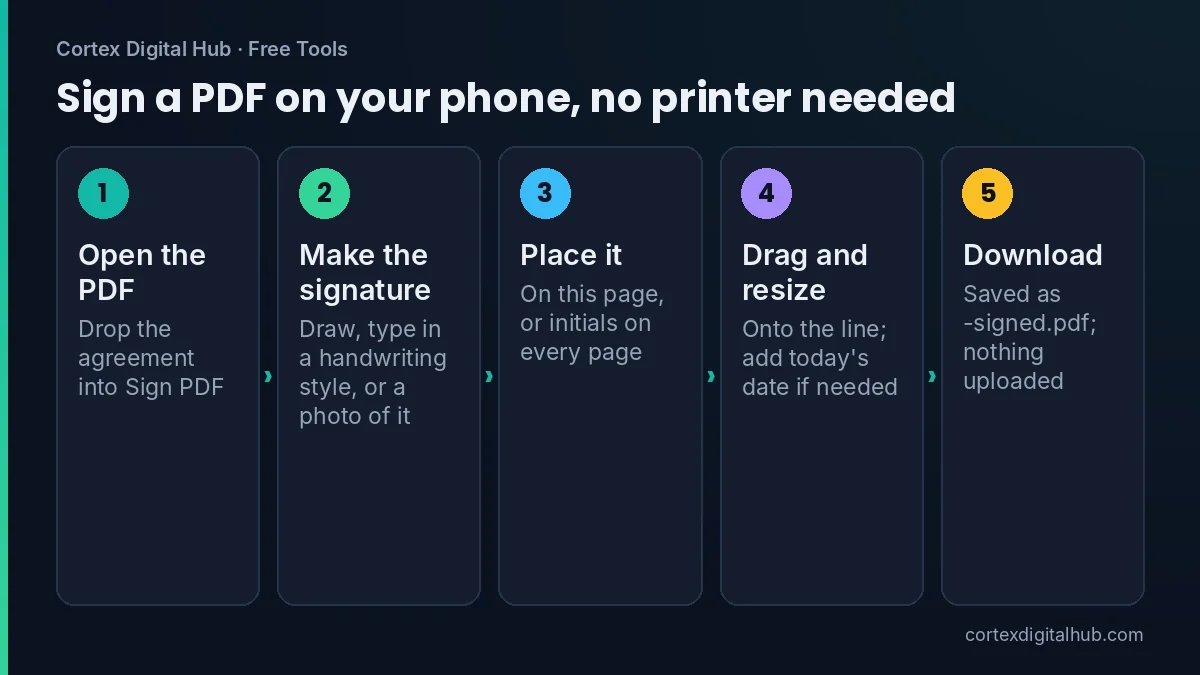
- She opened Sign PDF and dropped in the lease. Page 1 appeared with Prev and Next buttons to move between pages.
- Under Your signature she picked Draw and signed on the white pad with her finger. Blue ink is the default; Black is one tap away. Clear starts over.
- For the initials on every page, she wrote "LF" on the pad, ticked Put it on every page, and pressed Place on this page. The initials appeared on page 1 and on every other page too.
- She dragged the initials to the bottom right corner where the lease had a small box, and pulled the blue corner handle to make them smaller.
- She moved to page 8, cleared the pad, signed her full name, unticked Put it on every page, ticked Add today's date under it, and pressed Place on this page again. Then she dragged it onto the line marked Tenant.
- She pressed Sign and download. The file was saved with "-signed" added to its name.
A small x on each placed signature removes it if you put it on the wrong page. On a computer, arrow keys nudge a selected signature a little at a time.
Three ways to make the signature
The pad is the quickest on a phone, but it is not the only way.
- Draw. Use a finger, a stylus or the mouse. The tool trims the empty space around the ink, so the signature sits tight on the line.
- Type. Type your name and pick one of four handwriting styles. Good for initials, or when a finger-drawn signature looks shaky. For a lease, many people prefer their real hand.
- Photo of it. Sign on white paper with a dark pen, take a straight photo in good light, and choose it here. The paper is turned transparent, so only the ink lands on the PDF. This gives you the signature you already use on cheques and forms.
Whichever you use, the signature is drawn into the page as a picture. The lease's own text stays as it was, so it can still be searched and copied.
What this signature is, and what it is not
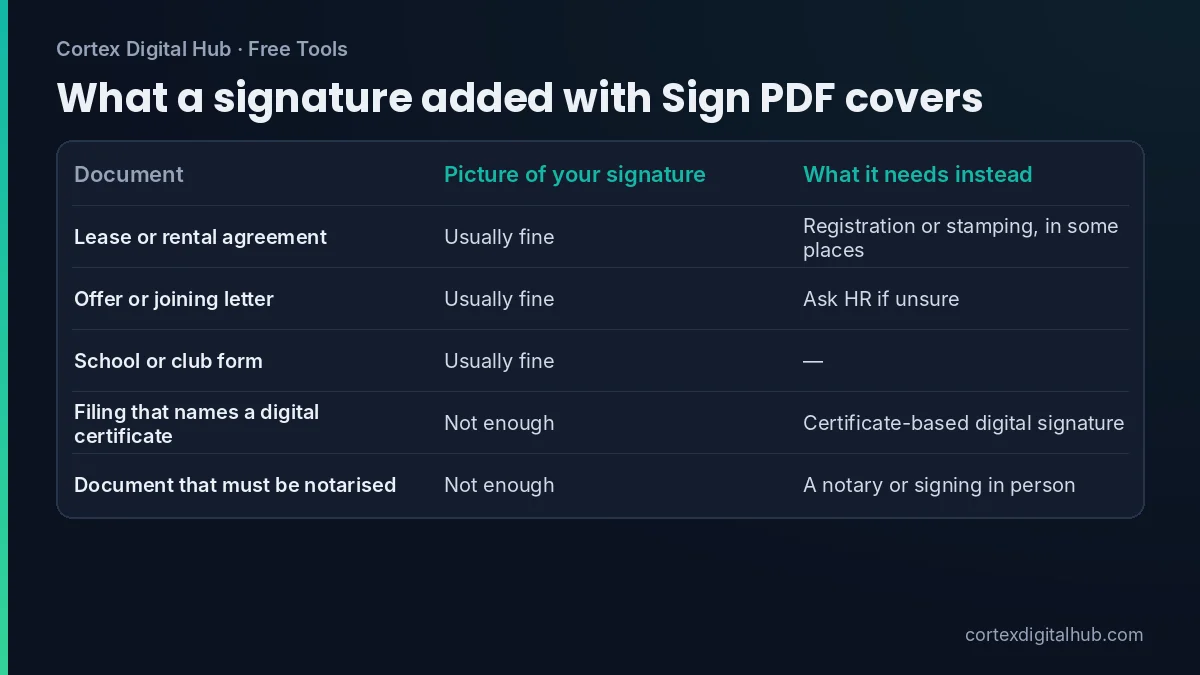
The tool says this plainly, and so should we. Sign PDF adds a picture of your signature to the page. It is the same in spirit as signing a printout and scanning it back, which is what most landlords, employers, schools and clubs ask for in everyday paperwork.
It is not a certificate-based digital signature, the kind issued to a verified person and checked by software. Some documents need one of those, or a notary, or a signature made in person: certain tax, company, court and property filings, and tenders that name a specific signature type. The rules differ from country to country, so if a document says how it must be signed, follow that.
Leases have one more wrinkle. In some places a tenancy has to be registered, stamped or witnessed, and that process has its own steps that no PDF tool replaces. Lena's landlord only wanted a signed PDF. If you are unsure which version yours needs, ask the landlord or the agent before you sign.
Before you send the signed copy
A few checks save a second round of emails.
- Read the last page again. Make sure the signature sits on your line, not the landlord's.
- Check every page has the initials. Swipe through with Prev and Next before downloading.
- Mind the size. A signed PDF is usually close to the original size. If an inbox or a portal has a limit, Compress PDF brings it down; the compress PDF for email guide covers the usual limits.
- Lock it if it carries ID. Leases often include passport or ID numbers. Put a password on the copy with Protect PDF and tell the landlord the password on a call. Sign first, then protect: a locked PDF has to be unlocked before any tool can add to it.
What to do next
The landlord's next email asked for her passport page and proof of enrolment in the same file. She had them as phone photos, so she turned them into a PDF with Image to PDF, then joined that with the signed lease in Merge PDF. If the lease had arrived locked, Unlock PDF would have opened it first, using the password she already had. Every one of these runs in the browser like Sign PDF does; there is more on why that matters in why browser-based tools are safer than upload sites. The rest are on the PDF tools page.
Sunday
The landlord replied with a thumbs-up at 2:40. On Sunday she picked up the keys, signed the move-in checklist in pen at the door, and carried her two suitcases up three flights of stairs. The signed PDF stayed in her email, which turned out to be useful a month later when the university asked for proof of address.
Frequently asked questions
Can I sign a PDF on my phone without installing an app?
Yes. Sign PDF works in the phone's browser. Draw on the pad with your finger, place the signature on the page, drag it into position and download the signed copy.
Is a signature added this way legally valid?
It adds a picture of your signature, like signing a printout and scanning it back. Many landlords, employers and schools accept that for everyday documents. It is not a certificate-based digital signature, and some legal, tax and government filings require one, or a notary, or signing in person.
Can I use my real signature from paper?
Yes. Sign on plain white paper, photograph it straight in good light and choose Photo of it. The paper is turned transparent so only the ink sits on the page.
How do I initial every page of a lease?
Make your initials, tick Put it on every page, then place it. It lands in the same spot on every page, and you can still add your full signature on the last page.
Can I add the date next to my signature?
Yes. Tick Add today's date under it before placing the signature. The date is written with the month as a word, for example 04 Dec 2026, so it reads the same in every country.
Is my signature saved or uploaded anywhere?
No. The signature and the PDF stay in your browser and are forgotten when you close the page.
The PDF says it has a password. Can I still sign it?
Remove the password first with Unlock PDF, using the password you already know, then open the unlocked copy in Sign PDF.