
Slow motion AI video: how to prompt it for liquids, hair and fabric
Slow motion AI video comes from the words in your prompt, not from a frame-rate setting. Here is how to ask for it, which subjects look best, and what each test clip costs in rupees on the AI Video Generator.
· 5 min read · 614 views · by the Cortex Digital Hub team
Describe a splash, a flowing dupatta or a falling petal in slow motion, run a cheap draft, then make the final on a sharper model. From ₹24 a clip · no watermark · runs in your browser
Try a slow-motion clip → → Opens AI Video Generator · runs in your browser
Slow motion AI video comes from your prompt, not from a frame-rate dial. You write "in slow motion", name the one thing that moves, and keep the camera calm, then the AI Video Generator interprets it. The look can be convincing for splashes, hair and fabric, though results vary by model, so run a cheap draft first. Prices are as of October 2026.
How do you ask for slow motion in an AI video?
The generator has no fps setting. Its controls are Model, Length, Format, Resolution, Quality, Bitrate and Camera, so the slowness has to live in the text. Three habits help:
- Say "slow motion" near the start of the prompt, not as an afterthought.
- Name one subject and the exact movement: milk pouring, hair lifting, a petal falling.
- Use a locked or slow camera, because a fast camera move fights the slow-motion feel.
A working example:
Slow motion, a ladle of hot masala chai poured into a glass in a Pune cafe, steam curling upward, locked camera, warm side light, shallow depth of field
Prompt basics are covered in text to video prompts that work.
Which words signal slow motion?
Some phrases push the model toward a gentle pace; others push the opposite way. Mixing them confuses the result.
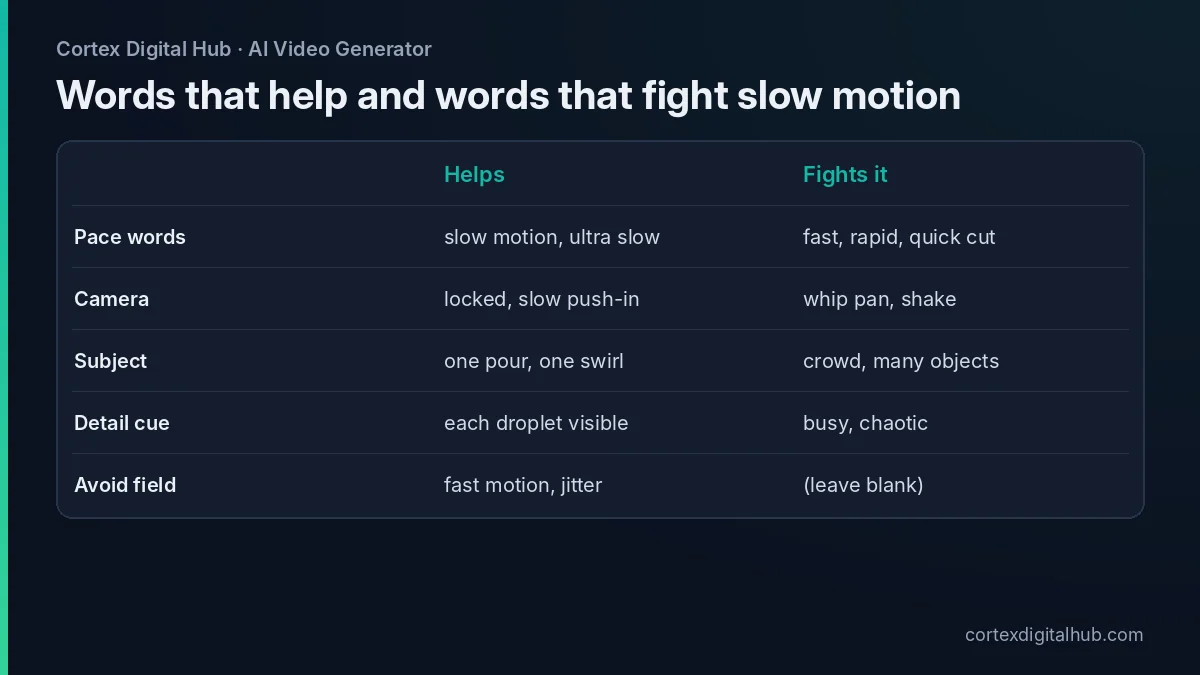 Pick one slow cue and keep fast words out of the same prompt.
| Phrase | What it tends to do | Use it for |
|---|---|---|
| "slow motion" | Stretches the action | Almost any subject |
| "high-speed camera look" | Suggests crisp frozen detail | Splashes, powder, sparks |
| "ultra slow, each droplet visible" | Pushes the pace even lower | Liquids |
| "gentle, unhurried movement" | Softer, dreamier pace | Hair, fabric, petals |
| "time slowly drifting" | Calm mood, less literal | Portraits, lifestyle |
These are starting points, not guarantees. Models read them differently, which is why a ₹24 draft beats a guess.
How do you handle liquids, hair and fabric?
These three subjects read well in slow motion because the eye expects them to drift and flow.
- Liquids: name the vessel, the pour and the light. "Cold coffee poured over ice, droplets rising, backlit."
- Hair: describe wind, not hair. "A gentle breeze lifts long black hair against a golden sunset." Use an illustrated or stock-style subject, and never animate a real person's photo without their consent.
- Fabric: pick a single piece. "A red silk dupatta floating down in slow motion against a white wall."
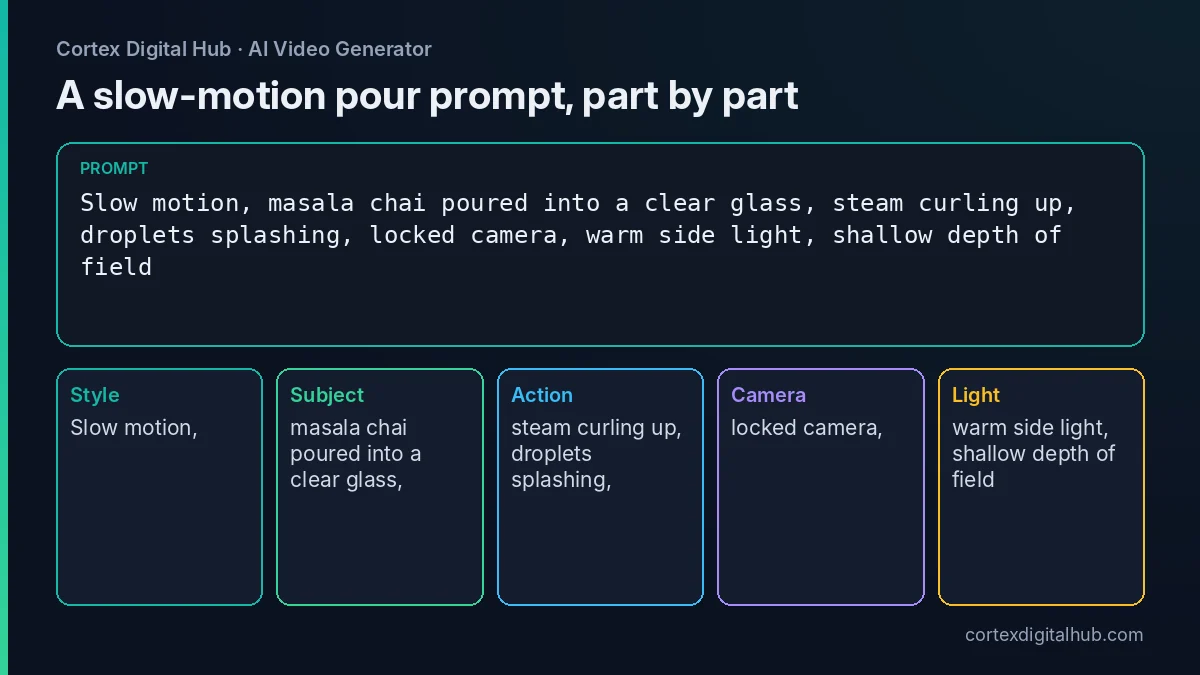 Subject, action, camera and light are enough; each part is one clear idea.
If you have a product shot, upload it as the first frame and describe only the motion, as the guide to animating a photo with AI explains. Tag a product with @ if you want it consistent across clips.
Which model should you try for slow motion?
Start where the site suggests: Lumen Motion 3 Standard. It is the popular all-rounder, takes text or an image, and makes sound to match. Move to Nova 2K when you need the sharpest single frame, for example visible droplets or fine weave. Vela 2.5 is the most cinematic and is the one to test for a hero shot. For cheap drafts, use Orbit 3 or Nova Lite.
Models change, and none promises a particular pace, so judge each by a short test. The overview of which AI video model to choose compares them side by side.
What does a slow motion test cost?
Credits are billed per second at 1 credit = ₹0.50.
| Clip | Model | Credits | Cost |
|---|---|---|---|
| 6 s draft | Nova Lite | 48 | ₹24 |
| 5 s draft | Orbit 3, 480p | 70 | ₹35 |
| 5 s final | Lumen Motion 3 Standard | 115 | ₹57.50 |
| 10 s final | Lumen Motion 3 Standard | 230 | ₹115 |
| 5 s sharp | Nova 2K | 175 | ₹87.50 |
Three Nova Lite drafts and one Lumen Motion 3 final come to ₹72 + ₹57.50 = ₹129.50. Choose 5 to 10 seconds, because slow action needs room to play.
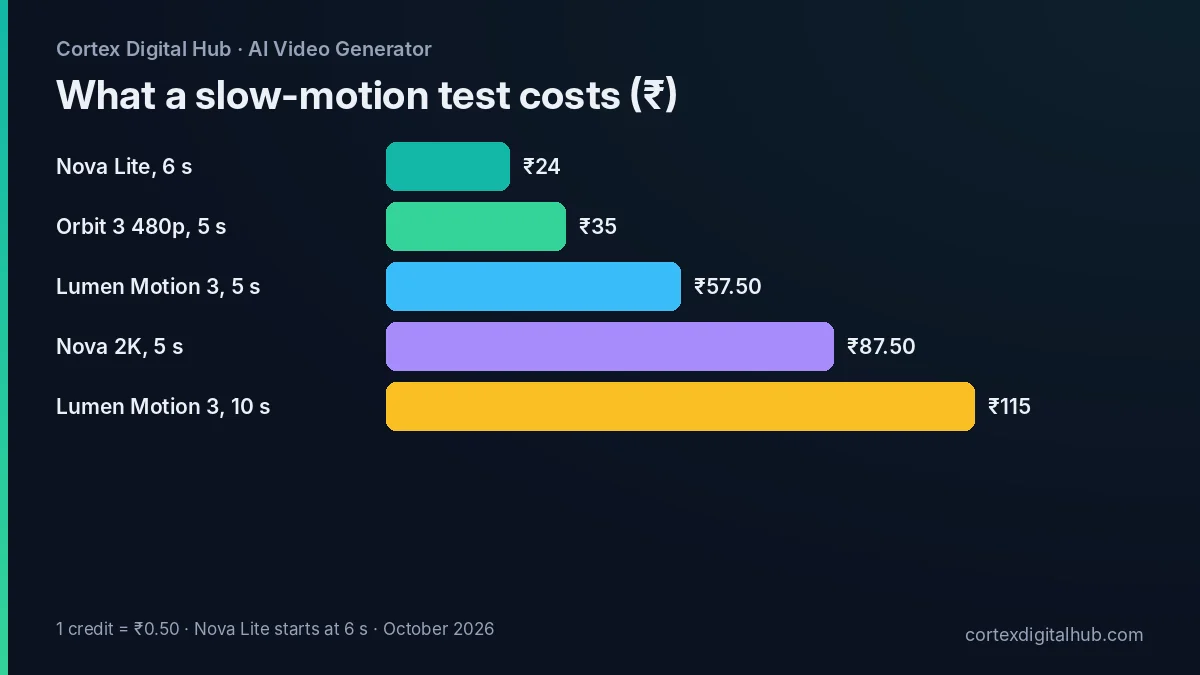 Spend ₹24 to learn the motion, then pay for the final once.
Where does slow motion earn its place?
Slow motion works as a single "hero moment" inside a longer Reel, not as the whole video. Picture a sweet shop in Jaipur: three quick cuts of the counter, then one slow clip of syrup spilling over jalebi. The contrast is what holds attention.
Ideas by business:
- Cafes and cloud kitchens: a pour, a flame, a cheese pull, steam off a biryani handi.
- Jewellery and ethnic wear: a chunni or dupatta floating, a necklace swinging gently on a velvet stand.
- Skincare and beauty: a serum drop falling, cream swirling, with no claims about results.
- Festivals: marigold petals falling, a diya flame, rangoli powder settling. Keep religious scenes respectful and simple.
- Sports and fitness: chalk dust, a rope landing, a ball spinning, shown as an illustrated or stock-style scene.
A single hero shot is also cheaper. Five seconds on Lumen Motion 3 Standard is ₹57.50, so a hero moment does not need a big budget.
Should the sound stay on?
Sound models generate ambience, effects and music that match the motion, so a slow pour can come with a soft liquid sound. That is useful for a WhatsApp status where people watch with the phone on silent half the time anyway. For Reels, the trending-track habit still applies: switch sound off, then add your own licensed or platform-supplied audio. Check the platform's help page for music rules, as they change. The post on AI video with native sound and music explains when each choice makes sense.
What if the clip looks floaty or rubbery?
Floaty motion usually means too many moving parts. Fix it in this order:
- Cut the prompt to one subject and one action.
- Lock the camera or choose a slow push-in.
- Put "fast motion, jitter, warping" in the Avoid field.
- Lower Prompt strength a little, or set a Seed to compare changes fairly.
- Move up one model tier.
Sound is generated to match the motion. For Reels, many people turn it off with the 🔊 button and add their own track. Trim the best 3 seconds with the free Trim video tool, and set the shape with the Video resizer. To slow a clip you already own, use the speed control in your editor.
Key takeaways
- Slow motion AI video is requested in words; there is no frame-rate setting.
- Use one subject, one movement, a calm camera and "slow motion" early in the prompt.
- Liquids, hair and fabric are the friendliest subjects.
- Draft on Nova Lite at ₹24, then make the final on Lumen Motion 3 or Nova 2K.
- Choose 5 to 10 seconds so the movement can unfold.
- Fix floaty results by simplifying, locking the camera and using the Avoid field.
Frequently asked questions
How do I make slow motion in an AI video?
Write it into the prompt: say 'slow motion', name what moves, and add a camera that is calm or locked. The AI Video Generator has no frame-rate setting, so the model interprets your words. Draft cheaply first, then refine.
Does the AI Video Generator have a frame rate or fps setting?
No. The settings are Model, Length, Format, Resolution, Quality, Bitrate and Camera. Slow motion is something you request in the prompt, and results vary by model and subject, so test a short draft before paying for a final.
Which words help for slow motion in AI video?
Try 'slow motion', 'high-speed camera look', 'ultra slow', 'each droplet visible' and 'gentle, unhurried movement'. Pair them with one subject and a still or slow camera. Avoid words like 'fast', 'rapid' or 'whip' in the same prompt.
Why does my slow motion AI clip look floaty or rubbery?
Usually too many things are moving, or the camera is also moving fast. Reduce the action to one subject, lock or slow the camera, add 'fast motion, jitter' to the Avoid field and try a higher-quality model.
How long should a slow motion AI clip be?
Five to ten seconds. Slow action needs time to read, and a 3-second clip may show only the start of the movement. A 5-second clip on Lumen Motion 3 Standard costs ₹57.50, and 10 seconds costs ₹115.
Which model is best for slow motion AI video?
There is no single answer. Start with Lumen Motion 3 Standard, use Nova 2K when detail in droplets or fabric matters, and try Vela 2.5 for a cinematic feel. Draft on Orbit 3 or Nova Lite to save money.
Can I slow down a clip I already have?
The generator makes new clips from prompts, photos and references. To slow an existing video, use the speed control in your phone or desktop editor. You can trim the clip first with the free Trim video tool.
Is slow motion good for Instagram Reels?
Yes, short slow-motion product moments such as a pour or a fabric swirl hold attention. Use 9:16, keep it under 10 seconds, and decide whether to keep the generated sound or add your own track.
How much does it cost to test slow motion prompts?
A 6-second Nova Lite draft is 48 credits, or ₹24. Three drafts cost ₹72. Once the motion looks right, a 5-second final on Lumen Motion 3 Standard adds ₹57.50. Prices are as of October 2026.