
The Diwali hamper post that wanted a subscription: putting text behind a person in a photo, free
A home baker in Kolhapur wanted the poster look for her Diwali hamper launch, big gold letters tucked behind her head. Every app wanted a plan or stamped its logo. How to put text behind image subjects for free, in the browser, and where it struggles.
· 6 min read · 1K views · by the Cortex Digital Hub team
Drop one photo, type your word and drag it to head height. The person is found for you in the browser, so the word sits behind them. Download a PNG or JPG; nothing is uploaded. Free · no sign-up, no watermark · works on phones
Put text behind your photo → → Opens Text Behind Image · runs in your browser
Rekha Kulkarni bakes from her kitchen in Kolhapur: nankhatai, karanji, a chocolate barfi her nephews fight over, and this year, for the first time, Diwali hampers in red boxes tied with gold thread. She wanted the launch post to look like the ones she kept saving on Reels, the kind where a huge word sits behind the person, so the head overlaps the letters. That look is called text behind image, and it is simple once you know what the tool is doing. Her daughter took the photo on the terrace one evening: Rekha holding a hamper, a plain cream wall behind her, the sky going orange. Then the evening went sideways.
Where the apps let her down
The first app she tried did the effect in seconds and then showed a pop-up: the result was a premium feature, available on a weekly plan. The second let her save, but stamped its own logo in the corner, right where her phone number was meant to go. A third asked her to sign in and upload the photo to its server before it would do anything. For a one-off festival post from a small home business, none of that made sense. She did not want a subscription she would forget to cancel, a stranger's logo on her launch, or her face sitting on someone else's server.
Her nephew, who does the shop's WhatsApp catalogue, sent her a link instead: a free page that runs in the browser. No plan, no logo, no sign-up.
What the effect actually is
The poster look is three layers stacked in the right order. At the bottom is your photo. In the middle is the big word. On top is a cut-out of just the person, laid exactly over themselves, so their head and shoulders hide part of the word. Your eye reads it as the word standing behind them.
The hard part is the cut-out. Doing it by hand means tracing around the hair and shoulders in a layered editor. The Text Behind Image tool does it with the subject finder, a small AI model that downloads into your browser once and works there. It is the same one behind our Remove Background tool. Your photo never leaves your device, which is why the page can be free; there is more on that in why browser-based tools are safer than upload sites.
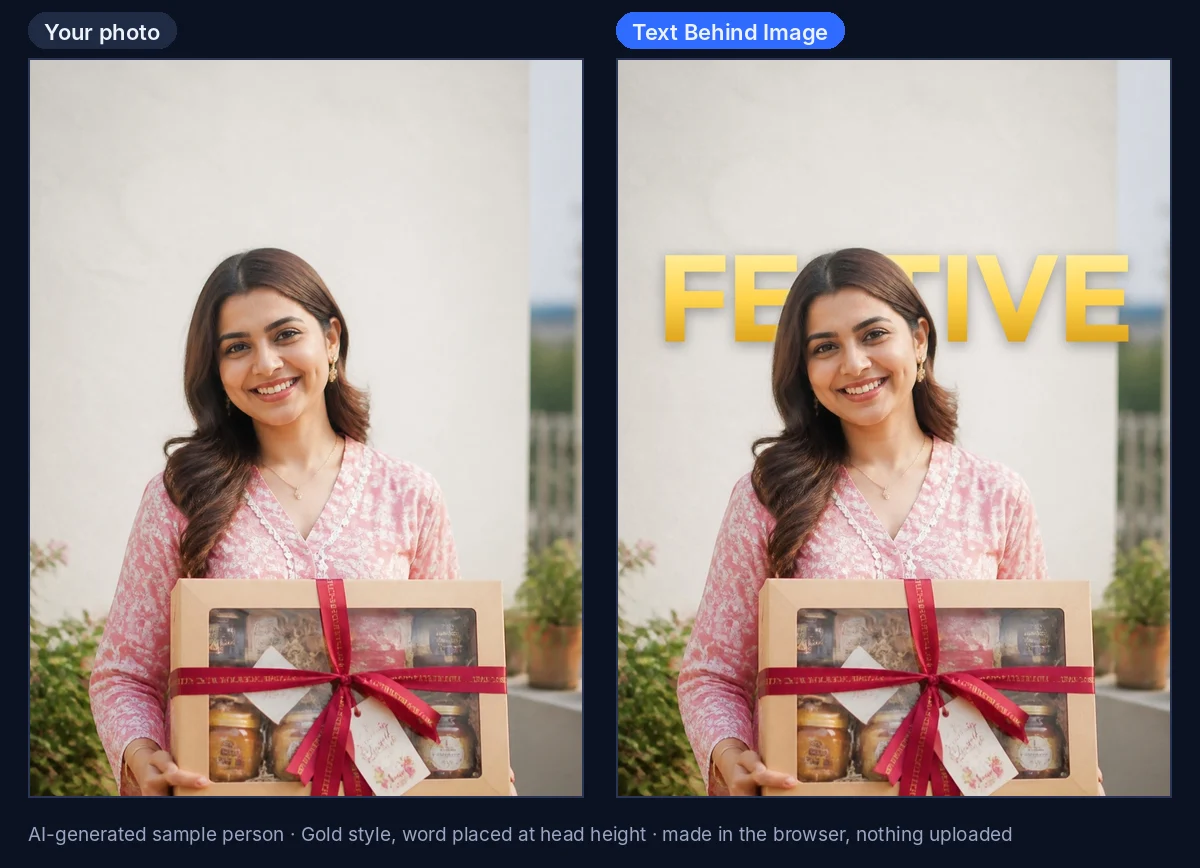
The picture above was made with the tool itself. The woman in it is an AI-generated sample person, not a real customer. We picked the Gold style, typed FESTIVE and set it at head height. Nothing else was touched.
How to put text behind image subjects, step by step
This is what Rekha did, on her phone, while the hamper photo was still fresh:
- Opened the tool and dropped in the photo. JPG, PNG, WebP and iPhone HEIC all open; if a HEIC gives you trouble elsewhere, HEIC to JPG converts it.
- Waited a few seconds while the page said it was finding the person or object. The first time also downloads the subject finder; after that it is cached.
- Typed DIWALI in the Big word box, and her shop name and phone number in the small line under it.
- Picked the Gold style, which sets a bold font with a gold fill and a soft shadow. Poster, Outline and Soft are the other starting points, with four fonts and any colour you like.
- Dragged the word on the photo until the top of her head covered the middle letters, then used the Size slider to make it fill the width.
- Switched between Result and Original to check nothing odd had happened at the edges, then downloaded a JPG.
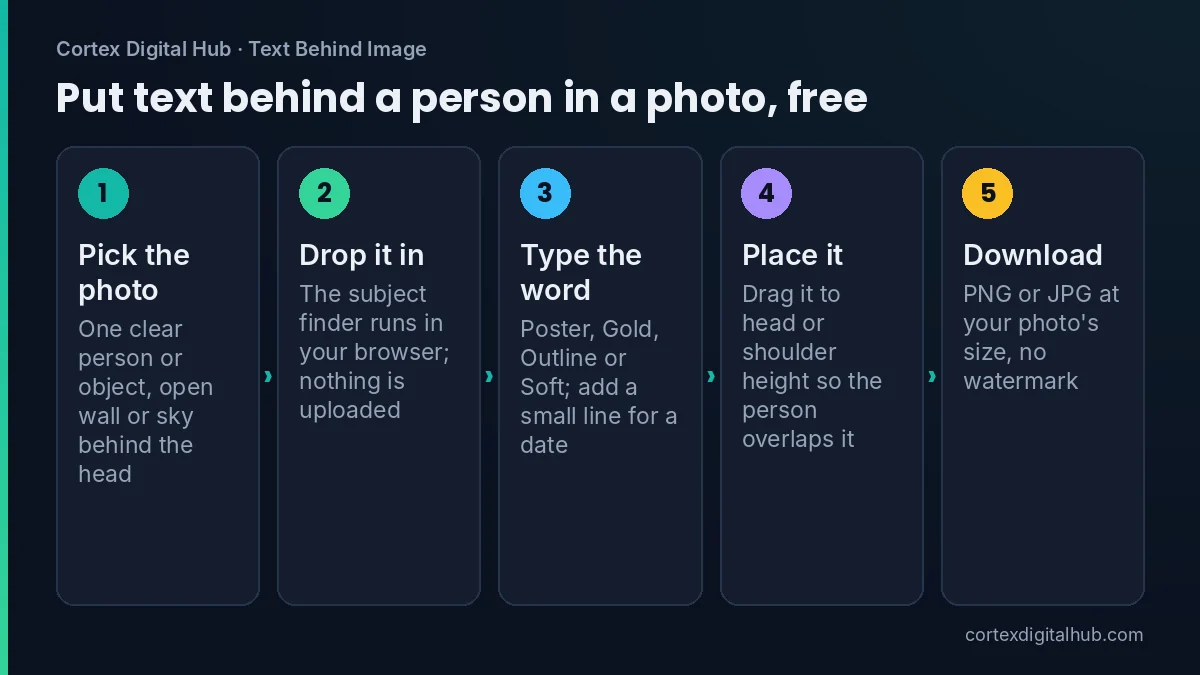
The download is saved at the photo's own size, up to 4096 pixels on the long side, with no watermark. PNG keeps every pixel as it is; JPG is much smaller to send on WhatsApp. The JPG vs PNG vs WebP guide covers which to send where.
Tips that make the poster look work
Most of the result is decided before you open the tool, when the photo is taken.
- Leave open space behind the head. A plain wall, sky or curtain above the shoulders is where the word lives. If the background is crowded right behind the head, the word has nowhere clean to sit.
- Put the word at head or shoulder height. The overlap is the whole trick. Too high and the word floats above the person; too low and it vanishes behind the body. Aim for the head covering the middle third of the letters.
- Use a short, wide word. DIWALI, SALE, LAUNCH or a name reads well even with the middle hidden. Long sentences do not. Put the details in the small line.
- Reach for Expand when letters show over hair. The Edges section has an Expand slider. A little to the right grows the cut-out, which pulls stray letter edges back behind the hair. Softness blurs the cut line slightly if it looks too sharp.
- Try Outline on a busy background. If the wall behind is patterned or full of things, a solid word can look heavy. The Outline style, or the Outline only box, draws just the edges of the letters and lets the background breathe.
- Play with Rotate, Spacing and Opacity last. A slight tilt or wider letter spacing can lift a plain word. Turning opacity down makes it sit quietly in the scene.
If the photo needs straightening or a 4:5 crop for an Instagram post first, do that in the Photo Editor and bring the result back.
Where it struggles
The tool is honest about this on its own page, and so is this post. One clear subject that stands out from the background works best. A group photo of eight cousins on a sofa is harder: the subject finder may treat them as one blob, or miss someone at the edge, and the word will peek through in odd places. Fine, flyaway hair against a busy background is the other hard case. Expand helps, but a few wisps may still show a sliver of letter through them. Dark hair against a dark wall, or a white shirt against a white wall, makes the edge harder to find for the same reason.
For those photos, a better photo is the real fix: step away from the wall, find plain space, or take one person at a time. A terrace wall at sunset, like Rekha's, is close to ideal.
The moving version
A week later Rekha wanted a short Reel for the last day of orders. The same look works on video. Video Effects has an effect called Word behind you: drop in a short clip and a huge word sits behind the person, who is found again in each frame, all in the browser. For more ideas for a home bakery's festival posts, there is a guide to video for bakeries and sweet shops.
How the launch went
The post went up on Dhanteras morning: Rekha on the terrace, the red hamper in her hands, DIWALI in gold behind her head and her number in small letters underneath. Her nephew put the same picture on the shop's WhatsApp status. The hampers sold out by Thursday. Nobody asked which app she had used, and she did not pay for one.
Frequently asked questions
Is the Text Behind Image tool really free?
Yes. There is no sign-up, no credits and no watermark. It runs in your browser, so there is nothing for us to charge for per photo.
Is my photo uploaded anywhere?
No. The subject finder, a small AI model, downloads into your browser the first time and is cached after that. Your photo is cut out and saved on your own phone or computer.
Which photos work best for text behind a person?
One person or one object that stands out from the background, with some open wall, sky or plain space above and around the head. That space is where the word goes.
Some letters show over the hair. How do I fix it?
Move the Expand slider a little to the right so the cut-out grows, or nudge the word up or down so it crosses less hair. Very fine, flyaway hair against a busy background is the hardest case.
Can I put text behind an object instead of a person?
Yes. A cake, a bottle, a car or a plant works the same way, as long as it is the one clear subject and stands out from what is behind it.
What size is the downloaded picture?
It is saved at your photo's own size, up to 4096 pixels on the long side, as PNG or JPG. WebP is offered too when your browser can save it.
Can I make the same effect move in a video?
Yes. Video Effects has a Word behind you effect that finds the person in each frame of your clip and keeps a big word behind them, also in the browser.
Put text behind your photo → →