
What colours suit me? Find your skin undertone before the wedding shopping
Leila had bought three party dresses in five years that looked lovely on the hanger and dull on her. Before her sister's wedding in Dubai, she checked her skin undertone from one selfie. How the free colour finder works, how to read its palette, and why the light you take the photo in matters.
· 5 min read · 757 views · by the Cortex Digital Hub team
One clear selfie gives your skin undertone and depth, then three quick questions confirm it. You get the colours, metals and shades to go easy on, plus your face shape, hairstyles and glasses frames. Free · runs on your phone · photo never uploaded
Find my colours → → Opens Face Shape & Colour Finder · runs in your browser
Leila has a wardrobe problem many of us know. Three party dresses in five years, each one gorgeous on the hanger and under the shop's warm lights, each one somehow making her look tired in the photos. Her sister's wedding in Dubai is in February, the family shopping day at the mall is next weekend, and this time she wanted to stop guessing. The question she kept typing into her phone was the same one the colour-season trend keeps asking on TikTok and Reels: what colours suit me? The honest answer starts with your skin undertone, and you can find yours from one selfie.
Undertone and depth: the two things that decide your colours
Your skin has two qualities that matter for colour.
Depth is how light or deep your skin is. It changes a little with the sun.
Undertone is the tint underneath, and it does not change with a tan. It comes in three kinds:
- Warm: a golden, peachy or olive tint. Gold jewellery tends to glow on it.
- Cool: a pink, red or bluish tint. Silver tends to look brighter.
- Neutral: a balance of both. Gold and silver both work.
Many people are only ever told their depth: "fair", "olive", "tan", "dark". Two people with the same depth can have opposite undertones, which is why a mustard top lights up one friend and drains the other.
How the colour finder reads your skin
The Face Shape & Colour Finder works on your phone, in the browser. It finds your face in the photo, then reads your skin colour from the cheeks and forehead, leaving out shadows and shiny spots that would throw it off. From that it gives your depth, one of Light, Light-medium, Medium, Tan or Deep, and a first guess at your undertone.
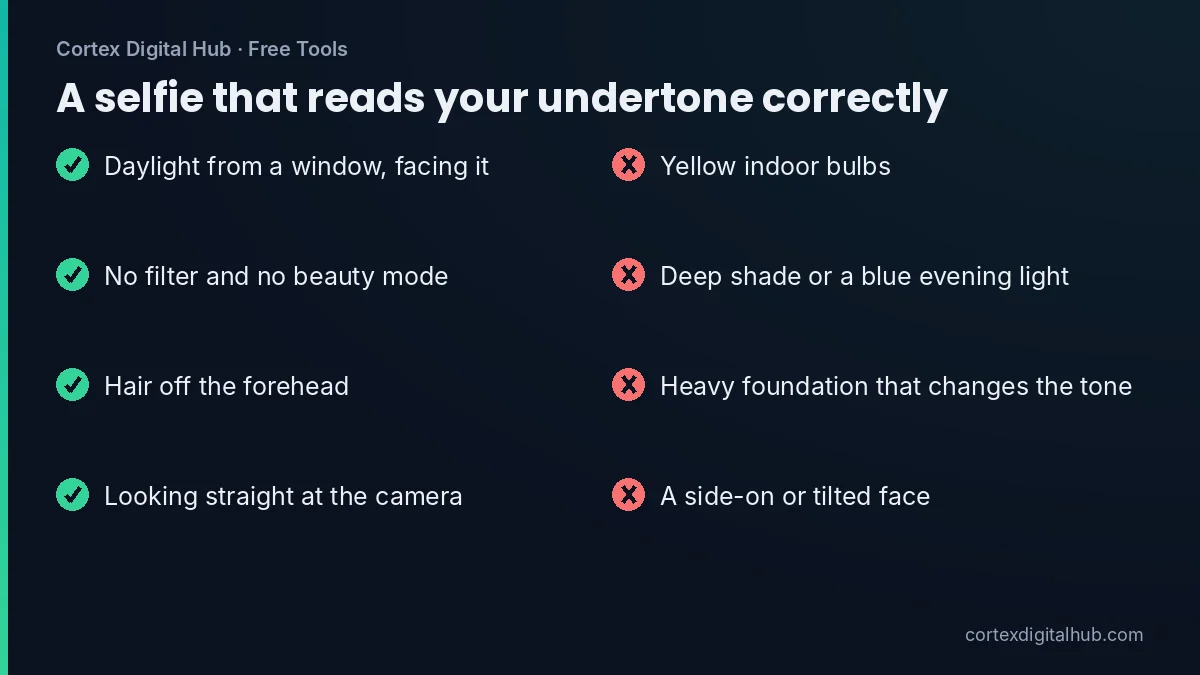
Then it asks three quick questions, because a photo alone can be fooled by light:
- The veins on your wrist look green, blue or purple, or hard to say.
- Jewellery that looks better on you: gold, silver or both.
- In the sun you tan easily, turn pink or burn, or a bit of both.
Your answers count as much as the photo. If the photo has a strong yellow or blue cast, it counts for less. The selfie is never uploaded, and nothing is kept after you close the page; why browser-based tools are safer than upload sites explains why that matters for a photo of your face.
What colours suit me? Reading the result
Leila stood by her bedroom window in the late morning, took a selfie with the tool's camera, and answered the questions: green veins, gold, tans easily. Result: Medium, Warm.
The palette for a warm undertone at medium depth was mustard, rust, teal, terracotta, bottle green, olive, tomato red and cream. Metals: gold, brass, copper. Go easy on: icy pastels and stark black right at the face, with chocolate or navy suggested instead.
That explained the wardrobe. Two of her three dresses were icy lavender and powder pink, and the third was black.
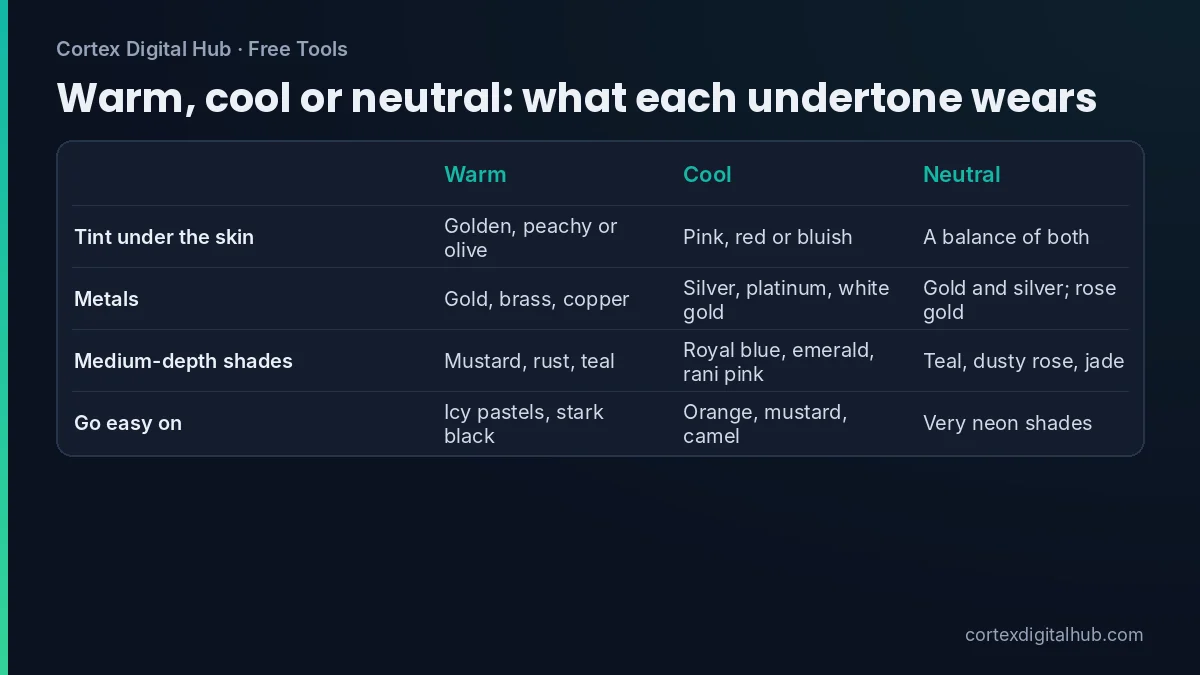
Here is what the finder shows for each undertone. The shades listed are the medium-depth palette; lighter and deeper skin get their own sets.
| Undertone | Signs | Metals | Shades at medium depth | Go easy on |
|---|---|---|---|---|
| Warm | Golden, peachy or olive tint | Gold, brass, copper | Mustard, rust, teal, terracotta, bottle green, tomato red | Icy pastels and stark black at the face |
| Cool | Pink, red or bluish tint | Silver, platinum, white gold | Royal blue, emerald, rani pink (a deep hot pink), plum, ruby, charcoal | Orange, mustard and camel near the face |
| Neutral | A balance of warm and cool | Gold and silver; rose gold is safe | Teal, dusty rose, jade green, plum, denim, burgundy | Very neon shades |
Each colour in the palette can be tapped to copy its code, and Download my colour card saves the whole result as one picture. Leila saved hers to show the shop assistants.
Taking the palette shopping
A palette is most useful near your face: the neckline, a scarf, a shirt collar, earrings. A skirt or trousers in a colour outside your palette is fine if what sits near your face is in it.
- Shop in daylight when you can. Shop lighting is warm and flattering. Step to the door or a window and hold the fabric under your chin.
- Match depth, not just colour. A warm undertone at deep depth wears marigold, burnt orange, emerald, deep teal and brick red better than pale peach.
- Pick your metal first. If gold suits you, choose the outfit that works with jewellery you already own.
- Use the copied colour codes with your tailor or designer. A hex code is a precise way to say "this teal, not that one".
Shopping for the whole family
Once Leila's result made sense, the rest of the family wanted theirs. Her mother came out Light-medium and Neutral, which explained why she could wear both her gold and her silver sets. Her younger brother, choosing a suit and tie, came out Tan and Cool: cobalt, emerald and ruby instead of the beige every shop suggested. Each person took their own daylight selfie and answered their own questions, because undertones differ even in one family. They saved all four colour cards in one family chat, which made the shop visits shorter and the arguments fewer.
The same works for any big occasion: a bridesmaid line-up in Manchester, a family in Hyderabad choosing wedding lehengas, prom in Texas, graduation photos in Manila.
Your face shape comes with it
The same photo gives your face shape. The finder measures forehead, cheekbone and jaw widths, face length and jaw angle, then compares them with six shapes: oval, round, square, oblong, heart and diamond. Many faces sit between two, and the tool says so. Each shape comes with hairstyle ideas for women and men and glasses frames that suit it, which helps when you are booking the salon for the wedding week.
What to do next
- Get the outfit photo right for the family group. Straighten and brighten it in the Photo Editor.
- Make a clean catalogue picture. Shopping for others over chat? Remove Background gives a white or transparent background for an outfit photo.
- Need a photo for an ID or a form after the event? The Image Resizer sets exact pixel sizes and file-size limits.
- Selling clothes or running a salon? See ideas for ethnic wear video. Every photo tool is on the Image Tools page.
How the shopping day went
Leila came home with a rust silk dress, a bottle green scarf for the henna night and no pastel at all. Her mother, who had chosen the lavender dress three years ago, held the rust fabric under Leila's chin at the shop door and said nothing for a second, then asked the assistant for the price.
Frequently asked questions
How do I know what colours suit me?
Find your skin undertone, warm, cool or neutral, and your skin depth. The Face Shape & Colour Finder reads both from one daylight selfie and asks three quick questions, then shows a palette of shades and the metals that suit you.
What is a skin undertone?
It is the tint under the surface of your skin, which stays the same whether you are tanned or not. Warm has a golden, peachy or olive tint, cool a pink, red or bluish one, and neutral is a balance of both.
Why does my undertone change with the photo?
Yellow indoor bulbs make skin look warmer and shade makes it look cooler. Take the selfie in daylight from a window and answer the three questions; your answers count as much as the photo.
Does skin depth matter for colours?
It changes how deep or bright your best shades are, not whether you can wear a colour family. Every skin depth, from light to deep, has colours that glow on it, and the palette shows the ones for yours.
Is my selfie uploaded or saved?
No. Everything runs in your browser and nothing is kept after you close the page.
Can I take the finder's colours to a shop?
Yes. Tap a colour to copy its code, or download your colour card as a picture and show it on your phone at the shop or to your tailor.
Does it tell me my face shape too?
Yes. It measures the forehead, cheekbone and jaw widths, the face length and the jaw angle, compares them with six shapes, and suggests hairstyles and glasses frames for yours.
Is the result a rule I must follow?
No. It is a starting point for choosing what you wear near your face, where colour matters most. Wear what you love; use the palette when you are stuck between two shades.