
Text to video vs image to video: which to use, what each costs, and why
Text to video vs image to video is a choice between an idea and a photo. Text gives freedom, a photo gives control. This post compares cost, control and risk, then walks through worked examples for shops, builders and creators.
· 5 min read · 638 views · by the Cortex Digital Hub team
Run the same idea as text to video and as image to video, and compare the results side by side on a cheap model. From ₹24 a clip · no watermark · runs in your browser
Try both modes → → Opens AI Video Generator · runs in your browser
Text to video vs image to video comes down to one question: do you have a photo that must stay exact? If yes, use image to video, because your photo becomes the first frame and the prompt describes only the movement. If no, use text to video and let the model invent the scene. Both run in the AI Video Generator, and on most models they cost the same per second.
Text to video vs image to video: the short answer
| Text to video | Image to video | |
|---|---|---|
| Starting point | A written prompt | Your photo plus a motion prompt |
| Who decides the look | The model | Your photo |
| Control over product, face or place | Low | High |
| Freedom to invent a scene | High | Limited to the photo |
| Prompt length needed | Longer, descriptive | One sentence of movement |
| Main risk | Wrong look | Odd motion at the edges |
| Best for | Ideas, moods, b-roll, greetings | Products, property, portraits |
Think of text to video as briefing a stranger and image to video as handing over a photo and asking for movement. The stranger can surprise you, which is useful for concepts and risky for a product you actually sell.
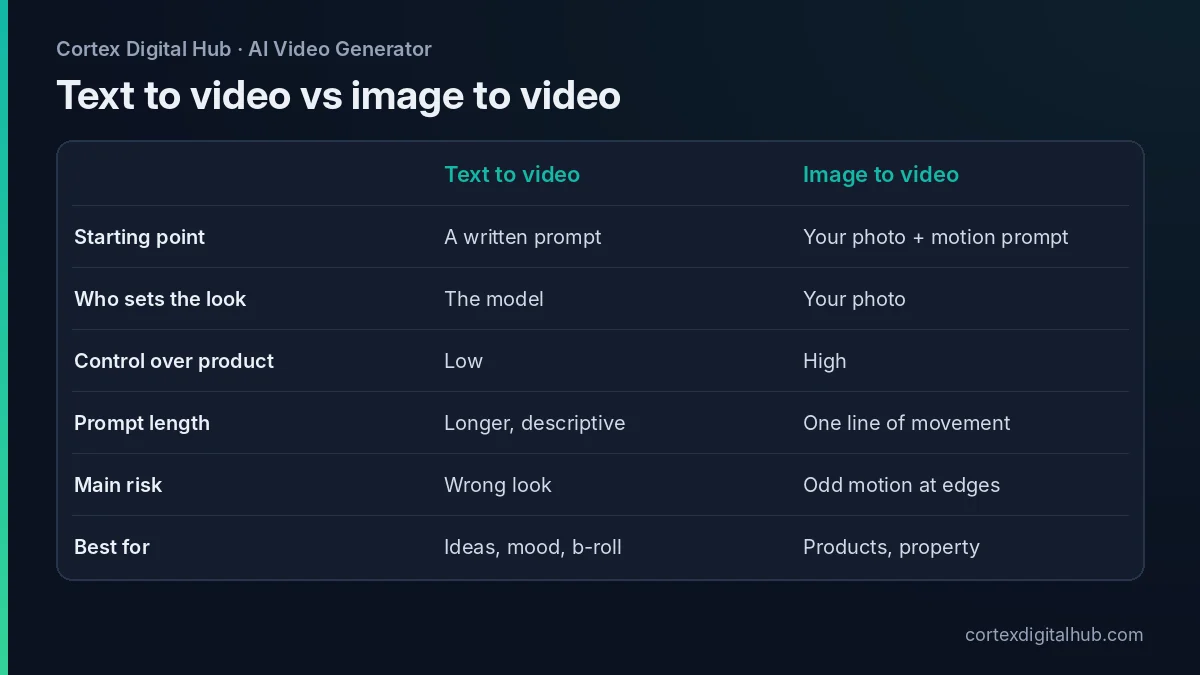 Text to video vs image to video: control, look and best use.
When does text to video win?
Choose text to video when you have no suitable photo, or when exactness does not matter.
- Concepts and moods. "A rainy Mumbai street at dusk, slow tracking shot" gives you atmosphere you could not shoot.
- B-roll. Cutaways for an explainer, a school presentation or a YouTube video.
- Festival and greeting clips. A diya, rangoli or fireworks scene needs no brand accuracy.
- Early exploration. You do not yet know what the final should look like.
Write a longer prompt: subject, action, camera, light and style, in that order. The prompt guide shows the pattern. Keep one subject and one camera move, even when the freedom tempts you to add more.
When does image to video win?
Choose image to video when the thing on screen must look like the real thing.
- Products on a catalogue, Meesho listing or Instagram page.
- Property: a tower elevation, a villa or a show flat.
- Portraits and brand mascots, with consent from anyone shown.
- Anything with a logo or fine detail that you cannot describe in words.
You write only the motion: "slow orbit to the right, steam rising". The image to video guide covers framing and prompts. The photo quality sets a ceiling, so start with a sharp one.
Cost and control differences
Billing is per second of finished video, with 1 credit = ₹0.50, so the mode itself does not change the price. Prices are as of October 2026.
- Lumen Motion 3 Standard, 5 s: 115 credits, ₹57.50, in either mode.
- Nova Lite, 6 s: 48 credits, ₹24, for drafts.
- Spark 1.5, 480p, 5 s: 215 credits, ₹107.50. It is listed for image to video only.
- Director 4, 480p, 5 s: 545 credits, ₹272.50. It is built for cinematic text to video with auto scene direction.
The real cost difference is wasted clips. Text to video often needs more attempts to land the look, while image to video needs fewer, because the look is fixed. That saved retries is where image to video quietly pays off.
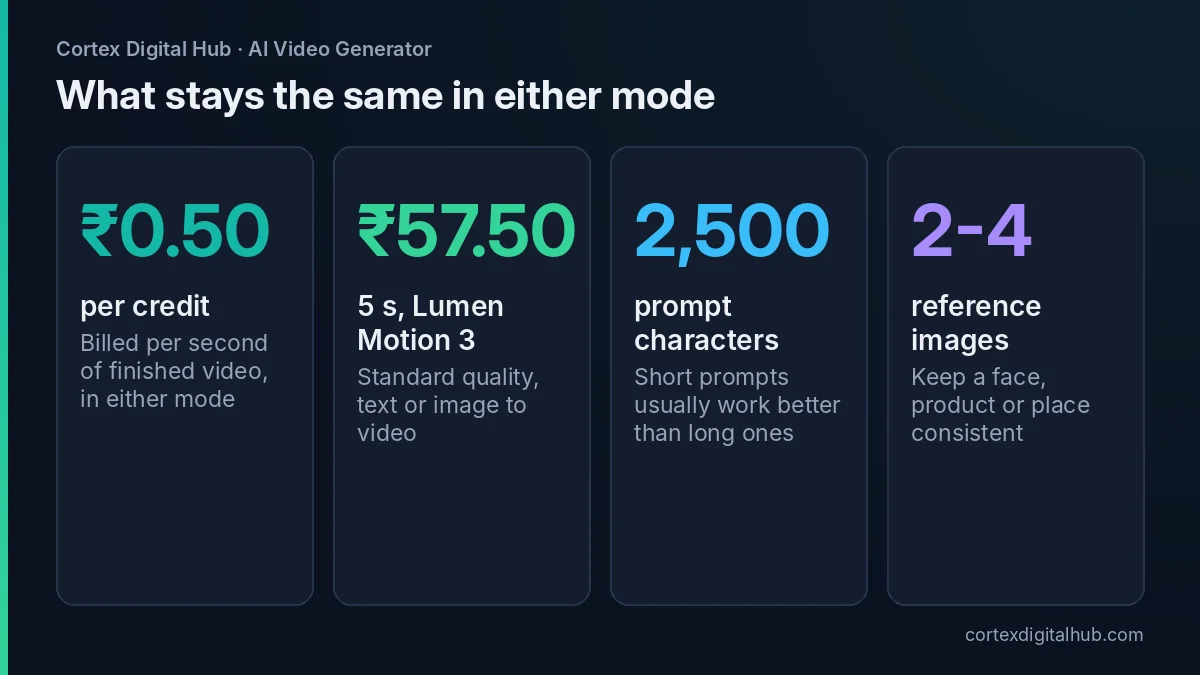 The numbers that stay the same in either mode.
Worked examples
A kirana brand in Chennai wants a Reel for its new filter coffee. It has a good pack photo. Use image to video, prompt "steam rising from a cup beside the pack, slow push-in", draft on Nova Lite for ₹24 and finish on Lumen Motion 3 Standard for ₹57.50.
A builder in Pune needs a hook clip for a launch. It has a tower elevation. Use image to video with "slow pull-out, clouds drifting". Real-estate teams can also start from a plan with the 3D plan to video tool.
A teacher in Lucknow needs b-roll for a lesson on monsoon. There is no photo. Use text to video: "rain falling on a village field, slow pan, soft grey light".
A boutique in Hyderabad wants one dress in three settings. Use reference images to keep the garment consistent, as in the reference images guide.
A creator wants a festive greeting but has no photo. Use text to video, then resize with the free video resizer.
Controls you can use in each mode
Neither mode is a black box. Both give you levers, and knowing which to pull saves clips.
In text to video, the prompt is your main lever. Be specific about subject, light and camera, and use the Avoid box under Advanced to list what you do not want. The Seed field lets you repeat a result you liked, and "Let the model expand my prompt" can add detail to a short idea if you want a surprise. Prompt strength, at 0.5 by default, sets how closely the model follows your words.
In image to video, the photo is the main lever. A sharp, well-framed image with room around the subject beats any prompt tweak. After that, slow the camera, name the movement clearly and keep the clip short. If motion at the edge looks odd, crop the photo so the subject sits comfortably inside the frame.
In both modes, first and last frame control on Lumen Frames, Lumen Omni and Prism 6 lets you set where the clip starts and ends, and reference images hold a character or product steady across clips. The first and last frame guide covers that.
Mistakes people make when choosing
- Using text to video for a product that must match the real item, then fighting the result.
- Using image to video with a blurry or crowded photo, then blaming the model.
- Writing a long scene description for image to video. The photo already supplies it.
- Skipping the draft and paying for a premium model on the first try.
- Forgetting the format. Set 9:16 for Reels and Status before you generate, or fix it later with the free tools.
A cheap way to decide
Run your idea both ways on a cheap model. Write the text to video prompt on Orbit 3 at 480p (₹35 for 5 seconds), then upload your best photo and run image to video on Nova Lite (₹24). Compare the two clips. If the photo version looks right and the text version drifts, you have your answer for that subject. Use the model guide when you are ready to finish.
Key takeaways
- Image to video fixes the look from your photo; text to video lets the model decide.
- Use image to video for products, property and portraits; use text to video for ideas and b-roll.
- Billing is per second in either mode: 5 s on Lumen Motion 3 Standard is ₹57.50.
- Image to video usually needs fewer retries, which saves credits.
- Text prompts are longer; photo prompts describe only movement.
- Draft both ways on a cheap model before choosing.
Frequently asked questions
What is the difference between text to video and image to video?
Text to video builds a clip from a written prompt alone, so the model decides the look. Image to video uses your photo as the first frame, so the photo fixes the look and the prompt describes only the movement.
Which is better for products, text or image to video?
Image to video. Your product photo is the first frame, so shape, colour and branding stay close to the real item. Text to video would invent a product that may not match what you sell.
Is image to video cheaper than text to video?
On most models they cost the same, because billing is per second of finished video. A 5-second clip on Lumen Motion 3 Standard is ₹57.50 in either mode. Costs differ only if you pick a pricier model.
When should I use text to video?
Use it when you have no photo and need an idea, mood or scene, such as b-roll, a festival greeting or a concept visual. It gives more freedom, with less control over the exact look.
Why does my image to video clip show odd motion at the edges?
The model has to invent what lies outside your photo as the camera moves. Keep camera moves slow, leave margin around the subject, and avoid prompts that ask the camera to travel far from the frame.
Can I combine text to video and image to video?
Yes, as a workflow. Use text to video to find a look cheaply, then recreate it with your own photo for the final. You can also use reference images to keep a face, product or place consistent.
Which models support image to video only?
Spark 1.5 is listed for image to video only, at 43 credits a second for 480p, or ₹107.50 for 5 seconds. Most other models, including Lumen Motion 3, support both text and image to video.
Do I need a long prompt for image to video?
No. The photo already describes the scene, so write only the movement, the camera and the light. A single sentence such as 'slow orbit to the right, steam rising' is usually enough.
How long can the prompt be?
The prompt box takes up to 2,500 characters, but short prompts work better. Aim for one subject, one movement and one camera move. Press Improve if you want the tool to polish your wording.