
One photo from Table Mountain, one moving Reel: the 3D photo effect, free in your browser
Amara came back from Cape Town with one great photo and no video. How the 3D photo effect turns a single picture into a Reel, TikTok or Short where the subject holds still and the background glides, which movements to pick, and which photos refuse to move well.
· 5 min read · 1K views · by the Cortex Digital Hub team
Drop one photo and a depth finder works out what is near and what is far. Pick orbit, zoom or sway, a vertical or post size and 3 to 8 seconds, then save an MP4. Free · no sign-up, no watermark · nothing uploaded
Make your photo move → → Opens 3D Photo Motion · runs in your browser
Amara went to Cape Town with three friends from Lagos in November and came back with exactly one photo she loved: herself on a rock near the top of Table Mountain at sunset, the city and the bay small and gold behind her. Everyone else had shot video. She had one still. Her friends' Reels had the slow camera drift that makes a trip look like a film; hers looked like a profile picture. Then a cousin showed her a clip where a single photo seemed to move in 3D, the person still and the hills sliding behind. That is the 3D photo effect, and she made her own that night, free, in the browser.
What the 3D photo effect actually is
A normal photo has no depth; everything is on one flat layer. The 3D photo effect works out which parts of the picture are near and which are far, then moves a virtual camera a tiny bit. Near things shift less than far things, exactly as they would if you walked past the scene. Your brain reads that difference as depth. Film editors call it parallax.
Doing it by hand means cutting the person out, rebuilding the background behind them and animating layers. 3D Photo Motion does it with a depth finder, an AI model that runs in your own browser. It downloads once, about 27 MB, or about 50 MB on a computer with a fast graphics chip, and then stays cached. The photo never leaves your device.
How to make the 3D photo effect, step by step
This is what Amara did on her laptop:
- Opened 3D Photo Motion and dropped in the photo. JPG, PNG, WebP and iPhone HEIC all open.
- Waited while the page said "Finding what is near and what is far". The first time also downloads the depth finder.
- Pressed Show the depth to check it: a grey map of near and far. She stood out clearly from the bay behind her, so the depth finder had read the scene well. Show the photo switched back.
- Picked Orbit as the movement, Reel / Short as the size and 5 s as the length.
- Watched the live preview, then nudged the How much slider down a little because the edge of her shoulder was smearing.
- Pressed Save the video and got an MP4 at 30 frames a second.
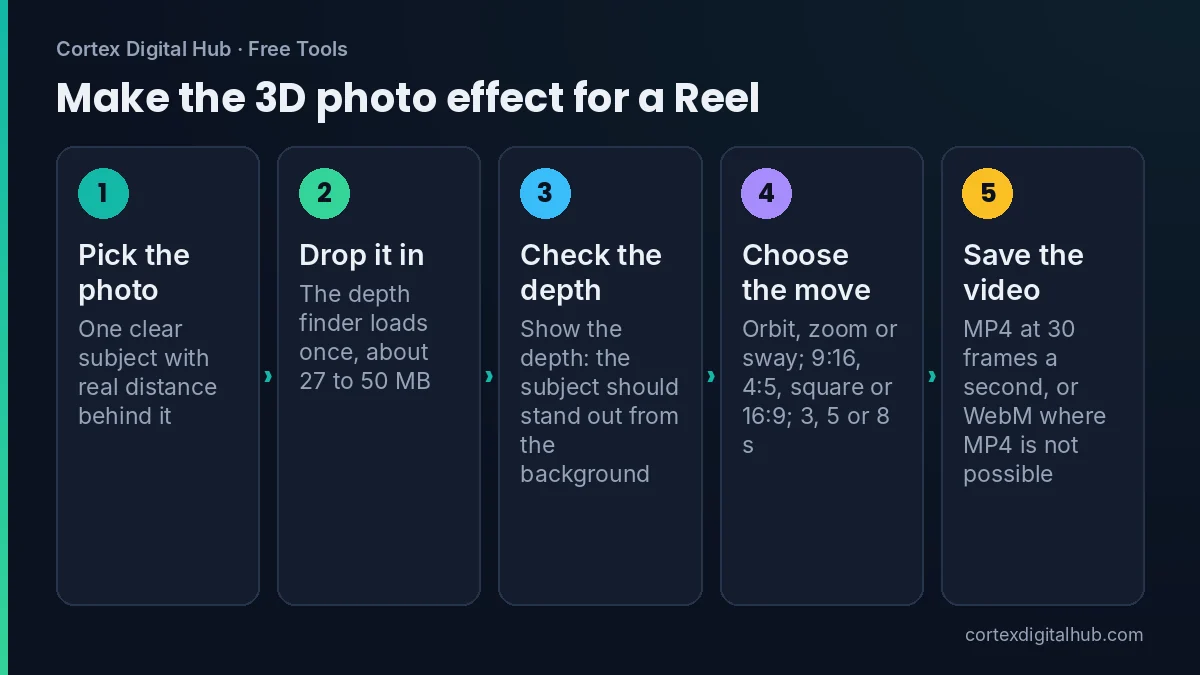
If your browser cannot write MP4, the tool saves WebM instead; the saved file then ends in .webm. WebM plays in Chrome and on YouTube; for apps that want MP4, run it through the Video Compressor to get one.
Which movement to pick
There are five movements. Each suits a different kind of photo:
| Movement | What it looks like | Best for | Loops smoothly |
|---|---|---|---|
| Orbit | The camera circles gently around the subject | Portraits, a person against a view | Yes |
| Zoom in | The camera pushes towards the subject | A reveal, a dish, a product | No |
| Zoom out | The camera pulls back from the subject | Opening a video, a wide landscape | No |
| Side to side | The camera sways left and right | Rooms, streets, a group | Yes |
| Up and down | The camera rises and dips | Tall things: a cathedral, a tower, a waterfall | Yes |
The looping ones repeat with no jump, which matters because Reels, TikToks and Shorts play on a loop. For a 3-second story, Orbit or Side to side looks best. For an 8-second clip with music, Zoom in gives a slow reveal.
Sizes are Reel / Short (9:16), Post (4:5), Square, YouTube (16:9) and As the photo. Lengths are 3, 5 or 8 seconds.
Which photos move well, and which do not
The depth finder needs something to work with: a clear subject, and some real distance behind it.
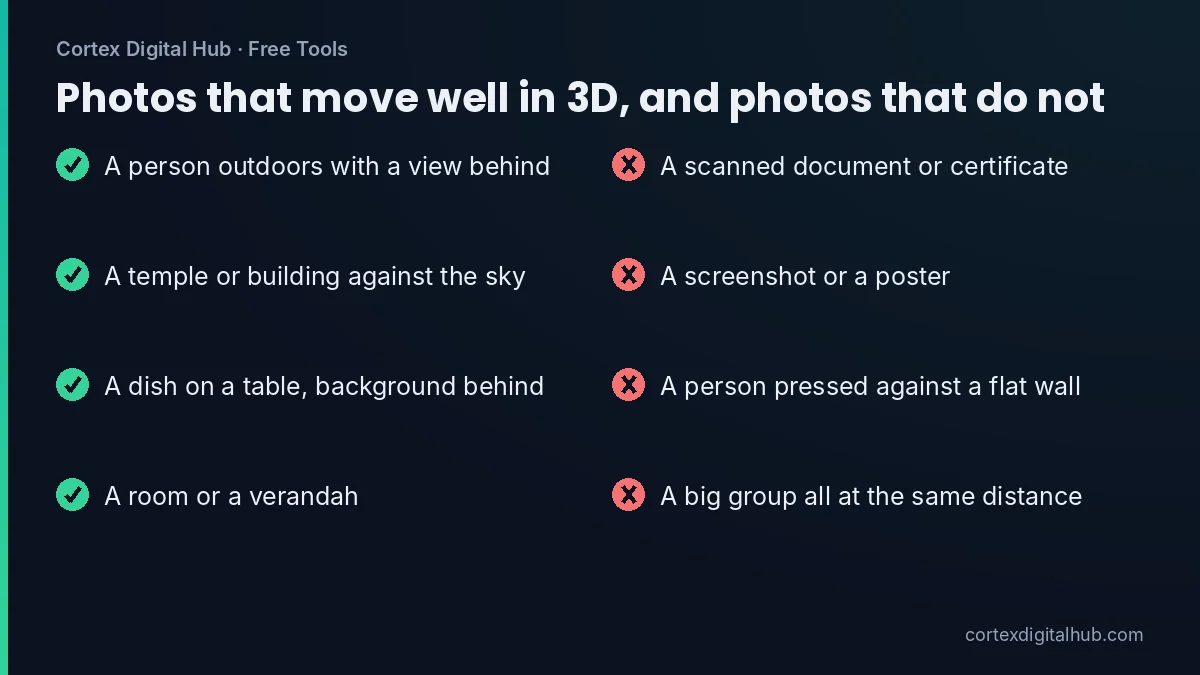
Flat things have no depth at all. A scanned certificate, a screenshot or a poster will only slide as one sheet. Group photos with eight people at the same distance give the depth finder very little to separate, so the move looks like a plain pan.
The other limit is honest maths. When the camera moves, a sliver of background that was hidden behind the person comes into view. The tool cannot know what was there, so it stretches the pixels around it. On a small move you will not notice. On a big move, the edges of hair and shoulders can smear. The fix is always the same: lower the How much slider.
Make the video feel finished
A moving photo is the start of a Reel, not the whole Reel. A few ways to take it further:
- Add a word behind yourself. Put CAPE TOWN behind your head first with Text Behind Image, then try that picture in 3D Photo Motion. Check the preview: how the word moves depends on how the depth finder reads it.
- Add an effect to a real clip. Video Effects has effects like giant captions and a word behind you on moving video; the guide to free video effects for Reels shows what each one does.
- Want more than a camera drift? If you want people in the photo to actually move, wave or walk, that is image-to-video, a different thing. The AI Video Generator does that, and animating a photo with AI explains the difference.
More photo tools are on the Image Tools page.
Holiday and trip photos worth trying this season
The same trick works on the photos you already have from this year. A couple under fairy lights at a wedding in Mexico City. A grandmother on a porch in Ohio with the garden behind her. A bowl of noodles with a Bangkok street blurred behind it. A Christmas market stall in Vienna. A homestay balcony in the hills of Kerala. The rule is the same each time: one clear subject, real distance behind it, and a small move.
How Amara's video turned out
She posted it with an Orbit at 5 seconds and a song from the trip playlist. On the rock she stays perfectly still while the golden bay drifts slowly behind her, then loops back without a jump. Two friends asked which app she used and whether she had brought a drone. She had not. She had one photo and a free page in the browser.
Frequently asked questions
What is the 3D photo effect?
It is a short video made from one still photo. The near parts, usually a person, hold still while the background glides behind them, as if a camera moved slightly. It is often called the parallax effect.
Is the 3D photo maker free?
Yes. There is no sign-up and no watermark. The depth finder runs in your browser, so there is nothing to charge per photo.
Which photos work best?
A clear subject with some distance behind it: a person outdoors, a building with sky, a dish on a table, a room. Flat things like documents and screenshots have no depth, so they only slide.
The edges around the person look stretched. How do I fix it?
Move the How much slider lower. A bigger move shows more of what was hidden behind the subject, and the tool can only stretch what is around it.
Why does it download something the first time?
The depth finder, about 27 MB, or 50 MB on a fast graphics chip, downloads once and stays in your browser, so the next photo starts at once.
Which size should I pick for Reels, TikTok or Shorts?
Reel / Short, which is 9:16 vertical, suits all three. For a feed post choose 4:5, and for a normal YouTube video choose 16:9. As the photo keeps the picture's own shape.
Will the video loop smoothly?
Orbit, Side to side and Up and down are made to loop with no jump, so they repeat well as a Reel or a story. Zoom in and Zoom out go one way.
Does it work on a phone?
It needs a browser with WebGL 2, which most recent phones and computers have in Chrome, Edge or Safari 15 and later. A computer is faster for longer, larger videos.