
The studio Reel that needed five apps: trending video effects for Reels, free, in the browser
A Pilates studio owner in Bengaluru wanted the Reel effects everyone is using, the word behind you, giant captions, a REC zoom, for her November batch launch. Each app did one effect and wanted a plan. How to add them all to your own clip for free, in the browser, and where it struggles.
· 5 min read · 756 views · by the Cortex Digital Hub team
Drop a short talking clip, pick an effect at the moment you want it, type its words and watch it live. Download 9:16 for Reels and Shorts, 1:1 or 16:9. It all runs in your browser. Free · no sign-up, no watermark · 14 effects
Add effects to your clip → → Opens Video Effects · runs in your browser
Meera Rao runs a small Pilates studio above a café in Indiranagar, Bengaluru: six reformers, big windows, a waiting list that grows every January and shrinks every monsoon. In late October she wanted to fill the November morning batches before the wedding season took everyone away, and she knew what the post had to look like. Her own feed was full of them: a woman talking to the camera, a huge word sitting behind her head, captions that land one word at a time, a quick zoom with a red REC dot, then a countdown to the launch date. She filmed a 40-second clip on her phone after the last class, standing by the window in her studio kit. The editing was where the evening went.
Five effects, five apps
The first app had the giant captions and nothing else. The second did the word behind you, but only on its weekly plan. The third had a zoom with a REC frame and stamped its logo in the corner, right over her studio's handle. A countdown meant a fourth app; the receipt look she liked, a bill printing out line by line, a fifth. Each one wanted her to upload the clip, sign in or both. By ten o'clock she had a phone full of half-finished exports and no Reel.
One of her clients, who makes videos for a living, sent her a link instead: one free page where all of those effects sit on a single timeline, run in the browser, and save without a logo.
What the tool does
Video Effects opens your clip in the browser and draws the effects on top of it, frame by frame, the way an editing app would. There are fourteen: word behind you, giant captions, digital zoom with REC, vertigo, glitter spotlight, a REJECTED stamp, a receipt that prints your lines, a flip-clock countdown, a tier list, keyboard rain, a red collage, a phone pull-back, frosted glass cards with a number that counts up, and a moody colour grade for the whole clip.
Three of them need to know where the person is: the word behind you, vertigo and the spotlight. For those, a small model of about 5 MB downloads into your browser once and finds the person in the frame. The rest are drawn straight onto the video. Either way, the clip never leaves your laptop or phone, which is why the page can be free; there is more on that in why browser-based tools are safer than upload sites.
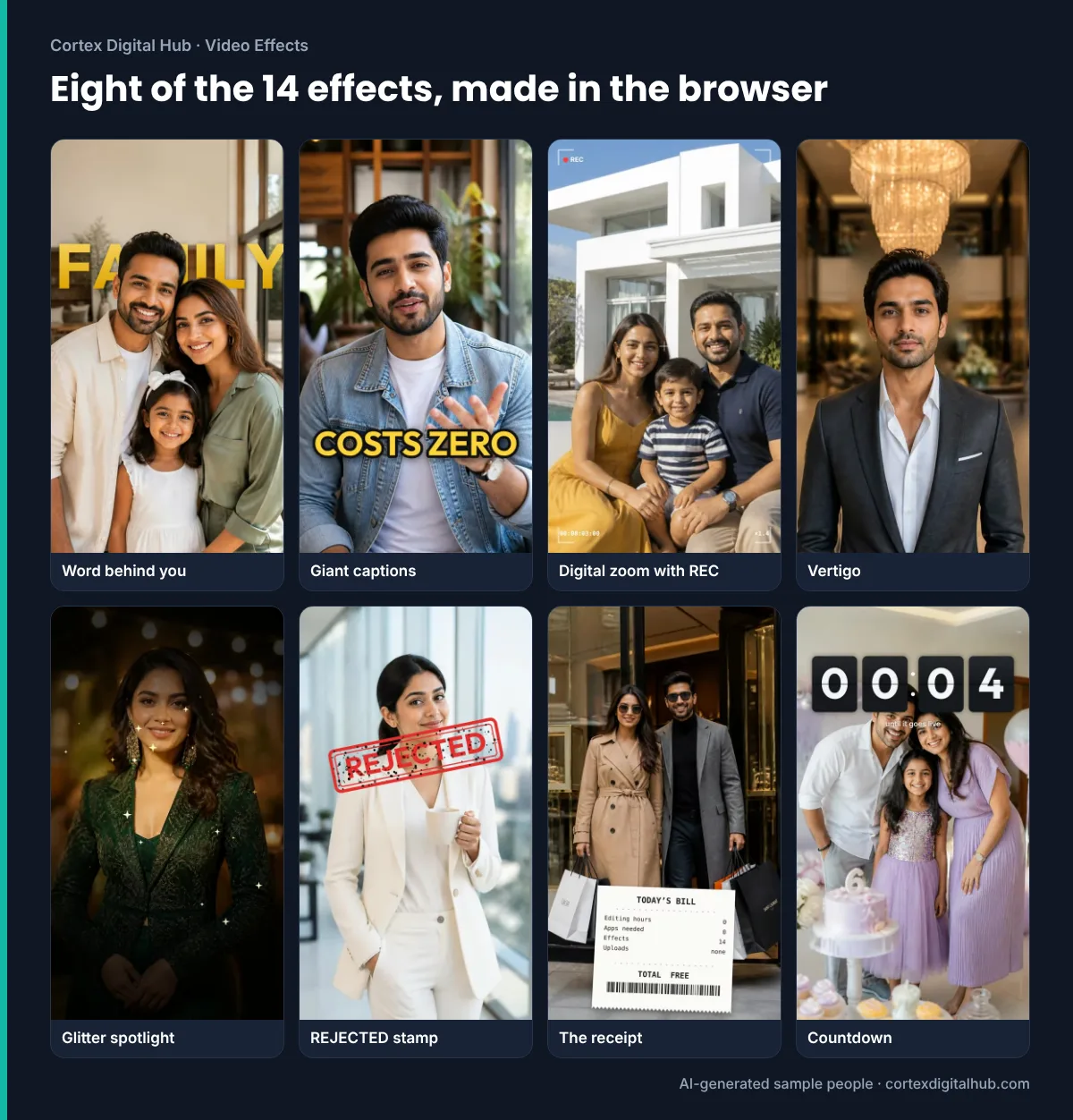
Every frame above is the tool's own output, saved as it came. The people in them are AI-generated sample people, not customers.
How to add Reel effects to your own clip, step by step
This is what Meera did, on her laptop, in about twenty minutes:
- Opened the page and dropped in the clip. Phone MP4s open everywhere; if yours is a MOV that will not play, Video Converter turns it into an MP4 first. If it is longer than 90 seconds, Trim Video cuts it down.
- Played to the first second, picked Word behind you and typed PILATES. The page found her in the frame and slid the word behind her head.
- Played on to where she says the batch timings, picked Giant captions and typed the three lines she wanted on screen, short and loud.
- Added Digital zoom with REC on the line where she points at the reformers, so the camera seems to push in.
- Finished with a Countdown to 4 November, the first class, and a line under it: until the doors open.
- Watched the whole thing live, moved two effects by half a second, changed one word, then picked 9:16 and pressed Make my video.
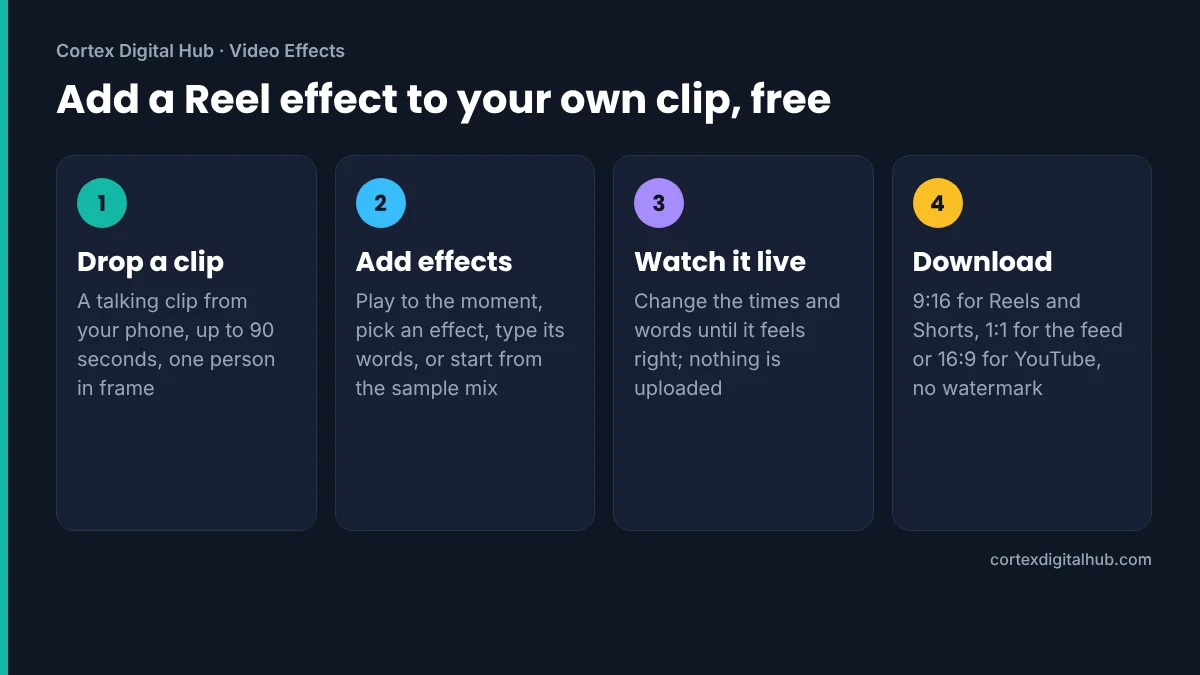
The export took about as long as the clip itself. Chrome on her laptop saved an MP4 at 1080 x 1920, ready for Reels, Shorts and her WhatsApp Status, with no watermark. The same project also saves 1:1 for the feed and 16:9 for YouTube. For which format each app likes best, see the best video format for WhatsApp Status and Instagram Reels.
Tips that make the effects land
Most of the result is decided when the clip is filmed.
- Film one person with space around the head. The word behind you needs open wall or window above the shoulders, the same as the photo version. A plain background also helps the spotlight and vertigo find you cleanly.
- Keep it short and talking. Thirty to sixty seconds of you speaking to the camera suits these effects. They are made to punctuate what you say, not to dress up a long recording.
- One effect per idea. A word behind you for the hook, captions for the key line, a stamp or receipt for the punchline, a countdown at the end. Stacking four at once on the same second reads as noise.
- Short words, big type. PILATES, LAUNCH, SALE or a name works behind the head. Put the details in the captions or the receipt lines.
- Use the moody grade last. It changes the colour of the whole clip, so add it once the rest is placed and you can judge the overall look.
- Pick 720p for drafts. A 720p export is quicker. Make the 1080p one when the timing is right.
Where it struggles
The page says this up front, and so does this post. The person-finding effects work best with one clear person against a plain background. Two people side by side, a busy shelf or a crowd behind you makes the cut-out less certain, and the word may peek through in odd places. Fast movement, like a jump or a quick turn, can blur the edge for a frame or two. Very dark clips are harder too.
Export runs on your own machine, so an older phone takes longer than a laptop, and the person-finding effects add time because frames are checked as they go. A progress bar shows where it is, and you can stop at any time. A few browsers cannot make MP4 files and save a WebM instead; Video Converter fixes that in one step.
The still version
For the studio's Instagram grid and the poster by the café counter, Meera wanted the same look without the motion. Text Behind Image does it for a photo: drop it in, type the word, drag it to head height and download a PNG or JPG. Together they gave her a matching Reel, post and poster from one evening's filming.
How the launch went
The Reel went up on a Sunday evening: Meera by the window, PILATES behind her, the timings in giant yellow captions, a zoom on the reformers and the countdown to Wednesday at the end. She put the same video on her WhatsApp Status and sent it to the studio's broadcast list. Two of the three morning batches were full before the first class. Nobody asked which app she had used, and she had not paid for one.
Watch the video
14 viral Reel effects, free, no app · 1:02 · Watch on YouTube
Frequently asked questions
Are these video effects really free?
Yes. The effects are drawn by your own browser, so there is nothing to charge per video: no sign-up, no credits and no watermark.
Is my video uploaded?
No. The clip is opened, edited and saved on your device. The effects that find the person (word behind you, vertigo, spotlight) use a small model of about 5 MB that downloads into your browser once and runs there.
Which effects are there?
Fourteen: word behind you, giant captions, digital zoom with REC, vertigo, glitter spotlight, a REJECTED stamp, a printed receipt, a flip-clock countdown, a tier list, keyboard rain, a red collage, a phone pull-back, frosted glass cards and a moody colour grade.
Which clips work best?
A short talking clip filmed on a phone, up to 90 seconds, with one person in the frame and a fairly plain background. MP4 from a phone opens in every browser.
Which sizes can I download?
9:16 for Reels, Shorts and Status (1080 x 1920), 1:1 for the feed (1080 x 1080) and 16:9 for YouTube (1920 x 1080), or the same at 720p for a quicker export.
Why did I get a WebM file instead of MP4?
Chrome and Edge on computers and Android save an MP4. A few browsers cannot make MP4 files, so they save WebM; the Video Converter on this site turns it into an MP4.
Can I do the word-behind look on a photo?
Yes. Text Behind Image does the same thing for a still photo, also in the browser, and saves a PNG or JPG.