
AI cartoon video maker: style words for anime, claymation and 3D cartoons
An AI cartoon video maker needs the right style words and a consistent character. Here are prompts for 2D anime, claymation, 3D cartoon and watercolour looks, plus reference tips and rupee costs for short clips.
· 5 min read · 1.2K views · by the Cortex Digital Hub team
Type a style word and one simple action, or upload your own illustration as the first frame and bring it to life. From ₹24 a clip · no watermark · runs in your browser
Make a cartoon clip → → Opens AI Video Generator · runs in your browser
An AI cartoon video maker works best when you put the style word first and keep the action simple: "2D anime style, a girl running through rain, camera follows". The AI Video Generator can also animate your own drawing. This guide gives you style words for anime, claymation, 3D cartoon and watercolour looks, tips for a consistent character and the cost of each test. Prices are as of October 2026.
Which style words work for an AI cartoon video maker?
Pick one style per clip and put it at the start. Mixing three styles gives a muddy result. These phrases are starting points:
| Look | Style words to try | Good for |
|---|---|---|
| 2D anime | "2D anime style, clean linework, soft shading" | Action, emotion, moody scenes |
| Flat cartoon | "flat vector cartoon, bold colours, simple shapes" | Explainers, kids' stories |
| 3D cartoon | "3D animated cartoon, glossy, expressive" | Mascots, ads |
| Claymation | "claymation stop-motion look, fingerprints visible" | Quirky product stories |
| Watercolour | "watercolour storybook, soft edges, paper texture" | Festival greetings, books |
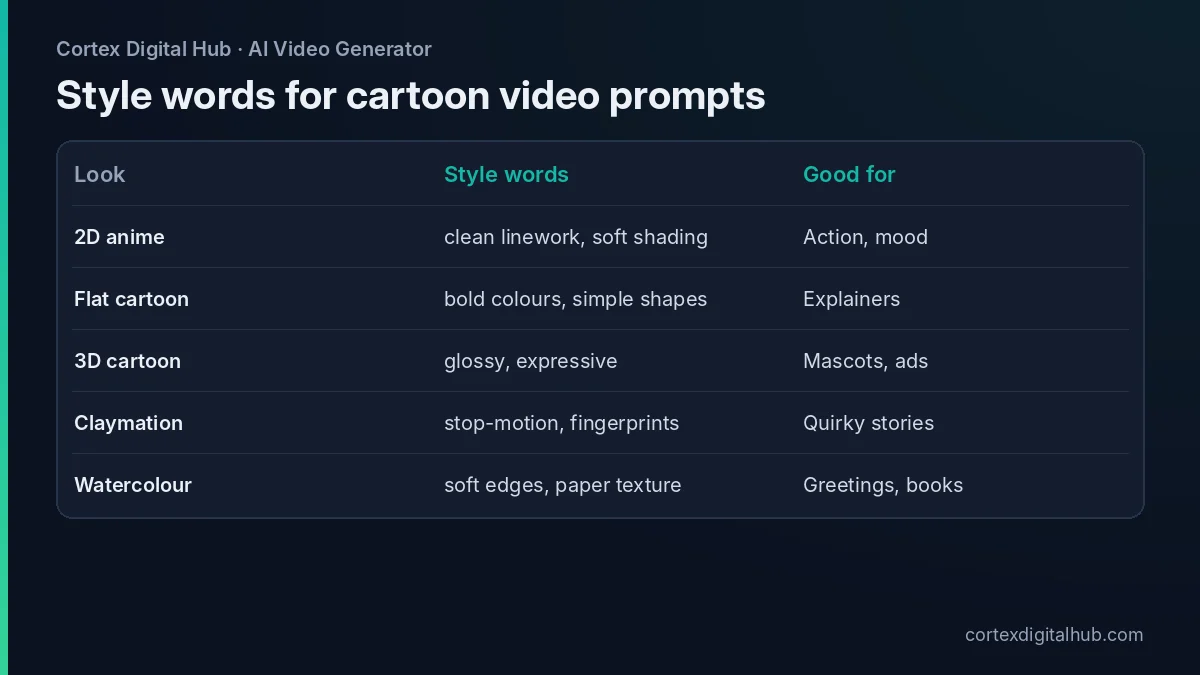 One style word at the start of the prompt does most of the work.
Describe the look in general words rather than naming a studio, a franchise or a living artist. A style phrase such as "clean linework, soft shading" gets you the feel without copying anyone.
How do you write a cartoon video prompt?
Use the same recipe as any prompt: subject, action, camera, light, style. The site's advice is one subject and one camera move per clip.
2D anime style, a boy with a red kite running across a rooftop in Jaipur at sunset, kite string fluttering, camera tracking from the side, warm orange sky, soft shading
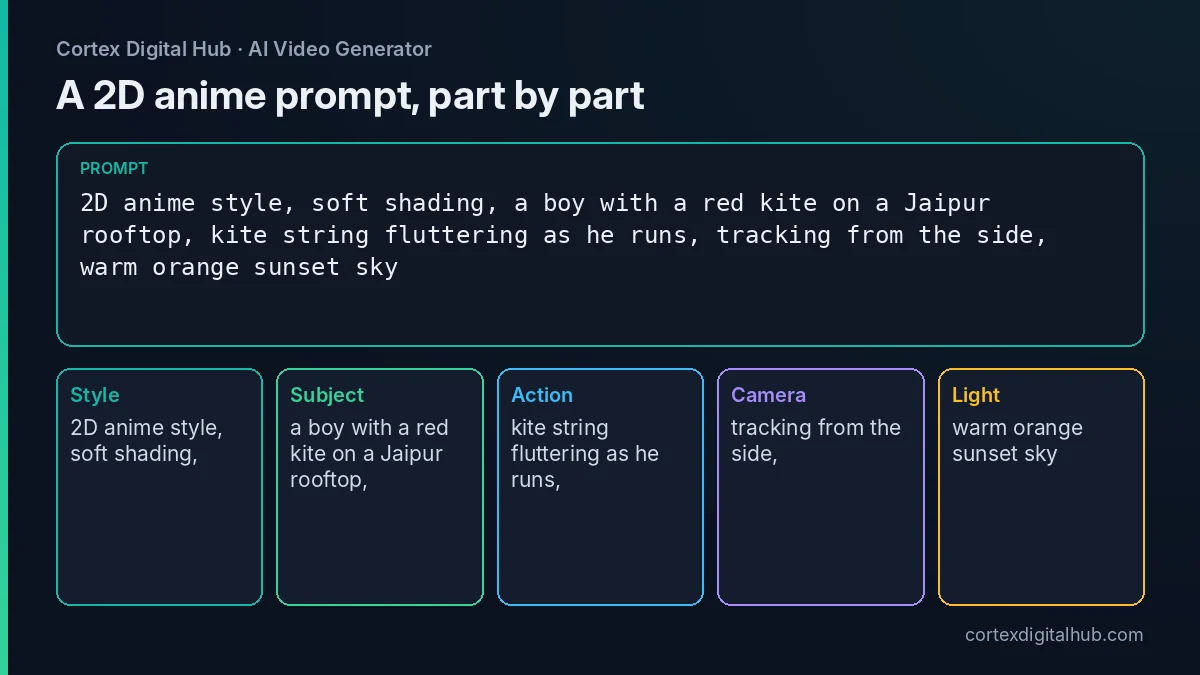 Style first, then subject, action, camera and light.
A cartoon boy is fine because he is an invented character, not a real child's likeness. Do not feed a photo of a real child into a cartoon prompt. The guide to text to video prompts that work covers the general structure in more detail.
How do you keep the same character in every clip?
Cartoon characters drift: the hair colour shifts, the outfit changes. Reference images solve most of it.
- Draw or generate one original character on a plain background, front and side views.
- Upload 2 to 4 images as references and tag them with @ in the prompt.
- Repeat the same short description in every clip: "Mitra, a girl with a yellow raincoat and short black hair".
- Pick a model that supports references, such as Orbit 2.7 (consistent characters), Vela 2.5, Nova 2K or Orbit 3.
- Set a Seed if you want to compare changes fairly.
The post on consistent characters with reference images walks through the method. Original characters also keep you clear of copyright trouble. As of 2026, check each platform's help page and speak to a legal adviser before using any character you did not create.
Can you turn real video or a drawing into a cartoon?
Yes, in two ways.
- Animate a drawing. Upload your sketch or digital art as the first frame and write only the motion. A clean picture with a plain background works best.
- Restyle a clip. Edit video with Morph changes a video from reference images and keeps the motion. You are billed on the input video's length, so trim first with the free Trim video tool. The post on extending, editing and restyling an AI video explains each option.
Only restyle footage you own, and only with the consent of anyone in it. Do not turn a real person into a caricature of a celebrity or politician.
What does a cartoon clip cost?
| Clip | Model | Length | Credits | Cost |
|---|---|---|---|---|
| Draft | Nova Lite | 6 s | 48 | ₹24 |
| Cartoon clip | Lumen Motion 3 Standard | 5 s | 115 | ₹57.50 |
| Consistent character | Orbit 2.7 at 720p | 5 s | 135 | ₹67.50 |
| Restyle a 5 s clip | Morph at 480p | 5 s | 420 | ₹210 |
Say a Surat education start-up makes a six-shot story, each shot 5 seconds on Lumen Motion 3 Standard. That is 690 credits, or ₹345. Morph is the premium option, so use it only when you must keep the exact motion of existing footage.
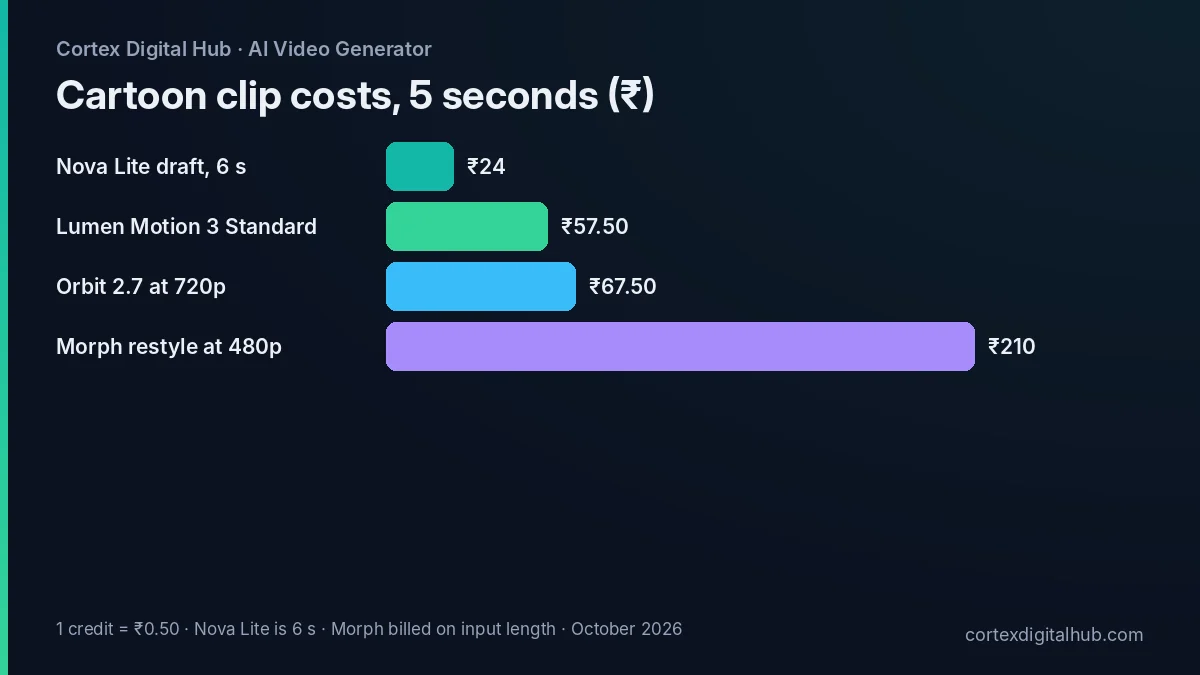 Draft the look cheaply, then spend on the shots that matter.
Which style suits which Indian use case?
Match the look to the job, not to what is trending.
- Festival greetings: watercolour storybook for Diwali, Holi or Eid, with soft colours and simple shapes. Keep religious figures respectful or leave them out and use diyas, rangoli and flowers.
- Kids' learning channels: flat vector cartoon with a friendly original mascot, so you can reuse it in every episode.
- D2C product stories: 3D cartoon or claymation for a snack or a stationery brand, with the product tagged as a reference so its packaging stays the same.
- Story Reels and shorts: 2D anime style for a mini-drama of 3 or 4 shots, such as a monsoon commute or a college canteen.
- Coaching and explainers: flat cartoon with one character per concept.
What goes wrong, and how do you fix it?
Cartoon clips fail in predictable ways.
- Hands and faces warp. Keep characters in medium shots, or turn them away from the camera, and avoid close-ups of fingers.
- The style flips mid-clip. Use one style phrase, move it to the start, and add "photorealistic, live action" to the Avoid field.
- The character changes between shots. Add reference images and reuse the same description.
- Too much happens. Cut the prompt to one action; short clips of three to six seconds hold their look better.
- Text on signs is gibberish. Remove written words and add titles later.
A cheap Nova Lite draft at ₹24 tells you whether the look is right before you commit to a ₹57.50 or ₹67.50 final. If a clip is nearly right but ends too soon, Extend video can continue it by 4 to 30 seconds, billed on the input length plus the new seconds.
How do you finish a cartoon story?
Cut the shots together in any editor, add a track or voice, and export. Set the shape to 9:16 for Reels with the free Video resizer, and see the guide to resizing video for Instagram Reels. Keep any text out of the prompt, because generated lettering is unreliable; add titles in your editor. Press the 🔊 button to switch sound off if you plan to add your own music.
Key takeaways
- Put one style word first: 2D anime, flat vector, 3D cartoon, claymation or watercolour.
- Describe the look in general words, not a studio or a living artist.
- Use 2 to 4 reference images and the same character description in every clip.
- Create original characters, and never base a cartoon on a real child's photo.
- Morph restyles real footage while keeping motion, and is billed on input length.
- Cartoon clips cost ₹24 to ₹67.50 for most tests.
Frequently asked questions
How do I make a cartoon video with AI?
Write a style word first, such as '2D anime style' or 'claymation', then one character, one action and one camera move. You can also upload your own drawing as the first frame and describe only the motion.
Which style words work for AI cartoon video?
Try '2D anime style', 'flat vector cartoon', '3D animated cartoon', 'claymation stop-motion look' and 'watercolour storybook'. Put the style at the start, keep it to one style per clip, and test on a cheap draft first.
How do I keep the same cartoon character in every clip?
Use reference images. Upload 2 to 4 pictures of your original character, tag them with @ and repeat the same short description in each prompt. Orbit 2.7 is built for consistent characters, and other models support references too.
Can I copy a famous cartoon character or studio style?
Do not. Characters and distinctive studio styles can be protected, and imitation can cause problems. Create an original character, describe the look in general words, and as of 2026 check platform and copyright rules.
Can I turn a real video into a cartoon?
Yes, with Edit video. Morph restyles a clip from reference images and keeps the motion, and billing is based on the input video's length. Trim the clip first with the free Trim tool. Only use footage you own and people have agreed to.
Can I animate my own drawing?
Yes. Upload your drawing, scan or digital art as the first frame and describe the motion. A clean, high-contrast image with a plain background works best. Keep the prompt to one action.
How much does a cartoon clip cost?
A 5-second clip on Lumen Motion 3 Standard is 115 credits, or ₹57.50. Orbit 2.7 at 720p is 135 credits, or ₹67.50. A 6-second Nova Lite draft is ₹24. Prices are as of October 2026.
Are cartoon videos good for kids' content?
They can be, with care. Use original characters, no real children's faces and no misleading claims. Check each platform's help page for kids' content rules, as they are strict and change often.
How long should a cartoon scene be?
Three to six seconds per shot is a good range, then cut shots together. Long single clips tend to drift off-model. Extend video can continue a clip by 4 to 30 seconds when you need it.