
AI logo animation: turn a PNG logo into a 3-second intro or outro
AI logo animation works best when the logo is the last frame, not something the model has to draw. Here is how to use first and last frame control with a PNG, what to do about text that warps, and what an intro costs in rupees.
· 5 min read · 1.2K views · by the Cortex Digital Hub team
Choose Lumen Frames, drop a start frame and your logo PNG as the last frame, and describe only the motion in between. From ₹24 a clip · no watermark · runs in your browser
Animate a logo → → Opens AI Video Generator · runs in your browser
AI logo animation works best when you stop asking the model to draw your logo and instead tell it where the clip must end. Put your PNG in as the last frame with first and last frame control, write a short prompt for the motion before it, and the AI Video Generator delivers a 3-second intro that lands on your real logo. A 3-second clip costs ₹34.50.
Why logos go wrong in AI video
A video model does not copy your logo into each frame. It redraws the picture from scratch, frame after frame, using your image as a guide. Big shapes survive that process. Thin strokes, small letters and exact colours do not.
That is why a plain image-to-video run on a logo often gives you a lovely swirl of light and a wordmark that quietly turns into nearly-right letters. The fix is not a better prompt. It is changing the job: let the model make the motion and let your file supply the final frame.
How to do AI logo animation with a PNG
The method uses first and last frame control, available on Lumen Frames, Lumen Omni and Prism 6. For background on how it works, see first and last frame control in AI video.
- Prepare the logo. Cut a clean version with the free remove background tool if your file has a box around it.
- Place it centred on a canvas in your final aspect ratio, with generous empty space around it. The image resizer sets exact pixel sizes.
- Choose Lumen Frames. Set the logo canvas as the last frame.
- Pick a start frame: a plain colour from your brand palette, a soft gradient, or an abstract image such as light streaks.
- Write a motion-only prompt, set Length to 3 seconds, and generate.
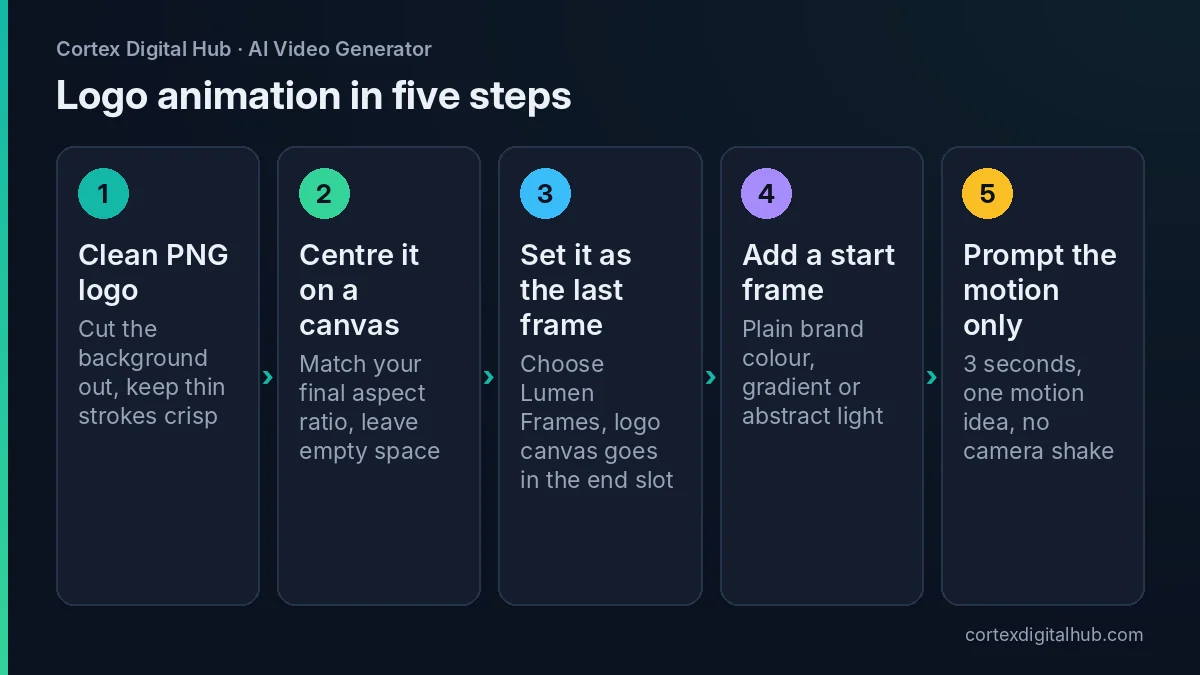 The logo PNG is the last frame, so the clip always ends on your exact artwork.
Prompts that work for a logo reveal
Describe the movement, not the logo. The model already has the logo in the last frame. Try:
Soft golden light streaks sweep across a deep navy background and slowly converge, forming the final frame, smooth motion, no camera shakePaper cut-out shapes in teal and white slide in from the edges and settle into place, clean studio light, slow ease-outInk drops spread across a cream surface, then clear to reveal the final frame, gentle slow motion
Keep one motion idea per clip. Words like "spinning, exploding, morphing and glowing" in one prompt produce a mess. If you need the same look for a series of clips, consistent reference images can help.
What can AI logo animation not do?
Be clear about the limits before you promise a client anything.
| Task | Works well? | Better approach |
|---|---|---|
| Light sweep or reveal onto the logo | Yes | First and last frame control |
| Icon-only logo with bold shapes | Yes | Same, or image to video |
| Thin script or small tagline | Poorly | Add text in an editor afterwards |
| Exact brand colours on every frame | Not guaranteed | Colour-match in an editor |
| Letters assembling one by one | Unreliable | Animate in an editor, use AI for the background |
If your wordmark is the star, generate the animated background and the final reveal, then place the finished logo as a layer on top in any video editor. That gives you sharp text and AI motion in the same clip.
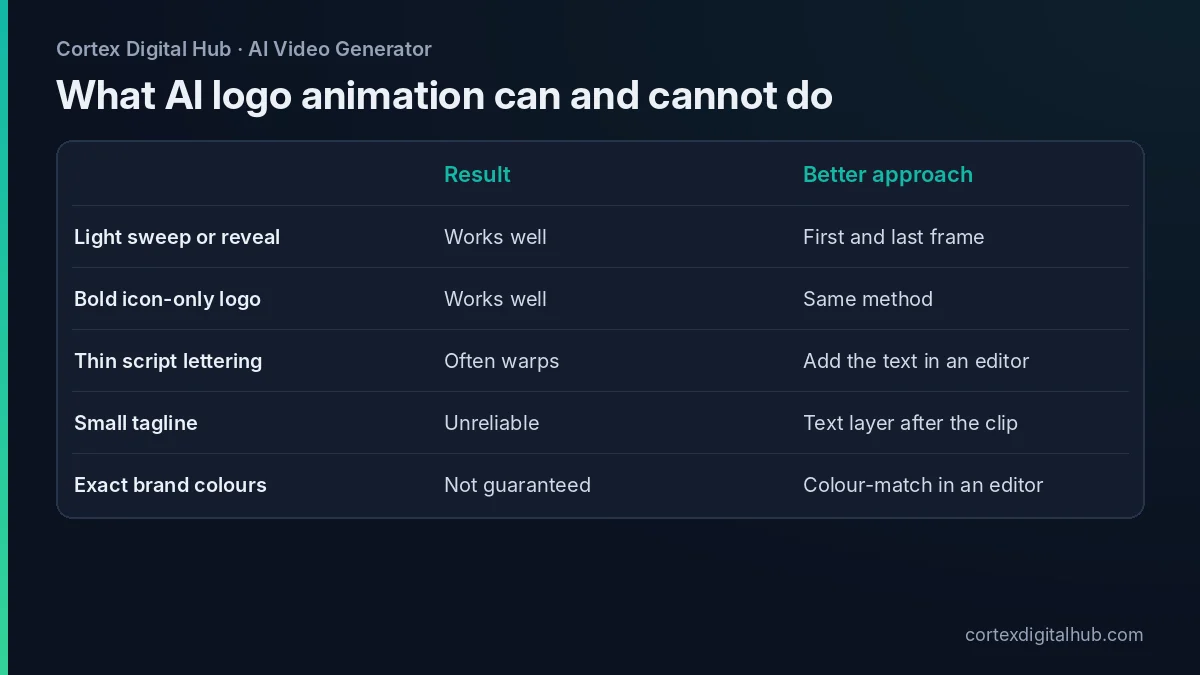 Bold icons and light reveals survive; thin lettering and taglines should be added afterwards.
What does it cost?
Credits are billed per second at 1 credit = ₹0.50, and the Generate button shows the total first. As of October 2026:
- Lumen Frames, 23 credits a second: 3 s is 69 credits (₹34.50), 5 s is 115 credits (₹57.50).
- Lumen Omni, 30 credits a second: 3 s is 90 credits (₹45), 5 s is 150 credits (₹75).
- Prism 6, 52 credits a second: 3 s is 156 credits (₹78).
Three tries on Lumen Frames at 3 seconds cost ₹103.50. That is still far below the price of most freelance intro packages, though a motion designer will give you a controlled, repeatable result that this method cannot promise. Use AI for fast, good-looking intros and outros on Reels, Shorts and WhatsApp status, and hire a designer for a brand identity film.
How do I keep the animation on brand?
Colour is where AI logo animation drifts most. Name your colours in words the model understands, such as "deep navy and warm gold", rather than hex codes, and use the same start frame colours every time. Pick a motion style once, say light streaks or paper shapes, and reuse that sentence for every logo clip you make, so your intro, outro and sticker clips feel like one family.
Last frame control needs Lumen Frames, Lumen Omni or Prism 6, so Lumen Frames is also your cheapest way to test. Save the prompt that worked in a note and reuse it, changing only the colours when you make a version for another brand or a festival edition, such as a Diwali gold or a Holi colour burst.
Using your logo clip as an intro or outro
Intros and outros do different jobs. An intro should be under 3 seconds so viewers do not scroll away; start the main content immediately after. An outro can hold on the logo for a beat with a call to action, such as a phone number or "Order on WhatsApp".
Trim the clip to the exact length with the free trim video tool, and if you are sending the final file to clients on WhatsApp, run it through the video compressor or the guide to compress video for WhatsApp. The same logo clip can be reframed with the video resizer when you need both 16:9 and 9:16 versions.
If you turn Sound on and the clip gets a generated sting, remember that it will differ each time. For a brand you post under every week, one fixed audio logo added in your editor sounds more consistent.
Key takeaways
- Do not ask AI to draw your logo. Make the logo the last frame and let the model create the motion toward it.
- Use Lumen Frames for the best value; a 3-second intro is ₹34.50 as of October 2026.
- Prepare a clean PNG, centred on a canvas with your final aspect ratio.
- Bold icons and light reveals work; thin text and taglines should be added in an editor.
- Keep intros under 3 seconds and trim the best part from a 5-second clip.
Frequently asked questions
How do I animate a logo with AI?
Use first and last frame control. Put an abstract or blank start frame in, set your clean logo PNG as the last frame, and write a short prompt describing the motion between them. The clip ends on your exact logo.
Why does the text in my logo get distorted?
Video models redraw every frame, and small or thin letters are the first thing to drift. Ending on your own PNG as the last frame, or adding the wordmark in an editor afterwards, keeps lettering sharp.
Which model should I use for AI logo animation?
Lumen Frames is the value pick: first and last frame control at 23 credits a second. Lumen Omni (30) and Prism 6 (52) also support it. Start with Lumen Frames and move up only if the motion needs it.
How much does a logo intro cost?
A 3-second intro on Lumen Frames is 69 credits, which is ₹34.50. A 5-second one is 115 credits, or ₹57.50. On Lumen Omni a 3-second clip is ₹45. Prices are as of October 2026.
What file should my logo be?
A clean PNG with a transparent or plain background, at least 1080 px on the long side. Place it centred on a canvas that matches your video's aspect ratio, so nothing is cropped when it becomes a frame.
How long should a logo intro or outro be?
Two to four seconds. Anything longer starts to feel like a wait, especially on Reels and Shorts. Generate 5 seconds and trim to the best 3 with the free trim tool.
Can AI animate a logo that has small tagline text?
Rarely well. Fine print is the first thing to warp. Animate the icon or main wordmark, and add the tagline as a text layer in your video editor after the clip is finished.
Can I add sound to my logo animation?
Yes, models that support sound can add a whoosh or soft music matching the motion. For a brand sting you will reuse, many people switch sound off and add one fixed audio logo in an editor instead.