
AI music video maker: turn a song idea into mood clips cut to the beat
An AI music video maker workflow starts with mood clips for each section of your song, generated with sound off and cut to the beat in an editor. Here is the method, the beat arithmetic and the rights you need to check.
· 5 min read · 1.3K views · by the Cortex Digital Hub team
Generate mood clips for each section of your song with sound off, then cut them to the beat in any editor. From ₹24 a clip · no watermark · runs in your browser
Make the visuals → → Opens AI Video Generator · runs in your browser
An AI music video maker workflow has two parts: the AI Video Generator makes the visuals, and you cut them to your track in an editor. It does not read a song and return a finished video, so plan clips by song section, generate with sound off and match the beat yourself. This guide covers the plan, the beat arithmetic and the music rights. Prices are as of October 2026.
How does an AI music video maker work in practice?
Think of the video as a set of 3 to 6 second mood clips, each tied to a part of the song. The tool supplies the images; the editor supplies the rhythm.
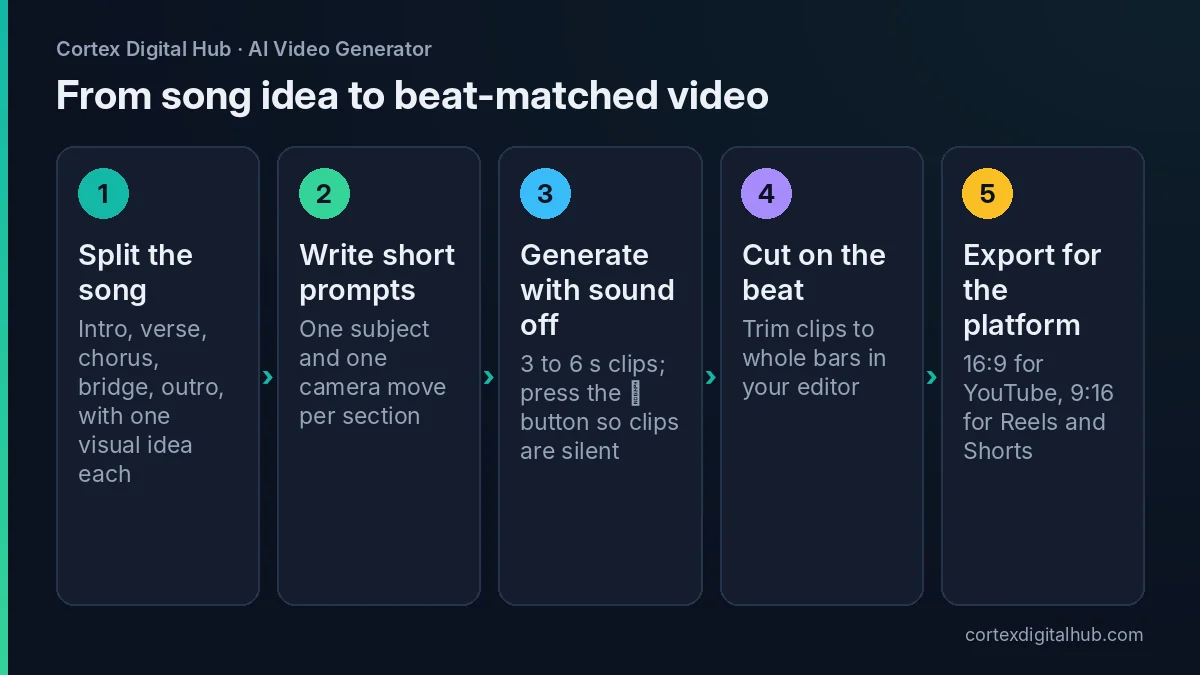 Plan by section, generate short clips, then cut to the beat in an editor.
- Split the song into sections: intro, verse, pre-chorus, chorus, bridge, outro.
- Write one visual idea per section, such as rain on a train window for the verse.
- Generate 3 to 6 second clips for each idea, with sound off.
- Drop them into a free or paid editor and cut on the beats.
- Export at the right shape for YouTube, Reels or WhatsApp status.
What visuals suit a song?
Choose a single theme and repeat it. A lo-fi track might use rain, a tea stall and a neon sign. A devotional track could use a diya, flowers and temple architecture, shown with respect and kept simple. A Punjabi wedding song might use marigolds, dhol drums and fabric in motion.
A prompt for a verse:
Slow push-in on a rain-streaked train window at night, blurred city lights outside, a steel tea glass on the sill, moody blue and amber light, shallow depth of field
Stay with places, objects, nature and illustrated characters. Do not animate real people without consent, and do not imitate a real singer or celebrity. For a recurring character, use an original illustration with reference images, as explained in consistent characters with reference images.
How do you match the beat in an editor?
Beat arithmetic is simple. One beat lasts 60 divided by the tempo in beats per minute. A bar of four beats lasts four times that.
| Tempo (BPM) | One beat | One bar (4 beats) | Two bars |
|---|---|---|---|
| 90 | 0.67 s | 2.67 s | 5.33 s |
| 100 | 0.60 s | 2.40 s | 4.80 s |
| 120 | 0.50 s | 2.00 s | 4.00 s |
| 128 | 0.47 s | 1.88 s | 3.75 s |
| 140 | 0.43 s | 1.71 s | 3.43 s |
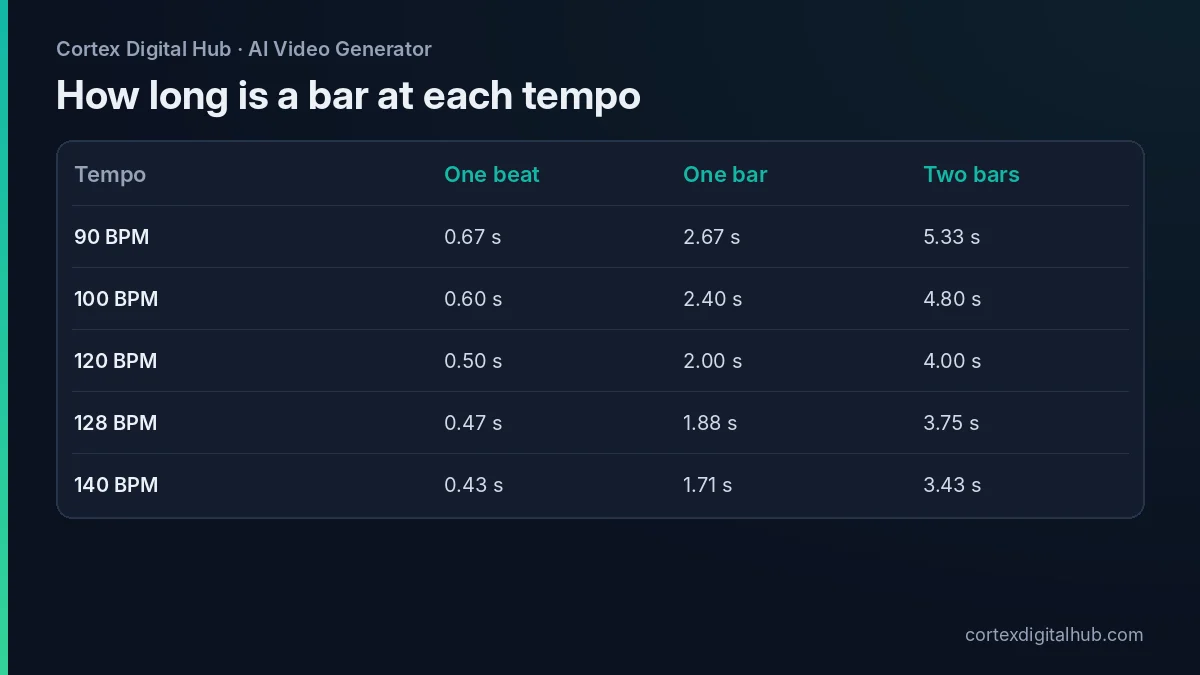 At 100 BPM, two bars last 4.8 seconds, so a 5-second clip fits with a small trim.
Say your song is 100 BPM. Generate 5-second clips, then trim each to 4.8 seconds with the free Trim video tool or inside your editor, and every cut lands on a downbeat. Place a visual change on the first beat of the chorus; it is the cheapest way to make the video feel designed.
Why turn sound off?
Generated sound adds ambience that can fight your track. Press the 🔊 button to switch sound off before generating, so each clip is silent and ready to lay over your song. If you want a rain texture, add it as a quiet layer in the editor instead. The post on AI video with native sound and music explains when generated audio is useful.
Do not expect accurate lip-sync to a sung vocal. Lumen Motion 2.6 handles dialogue and sound, but a performance of your exact vocal is best filmed. Use AI footage for the places and moods around it.
What about the rights to the music?
The visuals are one question; the audio is another. Use a track you composed, a track you have a licence for, or music from a library whose terms cover your use. Posting a commercial song you do not own can lead to the video being muted, blocked or claimed. As of 2026, check each platform's help page for current music rules, and read the licence for any library track. This is general guidance, not legal advice.
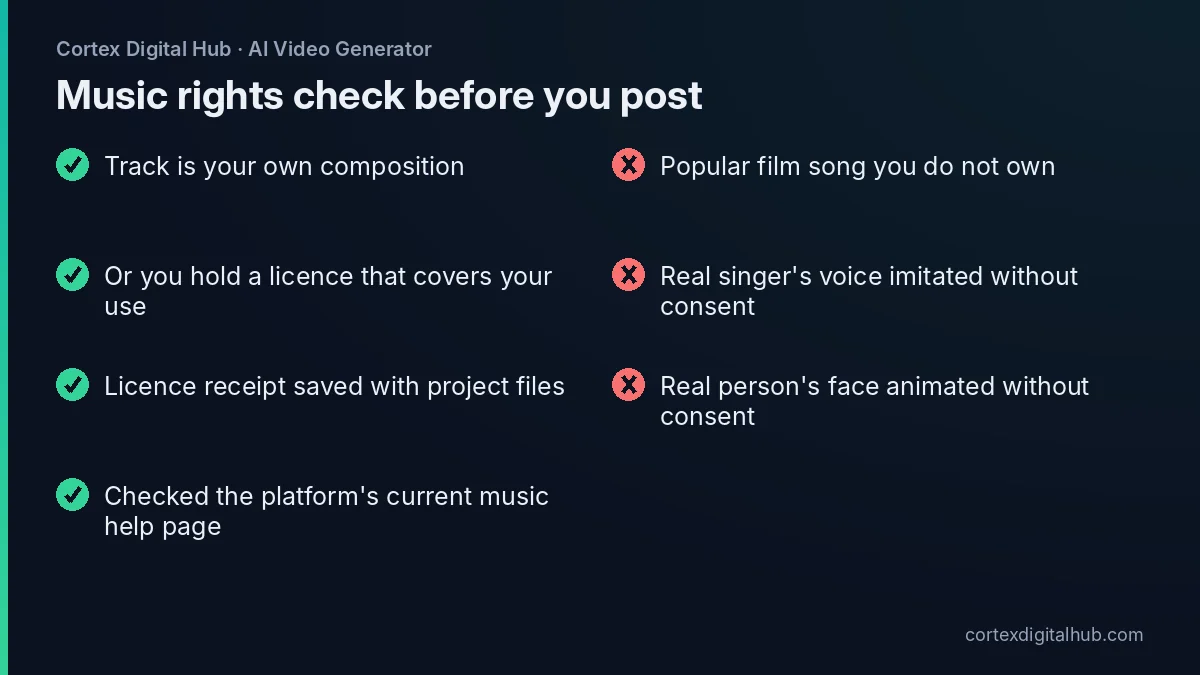 Settle the audio rights before you publish, not after a muting notice.
Keep the stems or the licence receipt with your project files. If you later monetise the video, you will want proof.
What does a shot list look like for a three-minute song?
A shot list keeps you from generating clips you will never use. For a lo-fi track at 100 BPM, one plan could be:
- Intro (8 bars, about 19 s): a rain-streaked window, a city at dusk. Four clips of 5 seconds.
- Verse (16 bars, about 38 s): a tea stall, a bicycle bell, a steel glass. Eight shots, but reuse three of them in the second verse.
- Chorus (8 bars, about 19 s): the neon sign, flashing in time. Your hero visual, made on a sharper model such as Nova 2K.
- Bridge (4 bars): a slow tilt up to the night sky.
- Outro: the intro shot reversed or repeated, so the video feels finished.
For variety, mix camera moves: push-in for the verse, pan for the chorus, static for the bridge. For a transition, use first and last frame control so that the last frame of one clip becomes the first of the next; Lumen Frames, Lumen Omni and Prism 6 support it. The post on which AI video model to choose helps you pick models for the hero shots.
What does a music video cost?
Say an independent musician in Kolkata makes a 3-minute video with twelve 5-second clips, reusing visuals for repeated choruses.
| Plan | Model | Credits | Cost |
|---|---|---|---|
| 12 finals, 5 s each | Lumen Motion 3 Standard | 1,380 | ₹690 |
| 4 tricky drafts, 6 s | Nova Lite | 192 | ₹96 |
| 12 finals at 720p | Orbit 3 | 1,620 | ₹810 |
Lumen Motion 3 Standard with four drafts totals ₹786. Repeating chorus clips keeps the number of unique shots low. Pick the shape first: 16:9 for YouTube, or 9:16 with the guide to resizing video for Instagram Reels. Compress for sharing with the free Video compressor. For posting rhythm, see AI videos for Instagram Reels and YouTube Shorts.
Key takeaways
- An AI music video maker workflow is generate-then-edit, not one click.
- Plan one visual idea per song section and repeat the chorus visuals.
- Generate with sound off and cut to the beat; at 100 BPM two bars last 4.8 seconds.
- Stick to places, objects and illustrated characters, not real people without consent.
- Use your own or licensed music and check each platform's help page.
- Twelve 5-second clips cost about ₹690 on Lumen Motion 3 Standard.
Frequently asked questions
Can I make a music video with AI?
Yes, in two parts. The AI Video Generator makes the visuals as short clips, and you cut them to your track in a video editor. It is not a one-click tool that reads a song and returns a finished video.
Does the AI Video Generator sync visuals to my song?
No. It does not analyse an uploaded track. You plan the clips by song section, then match them to the beat in your editor. Choosing clip lengths in whole bars makes the cuts land cleanly.
Should I turn sound off for a music video?
Usually yes. Press the 🔊 button to switch sound off so generated ambience does not clash with your song. Keep it on only if you want effects such as rain or crowd noise under the music.
Can AI make my singer lip-sync to the song?
Do not expect accurate singing lip-sync. Lumen Motion 2.6 handles dialogue and sound, but a performance of your exact vocal is better filmed. Use AI for atmosphere, places and illustrated characters, and cut to your real footage.
Who owns the music in my video?
That depends on the track. Use your own composition or a track you have licensed. Posting a commercial song you do not own can lead to muting or claims. As of 2026, check each platform's help page for music rules.
How long should each AI clip be for a music video?
Three to six seconds is a good range. At 100 beats per minute, two bars last about 4.8 seconds, so a 5-second clip fits neatly. Repeat chorus visuals to save credits and give the song a visual hook.
How much does an AI music video cost?
Twelve 5-second clips on Lumen Motion 3 Standard cost 1,380 credits, or ₹690. Drafting the trickiest shots on Nova Lite at ₹24 each adds a little. Prices are as of October 2026.
Can I keep one character across all clips?
Yes, with reference images. Upload 2 to 4 images of an illustrated character or a product and tag them with @ in each prompt. Use an original character, not a real person or a known cartoon.
What aspect ratio should a music video be?
Use 16:9 for YouTube and 9:16 for Reels and Shorts. Pick the shape before generating, since reframing later crops the picture. The free Video resizer can help with simple changes.