
AI Video Aspect Ratio Guide: 9:16, 16:9, 1:1 and 4:5 for Every Platform
The right AI video aspect ratio depends on where the clip will play, and it is easiest to set before you generate. This guide matches 9:16, 16:9, 1:1 and 4:5 to Reels, Shorts, YouTube, WhatsApp and listings, and explains when to resize instead.
· 5 min read · 507 views · by the Cortex Digital Hub team
Set the Format before you press Generate so the framing is built for your platform, not cropped into it later. From ₹24 a clip · no watermark · runs in your browser
Make a video → → Opens AI Video Generator · runs in your browser
The best AI video aspect ratio is the one that matches where the clip will play: 9:16 for Reels, Shorts and WhatsApp Status, 16:9 for YouTube and websites, 4:5 for the Instagram feed and 1:1 for grids and catalogue tiles. Set it in the Format box of the AI Video Generator before you press Generate, because the model composes the shot for that frame.
What an aspect ratio actually changes
An aspect ratio is the width-to-height shape of the picture. It is not the sharpness. A 9:16 clip is tall, 16:9 is wide, 1:1 is square, and 4:5 is a little taller than square.
The shape decides the framing. In a tall frame the model puts a person or a product in a vertical stack, with sky above and floor below. In a wide frame it spreads the scene sideways and adds room for a camera pan. The same prompt gives a different composition in each, so the ratio is a creative choice as much as a technical one.
The Format setting sits with Model, Length and Resolution. The list of ratios can differ by model, so open the menu for the model you picked and see what it offers.
Which aspect ratio for which platform?
Use this table as a starting point. Platform rules change, so as of 2026 check each platform's help page before a big campaign.
| Ratio | Full-size pixels | Best for |
|---|---|---|
| 9:16 | 1080 x 1920 | Reels, Shorts, WhatsApp Status, Stories |
| 16:9 | 1920 x 1080 | YouTube, websites, TV screens, presentations |
| 1:1 | 1080 x 1080 | Grid previews, carousels, catalogue tiles |
| 4:5 | 1080 x 1350 | Instagram feed posts |
Reels, Shorts and Status are built for phones held upright, so 9:16 is the sensible default. If you only make one version, make that one. For a deeper look at what Indian platforms prefer, see our guide to video formats for WhatsApp Status and Reels.
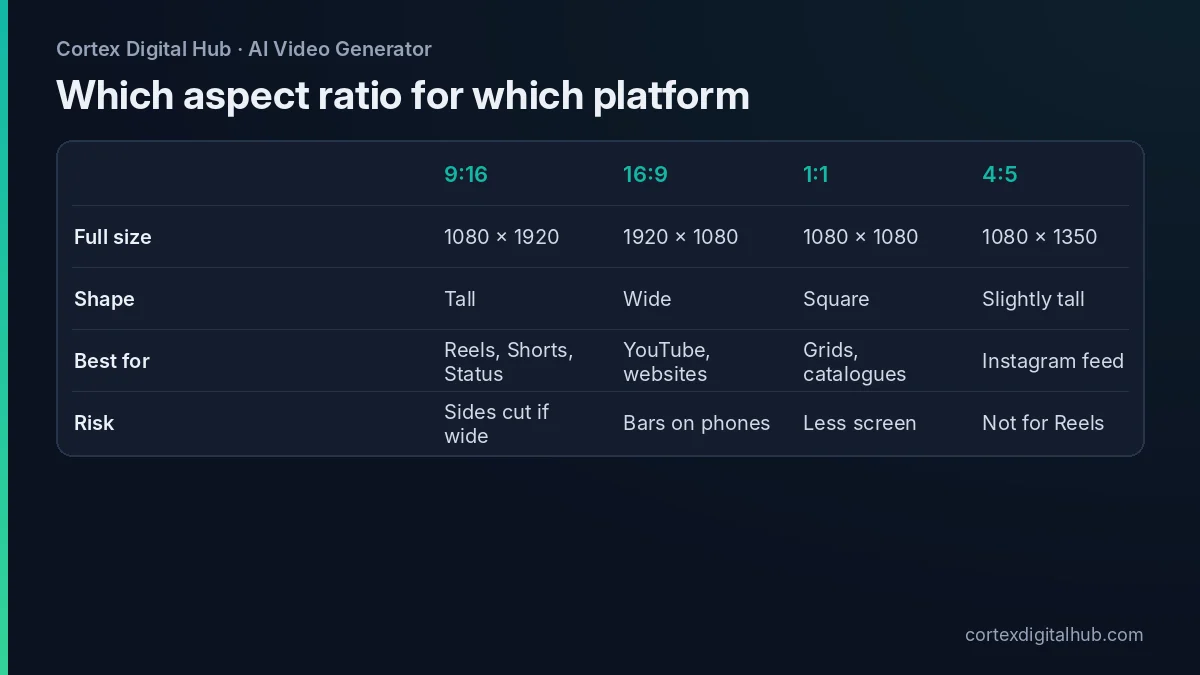
Pick the ratio from the destination, not from habit.
Should I generate in the right ratio or resize after?
Generate in the right ratio whenever the framing matters. Resizing afterwards cannot add picture that was never made. It can only crop the sides, or place the clip on a blurred or coloured background.
Here is what happens when you turn a 16:9 clip into 9:16 by cropping. You keep a thin vertical slice from the middle, so anything off-centre disappears. A product placed to the left is simply gone. A person walking across the frame leaves after a second.
Going the other way is just as lossy. A 9:16 clip shown in a 16:9 player gets thick bars on both sides and the picture shrinks to a narrow strip.
Resizing is still useful in three cases:
- The subject is centred and the background is plain, so a crop costs nothing.
- You need a quick square or 4:5 copy from a vertical master.
- You are fitting a pixel size, say 1080 x 1920, to a platform that asks for it.
For those, the free Video Resizer works on your device, and the resize-to-1080x1920 tool handles the vertical case in one step.
How do you keep the subject inside the safe zone?
A safe zone is the area apps do not cover. In vertical video the top carries the account name or a search bar, the bottom carries the caption, the Shop button and the progress bar, and the right edge carries the like and share icons. Exact positions change with app updates, so treat this as a rule of thumb and check the platform guidance.
Write the framing into your prompt. Tell the model where the subject sits and leave breathing room.
Vertical frame. A steel tiffin box centred on a wooden table, steam rising, slow push-in, soft window light, empty space above and below the box.
Three habits help:
- Keep faces, products and any text in the middle two-thirds of the frame.
- Ask for space above and below the subject, so captions and buttons do not sit on it.
- Add text and captions in your editor, not in the prompt, so you can move them if an overlay gets in the way.
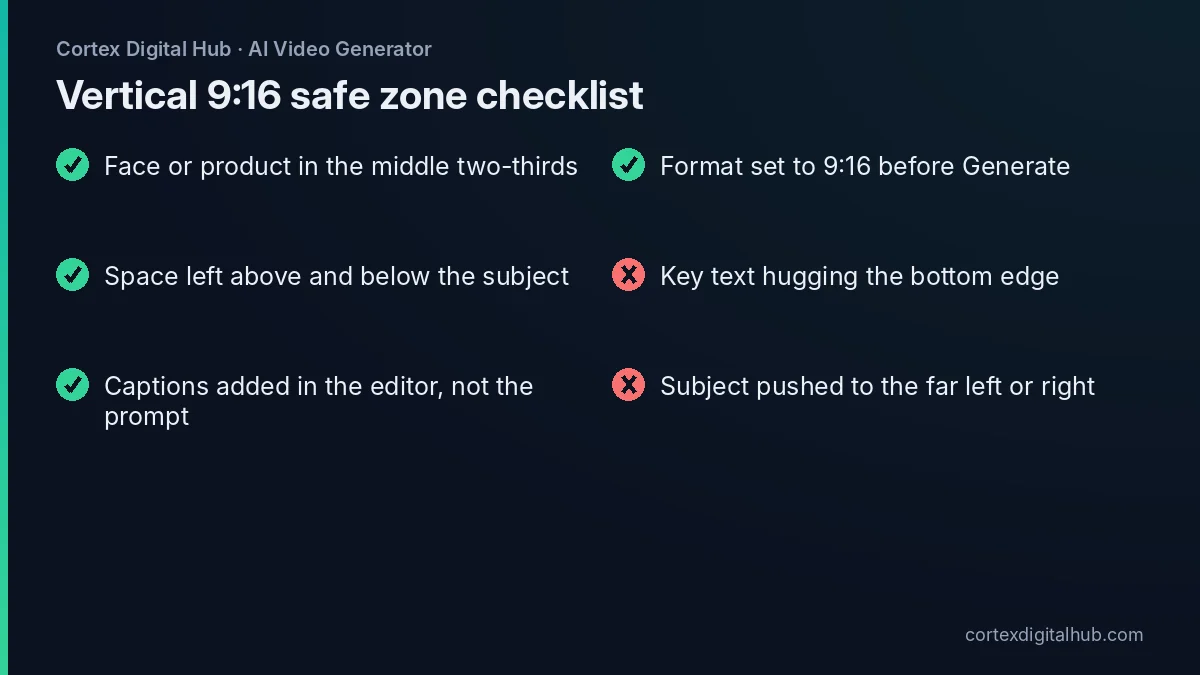
A quick check that keeps the product clear of buttons and captions.
One idea, several shapes: a simple workflow
If a single clip has to run on more than one platform, plan it from the start.
- Decide the master shape. For a Chennai jewellery shop that posts mostly to Reels and WhatsApp, that is 9:16.
- Draft the prompt on a cheap model such as Nova Lite or Orbit 3 and check the framing. Our prompt guide covers the subject, camera, motion and light pattern.
- Make the final in the master shape on your chosen model.
- For other places, either generate a second clip in that Format with the same prompt, or crop a copy with the Video Resizer.
- Compress the files for sharing with the free Video Compressor or the WhatsApp compression guide.
A second generation on a draft model is often cheaper than it sounds. A 5-second Orbit 3 clip at 480p is 70 credits, which is ₹35. Credits are billed per second of finished video and the total shows on the Generate button, so you always see the figure before you start.
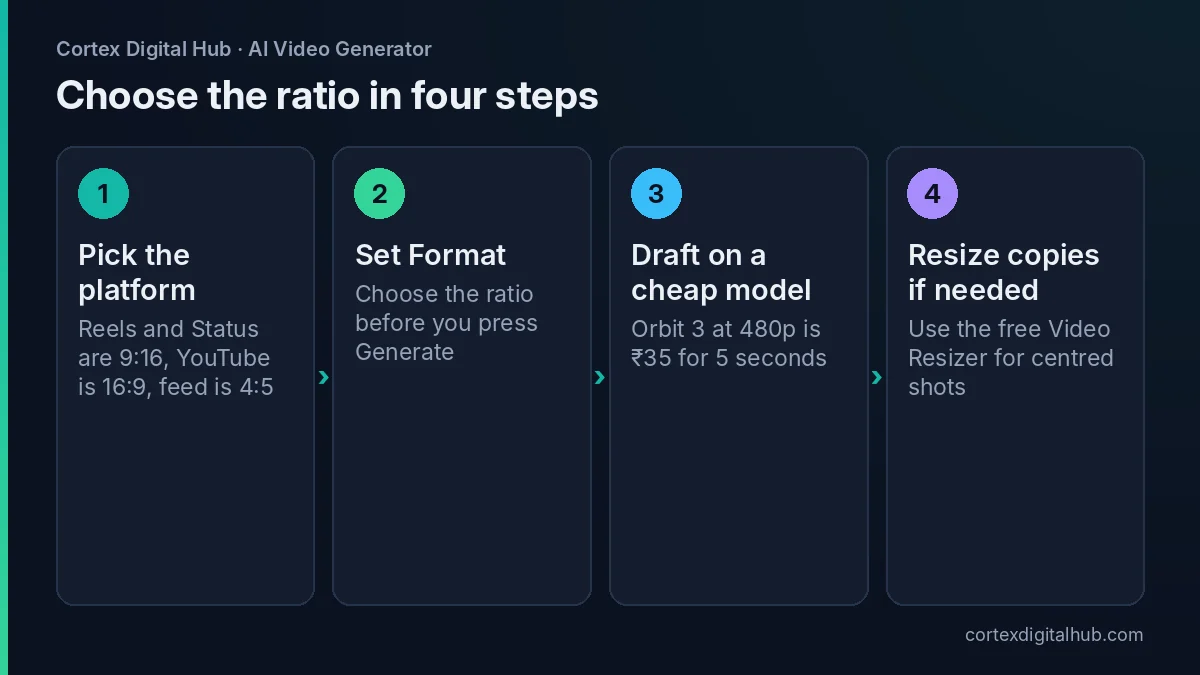
Choose the platform first, then the Format, then test on a cheap model.
Common mistakes with AI video aspect ratio
- Leaving the default. If you do not look at Format, the clip may come out wide when you wanted tall.
- Mixing ratios in one edit. A 9:16 clip next to a 16:9 clip in the same timeline forces bars or crops.
- Writing "vertical" and ignoring the setting. The prompt can hint at framing, but the Format controls the canvas. Set both.
- Putting key text at the edge. Captions drawn near the bottom often end up behind app buttons.
- Using one export for every upload slot. Marketplaces and ad platforms have their own rules, so confirm them in the help pages.
Key takeaways
- Choose the aspect ratio from the destination: 9:16 for Reels, Shorts and Status, 16:9 for YouTube, 4:5 for feed posts, 1:1 for tiles.
- Set Format before you generate. The model frames the shot for that canvas, and resizing later can only crop or add bars.
- Keep faces, products and text in the middle of a vertical frame, away from app buttons.
- The ratio does not change the per-second rate, but check the total on the Generate button.
- Use the free Video Resizer for quick copies of a centred, simple shot.
- Check each platform's help page for current limits, since they change.
Frequently asked questions
What is the best aspect ratio for AI video on Instagram Reels?
Use 9:16 (vertical), which is 1080 x 1920 pixels at full size. Reels, YouTube Shorts and WhatsApp Status are all built for tall video. Generate in 9:16 from the start so the subject is framed for a phone screen instead of cropped later.
Can I change the aspect ratio of an AI video after it is made?
You can resize it with the free Video Resizer, but it crops or adds bars; it cannot invent new picture. A wide clip squeezed into 9:16 loses the sides. If the framing matters, regenerate in the right Format instead.
Should I use 4:5 or 9:16 for an Instagram feed post?
As of 2026, 4:5 is a common choice for feed posts because it fills more of the screen than a square, while 9:16 suits Reels and Stories. Check Instagram's help page for the current recommendation before you finalise.
Does a different aspect ratio change the price of an AI video?
Billing is in credits per second of finished video, and each model lists its own rate, so the ratio itself is not a separate charge. The exact total shows on the Generate button before you start, so check it after changing Format.
What aspect ratio is best for YouTube videos?
16:9 landscape is the standard for regular YouTube videos on TVs, laptops and desktops. Shorts use 9:16. If you want one idea on both, generate two clips with different Formats instead of cropping one.
What is a safe zone in a vertical video?
A safe zone is the part of the frame that apps do not cover with buttons, captions and profile names. For 9:16, keep faces, products and text towards the middle. Exact overlays change, so check each platform's current guidance.
Is 1:1 square video still worth making?
Yes, for places that show a square preview, such as some grids, carousels and catalogue tiles. A square works as a safe middle shape, but it uses less of a phone screen than 9:16 or 4:5 does.
Which Format should I choose for a Meesho or Amazon product video?
Marketplaces set their own video rules and change them, so read the seller help page first. Many sellers lean on 1:1 or 16:9 for listings and 9:16 for social copies. Do not assume one clip fits every upload slot.