
Can I use AI video commercially in India? A practical checklist
Most clips from the AI Video Generator carry no watermark, so the real question is what you put into them and where you publish. This checklist covers your inputs, faces, logos, music and platform rules, in plain words. It is not legal advice.
· 5 min read · 822 views · by the Cortex Digital Hub team
Clips are exported without a watermark, so they are ready to post once your inputs and your claims are clean. Start from your own photos and your own product. From ₹24 a clip · no watermark · runs in your browser
Make a video → → Opens AI Video Generator · runs in your browser
Can you use AI video commercially? In most cases, yes, because a clip from the AI Video Generator has no watermark and you decide the prompt. The risk sits in what you feed it and where you post it: real faces, other brands' logos, borrowed music and platform ad rules. None of this is legal advice, so treat it as a working checklist and take anything high-stakes to a qualified advocate.
Can I use AI video commercially, step by step?
Think of it as four questions you answer before a clip goes into an ad, a catalogue or a client deck.
- What did I upload? Photos you shot, logos you own and text you wrote are safe inputs. A photo pulled from someone else's website is not.
- Who or what appears in the frame? Real people need consent. Other brands should stay out.
- What is the sound? Generated sound, licensed music, or your own recording.
- Where will it run? Each platform has its own ad and labelling rules, and they change.
If all four answers are clean, you are in a good place. If one is unclear, fix that one before you publish, not after the first complaint.
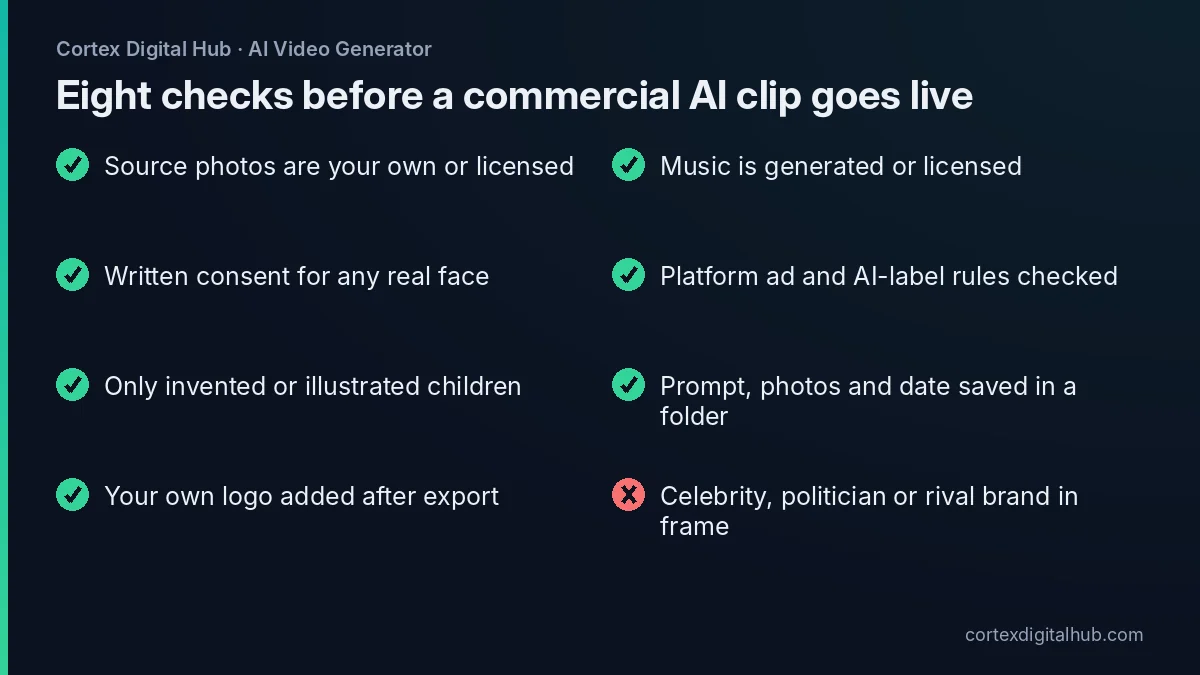 Eight checks that cover most of the risk in a commercial AI clip.
What counts as a safe input?
The safest starting point is your own material. A photo of your own product, shot on your own phone, used as the first frame in image to video, keeps the look and the rights with you. The same goes for a floor plan you drew, a menu you designed or a shop front you own.
Be careful with anything you did not make. A photographer's picture sent to you for a campaign may be licensed for print only. A model photo from a catalogue may not allow animation. A stock image may forbid "derivative works". If you are not sure, write to the owner and ask in one line: "May I animate this image for an Instagram ad?" Keep the reply.
Real people, children and public figures
This is where most real trouble starts.
- Customers, staff and family: animate a face only with clear written consent that mentions animation and the places the clip will appear. A WhatsApp message saying "yes, fine to use" is better than nothing, and a signed note is better still.
- Children: never use a real child's face. Use an illustrated character or an object instead.
- Celebrities, politicians, religious leaders: do not recreate their face or voice, even for a joke or a "tribute". It can mislead viewers and invite legal notices.
- Invented characters: a character built from your own prompt is fine. Keep it consistent with reference images so it reads as your brand mascot.
Logos, trademarks and look-alikes
Your own logo is the easy case. Put it on after export in a free editor such as the Photo Editor, because models redraw text and marks unpredictably. Putting a logo into the prompt rarely gives a clean result anyway.
A competitor's logo, pack or shop front is a different matter. Even a "better than" frame can raise trademark or misleading-advertising questions. Describe your product and leave other brands out. Avoid prompts like "a bottle that looks like" a well-known drink, as the result may be close enough to cause a complaint.
Music, sound and voice
Many models generate ambience, effects and music that match the motion. That sound is part of the clip you made, so it travels with it under the site terms. Lumen Motion 2.6 can add dialogue and sound; other models produce speech only if your prompt asks for it.
If you plan to add a trending track in Instagram, turn the sound off at generation. Trending audio from a platform library is often licensed for personal or creator use, and a business or paid ad can be a different category. As of 2026, check the platform's help page for the rule that applies to your account type. The longer explanation of sound options is in AI video with native sound and music.
Platform rules and labelling
Rules from Meta, YouTube, WhatsApp and the marketplaces change often, so never rely on a blog post, including this one. Three habits help:
| Situation | What to do |
|---|---|
| Realistic scene that could pass as real footage | Disclose it as AI-made where the platform asks you to |
| Product shown doing something it cannot do | Do not run it; it can be a misleading claim |
| Health, money or "guaranteed" results | Leave out; no medical or financial promises |
| Real estate and food | Show what is actually on offer, and say "artist's impression" where it applies |
In India, advertising standards expect ads not to mislead, and that holds whatever tool made the picture. For property, see the notes in AI video for real estate marketing.
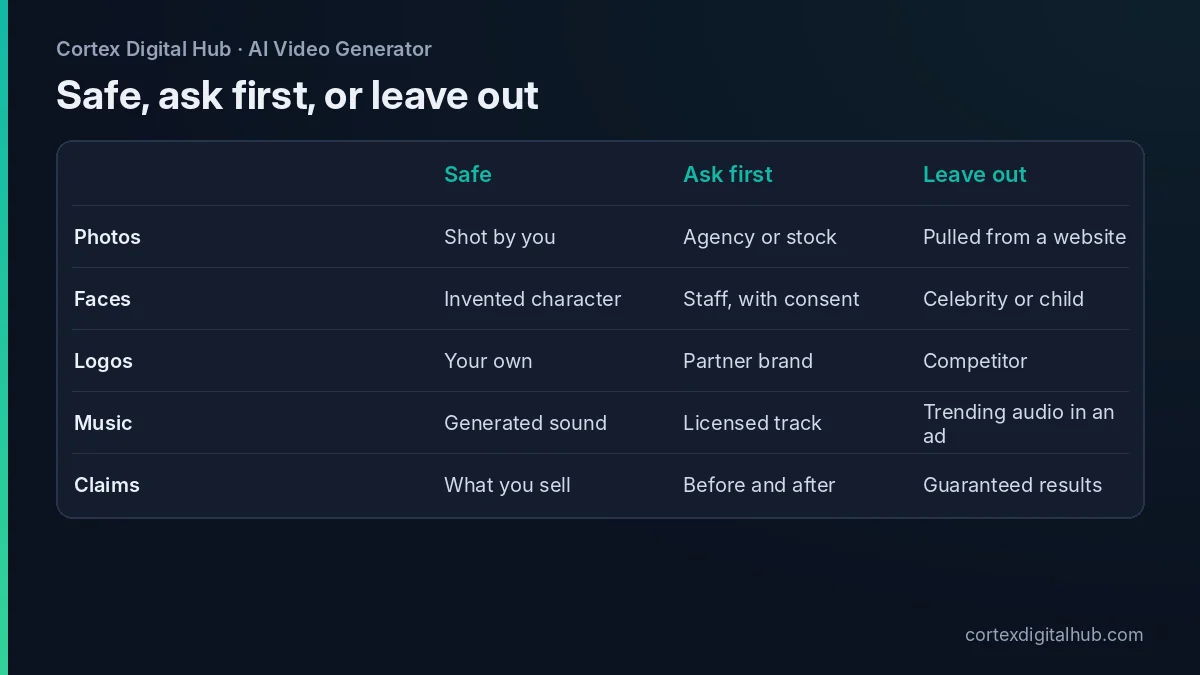 What to use freely, what needs permission and what to leave out.
Who owns the clip?
Copyright law for AI-made work is still being worked out in many countries, India included. The answer may depend on how much human creative choice went in, such as your photo, your prompt, your edit and your final cut. So use the clip freely in your marketing, but do not promise a client or investor exclusive ownership unless a lawyer has looked at the contract.
A practical safeguard: save your prompt, your source photos and the download date in one folder. If anyone questions the clip later, you can show how it was made. Finished MP4s stay in History for 7 days, so download them first. Storage and privacy details are in watermark, storage and privacy, and billing terms are on the terms page.
When a client or agency is involved
If you make clips for someone else, say a freelance editor in Pune producing Reels for a salon, put three lines in writing before you start: who supplies the photos, who approves the final clip, and who is responsible for the claims in it. Ask the client to confirm that they own or license every photo and logo they send. This protects both sides, and it takes five minutes in a WhatsApp message or a one-page agreement.
Key takeaways
- A clip has no watermark, but "no watermark" does not mean "no rules": your inputs and claims still matter.
- Start from your own photos, logos and words wherever you can.
- Get written consent before animating any real person, and never use a real child's face.
- Keep competitors, celebrities and politicians out of your frames.
- Add logos and music after export, and check each platform's ad and labelling rules as of 2026.
- This is a checklist, not legal advice; ask an advocate for contracts and high-value campaigns.
Frequently asked questions
Can I use AI-generated video in a paid ad in India?
Usually yes in practice, because the clip has no watermark and you control the prompt. What matters is your inputs, any real person or brand that appears, the music, and each platform's ad rules. As of 2026, check the platform's help page and the site terms before you spend on ads.
Do I own the copyright in an AI-generated video?
This is unsettled in many countries, including India, and the answer can depend on how much human creative input went in. Treat an AI clip as something you can use, but do not assume exclusive ownership. For anything high-stakes, ask a qualified advocate.
Can I use a celebrity or a politician in an AI video?
No. Do not recreate a real public figure's face or voice without written permission, even as a joke. It can mislead viewers, invite legal notices and get the ad rejected. Use an invented character or a model who has signed a release.
Can I animate a photo of my customer or employee?
Only with clear, written consent that says the photo will be animated and where the clip will appear. Keep the consent message or signed note. If you cannot get consent, use a stock-style invented person or an object shot instead.
Is it safe to put my competitor's logo or product in an AI clip?
It is risky. Showing another brand's logo or pack, especially in a way that suggests a comparison or endorsement, can raise trademark and misleading-advertising issues. Keep competitors out of your frames and describe your own product only.
Do I need to say that a video is made with AI?
Rules differ by platform and are changing. As of 2026, some platforms ask you to label realistic synthetic content, and Indian advertising bodies expect ads not to mislead. Check the platform's help page and disclose when the clip could be mistaken for real footage.
Can I use music generated with the clip in my Reel or ad?
Generated sound is part of the clip, so it is yours to use under the site terms. If you add a track from a platform library, its licence may cover personal use only. For paid ads, use generated sound or licensed music and check the terms.
Will the Cortex Hub AI Video Generator put a watermark on my clip?
No. Finished clips are exported without a watermark. They stay in History for 7 days, so download the MP4 you want to keep. Credits are returned automatically if a clip fails or the model declines your prompt.