
AI video for hotel marketing: room and pool clips from real photos
A good hotel photo can become a five-second mood clip for Instagram and your booking page in about three minutes. Here is how to animate rooms, pools and restaurants truthfully, what to avoid showing, and what a set of clips costs.
· 5 min read · 702 views · by the Cortex Digital Hub team
Upload your best room, pool or lobby photo as the first frame and describe only the motion. You get a mood clip in a few minutes. From ₹24 a clip · no watermark · runs in your browser
Animate a hotel photo → → Opens AI Video Generator · runs in your browser
If you want AI video for hotel marketing, start with a real photo. Upload your best shot of a room, pool or restaurant to the AI Video Generator, describe a slow camera move, and you get a 5-second mood clip in a few minutes. The clip should show the property as it is, only moving. That keeps the trust of the guest who arrives expecting what they saw.
Which AI video clips suit hotel marketing best?
Short, calm, atmospheric clips do the job. People scrolling Instagram do not need a tour. They need a feeling in four seconds: "I want to be there on Saturday."
- Room mood shot: bed, curtains, a window with morning light.
- Pool or courtyard: water moving, loungers, a palm shifting in the wind.
- Restaurant or breakfast: steam from chai, a plate on a table, sunlight.
- Arrival: the gate, lobby, flowers in a brass urn.
- Detail close-up: towel fold, tea set, a door handle with the sea beyond.
Say a 20-room boutique stay in Coorg wants a weekend Reel. Six clips of five seconds each, one per space, is plenty.
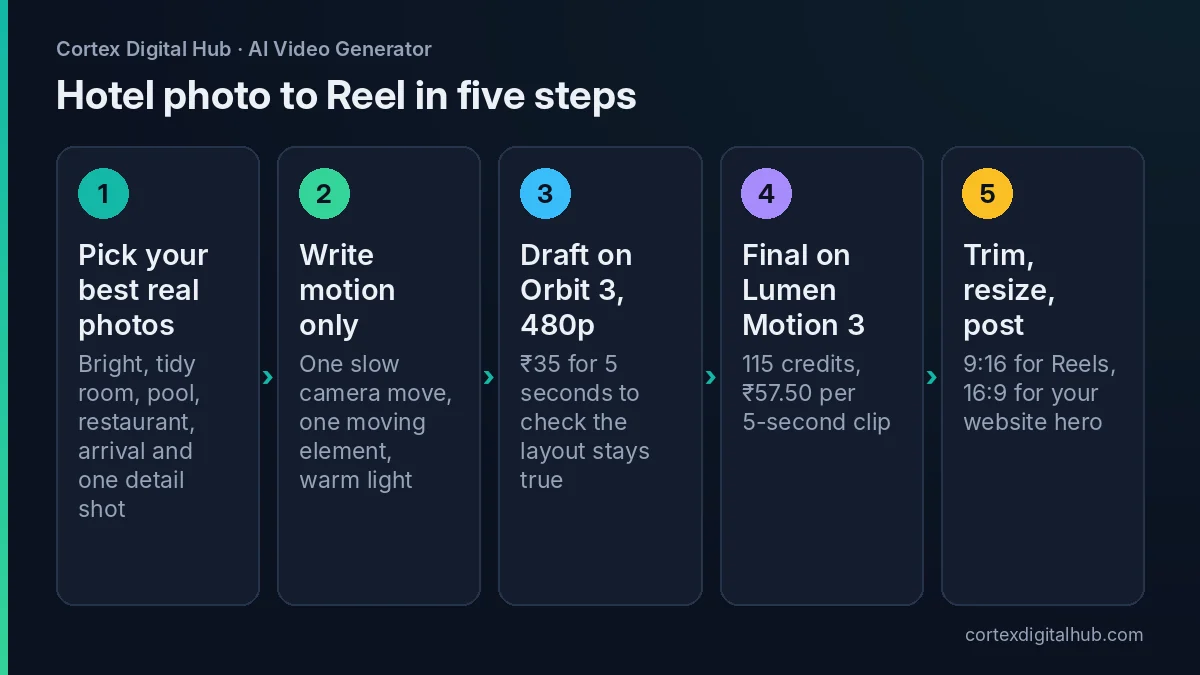 From photo to Reel: pick, prompt, draft, final, then post.
How do I write prompts for room and pool shots?
Use the photo as the first frame, so the look is already fixed. Then write only the movement: what the camera does, what moves in the scene and what the light does. One camera move per clip. The full method is in image to video: animate a photo with AI.
| Space | Prompt (motion only) |
|---|---|
| Bedroom | Slow push-in toward the window, sheer curtains lifting in a soft breeze, warm morning light |
| Pool | Gentle drift to the right along the pool edge, water shimmering, palm leaves moving slightly |
| Restaurant | Static shot, steam rising from a cup of chai, soft sunlight moving across the table |
| Lobby | Slow tilt up from the flowers to the chandelier, calm and quiet |
| Balcony view | Slow pan across the hills, mist drifting, birds far away |
Add an Avoid line such as "people, text, logos, extra furniture" under Advanced so the model does not invent anything.
Can I show the room and the view truthfully?
This is the part that matters most. A clip is a promise.
- Keep the layout: do not let the model change the bed size, add a bathtub or invent a balcony. If the result shows something your room lacks, discard it and run again.
- Do not upgrade the view: a sea glimpse stays a glimpse. A parking-lot view should not become a lake.
- Show real scale: a "pool" should not look three times larger than it is.
- Keep the listing photos real: on a booking page, your original photos should lead. As of 2026, check each platform's help page on photo and video rules.
- No real guests: unless each person has agreed in writing. A quiet, empty scene sells fine.
A good test: would a guest standing in that room say "yes, that is it"? If so, post.
Which model should a hotel pick?
Start with Lumen Motion 3 Standard at 115 credits for 5 seconds, which is ₹57.50. Draft the prompt on Orbit 3 at 480p for ₹35, then spend on the final. For a hero loop on a big screen at reception, Nova 2K at ₹87.50 for 5 seconds gives the sharpest single frame. More on picking is in which AI video model to choose.
A set of six clips on Lumen Motion 3 Standard costs 6 × ₹57.50 = ₹345. If three need a second try, add ₹172.50. The ₹249 pack covers four such clips with 60 credits left, so recharge any amount when you plan a bigger set. Failed clips refund automatically.
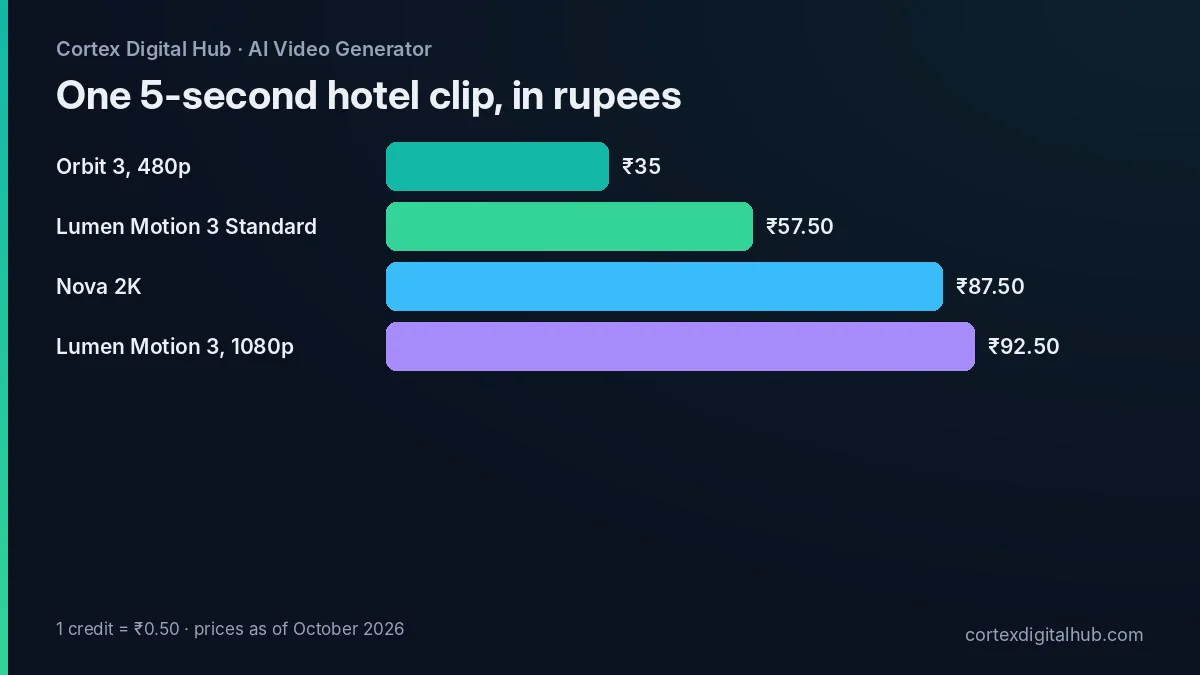 What one 5-second hotel clip costs on four models.
Seasonal and festival clips that fill weekends
Hotels sell dates, not just rooms. Once you have the real photo of a space, the same photo can be animated again for a season, which costs only the clip.
- Monsoon: rain on the windowpane, mist over the lawn, a pot of tea on the balcony table.
- Diwali and Christmas: diyas or fairy lights flickering in the lobby, with a slow push-in on the decorated entrance.
- Winter weekends: a fire pit glow, steam from coffee, soft sunrise over the hills.
- Weddings and offsites: an empty lawn or banquet hall with lights coming on at dusk. Keep guests out and let the venue carry the shot.
Keep the season truthful. If your resort has no fire pit, do not prompt for one. And if the photo shows dry weather, a rain effect is fine as mood, but do not use it to suggest it rains in your car park every evening.
Mistakes hotels make with AI clips
Three errors show up again and again.
- Asking for too much in one clip. "Pan across the pool, zoom into a couple, then fly over the beach" gives mush. One move, one subject. The same advice runs through text to video prompts that work.
- Letting the model repaint the room. If the sofa changes colour or an extra window appears, the clip is not your hotel any more. Adjust the Prompt strength, add an Avoid line, or try another seed.
- Posting without a check. Watch the whole clip at full size before it goes out. Look at the corners and at anything with writing on it. Ask someone at the front desk: "Is this our lobby?"
Save the prompt that worked for each space. Next season you only change the light and the weather, and the cost stays at one clip.
Using the clips on Instagram, your website and booking pages
Different places want different shapes.
- Reels and Stories: set Format to 9:16. If you already have a 16:9 clip, use the free Video Resizer or the Reels resizing guide.
- Website hero: keep 16:9, trim the loop to 5–6 seconds with Trim Video and compress it with the Video Compressor so the page loads fast.
- WhatsApp broadcasts to past guests: keep it under 16 MB; see compress video for WhatsApp.
- Booking platforms: many accept only photos or approved video. Check the platform's rules before uploading.
Add your logo and a one-line caption after export, not in the prompt. Models redraw text unpredictably. If you want sound, ambience such as water and birds fits a hotel well; turn it off if you will add a track.
Key takeaways
- Animate your real photos; do not invent rooms, views or amenities.
- One slow camera move and one moving element per clip.
- Six 5-second clips on Lumen Motion 3 Standard cost ₹345, with drafts on Orbit 3 at ₹35.
- Leave real guests out unless you hold written consent.
- Export 9:16 for Reels and 16:9 for your site, then trim and compress for speed.
- As of 2026, check each platform's help page before using AI clips on listings.
Frequently asked questions
How can a small hotel use AI video for marketing?
Start with your own photos of the room, pool, breakfast spread and view, then animate each one for 5 seconds with a slow camera move. Join four to six clips into an Instagram Reel or a homepage loop. Always keep the clip faithful to the real property.
Is it legal to show an AI clip of my hotel room on a booking site?
It depends on the site's rules, and they change. As of 2026, check each booking platform's help page on photo and video guidelines. A safe rule is to animate only what the room really has, and to keep the original photos as the main listing images.
What should I never show in an AI hotel video?
Do not add a view, pool size, amenity, beach access or room size that the property lacks. Guests judge you against the clip on arrival. Also avoid real guests' faces without written consent, and avoid famous people or other brands.
How much does an AI hotel video cost in India?
A 5-second clip on Lumen Motion 3 Standard costs 115 credits, which is ₹57.50. A set of six clips is ₹345. Drafting on Orbit 3 at 480p first costs ₹35 per 5 seconds, so you can test a prompt cheaply before the final.
Which aspect ratio is best for hotel clips?
Use 9:16 for Instagram Reels and Stories, 16:9 for your website hero and booking pages, and 1:1 or 4:5 for feed posts. Pick the Format setting before you generate, because changing it later means a new clip.
Can I show guests in my pool video?
Not real guests, unless each person has given written consent. A simple option is to leave people out and let the water, loungers and light carry the mood. Or use an invented, illustrated figure far from the camera.
How do I make a hotel room look inviting in a short clip?
Pick a bright, tidy photo, then ask for one slow move such as a gentle push-in, with curtains moving in a soft breeze and warm light. Avoid prompts that change the room's furniture or layout. Keep it to one camera move per clip.
Should I add music to my hotel Reel?
Turn the generated sound off if you plan to add a trending track in Instagram, or keep the soft ambience such as water and birds for a calm feel. For paid ads, use generated or licensed music and check the platform's terms.