
AI Video for NGO Awareness and Fundraising: A Respectful Guide
An NGO can make short awareness clips and donation appeals with AI video without putting real beneficiaries on camera for effect. This guide covers illustrative styles, consent, honest wording, costs in rupees and a pre-publish checklist.
· 5 min read · 664 views · by the Cortex Digital Hub team
Describe an illustrative scene, such as a lamp in a classroom or a seedling growing, and get a short clip for your appeal. From ₹24 a clip · no watermark · runs in your browser
Make an awareness clip → → Opens AI Video Generator · runs in your browser
Fundraising videos carry a weight that product ads do not, because they involve people at their most vulnerable. AI video for an NGO gives small teams a way to make a moving awareness clip without a camera crew, and without putting a real child or family on screen to win a donation. Used with care in the AI Video Generator, it can support your story rather than replace it.
What can an NGO make with AI video?
Short, illustrative clips of 5 to 10 seconds that carry one idea.
- Awareness-day clips. World Environment Day, Girl Child Day, Literacy Day.
- Donation appeals. A short visual behind your own text and payment QR code.
- Campaign teasers. A symbolic scene before a fundraiser or a walkathon.
- Volunteer calls. A clear invitation with date, place and contact in the caption.
- Thank-you notes. A warm clip for donors at year end.
Say a small trust in Coimbatore runs an evening tuition programme. It cannot film the children without consent forms, and it should not. A clip of a lamp lighting up a row of desks tells the story without a single real face.
How do I use AI video for an NGO without exploiting beneficiaries?
Treat dignity as the main rule. Images of suffering used for effect can strip the person shown of dignity. A few principles keep you safe.
- No fake beneficiaries. Never generate a "child in need" and present it as someone you helped.
- No real faces without written consent. That includes animating a photo of a real person. For children, you need a guardian's written permission, and as a rule do not use real children's faces in AI clips at all.
- No invented stories or quotes. A made-up testimonial is deception, even if it feels harmless.
- Say it is illustrative. A line such as "Illustration, not a real beneficiary" in the caption is enough.
- Use real numbers only. If you say you served meals, you must have records.
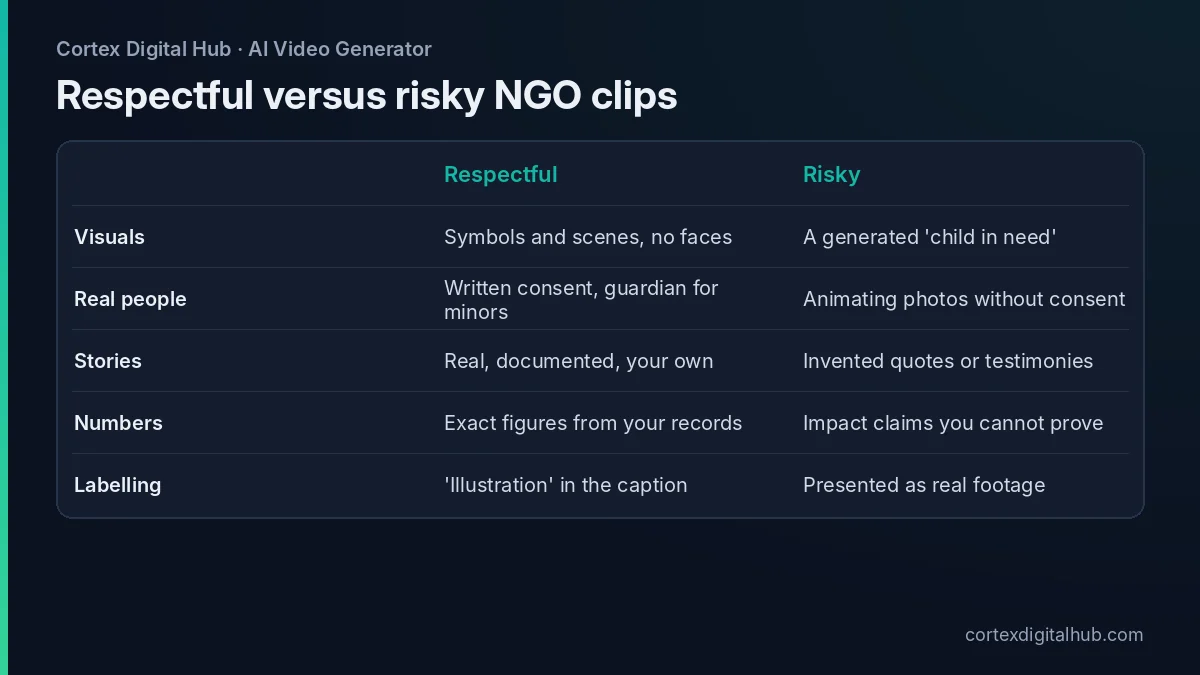 Illustrate with scenes and symbols, and keep real people, real stories and real numbers for what you can prove.
Which illustrative styles work for charity appeals?
Pick visuals that suggest the cause without using a real person's hardship.
- A paper-cut classroom where lamps switch on one by one
- A seedling growing through dry soil as rain begins
- A watercolour hand passing a school bag to another hand
- A stack of notebooks catching morning light
- A bowl being filled with warm food, shown close-up with no faces
Avoid clips that show distress, injury or hunger as spectacle. Respect religious symbols and community identity, and keep them in the background unless you have permission from the community.
A prompt example:
Paper-cut style classroom at dusk, small oil lamps lighting up on each desk one by one, camera slowly pulling back, warm golden light, hopeful mood, no people, no text
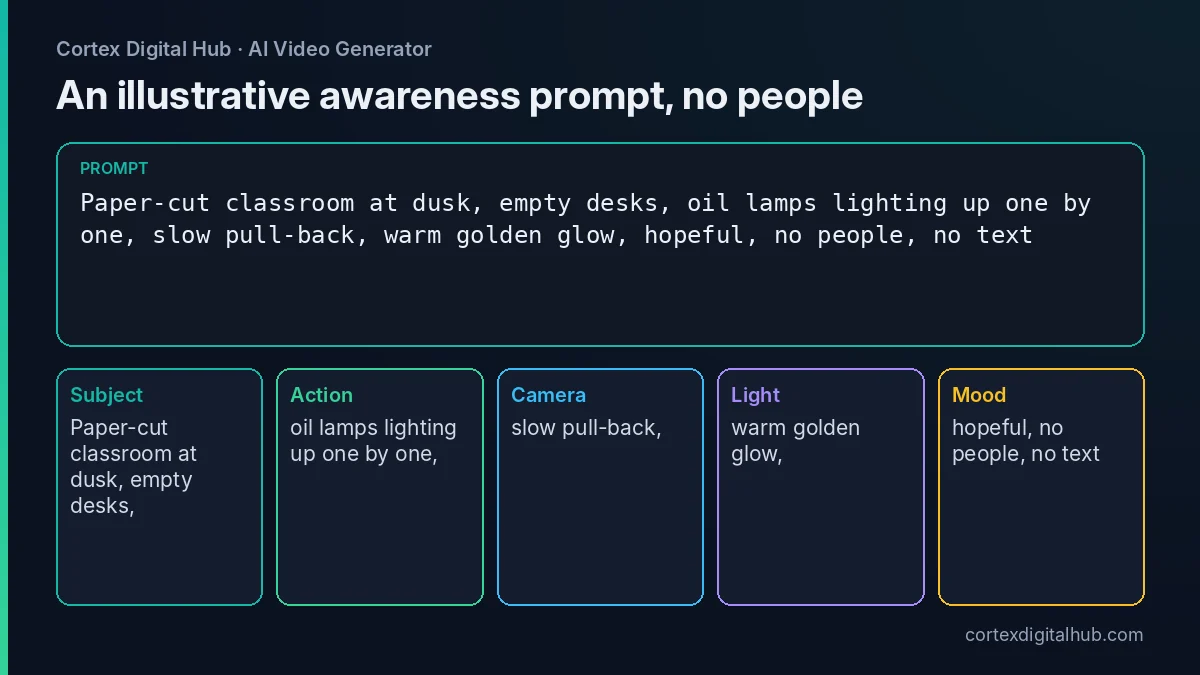 A symbolic scene with no people tells the story and protects dignity.
Our guide to text-to-video prompts that work covers the full structure. Put "faces, text, logos" in the Avoid box under Advanced.
What does an NGO awareness clip cost?
Prices are as of October 2026, at 1 credit = ₹0.50.
| Clip | Model | Cost |
|---|---|---|
| Quick test, 6 s | Nova Lite | ₹24 |
| 5 s awareness clip | Lumen Motion 3 Standard | ₹57.50 |
| 10 s appeal background | Lumen Motion 3 Standard | ₹115 |
| 5 s at 1080p for a screen | Lumen Motion 3 | ₹92.50 |
A small NGO can draft three ideas on Nova Lite for ₹72, then make one final at 10 seconds for ₹115, a total of ₹187. The ₹249 pack covers that with credits left over, and there is no subscription.
How to build the donation appeal
Keep the clip visual and the facts written by you.
- Make the clip with no text. Set Format to 9:16 for Reels and status.
- Add the headline, the amount, your organisation's name and registration details in an editor.
- Place your payment QR or link in the caption, and double-check every digit.
- Switch the sound off if you will add your own music or a voice-over.
- Compress for WhatsApp using the video compressor and the WhatsApp compression guide.
Check the shape for Reels with the Reels resizing guide. Fundraising and advertising rules differ by platform and by state, so as of 2026 check each platform's help page and take legal advice where you are unsure.
What if I want to show real photos of our work?
Real photos are valid and often the most credible proof. The line is consent and purpose. If you want to use them in a clip, follow a short routine.
- Get written consent that names the use, such as "short video for social media and fundraising". For anyone under 18, get it from a parent or guardian.
- Offer people the right to say no, and to withdraw later, without any effect on the help they receive.
- Skip animation of faces. Use real photos as still images, or show hands, tools and places instead of faces.
- Keep a record of who agreed to what, and when.
For volunteers and staff, the same applies: ask first. A cropped, resized photo from the free Image Resizer can sit beside an illustrative clip, with the caption making the difference clear: "Photo: our Pune centre, shared with consent. Clip: illustration."
How often should an NGO post video appeals?
There is no magic number, and what works depends on your audience. A steady rhythm many small teams can keep is one short clip around each awareness day, one for a fundraising milestone, and one thank-you note. Spending is easy to plan: five clips a quarter at ₹57.50 each is ₹287.50. Quality and honesty matter more than volume, because donors who trust you tend to stay.
Always close the loop. After an appeal, tell supporters what their money did, with real figures, in a short update. A transparent follow-up post builds more trust than a second emotional clip.
Key takeaways
- Use AI video for symbolic, illustrative scenes, not to invent beneficiaries.
- Get written consent for any real person, and avoid real children's faces in AI clips.
- Never fabricate testimonials, quotes or results; use only numbers you can document.
- Add donation details, QR codes and registration numbers in an editor, not in the AI clip.
- A 5-second clip costs ₹57.50 on Lumen Motion 3 Standard; tests start at ₹24.
- Say in the caption that visuals are illustrative.
Frequently asked questions
How can an NGO use AI video?
An NGO can make short illustrative clips for awareness days, donation appeals and WhatsApp updates, using symbols and scenes instead of real beneficiaries. Add your real facts, figures and registration details as text in an editor.
Is it ethical to use AI video in charity appeals?
It can be, if you are clear that visuals are illustrative, never invent a beneficiary or a testimony, and never use pictures to imply a real person's story. When in doubt, use real photos with written consent.
Can I animate photos of the people we help?
Only with clear written consent from the person, or from a parent or guardian, and with an understanding of how the clip will be used. Do not animate real children's faces. A safer path is to illustrate with objects and scenes.
What style works for NGO awareness clips?
Illustrative styles tend to work well: paper-cut, watercolour, soft animation or still-life scenes such as a school bag, a lamp or a seedling. They convey the idea without putting a real person's dignity at stake.
How much does an NGO awareness clip cost?
A 5-second clip on Lumen Motion 3 Standard costs 115 credits, or ₹57.50. A 10-second version is ₹115. Tests on Nova Lite start at ₹24. The exact total shows before you press Generate.
Should the donation appeal text be inside the AI video?
No. Add your name, registration details, amount and payment QR code in an editor so every character is accurate. Generated text can come out wrong, and a wrong account detail would be serious.
Do I have to label AI-generated visuals in fundraising videos?
It is good practice to say that scenes are illustrative. Rules on fundraising and advertising vary, so as of 2026 check each platform's help page and your local regulations or legal adviser.
Can I use AI video to make an impact claim like 'feeds 10 children'?
Only if the number is true and you can document it from your own records. Do not let a clip imply results you have not delivered. Write exact figures in the caption and keep proof ready for donors.
How do I share the video with donors on WhatsApp?
Compress the MP4 so it sends fast and stays clear. The free Video Compressor and the WhatsApp compression guide do this on your own device, with no upload to a server.