
AI Video for Salon Marketing: Reels, Hair Flow Prompts and Honest Before/After
AI video for salon marketing can turn one styled photo or a short prompt into a Reel that sells the mood of your studio. This guide covers hair-flow prompts, booking clips and a fair way to show transformations without misleading anyone.
· 5 min read · 805 views · by the Cortex Digital Hub team
Upload a styled-hair photo you own the rights to, write only the movement, and get a 5-second Reel clip with no watermark. From ₹24 a clip · no watermark · runs in your browser
Make a salon clip → → Opens AI Video Generator · runs in your browser
AI video for salon marketing works best as a mood-maker: a few seconds of flowing hair, warm mirror lights or a bridal veil that make people want to book. Use the AI Video Generator to turn a styled photo or a one-line prompt into a Reel, and keep proof of results for your real before/after posts.
What AI video can do for a salon (and what it should not)
A salon sells how you feel in the chair, and that is hard to show with a still photo. A short clip of hair moving, light catching a colour or steam rising from a head-spa towel gives the feeling in two seconds.
AI video is good at:
- Mood clips. Warm lights, mirrors, a quiet studio before opening.
- Hair movement. A slow turn, a breeze, a shine on fresh colour.
- Offer posters that move. A Diwali glow facial, a monsoon hair spa, a bridal package.
- Booking nudges. A calm clip with a caption and your WhatsApp number added in your editor.
It should not be used to invent results. A clip that makes hair look thicker, skin look clearer or a colour look more even than your work can deliver is a misleading ad, even if nobody meant it that way. Keep the AI for atmosphere and let real photos carry the proof.
How do you make hair flow in an AI video?
Start from a photo you own. A sharp, well-lit picture of a finished style, shot at the shoulders-up or half-body, gives the best result. The photo becomes the first frame, and your prompt only needs to say what moves. Our guide to animating a photo with AI shows the full flow.
Hair is easy to over-describe. Ask for one gentle movement and one camera move:
A woman with long glossy brown hair in soft waves, slowly turning her head to the left, a light breeze moving her hair, slow push-in, warm mirror lights in the background, shallow depth of field, calm and premium.
If the first result looks stiff, add words like "gently" and "soft breeze". If the hair wobbles or the face drifts, remove the extra actions and shorten the clip. Use the Avoid box under Advanced for things like "extra fingers, warped face, flickering".
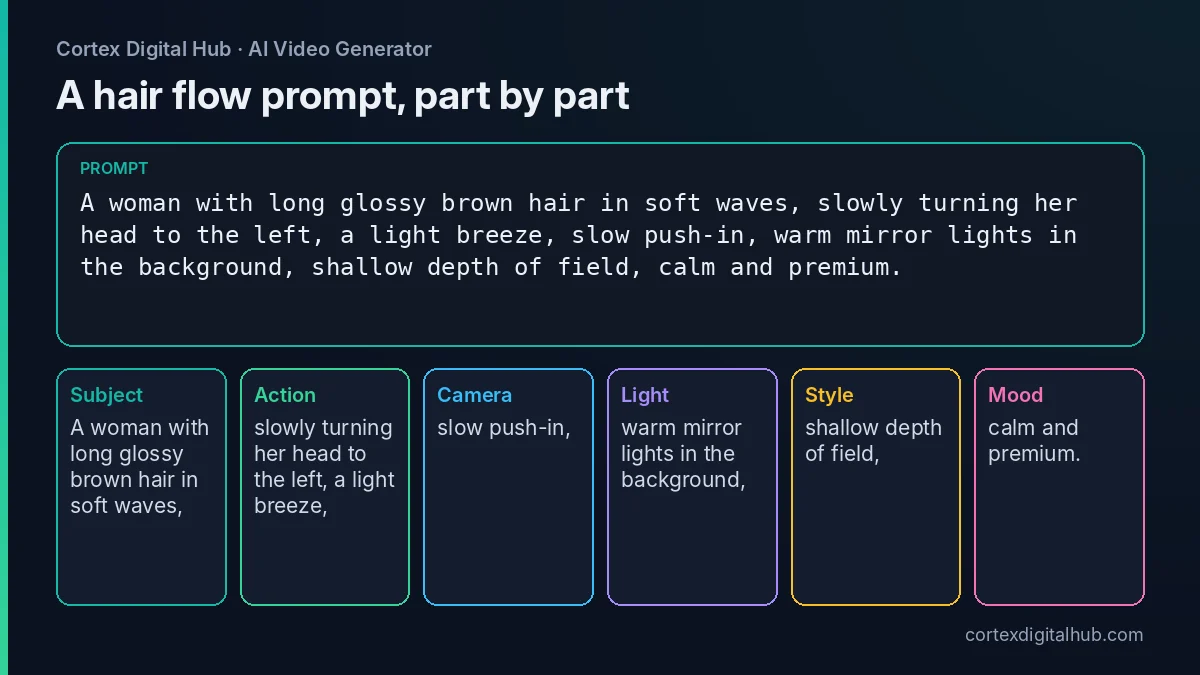
A hair-flow prompt split into the parts the model reads.
Only animate a real person's photo if they have agreed in writing to that use. Never use a child's face. A stylist who works with you, or a model who signed off, is a safe place to begin.
Which model and how much will a salon clip cost?
Start cheap and move up once the motion looks right. Credits are billed per second of finished video, 1 credit = ₹0.50, and the total shows on the Generate button before you start. Prices are as of October 2026.
| Use | Model | 5 seconds costs |
|---|---|---|
| Draft to test the idea | Nova Lite (smallest clip is 6 s) | ₹24 |
| Cheap draft, 480p | Orbit 3 | ₹35 |
| Everyday Reel clip | Lumen Motion 3 Standard | ₹57.50 |
| Sharper hero shot | Lumen Motion 3 1080p | ₹92.50 |
The ₹249 pack gives 520 credits, about four 5-second clips on Lumen Motion 3 Standard. A small studio in Pune could make a week of draft ideas and two or three finals from one pack. For a longer look at how to spend it, read our cost per clip breakdown.
Booking Reels: three clips to make this week
Say you run a unisex salon in Hyderabad and want more weekend bookings. Three short clips cover most needs.
- The mood opener. A 5-second clip of warm mirror lights and a stylist's hand holding a comb. Add "Book your slot" as text in your editor.
- The hair flow hero. One styled photo animated with a slow head turn. Use it as the cover of your Reel.
- The offer card. A calm background clip, then add your price and WhatsApp number as text.
Close-up of a stylist's hands combing glossy dark hair at a salon chair, soft warm mirror lights, slow dolly to the right, shallow depth of field, quiet studio, premium feel.
Make each clip vertical. Set Format to 9:16, keep faces towards the middle, and leave room at the bottom for your caption. When a clip is a little long, trim it with the free Trim Video tool, then check sizing with the Instagram Reels resize guide.
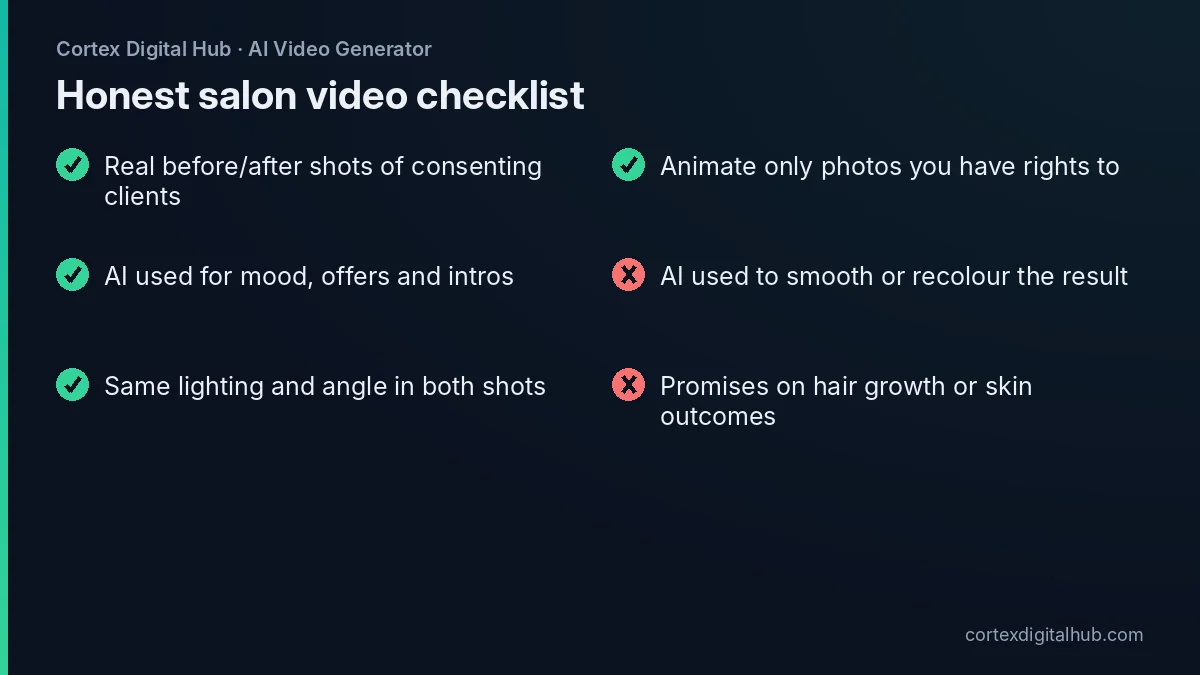
A short checklist to run before any salon clip goes live.
How to show before and after without misleading anyone
Before/after posts work because they are real. AI changes that if it touches the result. A few simple rules keep your marketing fair:
- Use real photos and video of real clients who agreed to be shown.
- Do not use AI to smooth, thicken, brighten or recolour the "after".
- Keep lighting, angle and distance the same in both shots.
- Use AI clips only for atmosphere, offers and intros, and say so if a viewer would otherwise assume it is real footage.
- Do not promise outcomes on hair growth, skin or weight. Describe the service instead.
Beauty and health claims are regulated, and platform ad policies change. As of 2026, check the platform's help page and the relevant advertising guidelines before running paid ads. When in doubt, say less.
Sound, captions and sharing
Sound models can add soft ambience and music that match the motion. If you plan to use a trending track in Instagram, turn Sound off in the generator and add the track in the app instead. For WhatsApp Status, keep clips short and compress them with the Video Compressor so they send quickly. There is more in the WhatsApp Status and business guide.
Finished MP4s stay in History for 7 days, so download the ones you want to keep.
Key takeaways
- Use AI video for salon marketing as mood and offers: hair movement, mirror lights, bridal sparkle, festive cards.
- Keep before/after posts real. Never use AI to improve a result you are showing as proof.
- Animate only photos you own, and only of people who agreed. Never use children's faces.
- Start with a ₹24 or ₹35 draft, then make the final on Lumen Motion 3 Standard at ₹57.50 for 5 seconds.
- Generate in 9:16, keep faces central, and add captions and your WhatsApp number in your editor.
- Check each platform's current ad and health-claim rules before paid promotion.
Frequently asked questions
How can a salon use AI video for marketing?
A salon can animate a styled photo into a short Reel, make ambience clips of the studio mood, and create a booking reminder for WhatsApp Status. Keep results real by showing your actual work in your own photos and video.
How much does an AI video for a salon cost?
A 5-second clip on Lumen Motion 3 Standard is 115 credits, or ₹57.50. Nova Lite costs ₹24 for its smallest 6-second clip. Credits are 1 credit = ₹0.50, and the total shows on the Generate button before you start.
Can I show before and after results with AI video?
Show real before and after photos or videos of real clients who agreed to it. Do not use AI to improve or invent a result, because that can mislead customers. Use AI clips for mood, offers and ambience, and label them as such.
What prompt makes hair look like it is flowing in AI video?
Describe the movement, not just the style: a slow turn of the head, soft breeze, hair moving gently, shallow depth of field. One subject and one camera move per clip keeps the hair stable and the result more natural.
Can I animate a photo of a client or model?
Only with their clear consent, and only for the use they agreed to. Never animate a real person's face without permission, and do not use children's faces. A photo of your own stylist or a model who signed off is the safest start.
What aspect ratio should a salon Reel be?
Use 9:16 vertical for Reels, Stories and WhatsApp Status. Set Format before you generate so the hair and face are framed for a phone. Keep the face towards the middle so app buttons do not cover it.
Should I keep the sound on for a salon AI video?
Sound models can add ambience, such as soft studio sounds and music that match the motion. If you plan to add a trending track in your editor, turn Sound off in the generator and add the audio there instead.
Is it okay to use AI video for bridal makeup ads?
Yes for mood and festive offers, such as lights, veils, bangles and rose petals. Do not use it to promise a particular look on a bride. Show real work from consenting clients for proof, and check the platform's current ad rules.