
AI Video Lighting Prompts: Golden Hour, Softbox, Neon and 5 More Looks
The fastest way to change the mood of an AI clip is to change the light you ask for. These AI video lighting prompts cover golden hour, softbox, rim light, neon, overcast and candlelight, with the exact phrases to use and a mood table.
· 5 min read · 1.4K views · by the Cortex Digital Hub team
Paste a lighting phrase into your prompt, run a cheap draft, and compare how the same scene changes with the light. From ₹24 a clip · no watermark · runs in your browser
Try a lighting prompt → → Opens AI Video Generator · runs in your browser
The quickest way to change an AI clip is to change the light you ask for. These AI video lighting prompts give you ready phrases for six common looks, from golden hour to candlelight, and a mood table to pick one fast. Test each on a cheap draft in the AI Video Generator before you spend on a final.
Why lighting matters more than adjectives
Words like "beautiful" or "stunning" tell the model nothing. Light is specific. It sets colour, contrast, shadow and mood in one phrase, and models respond to it well.
Think of lighting as one slot in a prompt that also has a subject, an action, a camera move and a style. Our text-to-video prompt guide covers that structure. This post fills in the Light slot.
Two rules help:
- One main light per clip. "Golden hour with neon and candlelight" gives the model three moods to fight over.
- Name the direction and softness. "Soft light from the left" beats "good lighting".
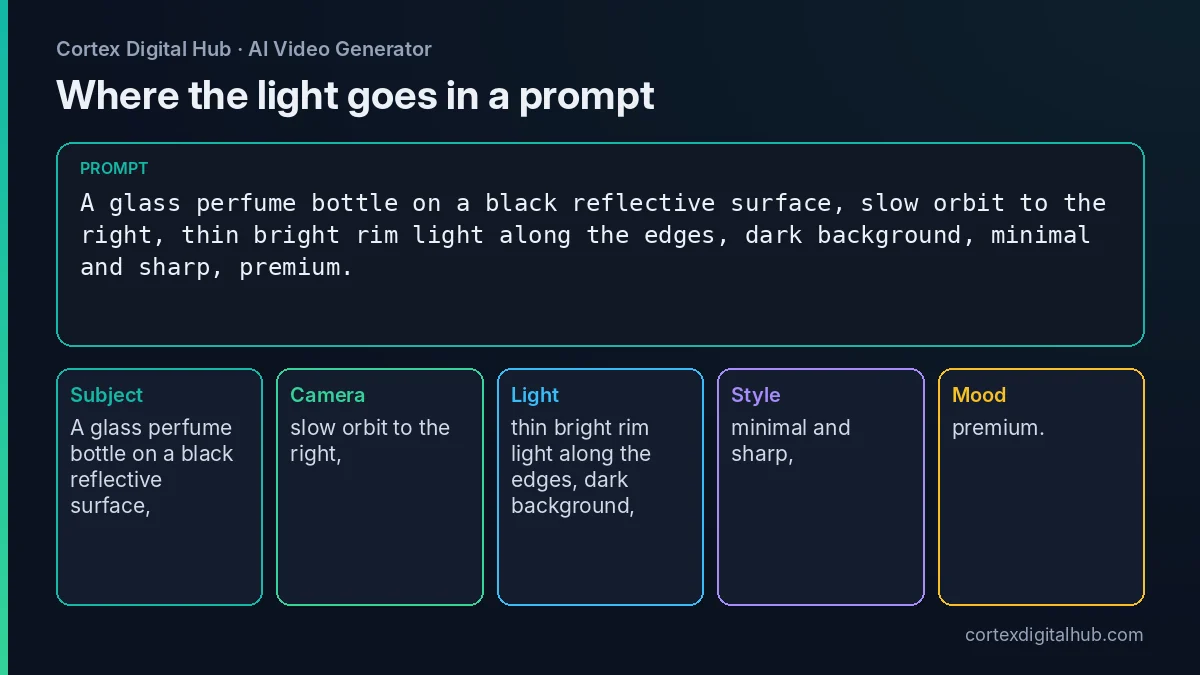
The Light slot sits beside subject, camera and mood in a working prompt.
Which AI video lighting prompts work for each look?
Here are six looks with phrases you can paste into the Light part of a prompt. Each pairs well with a tea cup, a product, a street or a portrait.
- Golden hour. "Warm low sun, long soft shadows, golden glow on the subject." Good for outdoor scenes, travel and food.
- Softbox. "Soft even studio light from a large softbox, gentle shadows, clean white background." Good for products and catalogue clips.
- Rim light. "Thin bright rim light along the edges, dark background." Good for jewellery, bottles and dramatic portraits.
- Neon. "Pink and blue neon glow reflecting on wet pavement, dark night." Good for city nights, gaming and music clips.
- Overcast. "Soft diffused daylight under an overcast sky, muted colours, no hard shadows." Good for calm, realistic outdoor scenes.
- Candlelight. "Warm flickering candlelight, deep shadows, glowing amber tones." Good for festive diyas, dinner scenes and jewellery.
Extra useful ones: "soft window light from the left" for homely scenes, "blue hour dusk" for the minutes after sunset, and "backlit with a hazy glow" for hair, steam and smoke.
A mood table to choose by feeling
Start with the feeling you want, then pick the light.
| Mood | Lighting phrase | Works well for |
|---|---|---|
| Warm and welcoming | Golden hour glow | Cafes, homestays, travel |
| Clean and trustworthy | Soft even softbox light | Products, clinics, listings |
| Premium and dramatic | Rim light on a dark background | Jewellery, perfume, watches |
| Modern and energetic | Neon glow, night | Events, gaming, fashion |
| Calm and real | Overcast diffused light | Property, nature, documentary |
| Festive and intimate | Warm candlelight, diyas | Diwali, weddings, sweets |
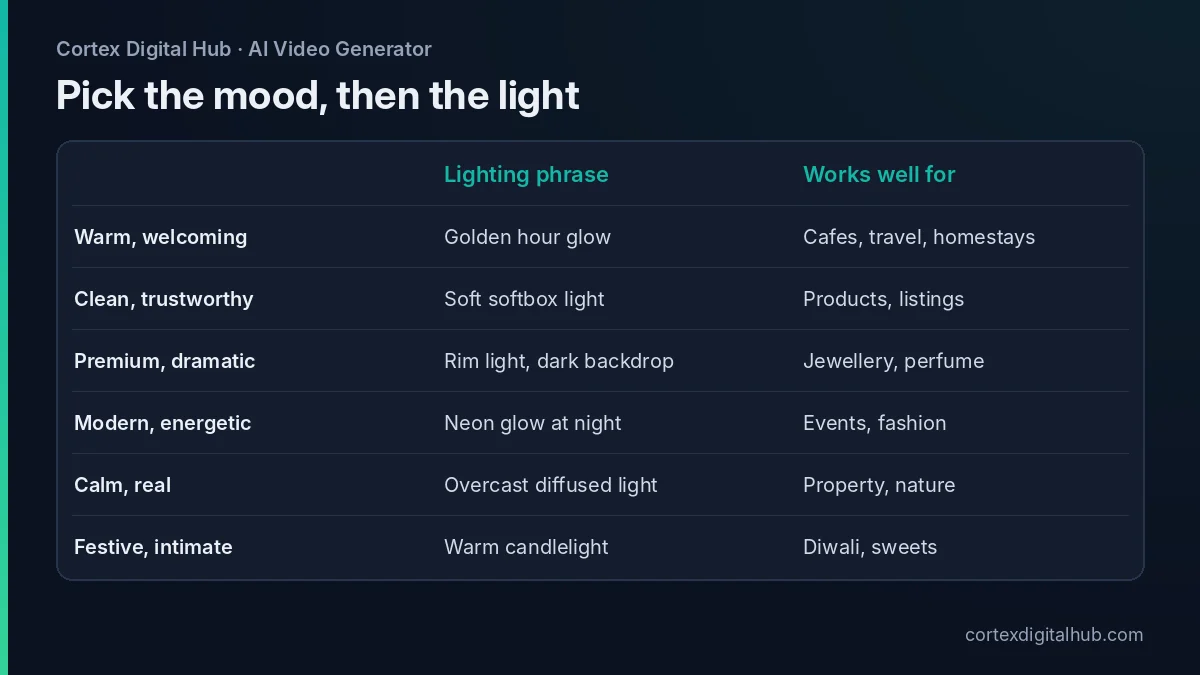
Pick the mood first and the lighting phrase follows.
Two full prompts you can copy
A product with rim light:
A glass perfume bottle on a black reflective surface, slow orbit to the right, thin bright rim light along the edges, dark background, soft glow, premium and minimal.
A street scene with monsoon overcast:
A chai stall on a Mumbai street in light rain, slow push-in, soft diffused overcast light, wet road reflections, steam rising from the glasses, muted warm colours.
Notice that each has one subject, one camera move and one light. If you also want to change the camera, use the presets, which write the move into your prompt. Choose "General" for full manual control.
How do you test lighting without wasting credits?
Run the same scene with different lights and compare. Keep everything else fixed, including the seed, so the only change is the light.
- Write the base prompt without any lighting.
- Run it on Nova Lite or Orbit 3 at 480p. Nova Lite's smallest clip is 6 seconds, which is 48 credits or ₹24. Orbit 3 at 480p is 70 credits, ₹35, for 5 seconds.
- Add one lighting phrase and run again.
- Repeat for two or three looks.
- Make the final of the winner on a bigger model such as Lumen Motion 3 Standard at ₹57.50 for 5 seconds.
Credits are billed per second of finished video, 1 credit = ₹0.50, and the Generate button shows the total first. Lighting words do not change the price. If you are unsure which model to use for the final, our model guide helps.
Product clips often look best with softbox or rim light. See AI product video from one photo for a full workflow.
Matching light to the platform and the product
The same light does different jobs depending on where the clip will play. A few pairings that tend to work:
- Reels and Status: warm golden hour or candlelight feels personal and holds attention on a small screen.
- Marketplace and catalogue clips: softbox light on a plain background keeps the product accurate, so the colour a buyer sees is close to the colour they get.
- Launch and event screens: rim light or neon on a dark background reads well on a large display.
- Property and travel: overcast or soft window light looks believable and avoids over-dramatic skies.
For products where the true colour matters, such as sarees, paint swatches or jewellery, avoid coloured lights like neon. A coloured light changes how the item looks, and a buyer may feel misled when the parcel arrives. Use neutral softbox light and say "true colours" in the prompt.
If you are animating a photo, remember the photo already has its own light. Describe that light in the prompt instead of asking for a different one, and the model is less likely to flicker or shift the colours.
Fixing common lighting problems
- Too dark. Add "bright, well lit" or choose softbox or overcast light.
- Harsh shadows on a face. Switch to "soft diffused light" or "overcast".
- Flicker or pulsing. Use one light, a shorter clip and a steady camera, and add "flicker" to the Avoid box under Advanced.
- Colour cast. Add the cast you see, such as "orange tint", to Avoid, and name the colour you want in the Light slot.
- Light does not match the photo. If you use image to video, describe the light already in your photo so the model does not fight it.
Finish with the free Video Resizer if you need another aspect ratio, or the Video Compressor before sharing on WhatsApp.
Key takeaways
- Light is the quickest lever on mood. Put it in its own phrase in your prompt.
- Use one main light per clip: golden hour, softbox, rim, neon, overcast or candlelight.
- Pick the light from the feeling: warm, clean, premium, energetic, calm or festive.
- Test looks on a ₹24 to ₹35 draft with the same seed before paying for a final.
- Lighting words do not change the price, which depends on the model, length and resolution.
- If you animate a photo, describe the light already in it.
Frequently asked questions
What are the best lighting words for AI video prompts?
Reliable phrases include golden hour, soft window light, softbox light, rim light, backlight, neon glow, overcast soft light and candlelight. Pair one light with the subject and mood, and avoid stacking three or four lighting styles in one prompt.
How do I get golden hour lighting in an AI video?
Write something like warm low sun, long soft shadows, golden glow on the subject, in the Light part of your prompt. Add the time, such as just after sunrise or an hour before sunset, so the model keeps the colour warm.
What is rim light and when should I use it?
Rim light is a thin bright edge around the subject from behind. It separates the subject from a dark background and gives a premium look to products, jewellery and portraits. Add it as: soft rim light on the edges.
How do I make an AI video look like studio lighting?
Use softbox light, even lighting, clean white or grey background and gentle shadows. This suits product clips and listings. Avoid words that add drama, such as neon or fire, if you want a neutral catalogue look.
Does lighting change the cost of an AI video?
No. Credits depend on the model, length and resolution, not on the lighting words. A 5-second clip on Lumen Motion 3 Standard is ₹57.50 whatever the light, so test looks cheaply on a draft model first.
Why does my AI video flicker or change brightness?
Flicker often comes from stacking lights, moving the camera and the light at once, or an unclear scene. Use one light source, one camera move and a shorter clip. Add flicker to the Avoid box under Advanced.
Can the Avoid box fix lighting problems?
It helps. Add terms like harsh shadows, overexposed, blown highlights, flicker or colour cast to Avoid under Advanced. Pair this with a positive lighting phrase in the prompt, since a short negative alone may not fix the problem.
Should I describe the light first or last in a prompt?
Either works if the prompt is clear. A common order is subject, action, camera, light, style. Keep lighting in its own phrase so the model reads it as the mood rather than as part of the subject.