
AI Video 4K vs 1080p: Which Resolution to Choose and What Each Costs
For most phone-first clips, 1080p is the sensible ceiling, and 4K is worth paying for only on big screens or when you plan to crop. This guide compares 720p, 1080p, 2K and 4K by use, render time and the credits each one takes.
· 5 min read · 960 views · by the Cortex Digital Hub team
Pick the model and resolution, and read the exact credit total on the Generate button before you spend anything. From ₹24 a clip · no watermark · runs in your browser
Make a video → → Opens AI Video Generator · runs in your browser
For most clips, AI video 4K vs 1080p is an easy call: 1080p is enough for Reels, Shorts, WhatsApp and web pages, and 4K is worth the extra credits only for large screens or when you plan to crop in an editor. The AI Video Generator shows the exact credit total before you start, so you can compare before you commit.
What the resolution names mean
Resolution is the number of pixels in the frame. More pixels hold more detail, which matters when the picture is shown big.
| Name | Typical size (16:9) | Rough use |
|---|---|---|
| 480p | 854 x 480 | Cheap drafts and idea tests |
| 720p | 1280 x 720 | Social drafts, small previews |
| 1080p | 1920 x 1080 | Reels, Shorts, YouTube, web |
| 2K | 2560 x 1440 | Sharper hero shots, bigger monitors |
| 4K | 3840 x 2160 | LED walls, TVs, cropping room |
In a vertical 9:16 clip the same numbers flip, so 1080p is 1080 x 1920. Not every model offers every step. Nova 2K is fixed at 2K, Vela 2.0 and Pulse Fast go up to 4K, and Lumen Motion 3 offers Standard, 720p and 1080p. Open the model picker to see exactly what is on offer.
Which resolution does each platform actually show?
Phones are small, and apps recompress what you upload. A very sharp file rarely survives intact, which is why more pixels do not always look better.
- Instagram Reels, YouTube Shorts and WhatsApp Status: 1080p in 9:16 is the practical ceiling. WhatsApp also compresses video on sending.
- YouTube regular videos: 1080p is a solid default. As of 2026, YouTube can play higher resolutions if you upload them, so check its help page if you want 4K playback.
- Websites and landing pages: 720p or 1080p keeps the page light. A heavy hero clip slows loading.
- Meesho, Amazon and Flipkart listings: each marketplace sets its own video rules, so read the seller help page before deciding.
- LED walls, TVs and event screens: here 2K or 4K can help, because the picture is large and viewers stand close.
For sizing and file weight on the phone side, see our guide to resizing video for Instagram Reels and the free Video Compressor.
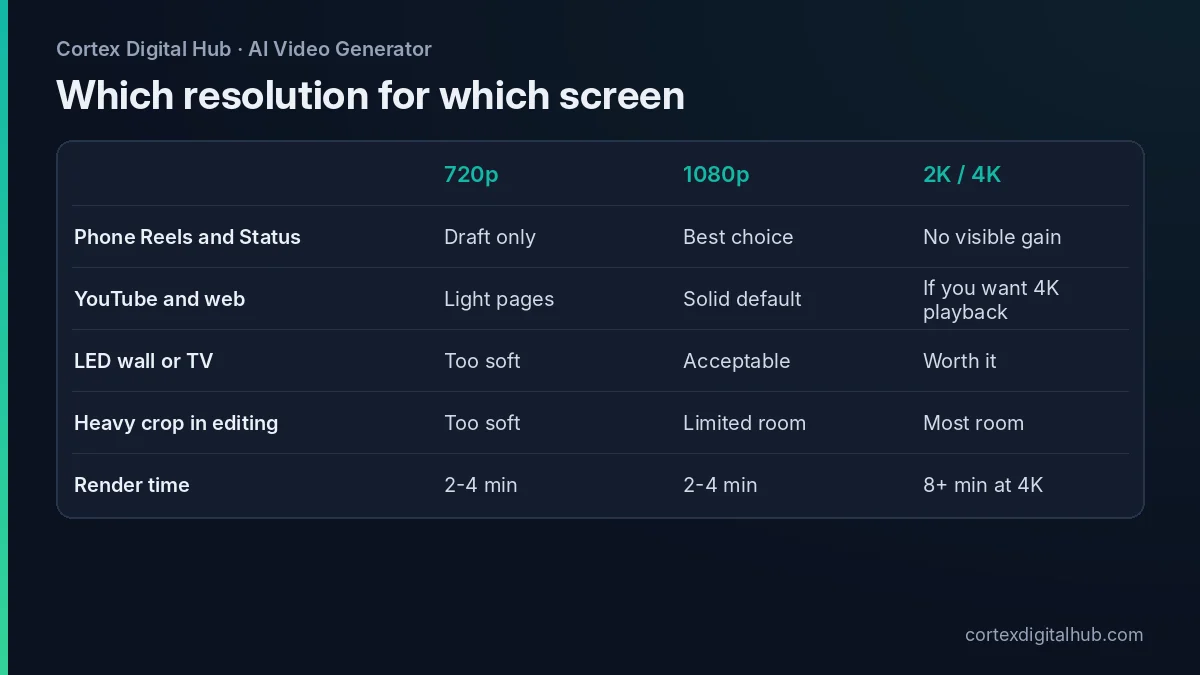
Match the resolution to the screen where the clip will be seen.
What does each AI video resolution cost?
Credits are billed per second of finished video, and 1 credit = ₹0.50. Higher resolution raises the rate, and the jump is large at the top end. Here is the same 5-second clip on two models, as of October 2026.
| Model and setting | Credits per second | 5 seconds costs |
|---|---|---|
| Lumen Motion 3 Standard | 23 | ₹57.50 |
| Lumen Motion 3 720p | 30 | ₹75 |
| Lumen Motion 3 1080p | 37 | ₹92.50 |
| Vela 2.0 480p | 53 | ₹132.50 |
| Vela 2.0 720p | 112 | ₹280 |
| Vela 2.0 1080p | 252 | ₹630 |
| Vela 2.0 4K | 575 | ₹1,437.50 |
On Vela 2.0, 4K is about 2.3 times the cost of 1080p, and more than ten times the cost of 480p. Pulse Fast follows a similar pattern, at 159 credits a second for 4K against 69 for 1080p, again about 2.3 times. Its shortest clip is 6 seconds, so a 4K Pulse Fast clip is 954 credits, or ₹477.
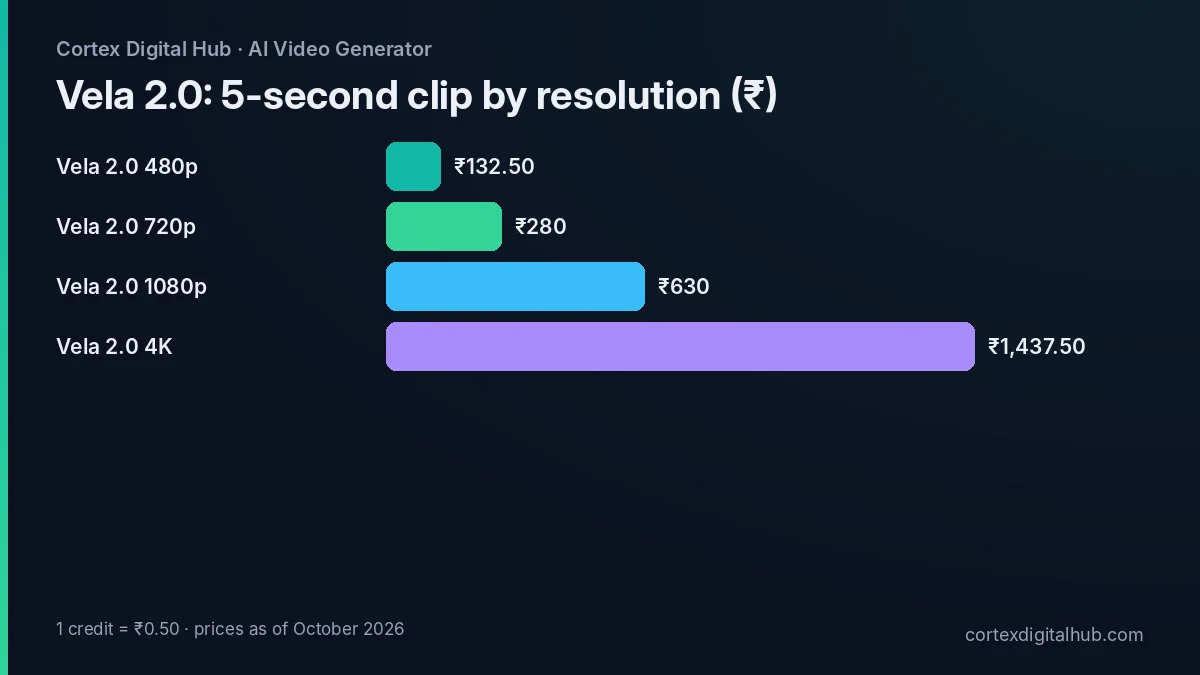
The same 5-second Vela 2.0 clip, priced at each resolution.
For a wider view of rates across models, read the cost per clip breakdown.
When is 4K worth it?
Pay for 4K when the pixels will actually be seen. Four situations qualify:
- A big screen. A launch event LED wall, a showroom TV, a hoarding preview.
- Heavy cropping. If you will cut a vertical 9:16 version out of a 16:9 frame, 4K leaves about 1215 x 2160 pixels to work with, which is still sharp. A 1080p source would leave about 608 x 1080.
- Slow zooms in the edit. Punching in on a 4K frame holds up better than on 1080p.
- A final master. You keep one 4K clip for the archive and export smaller copies.
For everything else, a 1080p final is sensible. A bakery in Pune making a Reel, or a real estate agent in Hyderabad posting a WhatsApp broadcast, gains nothing visible from 4K and pays more credits and more waiting time.
How to test without wasting money
Resolution only polishes a clip that already works. Test in this order:
- Write the prompt and run a draft on Nova Lite (₹24 for its smallest 6-second clip) or Orbit 3 at 480p (₹35 for 5 seconds).
- Fix the motion, framing and light on that draft.
- Run the final at 1080p on the model that suits the job.
- Only if the screen needs it, run a 4K version of the same prompt on a model that offers it.
Use the same Seed if you want to compare like with like, and keep the prompt unchanged. Not sure which model to start with? Our model guide explains the choices.
Remember render time. 5 to 10 seconds at 1080p usually takes 2 to 4 minutes, while 4K and 30-second clips can take 8 minutes or more. You can leave the page, and finished MP4s stay in History for 7 days.
File size, delivery and what happens after you download
A higher resolution makes a heavier file. A 4K MP4 can be several times larger than the 1080p version of the same clip, which matters when the clip has to travel over mobile data or WhatsApp. WhatsApp compresses video when you send it, so a 4K file sent to a customer is shrunk anyway, and you spend credits for detail that never arrives.
A practical delivery plan for a small business:
- Keep one high-quality master of the final clip, at the highest resolution you paid for.
- Export a 1080p copy for Reels, Shorts and your website.
- Make a small copy for WhatsApp with the free Video Compressor, or follow the guide to compressing video for WhatsApp.
- Use the free Video Converter if a platform wants a different container, such as MP4 instead of MOV.
Download your finals from History within 7 days, because the MP4s do not stay there longer. If you spent on 4K for a screen at an event, keep that file somewhere safe and send the lighter copies to everyone else.
Key takeaways
- 1080p is the practical choice for Reels, Shorts, WhatsApp, YouTube and web pages.
- 4K is for big screens, heavy cropping, slow zooms and archive masters.
- On Vela 2.0, 4K costs 575 credits a second against 252 at 1080p, about 2.3 times more.
- Draft at 480p or on Nova Lite, fix the motion, then spend on resolution.
- Resolution does not repair bad motion. Change the prompt or the model for that.
- Apps and WhatsApp recompress uploads, so check each platform's help page for current limits.
Frequently asked questions
Is 4K better than 1080p for AI video?
4K has more pixels, so it can look sharper on a large screen and gives room to crop. On a phone, 1080p usually looks the same to most viewers. It also costs more and renders slower, so use 4K only when the screen or the edit needs it.
How much more does 4K cost than 1080p?
It depends on the model. On Vela 2.0 the rate is 575 credits per second at 4K against 252 at 1080p, about 2.3 times more. For 5 seconds that is ₹1,437.50 against ₹630. Prices are as of October 2026.
Which AI video models support 4K?
On the site, Vela 2.0 and Pulse Fast offer 4K. Nova 2K and Pulse Fast offer 2K. Most other models top out at 1080p or lower. Open the model picker to see the current resolutions and the credit rate for each.
What resolution should I use for Instagram Reels?
1080p in 9:16 (1080 x 1920) is a safe choice. Apps recompress uploads, so a heavier 4K file rarely shows a visible gain on a phone. Check Instagram's help page for the current recommendation before you finalise.
Is 720p good enough for WhatsApp Status?
For many clips, yes. WhatsApp compresses video when you send it, and phone screens are small. Draft at 720p or lower to save credits, then make the final at 1080p if the shot has fine detail like text or jewellery.
How long does a 4K AI video take to render?
Usually 2 to 4 minutes for 5 to 10 seconds at 1080p, while 4K and 30-second clips can take 8 minutes or more. You can leave the page, and in-progress clips finish and appear in History.
Does a higher resolution make the motion better?
No. Resolution adds pixels, not better movement. If the motion is wrong, change the prompt or the model. Test the idea on a cheap, low-resolution draft first, and spend on resolution only once the motion works.
Can I upscale a 1080p AI video to 4K later?
Editing software can resize the file to a 4K frame, but it cannot add real detail that was never generated. For true 4K sharpness, generate on a model that offers 4K. Compare quality on a short test first.