
AI video shot types: wide, medium, close-up, macro, POV and over-the-shoulder
Shot type tells the model how big your subject is in the frame, and it changes the whole feel of a clip. Here are six shot types, the exact words to put in a prompt for each, and when to use them for Reels, ads and product videos.
· 5 min read · 761 views · by the Cortex Digital Hub team
Pick one shot type per clip, write it as the first words of your prompt, and compare a wide and a close-up of the same subject. From ₹24 a clip · no watermark · runs in your browser
Try a shot type → → Opens AI Video Generator · runs in your browser
AI video shot types are the same ones a film crew uses: wide, medium, close-up, macro, point of view and over-the-shoulder. Each tells the model how big your subject sits in the frame and from where the viewer watches. Put one shot type at the start of your prompt in the AI Video Generator, then add the subject, one movement and the light. That alone makes clips look planned instead of random.
Why do AI video shot types matter?
A model fills in whatever you leave out. If you write "a bowl of biryani", it picks the distance, the angle and the move for you. Sometimes that works. More often you get a medium-wide shot with the food too small to look tempting.
Naming the shot fixes the biggest unknown: how much of the frame the subject fills. It also helps you plan a set of clips. A 15-second Reel usually needs a wide shot to set the place, a medium shot for the action and a close-up for the detail. Three prompts, three clips, one story. For the wider prompt method, see text to video prompts that work.
The six shot types and the words to use
| Shot type | What the viewer sees | Prompt wording | Good for |
|---|---|---|---|
| Wide / establishing | Subject small, place visible | wide shot of, establishing shot |
Hotels, streets, plots, launches |
| Medium | Waist up, or a product with context | medium shot of |
People at work, shop counters |
| Close-up | Face, hands or a product fills the frame | close-up of, tight framing |
Food, jewellery, expressions |
| Macro | Tiny detail, huge | macro shot of, extreme close-up |
Texture, drops, fabric, spices |
| POV | Through the viewer's eyes | point of view shot, first-person |
Walkthroughs, travel, unboxing |
| Over-the-shoulder | Behind one person, looking at another | over-the-shoulder shot |
Conversations, shop dialogue |
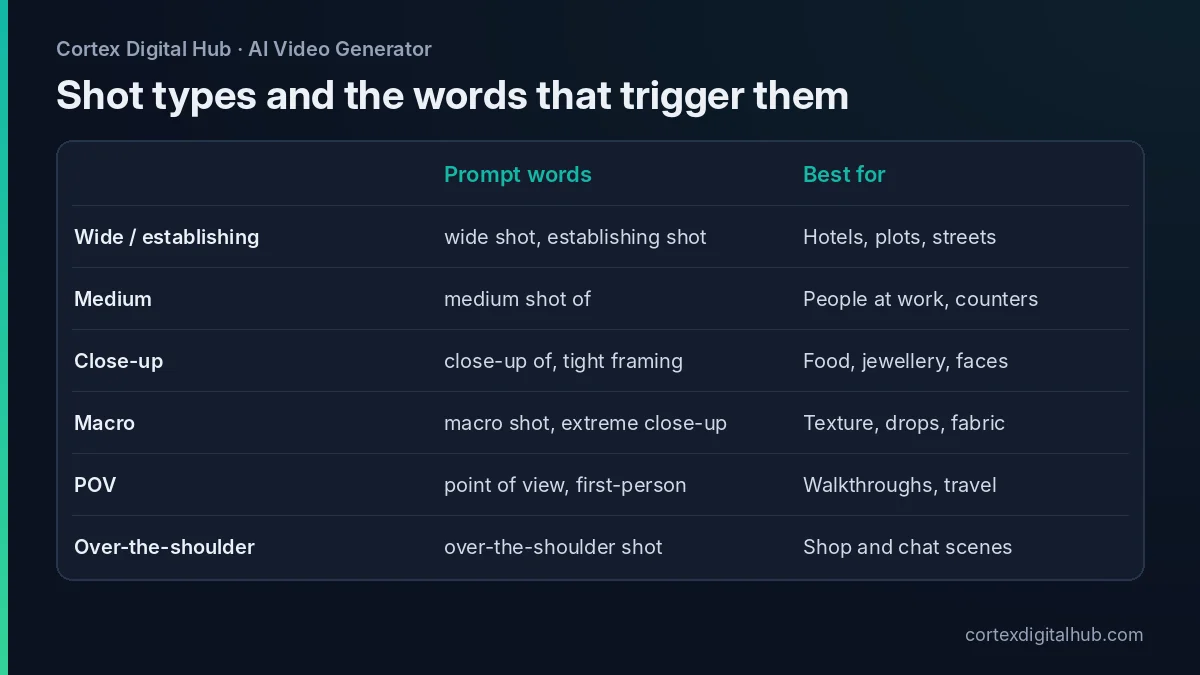 Six shot types and the words to start your prompt with.
What does each shot do in a prompt?
Wide shot. Use it first in a sequence. Try: Wide shot of a hill-station resort at sunrise, mist over the valley, slow drift to the right. Keep the subject simple, since small details at wide scale can look soft.
Medium shot. The workhorse for people and products. Medium shot of a potter shaping a clay pot on a wheel, hands steady, warm workshop light, static camera. Use an illustrated or invented person; never a real person's face without consent.
Close-up. Strong for food and jewellery. Close-up of a gold jhumka swinging slightly, soft window light, shallow depth of field.
Macro. Think of texture. Macro shot of cardamom pods being crushed, dust floating in a shaft of light, slow motion.
POV. Good when you want the viewer to feel they are walking in. Point of view shot walking through the lobby of a new apartment tower, bright daylight, steady camera. For homes, see AI video for real estate marketing.
Over-the-shoulder. Useful for conversation or a counter scene. Over-the-shoulder shot from behind a shopkeeper, handing a packet to a customer, shallow focus on the packet. Keep faces turned away or invented to avoid odd results at the edges.
Which shot type fits which job?
- Product ad for Meesho or Instagram: close-up first, then macro for texture. AI product video from one photo covers the photo side.
- Hotel or property: wide, then medium, then one detail close-up.
- Cafe Reel: macro of the pour, close-up of the cup, wide of the room.
- Tutorial or explainer: medium shot with a static camera.
- Travel or street food: POV for energy.
One shot type per clip is the safest rule. Mixing "wide shot" and "extreme close-up" in one sentence confuses most models. Some models, such as Lumen Motion 3, can handle multi-shot clips. If you try it, write the sequence plainly ("wide shot, then close-up") and check the result.
Can I combine shot type with camera moves?
Yes, and this is where the clip comes alive. Shot type is size; camera move is movement. A wide shot with a slow push-in feels like arrival. A close-up with a slow orbit makes a product feel 3D. A macro with a tiny drift feels precise.
The Camera menu and effect presets write the move into your prompt for you. The "General" preset is full manual. Keep it to one camera move per clip. If the subject also moves, keep both slow.
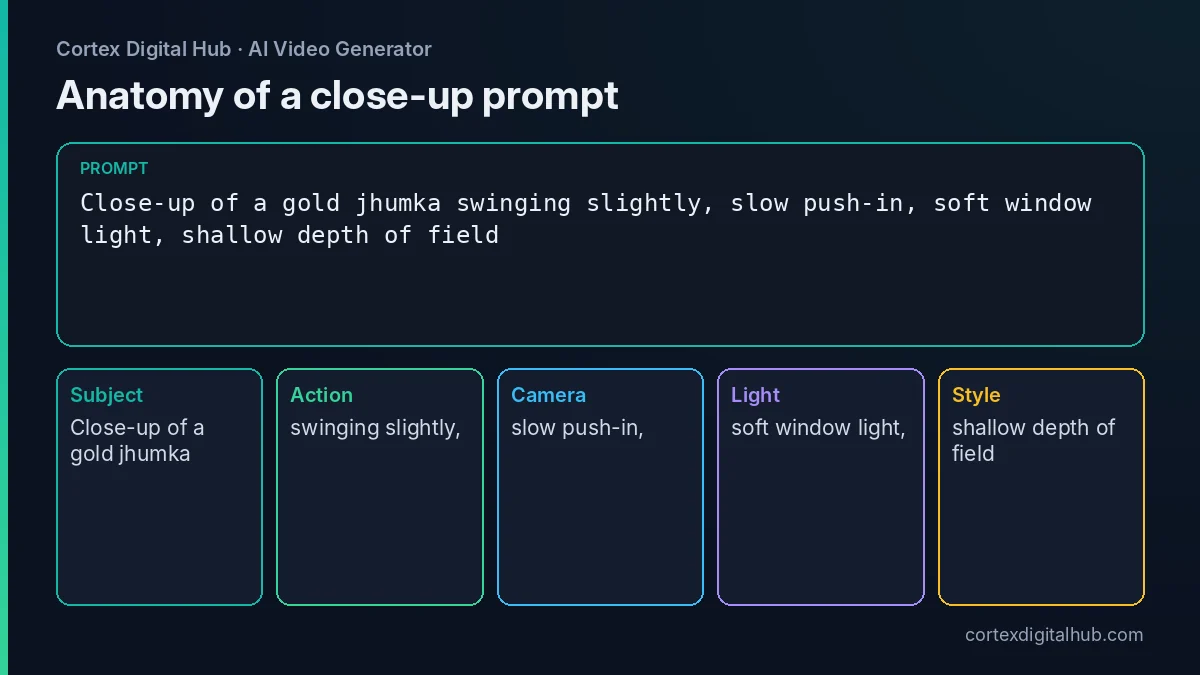 A close-up prompt broken into parts you can swap.
Common shot type mistakes
- Asking for a close-up of something too big. "Close-up of the whole building" is a contradiction. Say "wide shot" for the building and "close-up of the entrance door" for the detail.
- Burying the shot type. If the prompt starts with three adjectives about mood and ends with "close-up", the framing gets lost. Put it first.
- Too many subjects. A medium shot of "a family, a dog, a cake and a drone" has no clear centre. One subject, one action.
- Forgetting the aspect ratio. A wide shot looks right in 16:9 but loses its sides in 9:16. For Reels, set Format to 9:16 before you generate and favour medium and close-up shots, which fill a tall frame better.
- No Avoid line. If the model keeps giving you a wide shot, add "distant, small subject" under Avoid in Advanced settings, and tighten the framing words.
How much does testing shot types cost?
Cost does not change with framing. A 5-second clip on Lumen Motion 3 Standard is 115 credits, or ₹57.50. On Orbit 3 at 480p it is 70 credits, or ₹35. On Nova Lite the smallest clip is 6 seconds at 48 credits, or ₹24.
A good way to learn: write one subject, say a cup of filter coffee, and generate it three ways on Nova Lite: wide, close-up, macro. That is 3 × ₹24 = ₹72. Pick the winner and make the final on Lumen Motion 3. Budgets across models are in AI video generator price in India.
Finish in free tools: cut dead frames with Trim Video, and match the platform with the Video Resizer.
Key takeaways
- Shot type controls how large the subject is, so name it first in the prompt.
- The six to learn: wide, medium, close-up, macro, POV and over-the-shoulder.
- Use one shot type and one camera move per clip, and join clips in an editor.
- Wide to medium to close-up is a reliable three-clip story for a Reel.
- Framing does not change the price; test shot types on cheap models first.
- Keep people invented or illustrated unless you hold written consent.
Frequently asked questions
What are the main shot types in AI video?
The common ones are wide or establishing, medium, close-up, extreme close-up or macro, point of view (POV), and over-the-shoulder. Each describes how large the subject appears and from where we watch. Name one shot type per clip at the start of your prompt.
How do I get a close-up in an AI video prompt?
Start the prompt with the subject and the words close-up, for example, close-up of a hand pouring chai into a glass. Add the one thing that moves and one camera move. If the framing is too wide, say tight framing, face fills the frame.
What is the difference between a wide shot and an establishing shot?
A wide shot shows the subject small inside a large space. An establishing shot is a wide shot used at the start of a scene to show where we are, such as a street, a hotel or a building. In a prompt, they work the same way.
Can an AI video model make a POV shot?
Yes, usually. Write point of view, first-person view, followed by what the viewer sees, such as hands holding a phone or walking down a lane. Avoid asking to see the person's own face, as a POV shot has no visible camera holder.
What is a macro shot and when should I use it?
A macro shot is an extreme close-up of tiny detail, such as a water droplet on a leaf, coffee crema or thread on a handloom. Use it for texture, food and craft. Add shallow depth of field and a slow, small camera move.
Why does my AI video ignore the shot type I wrote?
Usually the prompt says too much, or two shot types clash, such as wide and extreme close-up. Keep one shot type, put it first, remove extra adjectives and try an Avoid line for the framing you do not want.
How many shot types can I put in one AI clip?
One is the safest. Some models, such as Lumen Motion 3, can make multi-shot clips, but ask for a sequence in plain words, for example, wide shot, then close-up, and check the result. For full control, make separate clips and cut them together.
Do shot types change the cost of an AI video?
No. Cost depends on the model, length and resolution, not the framing. A 5-second clip on Lumen Motion 3 Standard is 115 credits, which is ₹57.50, whether it is a wide shot or a close-up.