
CSIR NET December 2026: photo and signature mistakes before 5 Nov
The CSIR NET December 2026 form closes on 5 November, and most last-minute trouble comes from the uploads, not the questions. Here are the exact photo, signature and PDF limits from the NTA bulletin, the mistakes that waste an evening, and how to fix each file on your phone without sending it anywhere.
· 5 min read · 1K views · by the Cortex Digital Hub team
Choose To a file size, type a target inside the CSIR NET band (say 120 KB for the photo or 30 KB for the signature) and download a JPG that fits, without the file leaving your phone. Free · exact KB target · no upload
Fit the photo to the KB band → → Opens Image Compressor · runs in your browser
The Joint CSIR-UGC NET December 2026 form closes at 11:50 pm on 5 November, and the questions people ask in the final week are almost never about eligibility. They are about a photo the portal will not take, a signature that is 6 KB too small, or a caste certificate PDF that weighs 2 MB. This post walks through the common csir net photo mistakes, the exact limits from the NTA bulletin, and a fix for each one that works on a phone. Every tool linked here runs in your browser, so your photo and certificates are never uploaded to us.
The CSIR NET December 2026 upload limits
These figures are from the Joint CSIR-UGC NET December 2026 information bulletin dated 7 October 2026, published on csirnet.nta.nic.in. They apply to this cycle only; check the June 2027 bulletin when it comes, because NTA revises its bulletins every session.
| Item | Format | Size in KB | Dimensions | Notes |
|---|---|---|---|---|
| Photograph | JPG / JPEG | 10–200 | not prescribed | Colour, recent, about 80% face with ears, no mask, white background |
| Live photo | captured in the form | — | — | Webcam or phone camera; light background, good light, 80% face visible |
| Signature | JPG / JPEG | 10–50 | not prescribed | Clearly legible |
| Category certificate | 50–300 | — | Annexure XII, XIII or XIV, if applicable | |
| Result-awaited form | 50–300 | — | Annexure XI, if applicable | |
| PwD / UDID certificate | 50–300 | — | If applicable | |
| Identity proof | JPG / JPEG | 10–200 | — | Only if you did not verify with Aadhaar or DigiLocker |
Dates from the same bulletin: late fee window 6 to 9 November, correction window 10 to 12 November, exam on 19, 22 and 27 December 2026 (tentative).
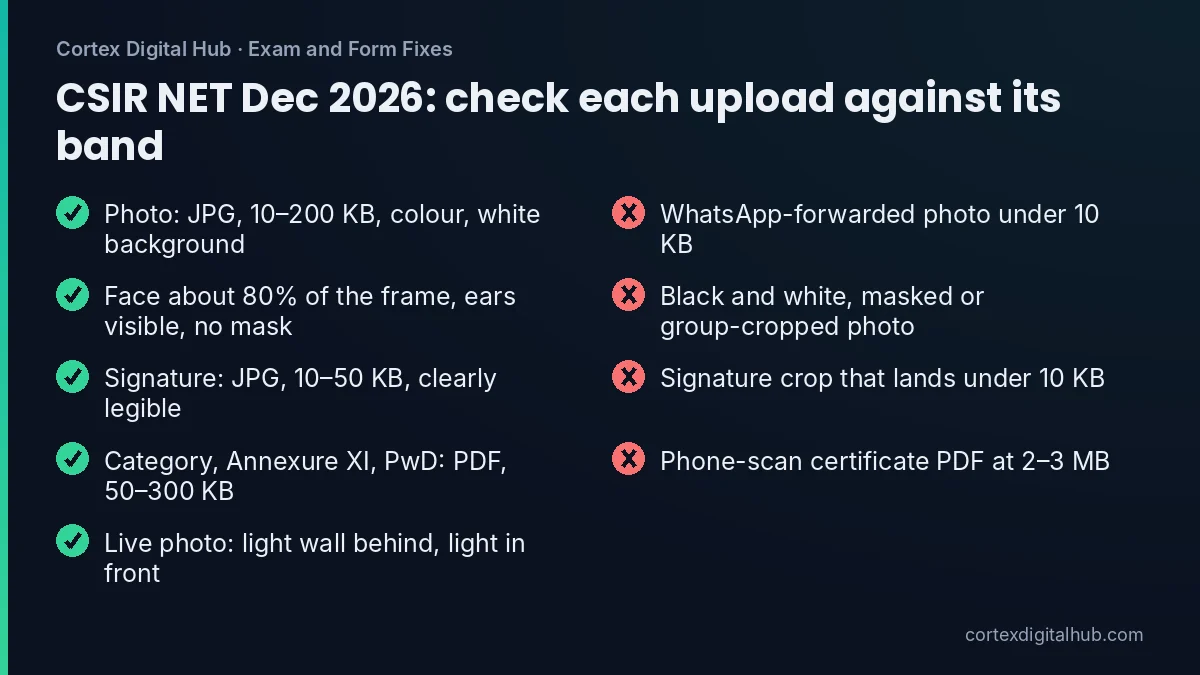 Seven uploads at most, three different KB bands. Check each file against its own band.
Mistake 1: the photo is outside 10 to 200 KB
The ceiling is generous, so most people assume any photo will do. Then a phone photo arrives at 3 MB, or a WhatsApp-forwarded studio photo arrives at 7 KB. Both fail.
The fix for a large photo: open the Image Compressor, choose To a file size and type 120. It searches for the best quality that fits under 120 KB and only shrinks the pixels if it has to. The fix for a tiny photo is different. A compressor cannot add detail that is not there, so go back to the original file from the studio or your camera roll. If the original is an iPhone HEIC, convert it first with HEIC to JPG.
Mistake 2: the photo breaks the content rules
NTA's rule is specific: colour, about 80% of the frame is your face, both ears visible, no mask, white background. Common failures are a full-length selfie with the face taking a quarter of the frame, a cropped group photo, a dark or patterned wall, and a black and white print.
Crop first, compress second. The passport size resizer crops to the 35 × 45 mm proportion (413 × 531 px), which keeps the head and shoulders filling the frame. If the wall behind you is coloured, Remove Background can put a plain white colour behind you, all on your device. Then compress to your KB target.
Mistake 3: the signature is too small or too faint
The signature band is 10 to 50 KB. A tight crop of black ink on white paper compresses so well that it often lands under 10 KB at normal settings, which the portal rejects. If that happens, do not upscale a tiny crop. Photograph the signature again, closer and in daylight, so the crop is several hundred pixels wide, then compress with a target of 30 KB. If the ink looks grey, raise contrast in the photo editor before you compress.
Mistake 4: the certificate PDF misses the 50 to 300 KB band
The PDF floor catches people out more than the ceiling. A clean text certificate exported from a website can be 30 KB; a phone scan can be 3 MB.
If the PDF is too big, the Compress PDF tool's To a size option steps through stronger settings until the file fits; type 250. If it is under 50 KB, compression will not help. Rebuild the PDF from a clear photo of the certificate with JPG to PDF at High quality, which usually lands well above 50 KB, then compress it to 250 KB if it overshoots. Our post on reducing PDF size without losing quality explains why scanned PDFs behave so differently from text PDFs.
Mistake 5: rushing the live photo
The December 2026 bulletin asks for a live photograph during form filling, in addition to the uploaded one. You switch on the camera or connect a webcam; if your device has no webcam, the form shows a QR code you can scan with a phone. The bulletin asks for a light-coloured background, proper lighting and 80% of your face visible.
Before you click capture:
- Sit facing a window or a bright lamp, not with the light behind you.
- Use a plain light wall, with no door frame, shelf or person behind you.
- Hold the phone at eye level, one arm's length away, and look straight at it.
- Remove your mask and cap, and push hair back so both ears show.
NTA also says it may verify candidates' photographs and advises keeping your Aadhaar photo current for verification at the exam centre, so the live photo and your appearance on exam day should agree.
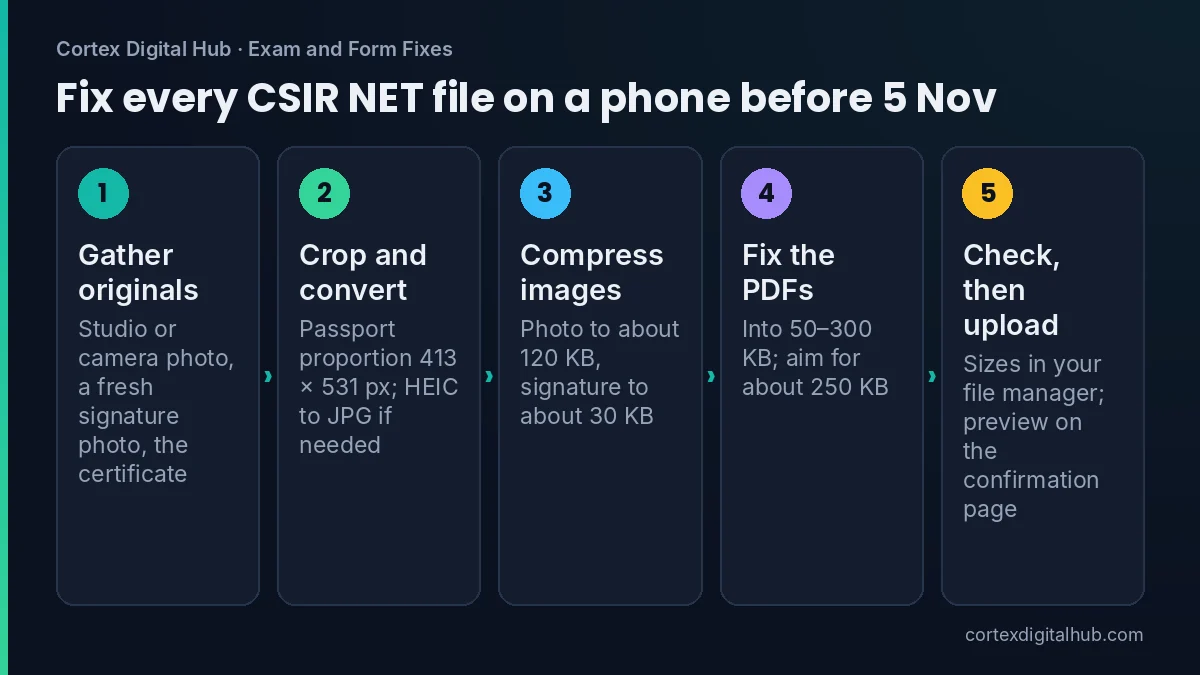 Crop, convert, compress, check, upload. In that order.
A ten-minute fix for all the CSIR NET photo mistakes
- Put the original photo, a fresh signature photo and the certificate in one folder on your phone.
- Crop the photo to passport proportion and convert HEIC to JPG if needed.
- Compress the photo to about 120 KB and the signature to about 30 KB.
- Bring each PDF into 50 to 300 KB, aiming for about 250 KB.
- Check each file's size in your file manager before you upload.
Aiming for the middle of each band, not the edge, protects you if the portal counts a kilobyte slightly differently from your phone. The resize photo to 20 KB guide has more tips for files that refuse to shrink cleanly.
After you submit
Download the confirmation page and look at the photo and signature on it. If they show up blank or stretched, raise it with the NTA helpline listed on csirnet.nta.nic.in straight away; the correction window from 10 to 12 November opens only the fields NTA lists at that time, so do not count on it for images. Keep the final files together; the same photo should be on your admit card, and the exam centre will compare it with your face and your ID.
Frequently asked questions
What is the CSIR NET December 2026 photo size?
The bulletin asks for a recent passport-size colour photo in JPG or JPEG, between 10 KB and 200 KB, with about 80% of the frame showing your face including ears, no mask, against a white background. It does not prescribe pixel dimensions.
What is the CSIR NET signature size?
A JPG or JPEG between 10 KB and 50 KB, clearly legible. Sign on plain white paper with a dark pen and crop close to the ink before you reduce the file size.
Which PDFs does CSIR NET ask for and what size?
If they apply to you: the category certificate (Annexure XII, XIII or XIV), the result-awaited attestation form (Annexure XI) and the PwD or UDID certificate. Each must be a PDF between 50 KB and 300 KB.
Do I still need to upload a photo if there is a live photo step?
Yes. The December 2026 bulletin asks for both: a scanned passport-size photo upload and a live photo captured through your camera or webcam while filling the form. If your device has no webcam, you can scan a QR code with a phone.
My photo is 8 KB. Why is it rejected when the limit is 200 KB?
Because the band has a floor of 10 KB as well as a ceiling. Files forwarded on WhatsApp or crushed by an aggressive compressor often drop below the floor. Start again from the original photo and aim for the middle of the band.
Can I fix my photo in the correction window?
The correction window runs from 10 to 12 November 2026. NTA opens only the fields it lists when the window goes live, so do not plan on changing the photo then. Get it right before 5 November.
When is the CSIR NET December 2026 exam?
The bulletin lists 19, 22 and 27 December 2026 as tentative exam dates. The city slip and admit card dates are to be announced on csirnet.nta.nic.in.
Fit the photo to the KB band → →