
Diwali offer email your customers will open, step by step
A plain Happy Diwali email gets ignored or lands in spam. Turn your offer creative into a ready email with real buttons, clean the list first, send only to people who asked to hear from you, and time it around Dhanteras.
· 5 min read · 973 views · by the Cortex Digital Hub team
Drop in your offer creative. It is cut into seamless strips, given Call and WhatsApp buttons, tracked links and a footer, and exported as email-ready HTML. Free · nothing uploaded · send yourself a test after a free sign-in
Build your Diwali email → → Opens Email Composer · runs in your browser
Most shops and small businesses with a customer list do the same thing at Diwali: a plain email that says "Happy Diwali" with a forwarded card pasted in. It gets a glance at best. Often it goes straight to the promotions tab or the spam folder, and the customer who would have bought a gift box never sees it. A diwali offer email works when it looks like your shop, says what the offer is in the first line, gives one clear thing to do, and goes only to people who asked to hear from you.
Why the plain Happy Diwali email gets ignored
Three things go wrong, usually together.
- It says nothing new. Every brand sends "Happy Diwali" the same week. A subject with no offer and no name of your shop gives nobody a reason to open it.
- It is one big picture. An email that is only an image shows up blank when images are blocked, and filters treat it as more likely to be promotional or spam.
- The list is tired. Old addresses, typos like gmail.co, and people who never agreed to emails all lead to bounces and spam complaints, which hurt every email you send after.
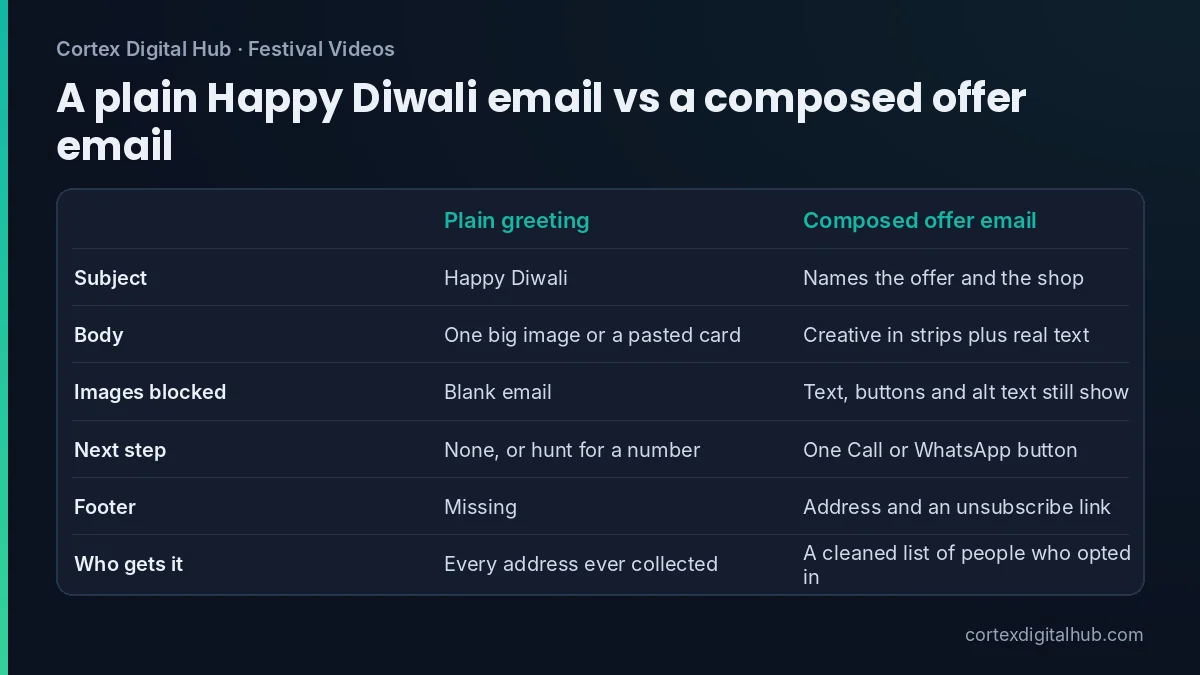 Same creative, same customers. The difference is text, one button, a footer and a clean list.
Step 1: clean the list before the Diwali offer email goes out
Open the free Email List Cleaner and paste your list, or drop the CSV you exported from your billing software or LMS. It runs in your browser, so the list never leaves your computer.
- Typos such as gmial.com and gmail.co are fixed.
- Duplicates, invalid addresses and throwaway inboxes are taken out.
- Role addresses like info@ and sales@ can be removed too; that switch is off by default.
- Your other columns (name, phone, city) stay as they are in the clean download.
If the list is old, an optional mailbox check marks each address as deliverable, risky or undeliverable before you send. It costs ₹3.90 per address and only the addresses are sent for it.
Then remove anyone who did not agree to hear from you. Gmail's email sender guidelines say it plainly: do not send messages to people who did not sign up to get them. A customer who gave you a phone number at the counter did not sign up for email.
Step 2: build the email from your offer creative
Open the Email Composer. It is free and nothing is uploaded.
- Drop in the creative. Your Diwali offer design as a JPG or PNG. Portrait 1080 × 1350 or 1080 × 1440 works best; resize it with the Image Resizer if needed. The composer cuts it into strips that stack with no gaps in Gmail, Outlook and phones.
- Write the message. Subject line, preheader (the grey text after the subject in the inbox), from name, and a short real-text block under the creative with the offer in words.
- Add one main button. Call, WhatsApp, a link, email or SMS are all there. Pick the one action you want most and make it the first button.
- Fill the footer. Company name, postal address, and the unsubscribe line. If nothing is linked, an Unsubscribe link is added at the end.
- Personal fields. Insert the first-name field with a fallback, and each reader sees their own name, or "there" when the name is missing.
- Test, then export. Sign in (free) and press Send test email to see it in Gmail, Outlook and on your phone. Then copy the HTML, download a ZIP, or press Create campaign to save it as a draft in Cortex Mail.
Made a Diwali reel of your shop already? Email apps do not reliably play video, so keep the creative as the picture and, if you like, add a link button to where the reel is posted. The shop offer video guide shows how to make one from a single photo, using ideas such as the product among diyas idea on the Diwali video generator.
Subject lines to copy
Name the offer and the shop. Keep it short, in sentence case, and true.
- Kaju katli boxes ready at Sri Lakshmi Sweets for Dhanteras
- Your Diwali gift boxes, packed and waiting
- Priya, our Diwali silk collection is in (the name comes from the first-name field)
- Order Diwali sweets on WhatsApp, delivered by Saturday
- Dhanteras hours: we open at 8 tomorrow
Pair each with a preheader that adds one fact, such as the last order date or the shop's area.
Step 3: what sending setup means
To send to your list, the email has to go out from your own domain (yourshop.in, not a free Gmail address), and inboxes need proof that it is really you. The sending setup page walks through it: three DKIM records, a bounce subdomain with MX and SPF records, and one DMARC record, all added where your domain is managed. It checks them live and turns them green as they start working. Your website and office email keep working as before.
You can send through your own Amazon SES account or let Cortex Digital Hub send for you; the pricing page lists both. Gmail's guidelines ask senders of more than 5,000 emails a day to have DMARC and one-click unsubscribe, and it is good practice for any list.
When to send around Dhanteras and Diwali
Dhanteras is on 6 November and Diwali on 8 November this year (dates vary a little by region, so check your local calendar).
| When | What to send |
|---|---|
| 3 or 4 November | The offer email, with the last order date |
| 6 November morning | A short reminder: hours, the WhatsApp button |
| 8 November | A warm greeting, no sales pitch, or nothing |
Send in the morning, not late at night. One clear call to action per email: if the button says "Order on WhatsApp", do not add three more asking people to visit, call and follow you.
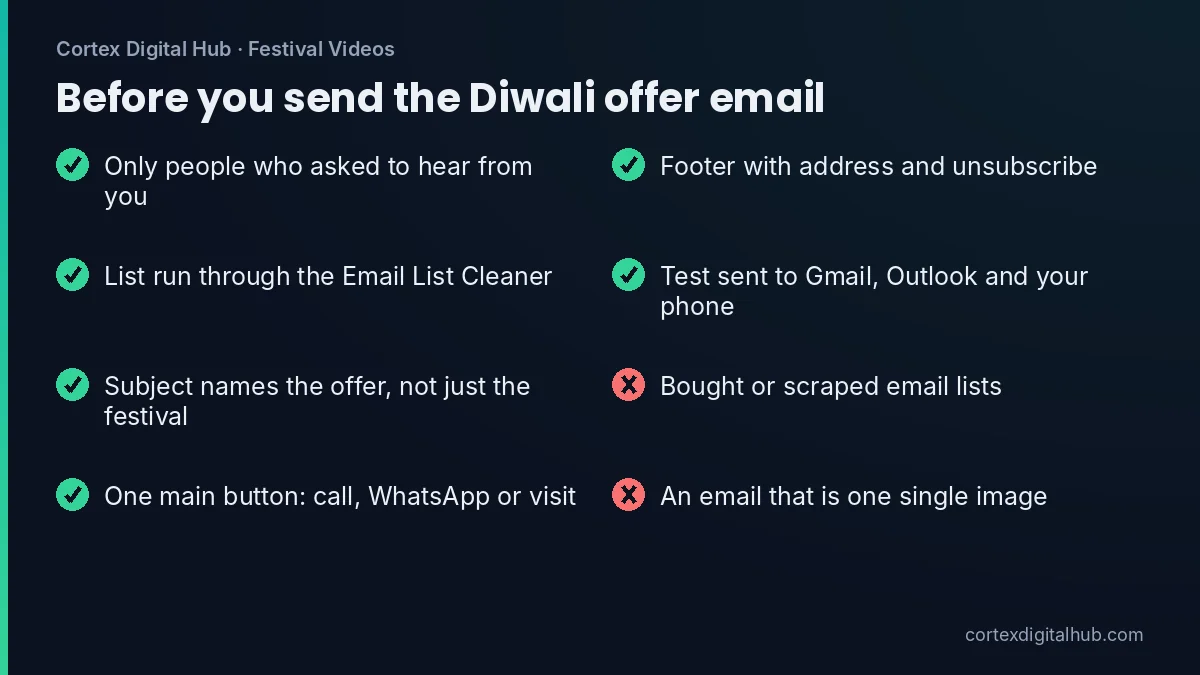 Run through this once before you press send.
The family greeting side of the festival is covered in Diwali video with your photo.
Frequently asked questions
What should a Diwali offer email contain?
Your offer creative, a short line of real text saying what the offer is and until when, one main button such as Call or WhatsApp, and a footer with your address and an unsubscribe link. That is enough.
Why do my Diwali emails land in spam?
Common reasons are an email that is one big image with no text, a list with many wrong or old addresses that bounce, sending from an address on a domain without DKIM, SPF and DMARC records, and people marking it as spam because they never asked for it.
Is the Email Composer free?
Yes. Building the email, the preview and the HTML or ZIP export are free and run in your browser. Sending yourself a test needs a free sign-in. Sending to your whole list is done through Cortex Mail or any email tool you already use.
Can I put my Diwali video inside the email?
Email apps do not reliably play video. Use your offer creative as the picture, and if you have a reel, add a button that opens it where it is posted. Keep one main button for the action you care about most.
When should I send a Diwali offer email?
Two or three days before Dhanteras for the offer, then a short reminder on Dhanteras morning. Send a greeting without a sales pitch on Diwali, if you send anything at all that day.
Can I email customers who only gave me their number?
No. Email only people who gave you their email address and agreed to hear from you, for example on a bill, an order form or a newsletter sign-up. Gmail's own sender guidelines say not to email people who did not sign up.
What does sending setup mean?
It is a one-time step that lets your emails go out from your own domain with DKIM, SPF and DMARC records, so inboxes can tell the email is really from you. The records are added where your domain is managed, not on your website.