
UTM parameters for email: tag every link so GA4 credits the campaign
Untagged email clicks often land in GA4 as Direct. Add utm_source, utm_medium=email and utm_campaign to every link, use utm_content for each button, and keep the values lowercase and consistent.
· 5 min read · 1.3K views · by the Cortex Digital Hub team
Build the email from your creative and turn on UTM tagging, so every link and button carries source, medium, campaign and content without typing them. Free · 15 test emails a day to yourself
Tag your email links → → Opens Email Composer · runs in your browser
UTM parameters for email are short tags added to each link so Google Analytics knows the visit came from a specific email. Set utm_medium=email so GA4 files it under its Email channel, add a consistent utm_source and utm_campaign, and use utm_content to tell buttons apart. Keep every value lowercase, with hyphens instead of spaces. Without tags, many email clicks show up as Direct traffic and your campaign gets no credit.
Why email clicks need tags
When someone clicks a link in a web page, their browser usually tells your site where they came from. Email is different. Clicks from the Gmail app, Apple Mail, Outlook and most other apps often arrive with no referrer at all. GA4 sees a visitor appear from nowhere and files them under Direct.
The result is familiar to anyone running email for a property launch: the email went out, the site visit form filled up, and the report shows a spike in Direct. Tags remove the guesswork.
The five UTM parameters for email
| Parameter | Job | Example value |
|---|---|---|
| utm_source | Who or which list sent it | leads |
| utm_medium | The channel | |
| utm_campaign | Which campaign | 2027-01-green-acres-launch |
| utm_content | Which link in the email | hero-button |
| utm_term | Paid search keyword | Rarely used for email |
A fully tagged link looks like this:
https://yourdomain.com/green-acres/?utm_source=leads&utm_medium=email&utm_campaign=2027-01-green-acres-launch&utm_content=hero-button
GA4 puts a session in its Email channel when the source or the medium is email, e-mail, e_mail or e mail, according to Google's channel definitions at the time of writing. Keep utm_medium=email and you never have to think about it.
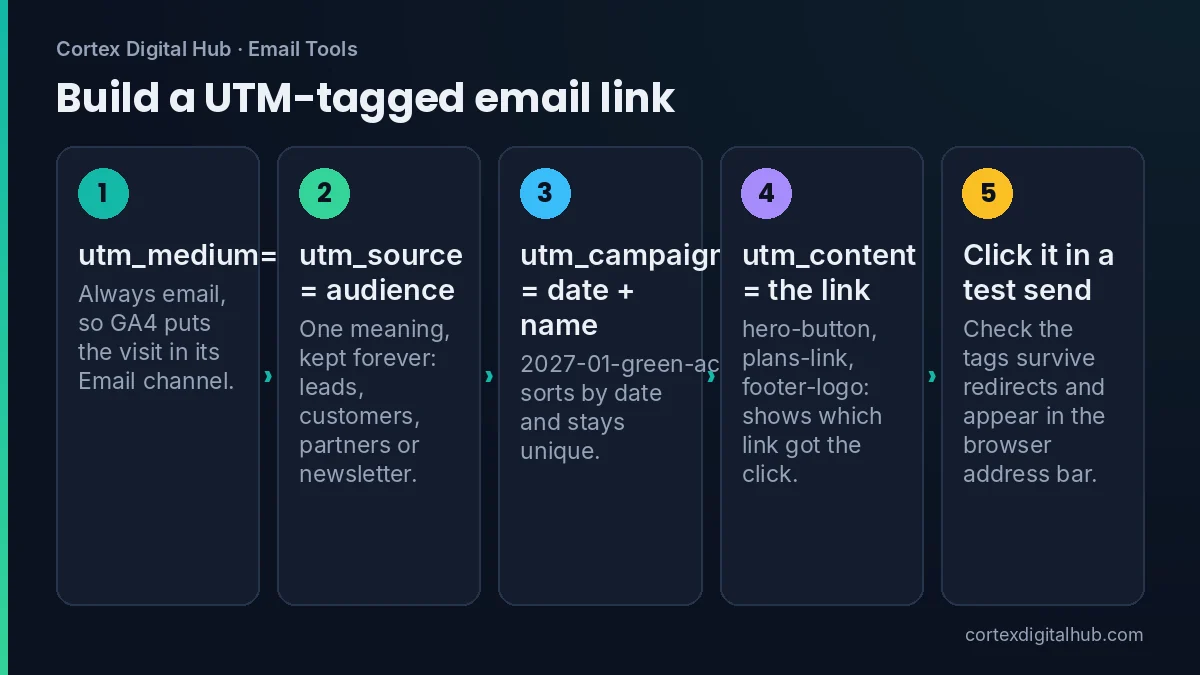 Medium fixed as email; source, campaign and content follow one naming rule.
A naming convention you can keep
Tags only help if they are consistent across months and across people. Write the rules down once and share them with whoever sends email, including your agency.
- Lowercase only. GA4 shows
Emailandemailas two different rows in reports, even though its channel rules treat them alike. - Hyphens, not spaces. Spaces become
%20and are easy to mistype. - utm_medium is always
email. Not newsletter, not mailer, not edm. - utm_source is the audience or system. For example
leads,customers,partners, ornewsletter. Choose one meaning and stick to it. - utm_campaign starts with the date.
2027-01-green-acres-launchsorts neatly and stays unique when you run the same project again in June. - utm_content names the link.
hero-button,plans-link,footer-logo,call-button.
A Hyderabad developer running launch, site visit and nurture emails might use:
utm_source=leads&utm_medium=email&utm_campaign=2027-01-green-acres-launchutm_source=leads&utm_medium=email&utm_campaign=2027-01-site-visit-sundayutm_source=customers&utm_medium=email&utm_campaign=2027-q1-construction-update
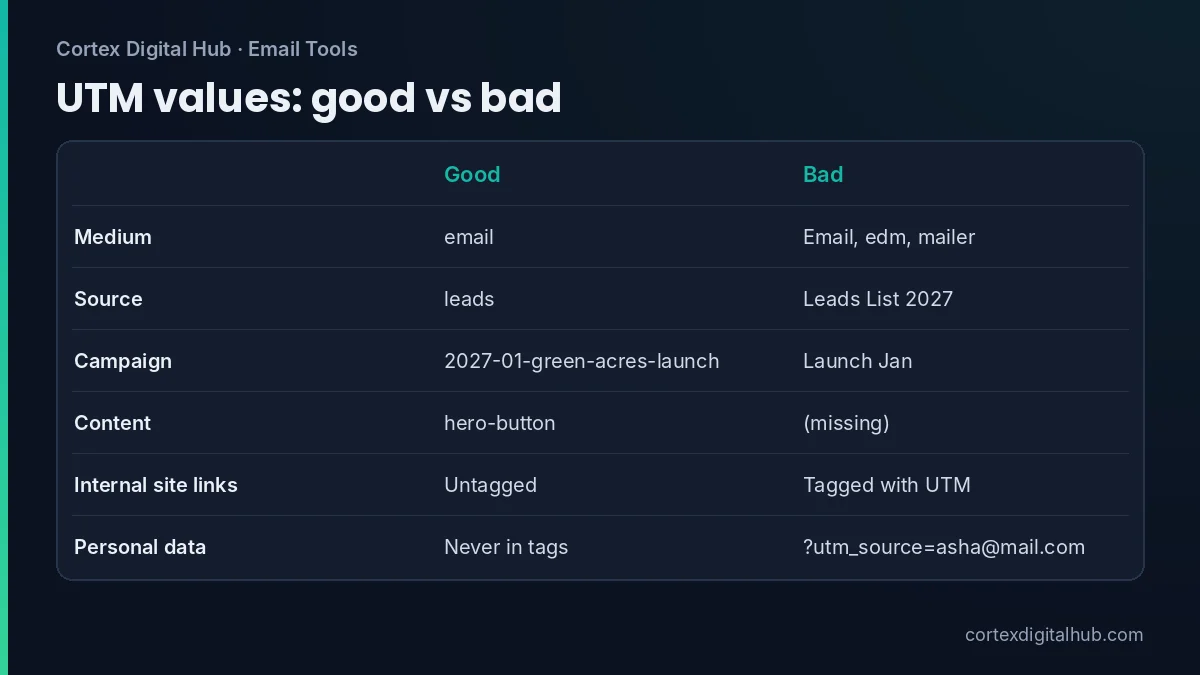 Lowercase, hyphenated and dated values keep GA4 reports in one row per campaign.
Use utm_content to see which button worked
utm_content is the most underused tag in email. One email often has three or four links: the main image, the button, a "see floor plans" link and the logo. Give each a different content value and GA4 shows you which one people actually used.
That answers practical questions. Do readers click the creative or the button? Does anyone use the footer link? Was the second button worth adding? The bulletproof button guide covers how to build the buttons; utm_content tells you which ones earned their place. If your email is built mostly from a campaign creative, it also shows whether the image or the live text is doing the work; the image-only emails guide explains why you want both.
Call and WhatsApp buttons are a special case. A tel: link opens the dialler and a wa.me link opens WhatsApp, so neither visits your website and GA4 never sees them. Count those through your sending platform's click report or your call tracking instead.
Common mistakes that break attribution
- Tagging internal links on your website. A UTM-tagged link from your home page to your project page starts a new session and overwrites the visitor's true source. Tag only the links inside the email.
- Mixed case and typos.
Email,emailande-mail(with a trailing space) split one campaign into three rows. - Redirects that drop the query string. Some old site setups redirect
/green-acresto/green-acres/and lose everything after the?. Click a tagged link in a test email and check the address bar. - Link shorteners. They hide your domain, which some filters dislike, and can add another redirect. Link straight to your own domain, as the deliverability checklist recommends.
- Tagging the unsubscribe link. It is not a campaign click; leave it untagged.
- Personal data in tags. Never put an email address or phone number in a UTM value. It ends up in analytics reports where it does not belong.
Tag links without typing them
Typing tags by hand on every link is where the typos come from. The free Email Composer adds UTM tags to every link and button in the email for you: you set the campaign once and each link gets its source, medium, campaign and its own content value. Send yourself a test (up to 15 a day are free) and click every link to confirm the tags arrive intact.
If your welcome emails go out automatically from an LMS or CRM, add the same tags to those templates too. The welcome email guide and the LMS connection guide show where they fit, and the real estate email marketing guide covers what to measure once traffic is tagged.
Where to see the results in GA4
Once links are tagged, three reports answer most questions. Traffic acquisition, grouped by Session default channel group, shows how much traffic email sends overall. Switch the dimension to Session campaign to compare launches, site visit invites and nurture emails. Add Session manual ad content as a secondary dimension to see which button or link each visit came from.
If you mark form submissions or site visit bookings as key events in GA4, the same reports show which campaign produced them, not just clicks. That is the number worth reporting.
Your UTM checklist
- Write a one-page naming sheet: lowercase, hyphens, medium always
email. - Tag every link to your own site; leave unsubscribe,
tel:andwa.melinks untagged. - Give each link its own
utm_content. - Click every link in a test send and check the URL in the browser.
- In GA4, open Traffic acquisition, filter Session default channel group to Email, and confirm your campaign appears with the name you expect.
Frequently asked questions
Which UTM parameters should I use for email?
Use utm_source, utm_medium and utm_campaign on every link, and utm_content to tell buttons and links apart. Set utm_medium to email so GA4 puts the traffic in its Email channel. utm_term is meant for paid search keywords and is rarely needed.
What should utm_source be for an email campaign?
Pick one convention and keep it. Common choices are the list or audience (leads, customers, partners) or the sending system (newsletter, crm). What matters is that the same kind of email always uses the same value.
Are UTM parameters case sensitive?
The values are stored as you type them, so Email and email appear as two separate rows in reports. GA4's channel rules ignore case, but your reports will still split. Use lowercase everywhere.
Why does my email traffic show as Direct in GA4?
Many email apps and webmail clicks arrive without a referrer, so GA4 cannot tell where they came from. Without UTM tags, those visits fall into Direct. Tagging every link fixes it.
Should I add UTM parameters to links on my own website?
No. UTM tags on internal links start a new session with the email source and overwrite the visitor's real source. Tag only links in the email that point to your site.
Do UTM parameters affect deliverability?
Not on their own. Very long, messy URLs and link shorteners can look suspicious, so keep tags short and readable and link to your own domain.
Does Apple strip UTM parameters from links?
Apple's Link Tracking Protection, added in iOS 17, removes certain user-identifying click parameters in Mail, Messages and private browsing. Standard UTM parameters describe the campaign, not the person, and are not among them as of 2026.