
Diwali offer video for your shop, made from one photo of the counter
Your Diwali post should look like your shop, not like the template every other shop used. Turn one photo of the counter or your best product into a short moving offer reel, keep the offer in the caption, and post it on Dhanteras morning.
· 5 min read · 1.3K views · by the Cortex Digital Hub team
Pick the sweet shop or product idea, add one photo of your counter or best product, and the studio opens with the prompt already written. 170 credits (₹85) for a 5-second clip · free account · ready in a few minutes
Make your shop's Diwali reel → → Opens Diwali video generator · runs in your browser
Every year the same thing happens. A wholesaler sends a Diwali template, a designer cousin makes one in an app, and by Dhanteras every sweet shop on the street has posted the same gold frame with the same stock diyas. Only the name at the bottom changes. A diwali offer video made from a photo of your own counter does what the template cannot: your regulars see the shop they walk into every week, glowing in lamp light, before they read a single word of the offer.
This guide is for the sweet shop, the saree store, the bakery and the small showroom. One photo, one idea, a few minutes on a phone.
Why your Diwali post looks like every other shop's
Templates are built to fit any shop, which is exactly the problem. They carry no detail of yours: not the brass lamp by the cash counter, not the stacked boxes of kaju katli, not the blue silk you put in the window every October. In a feed full of identical gold, a customer has no reason to stop.
The fix is not a bigger design budget. It is a picture of the place itself, moving a little: diyas lighting up one by one along your counter, marigold garlands swaying at your entrance, your sweets catching warm light. That is what the ideas on the Diwali video generator are written to do.
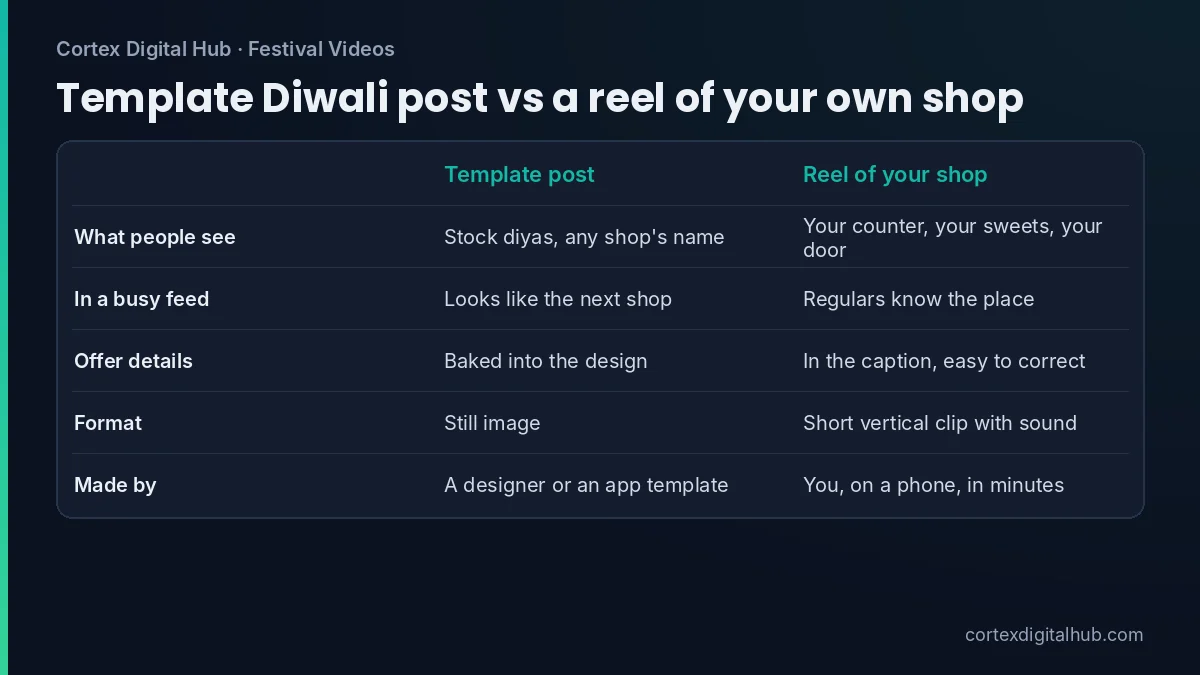 A template could belong to any shop. A reel of your counter could only be yours.
The photo that makes a good Diwali offer video
The photo becomes the first frame, so it decides most of the result. Take it on the day you finish decorating.
- Hold the phone upright. A portrait photo gives a vertical clip that fills WhatsApp Status and Reels.
- Shoot at dusk or with your lights on. Warm light blends with the lamp light the video adds; a harsh noon photo can look pasted on.
- Show what you sell. Full trays at the front of the counter, sarees opened out on the shelf, the cake case lit.
- Keep it tidy. Move the delivery crates and the cardboard out of frame.
- For one hero product, a clean close photo where the label and colour are clear.
If the photo is a little dark or tilted, fix it first in the free Photo Editor, which works in your browser.
Make the reel in four steps
- Open the sweet shop counter idea for a shop front, or the product among diyas idea for one saree, box or cake. The studio opens in 9:16 with the prompt filled in.
- Add your photo. Change any words in the prompt that do not match your shop.
- Press Generate. A 5-second clip on the studio's default model takes 170 credits (₹85); the button shows the total before anything is deducted. Credits come back automatically if a clip fails.
- Wait two to four minutes. You can leave the page; the clip waits under Your videos for 7 days.
Want to test an idea cheaply first? A quick draft takes 48 credits (₹24) for 6 seconds. Make the final with the default model once you like the look.
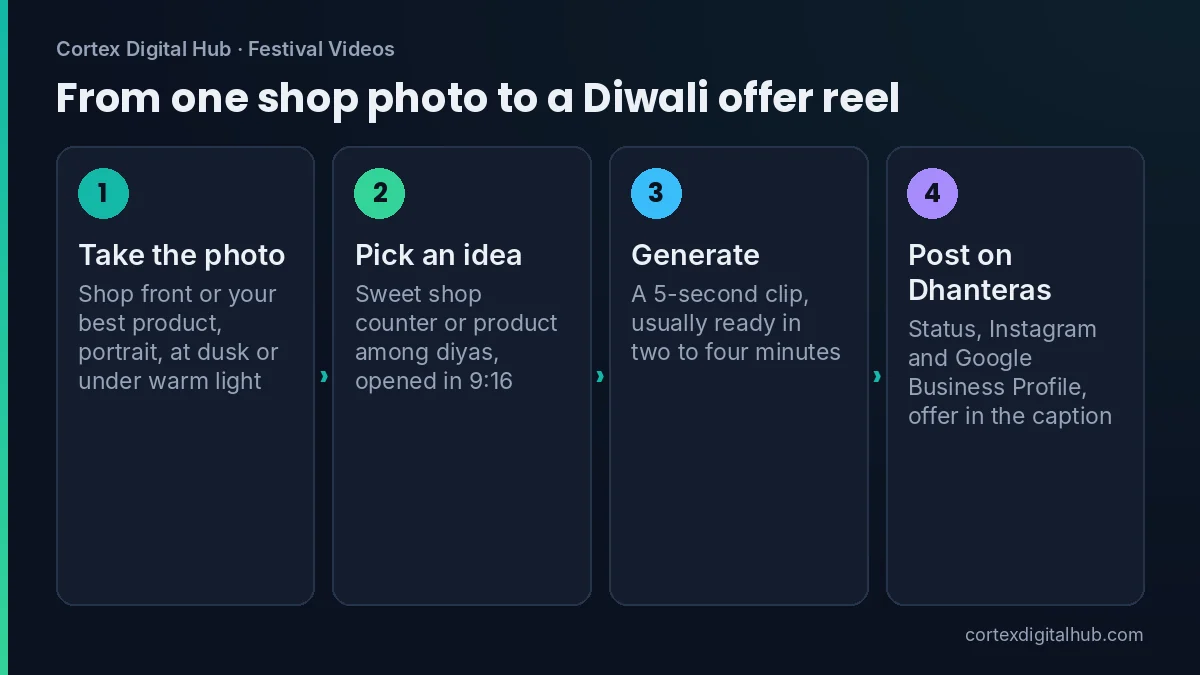 Photo, idea, generate, post. The offer itself waits for the caption.
Prompts to copy
Each one starts by telling the studio to keep your shop as it is. Swap in what you actually sell.
Keep the shop and any people exactly as in the photo. Diyas along the counter light up one by one, marigold garlands sway at the entrance, the sweets glisten in warm light, slow push in, cheerful festive music.
Keep the shop exactly as in the photo. Silk sarees on the shelves catch warm lamp light, small diyas flicker along the display table, a marigold garland sways at the door, slow dolly along the shelves, soft shehnai.
Keep the product exactly as in the photo, same shape, label and colour. Diyas and small candles light up around the box of sweets, warm gold bokeh fills the background, a few marigold petals fall past, the camera orbits slowly, soft music.
Keep the bakery exactly as in the photo. Fairy lights glow along the glass case, the cakes and cookies shine in warm light, diyas flicker on the counter top, slow push in, cheerful music.
Keep the offer in the caption, not in the video
This is the one rule worth following. Video models still misspell longer words and numbers, so "20% off till 8 Nov" can arrive as something you would never print. Even a two-word banner can come out misspelled, so the sweet shop idea keeps text out of the picture altogether.
Put everything that must be exact in the caption:
| In the video | In the caption |
|---|---|
| Your shop, lamps, garlands, sweets | The offer, in plain words |
| No text at all | Dates and timings |
| Sound: bells, sitar or shehnai | Phone number and address |
| Nothing that needs correcting | A line on how to order |
If the price changes on Choti Diwali, you edit one caption instead of making the reel again.
When and where to post your Diwali offer video
Dhanteras falls on 6 November this year and Diwali on 8 November (dates vary a little by region and panchang, so check your local calendar). Post on Dhanteras morning, before the first rush, when people are still deciding where to buy.
- WhatsApp Status: customers who have saved your number can see it when they open the app. Add a short line with the offer as the Status caption.
- Instagram: post it as a Reel with the full offer in the caption. If you want a trending song, turn sound off in the studio before generating and add the track in Instagram.
- Google Business Profile: an update on your profile can include a video along with a description and a button, so people searching for a sweet shop near them see the shop in festive light.
If WhatsApp says the file is too big, the free Video Compressor shrinks it on your own phone. If a clip came out square and you need it vertical, use Resize video to 1080 × 1920.
Sending the same offer to your customers by email? The free Email Composer turns your offer creative into a ready email with Call and WhatsApp buttons.
A few more ways shops use it
- Two reels, two days. The counter on Dhanteras, a single gift box on Diwali morning.
- The new stock. A photo of this season's sarees laid out, so regulars see what has arrived.
- The thank-you post. After Diwali, the same counter photo with a quieter prompt and a caption thanking your customers.
For more on how a family greeting is made from one photo, read the Diwali video with your photo guide. Sweet shops and bakeries will find more year-round ideas in AI video for bakeries and sweet shops.
Watch the video
A Diwali video for two, and a rangoli that blooms · 0:21 · Watch on YouTube
Frequently asked questions
What is a Diwali offer video?
A short clip, a few seconds long, that shows your own shop or product in festive light: diyas along the counter, garlands at the door, sweets or silk catching warm light. The offer itself goes in the caption of the post, not inside the video.
Why not put the discount inside the video?
Video models still misspell longer words and numbers, so a percentage, a date or a phone number can come out wrong. The ideas keep all text out of the video. In the caption, the offer is always spelled right and you can correct it in seconds.
Which photo of my shop works best?
A sharp portrait photo of the shop front or counter, taken at dusk or under warm lights, with the sweets or products clearly visible. For a single product, a clean photo where the label and colour are easy to see.
How much does one reel cost?
A 5-second clip from your photo on the studio's default model takes 170 credits, which is ₹85. A quick draft takes 48 credits (₹24) for 6 seconds. You need a free account; the Generate button shows the exact total first.
Can I post the same reel on WhatsApp Status, Instagram and Google?
Yes. The clip is a standard MP4. Made in 9:16 it fits Status and Reels, and Google Business Profile updates can include a video. If a file is too heavy to send, the free Video Compressor shrinks it on your phone.
Will the video show my shop as it really is?
Each idea starts with an instruction to keep the shop and any people exactly as in the photo, and your photo becomes the first frame. If something changes that you do not like, generate again.
Can a saree store or bakery use the sweet shop idea?
Yes. Change the words for what you sell: silk sarees on the shelves instead of sweets on the counter, cakes and cookies in the glass case. Keep the first line that tells the studio to keep the shop as it is.
Make your shop's Diwali reel → →