
Hindi audio to English text: transcribe a Hindi recording and read it in English
Turn Hindi audio to English text in your browser: a WhatsApp note, a call recording or a video. Get the Hindi in Devanagari and an English version beside it, then check names, amounts and Hindi number words before you send it on.
· 5 min read · 685 views · by the Cortex Digital Hub team
Drop a Hindi voice note, call or video, set Spoken language to Hindi, and copy the English from the box beside the Hindi. Free · no sign-up · runs in your browser, nothing uploaded
Convert Hindi audio to text → → Opens Voice to Text · runs in your browser
Your uncle sends a four-minute Hindi voice note about a property paper, and the lawyer who needs to read it only reads English. A training video from the head office is in Hindi, and half your team in Chennai wants notes in English. Retyping and translating it by hand takes an evening. Turning Hindi audio to English text takes a few minutes: the free Voice to Text tool writes the Hindi in Devanagari, puts an English version beside it, and does it inside your browser, so the recording stays on your device.
Two jobs in one: writing it down, then English
Getting Hindi audio into English is really two steps, and the tool shows both so you can check one against the other.
- As spoken: the words as they were said, in Devanagari. This is the transcript.
- English: an English version of the same words, line for line. This is what you forward.
Seeing both matters. If the English says "three lakh" and the Hindi line says "साढ़े तीन लाख", you know the English dropped the "and a half", and you can fix it before it reaches anyone.
How to convert Hindi audio to English text
- Open Voice to Text on a laptop or desktop in Chrome or Edge.
- Use the Accurate engine, which is best for Indian languages. It is about 565 MB on computers with graphics acceleration in the browser, about 760 MB otherwise, downloaded once and kept in the browser. After that it starts in seconds.
- Set Spoken language to Hindi, or leave it on Detect automatically if the recording mixes languages.
- Add names in Names to expect, separated by commas, for example "Sharma ji, Lucknow, Gomti Nagar".
- Drop the file, or several at once (up to 10).
- Read the Hindi, then the English. Fix anything wrong in either box, then copy or download.
On a phone, the page picks the Light engine (about 250 MB). It is quick and works best for English; for Hindi, a laptop with Accurate is the better choice, and the tool suggests switching after the first result.
Where Hindi audio usually comes from
| Source | File you will have | What to do first |
|---|---|---|
| WhatsApp voice note | .ogg or .opus | Save it from WhatsApp Web or Desktop, or export it from your phone |
| Phone call recording | .m4a, .mp3 or .amr | Copy it from the recorder app or file manager |
| Video from a meeting or class | .mp4, .mov or .mkv | Drop the video as it is; the sound is read from it |
| Long lecture | any of the above | Trim it to the part you need with Video to MP3 |
Getting a note out of WhatsApp has its own small steps; the WhatsApp voice note to text guide walks through Web, Desktop, Android and iPhone. For long recordings, Video to MP3 lets you trim on a waveform and even out the volume first, which helps when a speaker drifts away from the phone.
Hinglish: when Hindi and English mix
Most Hindi recordings are not pure Hindi. People say "meeting kal shift ho gayi hai" or switch to English for prices and dates. The tool cuts the recording into parts at natural pauses and detects the language of each part. A part spoken mostly in Hindi is written in Devanagari, a part spoken in English is written in English, and the English box gives you the whole thing in English.
When you set Spoken language to Hindi, every part is treated as Hindi. That suits short or noisy notes that are clearly Hindi. Leave Detect automatically on for a recording where someone switches to full English sentences, such as a meeting with a client from outside the state. English words inside a Hindi sentence may then appear in Devanagari in the first box; the English box usually reads fine.
The English box: two ways it is made
In Chrome, the English comes from the browser's own on-device translator, where it has one for Hindi. The first time, it may download a language pack. In other browsers, a button makes the English with the speech engine instead, by listening to the sound again. The tool labels that English "direct but can be loose", and it is worth taking at its word.
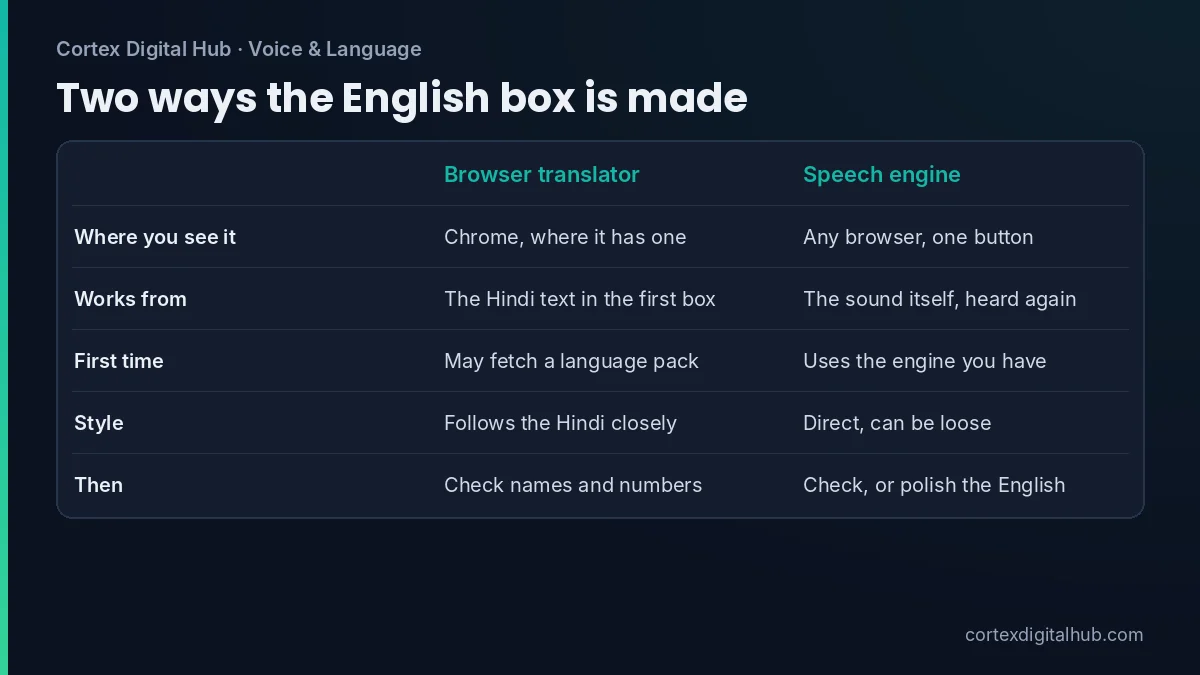 The translator works from the Hindi text; the speech engine listens again. Check either way.
Where the browser supports it, Polish the English tidies the grammar on your device and is told to keep every name, number, amount and date. Compare the polished version with the original once: a smoother sentence is not always a more accurate one.
Check Hindi numbers and amounts with care
Hindi number words are where English versions slip. Watch for:
- Fractions: सवा (one and a quarter), डेढ़ (one and a half), ढाई (two and a half) and साढ़े (plus a half) are easy to lose in English.
- Lakh and crore: "पचास लाख" is 50 lakh, which is 5 million; make sure the English kept the Indian unit you meant.
- Dates and days: "परसों" can mean the day after tomorrow or the day before yesterday, depending on context.
- Names: anything not in Names to expect may be spelled the way it sounds.
The tool's Before you copy checklist says the same thing: fix names, numbers, amounts and dates, replay unclear lines from Lines with times, then copy. Accuracy depends on the audio, so a clear note from one speaker comes out much better than a call on a weak line.
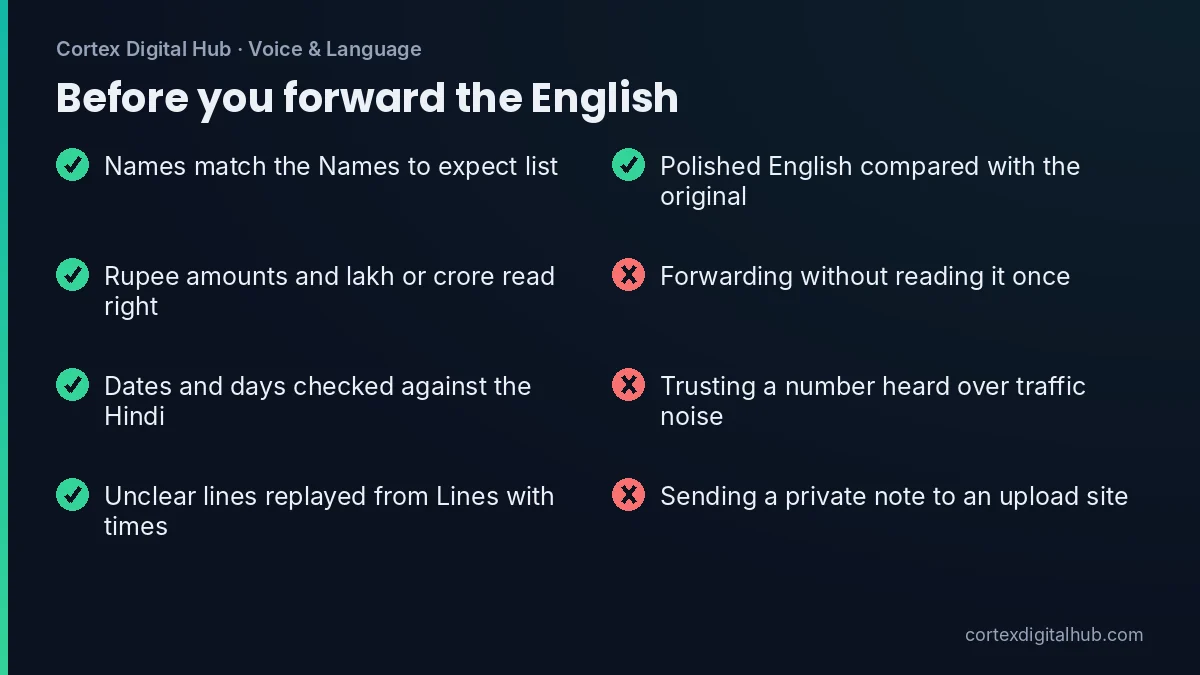 A minute of checking keeps a wrong amount out of an email.
Why do it in the browser?
A Hindi family note or a client call often carries addresses, money and personal matters. Upload sites keep a copy on their servers. Here the speech engine runs on your device, nothing is uploaded and there is no account. Why browser-based tools are safer than upload sites explains what changes when a file never leaves your device.
Going the other way: English text to Hindi voice
Sometimes you need the reverse: a Hindi voice for an English script you wrote. AI Voice Over speaks Hindi among its 20 languages, with Indian-accent voices in its library. The free AI voice over from a script guide shows how to write, generate and download it. Both tools sit under Language Tools and Video Tools.
Watch the video
The voice note you can't play in a meeting · 1:19 · Watch on YouTube
Frequently asked questions
How do I convert Hindi audio to English text?
Open Voice to Text, set Spoken language to Hindi or leave it on Detect automatically, and drop the audio or video file. The Hindi appears in Devanagari and an English version appears beside it. Check names and numbers, then copy or download.
Do I get the Hindi text too, or only English?
Both. The As spoken box shows the Hindi in Devanagari, and the English box shows the English version. Both are editable and both go into the .txt download.
Can it handle Hinglish?
Yes. The language is detected for each part of the recording, so Hindi parts are written in Hindi and English parts in English. The English box gives the whole recording in English.
Which files work?
WhatsApp voice notes (OGG, OPUS), MP3, M4A, WAV, AAC, FLAC, AMR, WebM, MP4, MOV, MKV and 3GP. You can drop up to 10 files at once or record with the microphone.
Why does the English sometimes read a little stiff?
The English is a translation of speech, which is looser than written Hindi. Where your browser supports it, press Polish the English to tidy the grammar on your device, then compare it with the original once.
Is the recording uploaded?
No. The speech engine runs in your browser, so the recording is read on your device and never sent to a server. There is no account.
Can I turn English text into a Hindi voice?
Yes, with the AI Voice Over tool, which speaks Hindi and 19 other languages. Write or paste the script, pick a voice and download the audio.
Convert Hindi audio to text → →