
The wedding photo with a waiter in it: remove a person from a photo, free and in your browser
The best shot of Inês and Tomás's first kiss in Lisbon had a waiter walking right behind them. How to remove a person from a photo for free in the browser, the brush habits that give a clean fill, and the photos where the eraser struggles.
· 5 min read · 918 views · by the Cortex Digital Hub team
Paint over a stranger, a wire, a date stamp or a parked car, lift your finger, and it is filled in from what is around it. Undo a pass and hold a button to compare with the original. Free · no sign-up, no watermark · saved up to 2560 px
Erase something from your photo → → Opens Object Eraser · runs in your browser
The first kiss at Inês and Tomás's wedding in Lisbon lasted about four seconds, and her cousin Rui caught it: the couple on the steps of the old chapel, rice in the air, both of them laughing. One problem. Right behind them, a waiter in a white jacket was crossing with a tray of glasses, in perfect focus. Inês wanted it as her profile picture by morning. Rui had a laptop and no paid editing app, so he typed "remove person from photo free" into the search bar. This is how he did it, in the browser, and what to expect if your photo is harder than his.
Why the usual apps did not help
The first app Rui tried erased the waiter, then blurred the result under a pop-up that said HD export needed a weekly plan. The second asked him to sign in and upload the photo to its server. For a family wedding photo, with the bride's face in it, he did not want either. A third did the job but stamped its logo in the corner.
The Object Eraser works differently. It runs inside your own browser. An AI model downloads once, about 28 MB, stays in your browser's cache, and the photo never leaves your phone or laptop. That is also why it can be free with no watermark; there is more on that in why browser-based tools are safer than upload sites.
How to remove a person from a photo, step by step
This is what Rui did, at a table at the edge of the reception:
- Opened the Object Eraser and dropped in the photo. JPG, PNG, WebP and iPhone HEIC all open. If a HEIC gives you trouble in other apps, HEIC to JPG converts it.
- Waited the first time while the page said it was getting the eraser ready. It is a one-time download of about 28 MB; the next photos started at once.
- Set the brush a little wider than the waiter's arm and painted over him: head, jacket, the tray, and the shadow on the stone steps.
- Lifted his finger. With "Erase when I lift the brush" ticked, the eraser runs the moment you stop painting. A few seconds later the waiter was gone and the chapel's pale wall carried on behind the couple.
- Held the compare button to see the original, then let go to see the result.
- Picked JPG under Download and saved it.
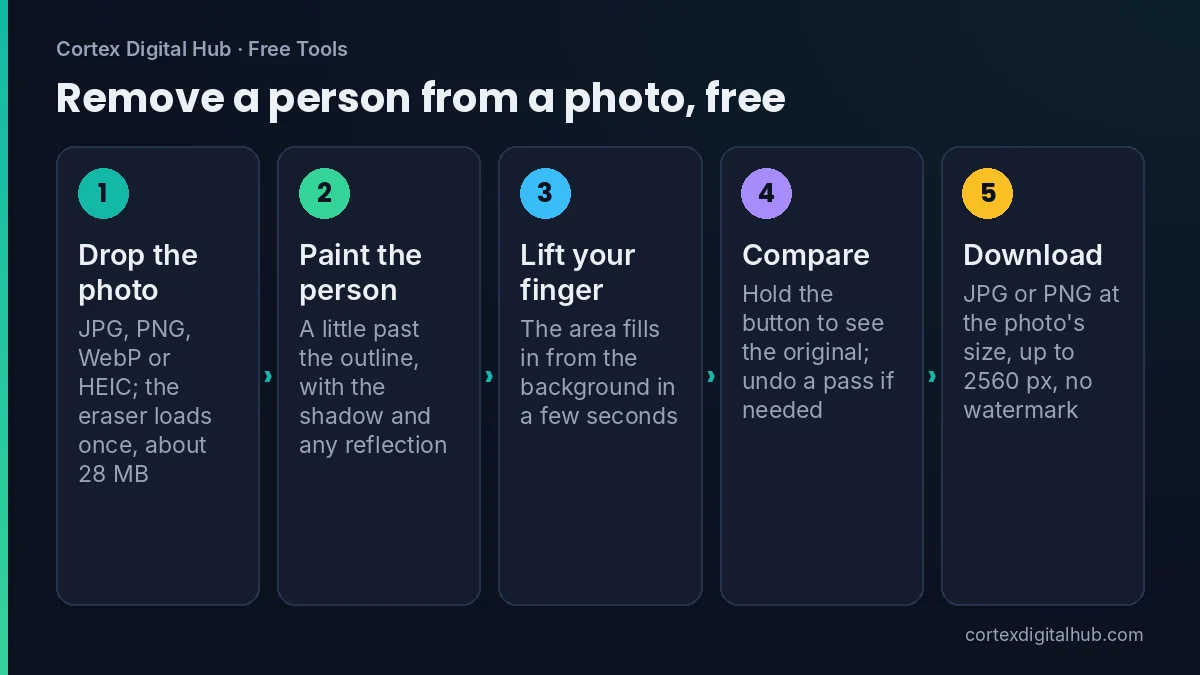
The download is saved at the photo's own size, up to 2560 pixels on the long side, as JPG or PNG. Inês had her new profile picture before the cake was cut.
The brush habits that give a clean fill
The eraser does not blur the spot. It rebuilds what was most likely behind the object from what is around it: sand carries on as sand, a wall as a wall, grass as grass. You help it most by painting well.
- Cover the whole person, with a little margin. A sliver of white sleeve left at the edge gives the eraser a white clue, and it may paint a smudge back in. Go a few pixels past the outline.
- Include the shadow and the reflection. A shadow on the ground with nobody casting it is the giveaway in most edited photos. On polished floors or by a pool, paint the reflection too.
- Do big things in passes. A crowd at the edge, a parked car or a whole market stall comes out cleaner in two or three smaller passes than in one huge stroke. Erase one part, look, then the next.
- Undo freely. Recent passes can be undone, with the Undo button or Ctrl+Z. If a pass looks wrong, undo it and paint a slightly different shape.
- Use Clear brush when a stroke goes astray. With auto-erase turned off, you can paint, check the mask, and clear it without touching the photo before you press Erase.
- Zoom out to judge. At 100% on a laptop you will see tiny texture repeats. On a phone screen or a printed photo, they usually vanish.
Where the eraser struggles
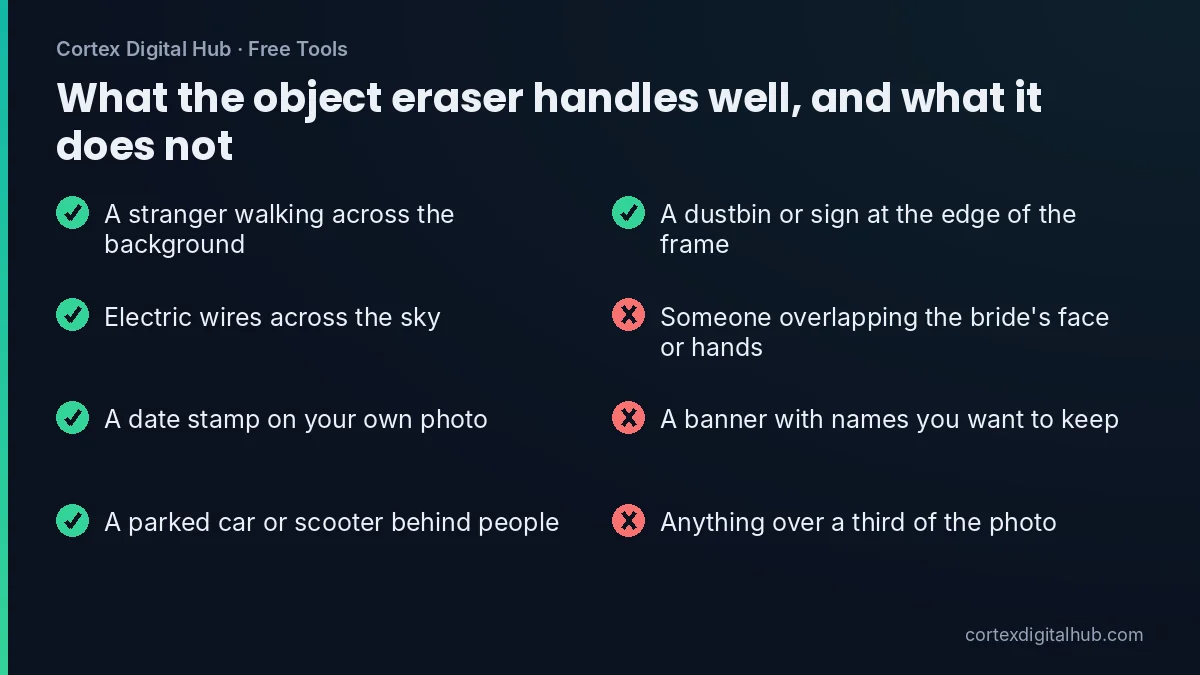
The tool says this plainly on its own page, so this post does too. Removing things from the background works best. Three cases are hard:
- Faces and people you want to keep. If the stranger overlaps the bride's face, her hand or the bouquet, the eraser has to invent part of the bride. It will try, but faces are the one thing people notice instantly when they are wrong.
- Text you want to keep. A sign with the couple's names behind the stranger will not be rewritten correctly. The fill will look like texture, not letters.
- Very large areas. If the thing you want gone covers more than about a third of the photo, there is not enough real background left to work from.
For those photos, try a different frame from the burst, or crop the stranger out in the Photo Editor instead. Wedding photographers shoot many frames for exactly this reason.
Other things worth erasing this wedding season
Once Rui had the eraser open, the family queue started. An uncle wanted the overhead tram wires gone from a photo of the couple against the evening sky; two passes did it. An aunt wanted the orange date stamp removed from a scanned 1998 photo of her own wedding. A cousin wanted the parked scooters gone from behind the welcome sign. Each one was a brush stroke and a few seconds.
The same goes for other photos from the year: a family in Dubai with a stranger at the edge of their desert sunset, a bin in front of a Kyoto temple gate, a selfie stick poking into a group photo at a birthday in Toronto, a photobomber on a beach in Cape Town.
What to do next with the cleaned photo
A clean photo often needs one more step before it goes anywhere:
- Enlarge it for a print or a frame. If the photo came through a messaging app and you want a big print for the couple, run it through the Image Upscaler after erasing. It cleans blocky compression edges while it enlarges.
- Cut the couple out for a card. Remove Background lifts the couple out as a transparent PNG for a thank-you card or a collage. The transparent PNG guide explains when PNG matters.
- Turn it into a moving greeting. The cleaned photo can open a short video; see the guide to an AI wedding invitation video for ideas that work for thank-you messages too.
All of these, and more, are on the Image Tools page, free and in the browser.
How the photo ended up
The waiter is gone. Where he stood there is pale chapel wall with the same soft afternoon light as the rest of it, and the rice in the air is untouched. Inês printed it for her parents' living room a week later. Nobody in the family has spotted where the waiter used to be, and Rui is now the person every cousin sends their photos to.
Frequently asked questions
How do I remove a person from a photo for free?
Open the Object Eraser, drop in the photo, paint over the person with the brush, including their shadow, and lift your finger. The area is filled in from the background. Download it as JPG or PNG; there is no sign-up and no watermark.
Is my photo uploaded anywhere?
No. The eraser runs in your browser. Its AI model downloads once, about 28 MB, and stays in your browser's cache, so later photos start faster and nothing leaves your device.
Why is there a faint smudge where the person was?
Usually the brush missed an edge, a shadow or a reflection. Paint over what is left with a little margin and erase again. Big objects come out cleaner in two or three smaller passes than in one.
Can it remove a person standing right next to the couple?
Sometimes, but this is the hardest case. The eraser works out what was behind the person from the area around them, so a stranger overlapping a face, a hand or a bouquet is far harder than one walking across a plain wall.
Will the photo lose quality?
Photos are kept at their own size up to 2560 pixels on the long side. A bigger photo is saved at 2560 pixels, which is still plenty for social media and a 6x4 inch (10x15 cm) print.
Can I remove a date stamp or a watermark?
A date stamp on your own photo, yes; paint over it like any small object. Removing someone else's watermark from their picture is not something to do, as it is their work.
What does the eraser not do well?
Faces, text you want to keep and very large areas, more than about a third of the photo. It is best for distractions in the background, not for rebuilding the main subject.
Erase something from your photo → →