
360 Product Video AI: Make a Turntable Spin From One or Two Photos
A 360 product video AI clip shows your item turning on a turntable, made from one or two photos instead of a studio rig. Learn the prompts, the first and last frame trick, background choices and the honest limits for marketplace listings.
· 5 min read · 512 views · by the Cortex Digital Hub team
Upload your product photo as the first frame, add a second angle as a reference, and ask for a slow turntable orbit. From ₹24 a clip · no watermark · runs in your browser
Make a product spin → → Opens AI Video Generator · runs in your browser
A 360 product video AI clip is a short turntable-style spin made from one or two photos, so you can show a product from several sides without a studio rig. Upload the front photo to the AI Video Generator, ask for a slow orbit on a clean background, and add a second angle as a reference to keep the sides faithful.
What a 360 product video is, and what AI can and cannot do
A classic 360 spin is shot on a rotating plate with a fixed camera. It is accurate, because every side was really photographed.
An AI spin is different. The model imitates a turntable. From the front photo it can see only the front, so the sides and back are an educated guess. For a plain steel bottle or a ceramic mug that guess is usually fine. For a saree border, a skincare label or a gadget with ports, a guess is risky.
So use the AI spin as a showcase clip that gives the feel of a turn, and keep it honest with real photos of every side that matters. The AI part is the motion, not the facts.
How do you make a 360 product turntable from photos?
The method has five steps. Each is quick, and the first four cost nothing but your time.
- Photograph the product. Shoot the front on a plain surface in soft, even light. If you can, shoot one side and the back as well.
- Clean the background. Cut out a messy backdrop with the free Remove Background tool, then place the product on white or grey.
- Upload the front photo as the first frame. This fixes the look of the product at the start of the clip.
- Add reference images. Use the @ Tag button to attach 2 to 4 photos of other angles, so the model keeps the shape and colour consistent.
- Write only the motion. Ask for the turn, the camera and the light.
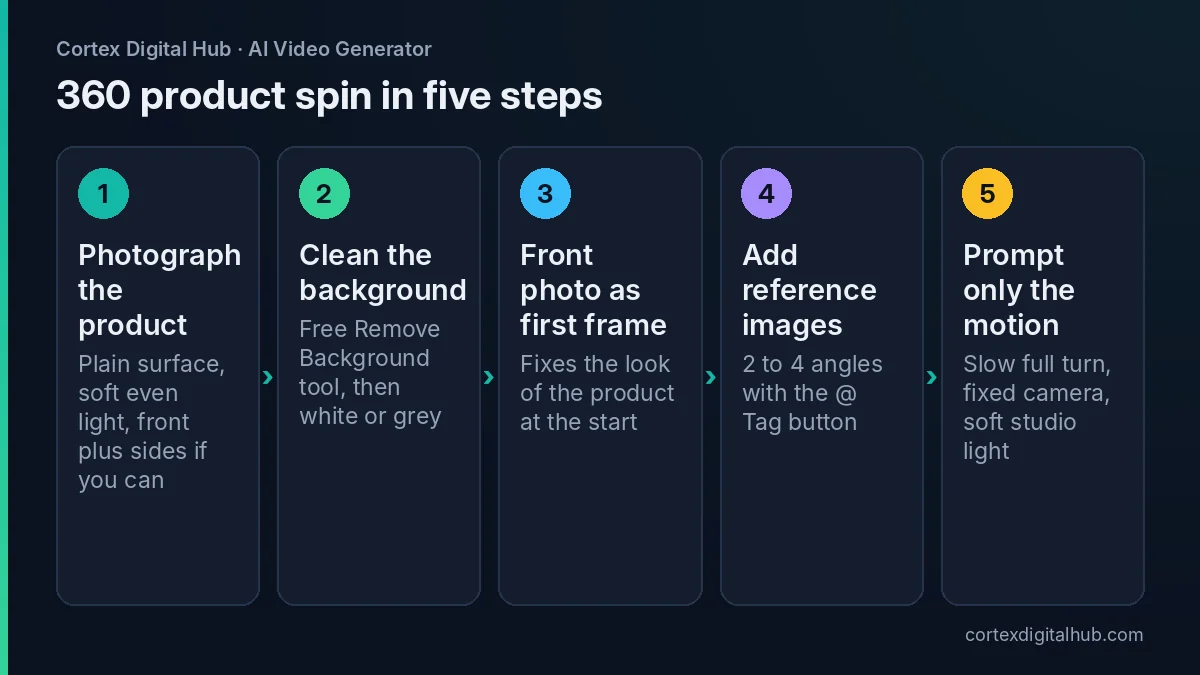
From first photo to finished spin in five short steps.
Here is a prompt for a copper water bottle on white:
A copper water bottle on a white turntable, slowly rotating a full turn to the right, camera fixed at eye level, soft studio light with gentle reflections, plain white background, clean and sharp.
The words "fixed camera" matter. If the camera also moves, the model has two things to handle, and the product can warp. For more on keeping the prompt short, see our text-to-video prompt guide.
How do first and last frames help the spin?
Models with first and last frame control, such as Lumen Frames, Lumen Omni and Prism 6, let you set where the clip starts and where it ends. Use the front photo as the first frame and a side or back photo as the last. The model then fills the turn between the two views, and the end of the clip is something you actually photographed.
That is the closest an AI spin gets to being truthful. Our guide to first and last frame control shows how to set it up.
Choose the three options by what you have:
| Your photos | Best approach | Risk |
|---|---|---|
| Front only | Image to video with a slow orbit | Sides and back are guessed |
| Front + back | First and last frame | Middle of the turn is generated |
| Front + 2 to 3 angles | First frame plus reference images | Small text may still drift |
If you have a face or brand mark on the product, see how reference images keep a subject steady across a clip.
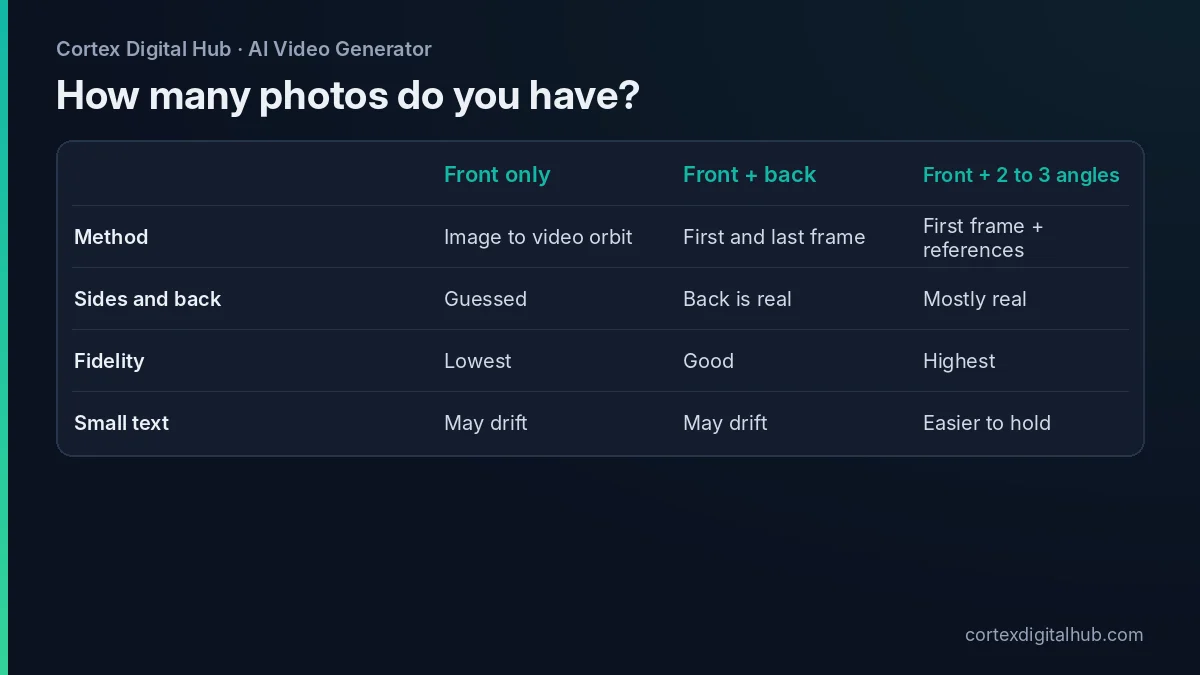
More real angles in means fewer invented details out.
Which background works best?
For marketplaces and catalogues, a plain white or light grey background is the safest. It keeps attention on the item and looks the same across your whole range. For Instagram or a shop website, a surface with mood can lift the clip: a wooden table for a handmade candle, a marble top for jewellery, a brass tray for a festive gift box.
Whichever you choose, say it in the prompt and keep it simple. A busy backdrop competes with the product and makes the turn look messy. Avoid reflective floors unless the product is meant to sit on one.
What does a product spin cost?
Credits are billed per second of finished video, 1 credit = ₹0.50, and the total shows on the Generate button before you start. Prices are as of October 2026.
- Orbit 3 at 480p: 70 credits for 5 seconds, ₹35. A good draft.
- Lumen Motion 3 Standard: 115 credits for 5 seconds, ₹57.50.
- Lumen Frames, first and last frame: 23 credits a second, so 115 credits, ₹57.50 for 5 seconds.
- Nova 2K: 175 credits for 5 seconds, ₹87.50, for a sharper hero shot.
A seller in Surat with ten products can draft all ten at ₹35 each (₹350), then make finals only for the three best sellers. For the wider picture on a single-photo workflow, read AI product video from one photo.
Using the clip for e-commerce
Marketplaces such as Meesho, Amazon and Flipkart set their own video and image rules, and they change. As of 2026, check the seller help page before uploading, and see our product photo requirements guide. A few practical points:
- Show the product accurately: true colour, true size, true labels.
- Do not suggest features the item lacks.
- Keep your real photos in the listing. The spin supports them and does not replace them.
- Trim any extra seconds with the free Trim Video tool, and compress before sharing on WhatsApp.
Turn Sound off for a silent catalogue clip, or add a short audio bed in your editor.
Key takeaways
- A 360 product video AI clip imitates a turntable. Unseen sides are guessed, so add real angles.
- Use the front photo as the first frame and a side or back photo as the last for the most faithful spin.
- Add 2 to 4 reference images with the @ Tag button to keep colour and shape steady.
- Ask for one rotation and a fixed camera, and keep the background plain.
- Draft at ₹35 on Orbit 3, then make the final at ₹57.50 on Lumen Motion 3 Standard or Lumen Frames.
- Check marketplace rules as of 2026, and never let a generated detail misstate the product.
Frequently asked questions
Can AI make a 360 product video from a single photo?
It can make a turntable-style spin, but the model has to guess the sides and back it cannot see. For a faithful result, add reference photos of the other angles, and never rely on a guess for labels, ingredients or fine print.
Is an AI 360 spin the same as a real 360 photo viewer?
No. A real 360 viewer stitches many photos taken around the product. An AI spin is a generated video that imitates a turntable, so details on unseen sides may be invented. Treat it as a showcase clip, not a technical record.
How many photos do I need for a good product spin?
One clear photo can start a clip, but two to four angles give better control. Use the front as the first frame and add side or back views as reference images. Keep lighting and background consistent across the photos.
What background is best for a product turntable?
A plain white or soft grey background keeps attention on the product and suits most listings. For social posts, a wooden table, marble top or festive set can add mood. Remove a messy background first with the free Remove Background tool.
Can I use the first and last frame to control the spin?
Yes, on models that support first and last frame control, such as Lumen Frames, Lumen Omni and Prism 6. Use the front photo as the first frame and a side or back photo as the last, and the model fills the turn between them.
How much does a 360 product video cost?
A 5-second spin on Lumen Motion 3 Standard is 115 credits, or ₹57.50. Lumen Frames at 23 credits a second is the same for 5 seconds. Orbit 3 at 480p costs ₹35 for a draft. The total shows before you press Generate.
Can I upload an AI product spin to Amazon, Flipkart or Meesho?
Marketplaces have their own video and image rules and update them, so check the seller help page first. Make sure the video shows the product accurately, including colour, size and labels, and do not exaggerate what the item does.
Why does my AI product spin change the logo or text?
Models often struggle with small text and logos while rotating. Use a high-quality photo, a slow turn, shorter length and reference images that show the logo clearly. If text still drifts, add the logo or label in your editor afterwards.