
Festive Sale Video Ad: Countdown Clips for WhatsApp and Meta
A festive sale video ad does not need a studio: one or two 5-second AI clips, offer cards added in an editor and a short countdown are enough. Here is the plan, the prompts, the cost in rupees and how to create urgency without spamming your customers.
· 5 min read · 717 views · by the Cortex Digital Hub team
Make one festive background clip, reuse it for every countdown day, and check the ₹ total before you press Generate. From ₹24 a clip · no watermark · runs in your browser
Make a video → → Opens AI Video Generator · runs in your browser
A festive sale video ad is easiest to make in three parts: a short AI clip for the mood, offer cards added afterwards in an editor, and a plain countdown schedule. In the AI Video Generator a 5-second clip costs from ₹57.50 on Lumen Motion 3 Standard. This guide shows the plan, the prompts, the formats for WhatsApp and Meta, and how to push urgency without annoying people.
What goes into a festive sale video ad?
Keep it small. A good festive ad has four parts:
- A mood clip of 5 seconds: lights, a gift box, a product glowing, confetti.
- An offer card with the discount, the dates and the shop or website.
- A call to action: "Message us on WhatsApp", "Visit the store", "Shop now".
- A schedule for when each version goes out.
The AI clip supplies only the first part. The offer, the price and the dates should be typed by you, because AI-drawn text can warp or change a digit. This division also makes the ad cheap: one clip, many cards.
Take a made-up example. A saree shop in Madurai plans a year-end sale from 20 to 25 December. It makes one 5-second clip of folded silks under warm lights, then three cards: "Sale starts Friday", "3 days left" and "Last day". One clip, three posts.
How do I prompt a festive sale clip?
Use the usual structure: subject, motion, camera, light. Festive scenes rely on warm light and small sparkling movements.
A stack of gift boxes with gold ribbons on a dark red table, fairy lights glowing and twinkling softly, a few golden sparks drifting upwards, slow push-in, warm festive light, shallow depth of field
For a product-led version, start from your own product photo with image to video, and write only the movement: slow orbit to the right, soft golden sparks drifting in the air, warm festive light. If the festival involves religious symbols such as a diya or rangoli, show them as part of a scene with respect, and do not place them behind prices or discount stickers.
Use Avoid for text, extra people and fast flashing. Turn Sound off if you will add a track. More examples are in text to video prompts that work.
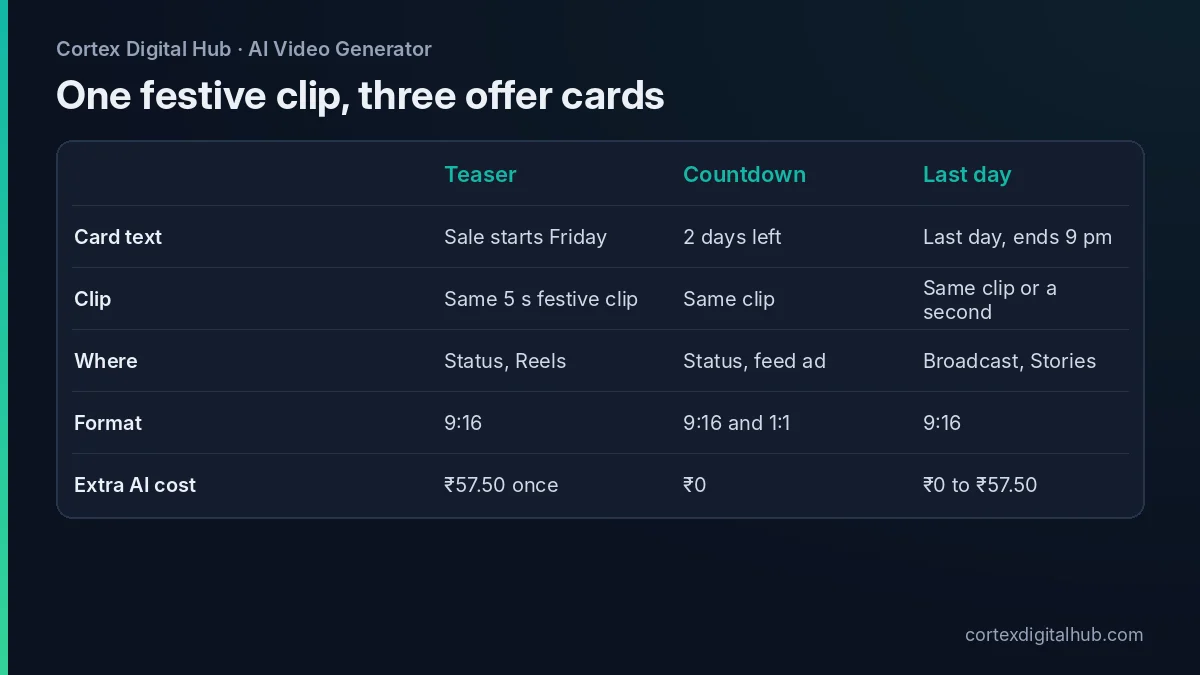
One festive clip, three offer cards: teaser, countdown and last day.
How do I build a countdown without drawing the numbers?
Make the countdown in your editor, not in the prompt.
- Generate one clean festive clip, for example 5 seconds, with space at the top or bottom for text.
- Duplicate it three times in your editor.
- Add a different card to each: "Starts tomorrow", "2 days left", "Last day".
- Use large type with strong contrast. Keep text away from the top and bottom edges where app buttons sit.
- Export each version in 9:16 and 1:1.
The same base clip works for every day, so the countdown costs ₹57.50 for the clip plus your editing time. If you want variety, make a second clip with a different mood, such as a product reveal on Nova 2K at ₹87.50, and alternate them.
What does a festive campaign cost?
Prices are as of October 2026, at 1 credit = ₹0.50.
| Clip | Model and setting | Length | Credits | Cost |
|---|---|---|---|---|
| Teaser, gift boxes | Lumen Motion 3, Standard | 5 s | 115 | ₹57.50 |
| Sale reveal, confetti | Lumen Motion 3, Standard | 5 s | 115 | ₹57.50 |
| Product hero | Nova 2K | 5 s | 175 | ₹87.50 |
| Last-day glow | Lumen Motion 3, Standard | 5 s | 115 | ₹57.50 |
| Four clips | 520 | ₹260 |
The four clips total exactly 520 credits, which is the size of the ₹249 pack. Draft cheaply first on Orbit 3 at 480p for ₹35 a clip, or on Nova Lite from ₹24, and spend the credits on the finals only. For the full price list, see AI video generator price in India.
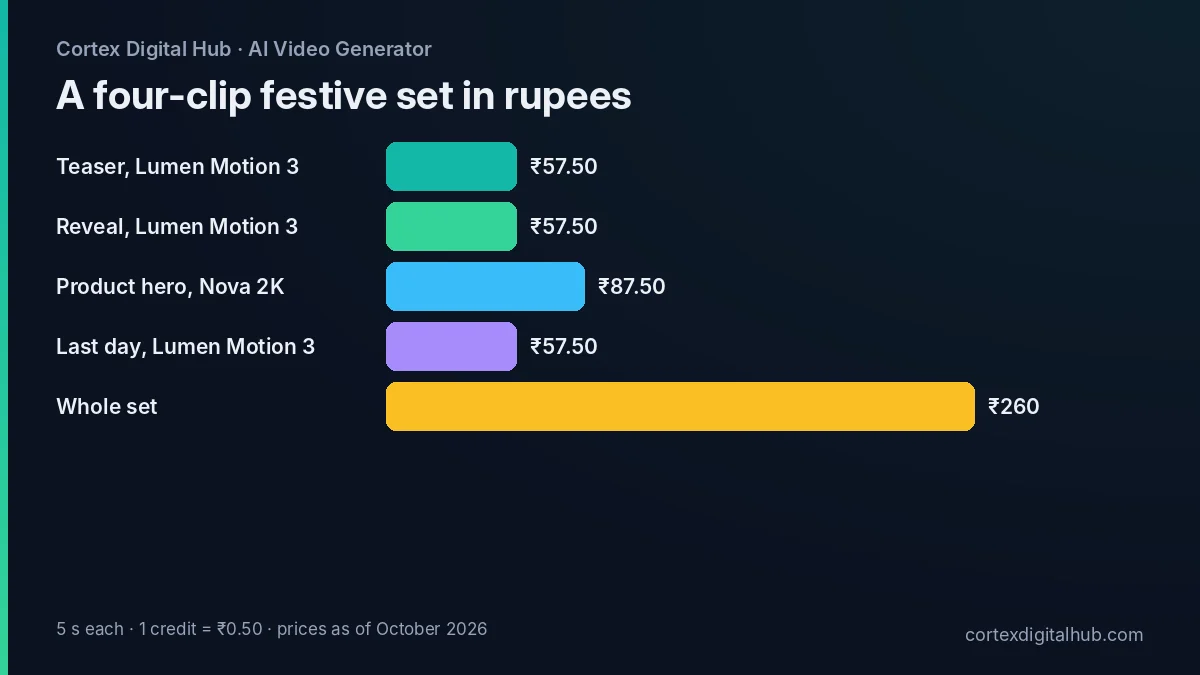
Four 5-second festive clips come to ₹260 when one of them is made on Nova 2K.
How do I post it on WhatsApp and Meta?
Pick the shape for each place, then compress.
- WhatsApp Status and broadcasts: 9:16, kept short (around 30 seconds or less is plenty for a sale clip), compressed so it sends quickly. The WhatsApp compression guide explains the steps, and the 16 MB guide covers larger files.
- Reels and Stories: 9:16. The Reels sizing guide lists the settings.
- Feed ads: 1:1 or 4:5, depending on the placement. Use the free video resizer.
Ad rules on Meta and WhatsApp change, so as of 2026 check each platform's help page before running paid ads or business messages. The formats are compared in best video format for WhatsApp Status and Instagram Reels, and the Status routine is in AI video for WhatsApp Status and business.
How do I create urgency without spamming?
Urgency should come from real dates, not pressure.
- Use a true deadline and say it once per milestone: launch, midpoint, last day.
- Message only customers who have agreed to hear from you. Do not add people to groups or broadcasts without consent.
- Do not invent stock levels or fake countdowns. If the offer continues, do not say it ends.
- Back up discount claims such as "lowest price" with something you can show, and check advertising rules for your category.
- Offer something useful in every message: a new product, a time slot or a gift option, not the same card repeated.
A bakery in Hyderabad that sends three messages across a week, each with a different clip and a real date, will usually build more goodwill than one that sends a daily forward.
Which festive moments suit this approach?
The same plan works across the year: Dhanteras and Diwali, Christmas and year-end sales, Pongal and Sankranti, Eid, Onam, and local fairs. Each needs only a change of colour, props and card text. Prepare the base prompt once, swap "gold ribbons on dark red" for "green and white" or "marigold and saffron", and keep your offer cards in a template. Start two weeks ahead, because rendering is quick but approval and copy usually take longer.
Key takeaways
- Make one festive background clip and add offer cards in an editor; do not let the AI draw prices or dates.
- A 5-second clip costs ₹57.50 on Lumen Motion 3 Standard, and four clips come to ₹260.
- Export 9:16 for Status, Reels and Stories, and 1:1 or 4:5 for feed ads, then compress for WhatsApp.
- Reuse the same clip for each countdown day with a different card.
- Use real deadlines, message only opted-in customers and avoid fake scarcity.
- Treat festival symbols with respect, and check platform help pages for current ad rules.
Frequently asked questions
How do I make a festive sale video ad with AI?
Generate one or two short festive clips, such as a glowing gift box or a lit-up product, then add your offer, dates and contact details as text cards in an editor. Export in 9:16 for Reels and Status, and 1:1 or 4:5 for feed ads.
Should the AI draw the offer text and countdown?
No. AI-drawn numbers and letters can warp, and a wrong price or date is costly. Generate a clean background and add the sale text, countdown digits and logo yourself in an editor.
How do I create urgency without spamming?
Use real deadlines, send one clear message per milestone rather than daily blasts, and only message people who agreed to hear from you. Never invent stock limits or fake countdowns.
What format works for WhatsApp and Meta?
Use 9:16 for Status, Reels and Stories, and 1:1 or 4:5 for feed placements. Compress for WhatsApp so the file sends reliably. Check each platform's help page for current size and length limits as of 2026.
How much does a festive sale clip cost?
A 5-second clip on Lumen Motion 3 Standard costs 115 credits, or ₹57.50. At 1080p it is ₹92.50. A set of four clips with one on Nova 2K comes to ₹260. Prices are as of October 2026 at 1 credit = ₹0.50.
Can I reuse one clip for the whole countdown?
Yes. Make one background clip and put a different card on it for each day, such as 3 days left, 2 days left and last day. You pay for the clip once and only change the text.
Can I use festival symbols like diyas and rangoli?
Yes, if you treat them respectfully. Show them as part of the scene, not as decoration behind prices or discount stickers, and avoid depicting deities in a sales context unless you are sure it suits your audience.
Do I need permission for music on a sale ad?
Use only music you have the right to use, or the platform's own library for that placement. Rules differ, so as of 2026 check the platform's help page. Switch off the clip's sound in the generator if you plan to add a track.