
AI video for gym marketing: Reels, offers and slow-motion clips
AI video for gym marketing gives a gym or fitness coach energetic clips for Reels, membership offers and festival promotions without a shoot day. This guide covers prompts, slow motion, costs in rupees and how to avoid fake-result claims.
· 5 min read · 928 views · by the Cortex Digital Hub team
Describe the movement, the camera and the lighting for one exercise per clip, set the format to 9:16, and read the credit total before you start. From ₹24 a clip · no watermark · runs in your browser
Make a gym clip → → Opens AI Video Generator · runs in your browser
AI video for gym marketing gives a gym owner or fitness coach short, high-energy clips for Reels, offer posts and WhatsApp status without a camera crew. Describe one exercise or one scene, set the format to 9:16 in the AI Video Generator, and add your membership offer as text afterwards. A 5-second clip costs ₹57.50 on Lumen Motion 3 Standard.
What kind of gym content works as AI video?
Pick content where the mood sells and nobody has to look real. Good fits:
- Atmosphere shots: a barbell on chalky hands, sweat drops falling, battle ropes in slow motion.
- Empty-gym openings: sunrise light across rows of equipment, a treadmill starting up.
- Festival and season offers: New Year, Diwali, monsoon or summer-body style promotions with your own offer text.
- Class teasers: a spin class, yoga on a rooftop, a Zumba burst of colour.
- Loop clips for status: 3 to 5 seconds that repeat nicely on WhatsApp.
Avoid anything where accuracy matters, such as showing exact exercise form to teach members. A model can produce a lovely lift that is anatomically wrong, and you do not want that to be the demo.
How do I write a workout-energy prompt?
Name one subject, one action, one camera move, the light and the mood. The structure from text-to-video prompts that work applies directly:
A silhouetted athlete lifts a barbell in a dim gym, chalk dust rising, slow motion, low camera orbit, warm backlight with haze, intense cinematic mood
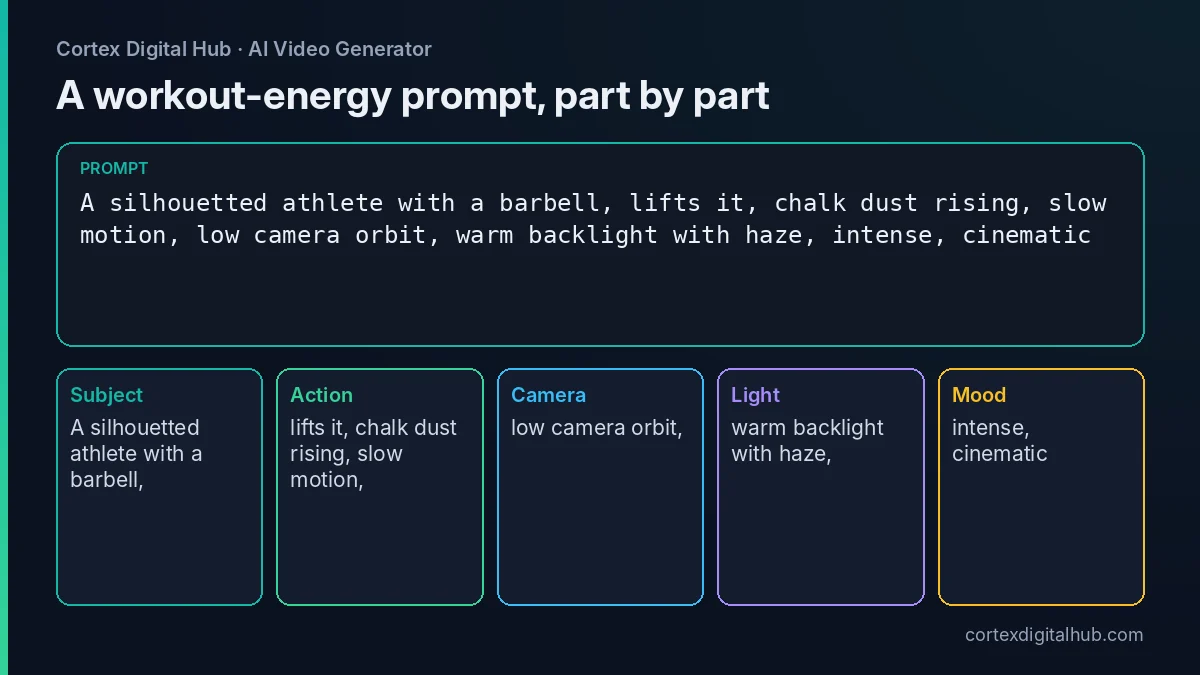 One lift, one camera move and strong backlight give a clip with energy and few things to go wrong.
Silhouettes, hands and close-ups on equipment work better than full-body faces. They hide the weak spots of AI video, such as hands and faces in motion.
How do I get slow motion and punchy camera moves?
Slow motion is the most useful trick in gym content because it makes small actions look dramatic. Write slow motion plus a trigger: dust, sweat, rope waves, a plate being set down. For the camera, choose one move: slow push-in, low orbit, tilt up from the floor. The camera presets in the generator write the move into the prompt for you, and "General" gives full manual control.
If the movement looks odd, shorten the clip to 4 or 5 seconds, simplify to one subject, and use the Avoid field for extra fingers, distorted limbs, flicker. See how the generator handles motion for more on how the settings work.
How do I turn clips into a membership offer Reel?
A 15-second offer Reel has three beats, just like an ad:
- Mood (0 to 5 s). A high-energy AI clip, such as the silhouette lift above.
- Place (5 to 10 s). Your own gym, animated from a real photo with image to video.
- Offer (10 to 15 s). A calm clip of a clean workout floor with your offer text overlaid in an editor, for example "3 months for ₹4,999. Call or WhatsApp to book a free trial" if that is your real offer.
Add the text, logo and phone number yourself. Models often warp lettering, so never ask the prompt to write the offer. Then check the safe margins in the guide to resizing video for Instagram Reels.
What does a week of gym content cost?
Credits are billed per second at 1 credit = ₹0.50. As of October 2026:
| Plan | Clips | Cost |
|---|---|---|
| Seven 5 s clips, Lumen Motion 3 Standard | 7 | ₹402.50 |
| Seven 5 s clips, Orbit 3 480p | 7 | ₹245 |
| Three 6 s drafts, Nova Lite | 3 | ₹72 |
| One 10 s hero clip, Lumen Motion 3 1080p | 1 | ₹185 |
The ₹249 pack (520 credits) covers about four 5-second clips on Lumen Motion 3 Standard. Draft on Nova Lite first, then remake the ones you like. The cheaper approach is a monthly bank of 10 clips you reuse across posts, status and festival offers.
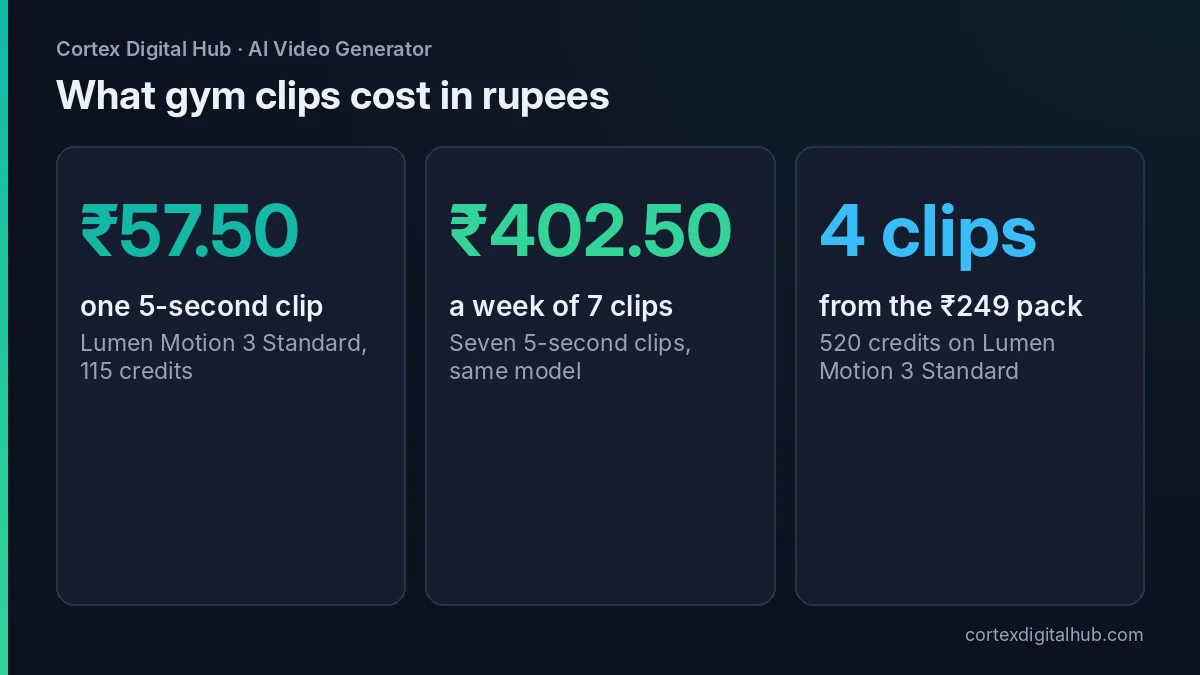 A week of seven Lumen Motion 3 Standard clips is ₹402.50; a single clip is ₹57.50.
How do I show my own gym without filming?
Members are the best proof of a gym, but filming them takes consent, time and a quiet hour. A cheaper start is your space. Take a clear, well-lit photo of the weights area, the cardio floor or the reception desk, then animate it with image to video and a prompt such as slow push-in across the weights area, ceiling lights flickering on, morning light through the windows. The photo becomes the first frame, so a new member sees your real gym, not an invented one.
If you do want people in the frame, use staff who have said yes, and keep their permission in writing. For a fitness coach working online, the same idea applies to a home setup: animate a photo of your mat, dumbbells and corner of the room, then add your voice-over on top.
What should a gym never claim in an AI video?
This is the part that can get you into trouble. Do not use AI to produce:
- Before-and-after transformations or invented progress photos.
- Fake member testimonials or "real results" captions.
- Health or weight-loss promises, such as a number of kilos in a number of days.
- A real trainer, athlete or celebrity's likeness without their written permission.
As of 2026, advertising in India is covered by the Advertising Standards Council of India's guidelines, and each platform has its own ad policies. Check both before you run a paid promotion. If a clip is atmospheric rather than evidence, treat it as an illustration, not proof, and word the caption that way.
Finishing for Reels and status
Trim the opening dead frames with the free trim video tool, reframe with the video resizer and shrink the file with the video compressor if you will also share it on WhatsApp. Read AI video for WhatsApp status and business to repurpose the same clips for status.
Key takeaways
- Use AI video for mood: silhouettes, equipment, chalk dust and atmosphere, not for teaching exercise form.
- Write one subject, one action, one camera move, and ask for slow motion for drama.
- A 5-second Lumen Motion 3 Standard clip is ₹57.50; a week of seven is ₹402.50.
- Add offers, prices and phone numbers in an editor, not in the prompt.
- Never fake transformations, testimonials or health claims, and never use real members' faces without consent.
Frequently asked questions
Can AI make gym promo videos?
Yes. You can generate workout-energy clips from a text prompt, or animate a photo of your own gym, then add your offer text and logo in an editor. Clips come without a watermark and are ready in a few minutes.
How do I get slow-motion in an AI gym video?
Write it into the prompt: 'slow motion', 'slow-motion chalk dust', 'slow push-in on the lift'. Pair it with one clear action per clip, since slow motion shows every mistake in the movement.
How much does a gym Reel cost to make with AI?
A 5-second clip on Lumen Motion 3 Standard costs 115 credits, which is ₹57.50. A week of seven clips is ₹402.50. A Nova Lite draft clip is ₹24. Prices are as of October 2026.
Can I show before and after transformations with AI?
No. Do not use AI to invent transformation results or fake member testimonials. They mislead viewers and may breach advertising rules. As of 2026, check ASCI guidelines and the platform's ad policies.
Is it okay to use my members' faces in AI videos?
Only with clear, written consent, and for the purpose they agreed to. The safer route is generic scenes of equipment, hands, silhouettes and spaces, or reference images of your own gym with no identifiable members.
What format should a gym Reel be?
Use 9:16 for Reels and Shorts. Keep the main action in the middle of the frame, away from the top and bottom edges where captions and buttons sit. The free video resizer can reframe an existing clip.
Should I add music to my gym clips?
Usually yes, and usually after generating. Turn Sound off in the settings and add a trending track in your editor, or leave it on for clip-matched ambience like clanking weights.
Can I use my gym's real photos as a starting point?
Yes. Use image to video with a photo of your floor, equipment or reception, and describe only the motion. The photo becomes the first frame, so the clip looks like your space.