
AI Video for Mobile Shop Owners: New-Arrival Clips From One Photo
A mobile shop can turn one clean product photo into a 5-second new-arrival clip with a light sweep across the screen and body. This guide covers prompts, offer Reels, costs in rupees, and how to keep the clip true to the phone you actually sell.
· 5 min read · 1.4K views · by the Cortex Digital Hub team
Upload your product photo as the first frame, describe a slow light sweep, and get a 5-second hero clip for Reels and WhatsApp status. From ₹24 a clip · no watermark · runs in your browser
Animate a product photo → → Opens AI Video Generator · runs in your browser
A new phone lands in the shop and the usual photo goes up on WhatsApp status. It gets a glance. With AI video for a mobile shop, that same photo becomes a 5-second hero clip where light slides across the glass and the body catches a highlight. Make it in the AI Video Generator, add your price in an editor, and post it as a Reel.
What kind of AI video suits a mobile shop?
Phones and accessories are about shine, edges and screens, which suit slow, simple camera moves. Four formats work well.
- New-arrival hero clip. The phone rotates slightly while a soft light sweeps across it.
- Accessory spotlight. A case, earbuds or charger on a clean surface with a slow push-in.
- Offer Reel. A short clip behind your own text: price, exchange offer, shop name.
- Festive backdrop. A diya glow or fairy-light bokeh behind the product for Diwali or Eid.
Say a shop in Lucknow gets stock of a new mid-range 5G phone. One photo, one prompt, and the clip is ready for status the same evening.
How to make a new-arrival clip from a product photo
Image to video uses your photo as the first frame, so the product starts exactly as you shot it. Then you describe only the movement.
- Photograph the phone on a plain surface in even light. Fill the frame, at least 1080 pixels wide.
- Optionally clean the background with the free Remove Background tool, which runs on your device.
- Upload the photo in the generator and choose Lumen Motion 3 Standard.
- Write the motion, not the object.
A prompt that works:
Slow light sweep across the glass and edges of the phone, subtle reflections, camera slowly pushes in, dark gradient background, premium product look, no text
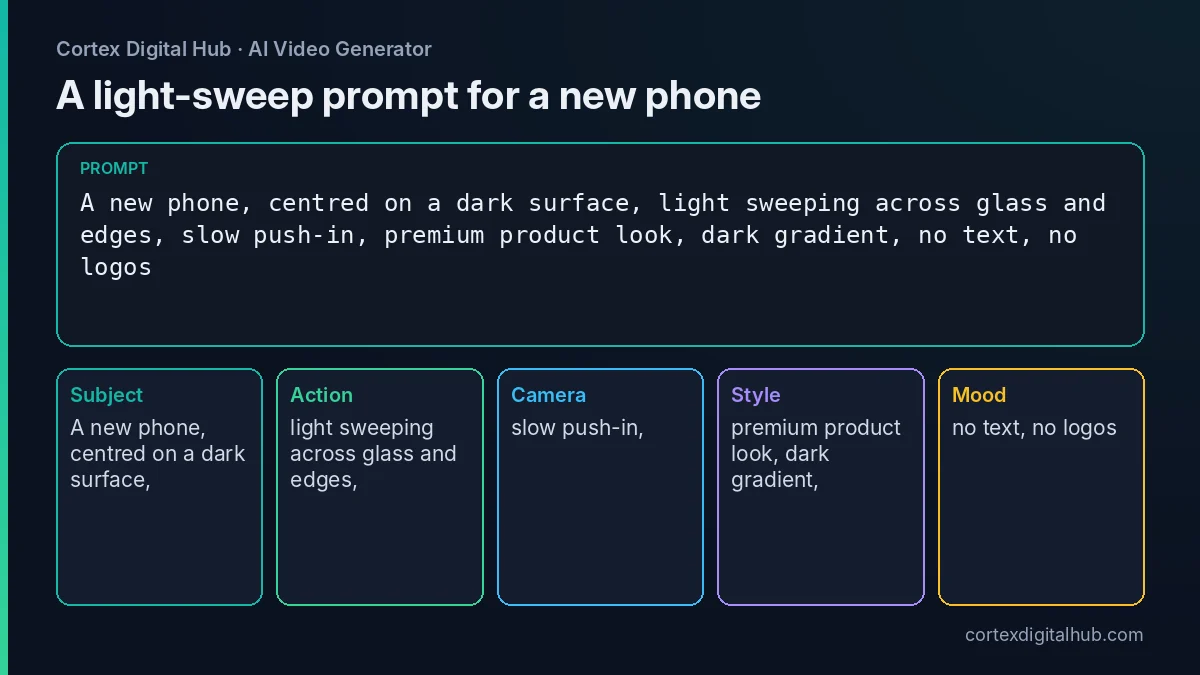 Say what moves: a light sweep and a slow push-in, with no text inside the clip.
Put "text, logos, extra buttons, warped edges" in the Avoid box under Advanced. For more on this method, read AI product video from one photo.
How accurate will the phone look in the AI video?
Close, but not guaranteed, and that is the point to take seriously. A customer who sees a camera bump or a button in the wrong place will notice, and trust drops.
Check every clip against the real phone for:
- Camera module shape and number of lenses
- Button and port positions
- Screen content, if any, and any text on the body
- Colour of the finish, since reflections can shift it
- Logos, which can blur or warp
If anything is off, regenerate with a plainer prompt, or lower the movement by describing a smaller camera move. Never post a clip that shows a feature the phone does not have. Do not make performance, battery or camera claims through a video; stick to what the spec sheet says in your own caption.
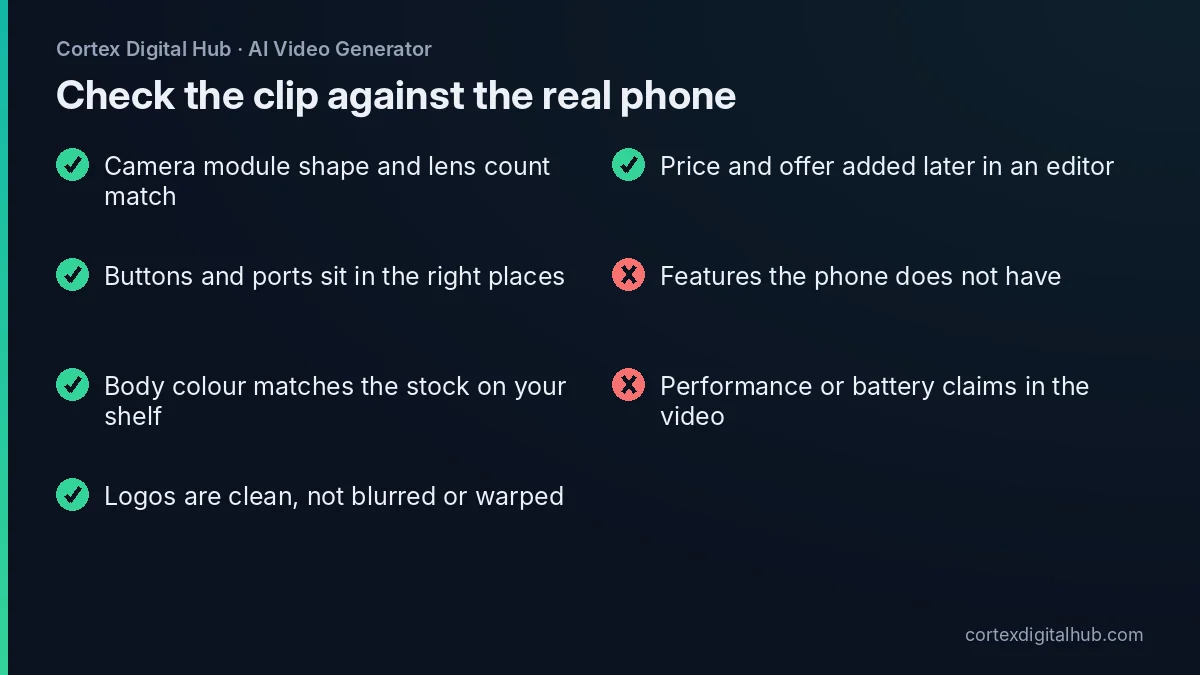 Compare the clip with the real phone before it goes live.
How much does it cost to make phone clips?
Prices are as of October 2026, at 1 credit = ₹0.50.
| Clip | Model | Cost |
|---|---|---|
| Quick test, 6 s | Nova Lite | ₹24 |
| 5 s hero clip | Lumen Motion 3 Standard | ₹57.50 |
| 5 s hero clip at 1080p | Lumen Motion 3 | ₹92.50 |
| Extra-sharp 5 s still-style clip | Nova 2K | ₹87.50 |
Two habits keep the bill low. Draft on Nova Lite when the shape is tricky, and make the final only on the draft that looks right. A weekly rhythm for a small shop: three new-arrival clips on Lumen Motion 3 Standard come to ₹172.50. The ₹249 pack covers four such clips with credits left over.
Which prompts work for other electronics?
The same approach carries over to anything with a clean shape and a reflective surface. Change the subject and the motion; keep the rest short.
| Product | Motion line to try |
|---|---|
| Earbuds in an open case | Lid opens slowly, soft light glints on the buds, slow push-in |
| Smartwatch | Gentle rotation, light sweeps across the glass, shallow depth of field |
| Power bank and cable | Slow pan along the product, rim light on the edges |
| Bluetooth speaker | Subtle pulse of warm light on the grille, camera orbits slowly |
| Phone case range | Cases fan out one by one, soft studio light, top-down view |
Keep to one subject per clip. A shelf with ten accessories gives the model too much to move, and details melt. If you want a range shot, make one clip per product and cut them together in an editor, or show them in a single top-down arrangement with only the camera moving.
For festive offers, the backdrop can carry the mood while the phone stays sharp. Say "warm diya glow in soft focus behind the product" and keep the product description unchanged. Treat religious symbols with respect and keep them in the background.
How to turn the clip into an offer Reel
Generated text is unreliable, so keep the clip clean and add your words yourself.
- Set Format to 9:16 before you generate. If needed, fix the shape with the Video Resizer or the 1080x1920 resizer.
- Switch sound off, then add a trending track in the Reels editor.
- Overlay the price, exchange value and shop name in your phone's editor, leaving the centre clear for the product.
- Trim the first second with Trim Video so the clip opens on the best frame.
- Check the guide to Reels sizing for safe areas.
For broadcast lists, compress with the WhatsApp compression guide. Offer wording and platform rules change, so as of 2026 check each platform's help page before you run paid promotion.
Key takeaways
- One clean product photo is enough for a 5-second new-arrival clip.
- Describe movement only: a light sweep, a slow push-in, a dark premium background.
- Check logos, camera layout and buttons against the real phone before posting.
- Add price and offer text in an editor, never inside the AI clip.
- A 5-second Lumen Motion 3 Standard clip costs ₹57.50; Nova Lite tests start at ₹24.
- Set 9:16 and switch sound off if you will add a trending track.
Frequently asked questions
How can a mobile shop use AI video?
Turn a clean product photo into a short new-arrival clip with a slow light sweep, then post it as a Reel or WhatsApp status. You can also make simple offer clips, with price and offer text added later in an editor.
How much does an AI clip for a phone launch cost?
A 5-second clip on Lumen Motion 3 Standard costs 115 credits, or ₹57.50, and the 1080p version is ₹92.50. A cheap test on Nova Lite starts at ₹24. The exact total shows before you press Generate.
Will the AI clip show my exact phone model?
Not guaranteed. Image to video starts from your photo, but small details such as logos, camera layout, buttons and screen text can drift. Always check the clip against the real phone before posting it.
Should I add prices and offer text inside the AI video?
No. Generated text can come out wrong. Make the clip without text, then add the price, offer and shop name in a free editor or your phone's editing app, where you control every letter.
What photo works best for a product clip?
A sharp, well-lit photo with the product centred on a plain background, at 1080 pixels or larger. The free Remove Background tool can clean the backdrop on your own device before you animate it.
What size should a mobile shop Reel be?
Use 9:16 vertical for Reels and status, set in Format before you generate. If you already have a 16:9 clip, resize it with the free Video Resizer or the 1080x1920 tool.
Can I show a competitor's phone or use brand logos in the clip?
Be careful. Only show products you stock and have the right to promote. Logos and brand names are the manufacturer's property, so for ads and platform rules check each platform's help page as of 2026.
How do I send the clip to customers on WhatsApp?
Compress the MP4 so it goes quickly and stays sharp. The free Video Compressor and the WhatsApp compression guide handle it on your own device, without uploading the file anywhere.
Should I keep AI sound on for a phone offer Reel?
Usually switch sound off and add a trending track in the Reels editor. Generated ambience is useful for atmosphere, but a product Reel often works better with the music your customers already know.