
AI Video for Photographers: Animate Portfolio Stills With Consent
Photographers can turn a still into a short cinemagraph-style clip, with drifting fabric, flickering lamps or moving light, and offer it as a client add-on. This guide covers consent, subtle prompts, costs in rupees and how to keep your photographic style.
· 5 min read · 1.4K views · by the Cortex Digital Hub team
Upload your photograph as the first frame and describe one subtle movement, such as drifting fabric or flickering light. From ₹24 a clip · no watermark · runs in your browser
Animate a photo → → Opens AI Video Generator · runs in your browser
A still photograph is a finished piece, so animation should be a light touch, not a rewrite. AI video for photographers works best as a cinemagraph-style add-on: one small thing moves, such as fabric, steam, a lamp or drifting light, while the rest stays as you shot it. Upload your frame to the AI Video Generator and write only the movement.
What can photographers do with AI video?
Four uses fit a studio.
- Moving portfolio pieces. Animate your best landscape, food or product still for Reels and your website.
- Cinemagraph-style posts. One subtle motion that makes viewers stop scrolling.
- Client add-ons. A 5-second clip of a wedding detail, a product shot or a studio portrait, delivered with the photos.
- Teasers. A short motion preview that sends people to the full gallery.
Say a food photographer in Chennai has a hero shot of filter coffee in a steel tumbler. A clip with soft steam rising and a slow push-in keeps the photograph intact and adds a reason to watch it twice.
How do I animate a still while keeping my style?
Image to video uses your photo as the first frame, so composition, colour and grade start from your work. Keep the change small.
- Export your photo at full quality, at least 1080 pixels on the long side.
- Upload it and pick Lumen Motion 3 Standard.
- Describe one movement, and say the rest stays still.
- Keep it to 5 seconds.
- Compare the first and last frames with your original.
A prompt that works:
Filter coffee in a steel tumbler on a wooden table, soft steam rising slowly, everything else perfectly still, camera locked, warm window light, natural colours
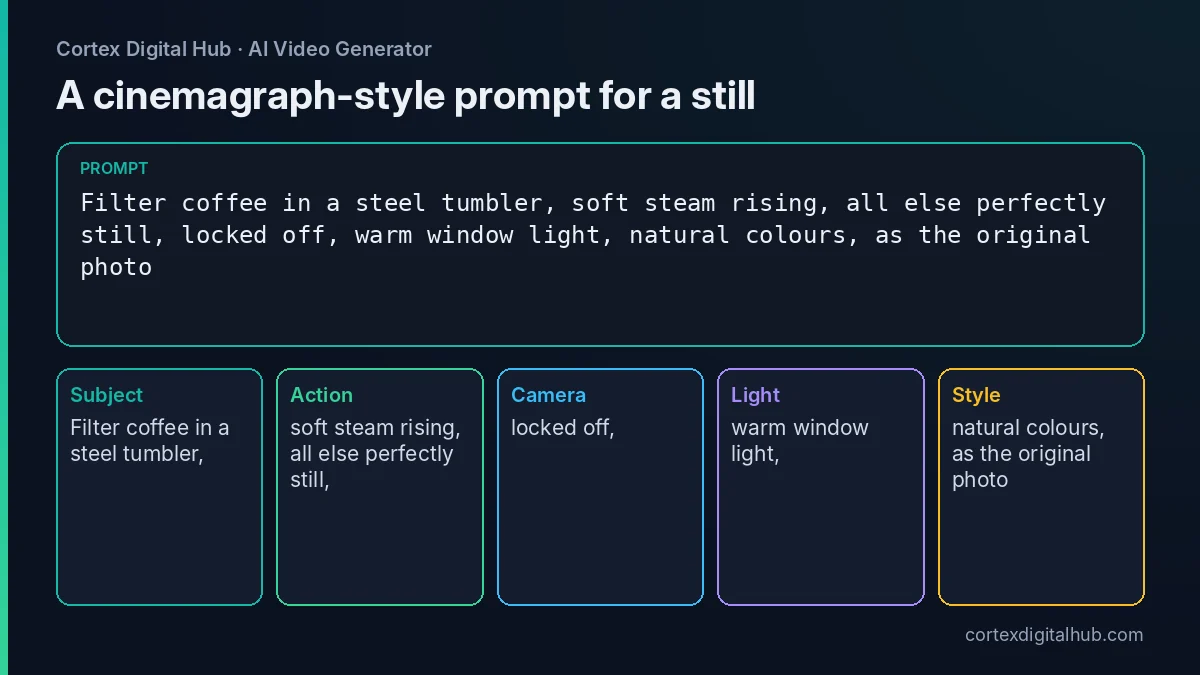 Name one moving element, lock the camera, and keep the original light and colour.
Add "warping, new objects, changed colours" to the Avoid box under Advanced. Our guide to animating a photo with AI goes deeper into first-frame prompts.
Do I need consent to animate photos?
Yes, and a photographer should lead on this. Three groups of images need different handling.
- Your own images with no identifiable people: landscapes, food, architecture, products. Fine.
- Your own images of people: get written consent that names animation and where the clip will be shown. Put it in your contract or model release.
- Anyone else's images: copyright applies. Ask for permission in writing.
Never animate real children's faces. Never animate or alter a real person without agreement, and do not impersonate anyone. For portraits, ask only for small motion such as hair or fabric, and check that the face stays true to the person. Platform rules on AI labels change, so as of 2026 check each platform's help page.
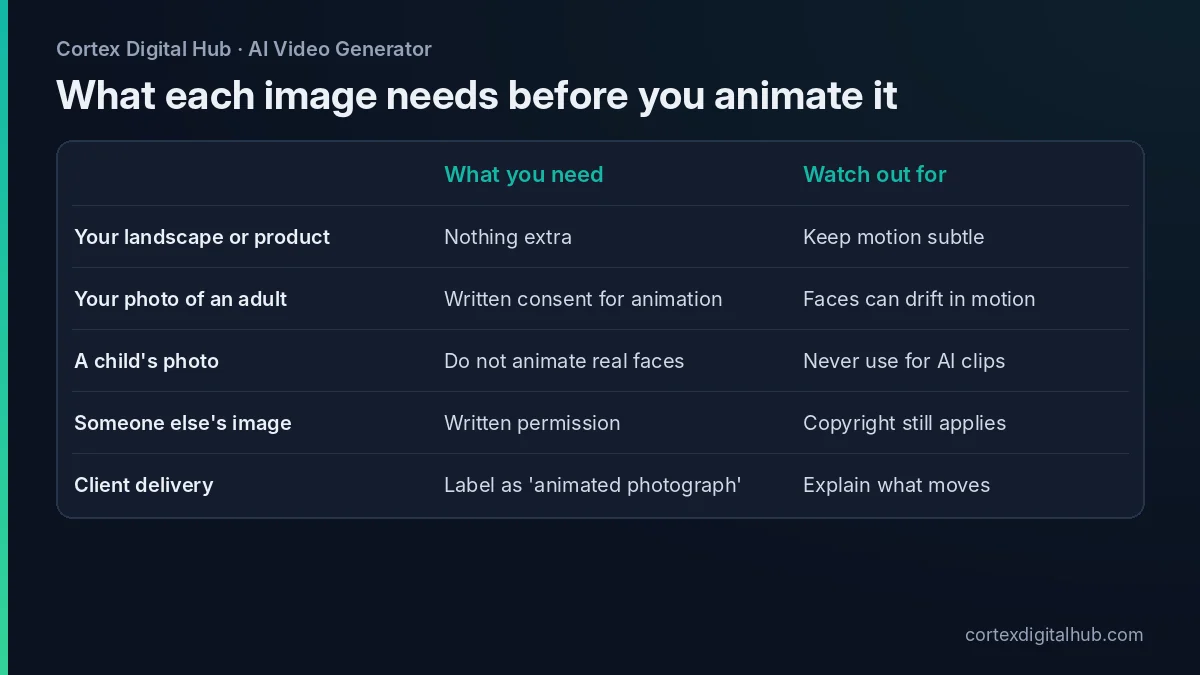 Landscapes need no release, people need written consent, and other people's images need permission.
What does it cost to animate a photograph?
Prices are as of October 2026, at 1 credit = ₹0.50.
| Clip | Model | Cost |
|---|---|---|
| Draft, 6 s | Nova Lite | ₹24 |
| 5 s clip | Lumen Motion 3 Standard | ₹57.50 |
| 5 s clip at 1080p | Lumen Motion 3 | ₹92.50 |
| 5 s sharp still-style clip | Nova 2K | ₹87.50 |
A portfolio set of five animated stills on Lumen Motion 3 Standard costs ₹287.50. The ₹249 pack covers four 5-second clips, and there is no subscription.
Which photos animate well, and which should stay still?
Not every frame deserves motion. Pick images with an obvious thing that can move naturally.
Good candidates
- Food with steam, pouring liquid or flickering candles
- Landscapes with clouds, water or mist
- Architecture at dusk with lights switching on
- Fabric, saris, curtains and garlands that can sway
- Jewellery and product shots where a light sweep adds shine
Leave these as stills
- Crowded frames with many small subjects, where details melt
- Hands, close faces and fine text, which can distort
- Images with a strong, decisive moment, because motion can weaken it
- Any frame where the story is a person's expression
A useful rule: if you cannot describe the movement in one short phrase, the model will not guess it well. Run a 6-second draft on Nova Lite for ₹24, check it against the original at full size, and only then pay for the final. If the draft changes the subject's look, shorten the motion or pick another frame. Your reputation rests on the photograph, so never publish a clip you would not frame beside the original.
How can a studio sell animated clips as an add-on?
Keep the offer simple and honest. Set your own prices, because they depend on your market and your time.
| Option | What the client gets | Notes |
|---|---|---|
| Single clip | One animated favourite, 5 s | Cost to you: about ₹57.50 plus your editing time |
| Set of three | Three clips in 9:16 for Reels | Cost: about ₹172.50 |
| Portfolio clip | One for your own use | Needs the client's written consent |
Process: shoot as usual, pick the frame, get consent in the contract, generate a draft on Nova Lite, and make the final on Lumen Motion 3. Label the add-on as an "animated photograph". Review the clip yourself before delivery, since motion can shift details.
How do I finish and share the clip?
Format the clip for where it will live. Set 9:16 up front, and fix the shape later with the Video Resizer or the Reels resizing guide. Trim the first frames with Trim Video, and shrink it for WhatsApp with the Video Compressor. Switch AI sound off if you will add your own track. For clean product stills first, use Remove Background. For product work, see AI product video from one photo.
Key takeaways
- Treat AI video as a subtle add-on: one thing moves, the photograph stays the work.
- Use your own images, or get written permission and consent for others.
- Never animate real children's faces, and never alter a real person without agreement.
- A 5-second clip costs ₹57.50 on Lumen Motion 3 Standard; drafts start at ₹24.
- Compare the first and last frames with your original and keep clips short.
- Label add-ons as animated photographs and set your own pricing.
Frequently asked questions
How can photographers use AI video?
Photographers can animate their own stills into 5-second clips with subtle motion, post them as Reels or portfolio pieces, and offer short clips to clients as an add-on. The still stays the main work.
Do I need consent to animate a client's photo?
Yes. Get written consent that covers animation and where the clip will appear, and put it in your contract or release. Never animate a real person without permission, and avoid real children's faces.
What is a cinemagraph-style clip?
It is a still-looking image where only one small element moves, such as steam, fabric, a flame or falling petals. You can describe that in your prompt: keep everything else still and move one thing.
How much does it cost to animate one photo?
A 5-second clip on Lumen Motion 3 Standard costs 115 credits, or ₹57.50. At 1080p it is ₹92.50. A cheap draft on Nova Lite starts at ₹24. The exact total shows before you generate.
Will the animated photo keep my editing style and colours?
Image to video starts from your photo as the first frame, so look and colour carry over at the start. Motion can shift details over time, so compare the clip with the original and keep it short.
Can I animate photos I did not take?
Only if you own them or have permission. Copyright still applies to images taken by others, stock images and client photos. When unsure, ask for written permission, or use your own images.
Can AI video change a person's face or expression?
It can, which is a risk. Faces may drift or shift in motion. For portraits, ask for very small motion such as hair or fabric, check the result carefully, and do not alter someone's face without their agreement.
What size should I export for Instagram and WhatsApp?
Use 9:16 vertical for Reels and status, and set Format before you generate. The free Video Resizer and the Reels resizing guide fix the shape, and the Video Compressor shrinks it for WhatsApp.
Should I tell clients a clip was made with AI?
Yes, in your add-on description and delivery note. Say the clip is an animated version of their photograph, and explain what moves. Clear labelling avoids surprises and builds trust.