
Bengali voice to text and Gujarati voice to text: one tool, both scripts, plus English
Bengali voice to text and Gujarati voice to text in your browser: turn WhatsApp notes, orders and call recordings into Bengali or Gujarati script with an English version. Settings, mixed speech with English and Hindi, and an honest review routine.
· 5 min read · 686 views · by the Cortex Digital Hub team
Pick Bengali or Gujarati as the spoken language, drop the voice note or recording, and read the original script with English beside it. Free · no sign-up · runs in your browser, nothing uploaded
Turn Bengali or Gujarati speech into text → → Opens Voice to Text · runs in your browser
A saree wholesaler in Surat takes thirty orders a day as Gujarati voice notes: colour, design number, quantity, transport. A Kolkata family's group chat is all Bengali voice notes, and the son-in-law from Chennai is lost. In both cases the voice note is quick to send and slow to use. Bengali voice to text, and the same for Gujarati, fixes that: the free Voice to Text tool writes the words in their own script, puts an English version beside them, and runs inside your browser, so nothing is uploaded.
Bengali voice to text and Gujarati voice to text: the steps
The steps are the same for both languages. Only the language you pick changes.
- Open Voice to Text in Chrome or Edge on a laptop or desktop. It is listed under More Tools, then Language Tools.
- Choose the Accurate engine, best for Indian languages. It is about 565 MB on computers with graphics acceleration in the browser, about 760 MB otherwise. It downloads once and stays in the browser, so the next visit starts in seconds.
- Set Spoken language to Bengali or Gujarati.
- Add names in Names to expect, separated by commas. Type them in English, and in Bengali or Gujarati script too if you want the first box fixed as well.
- Drop the files, up to 10 at once, or press Record.
- Read the original and the English, correct anything wrong, then copy or download.
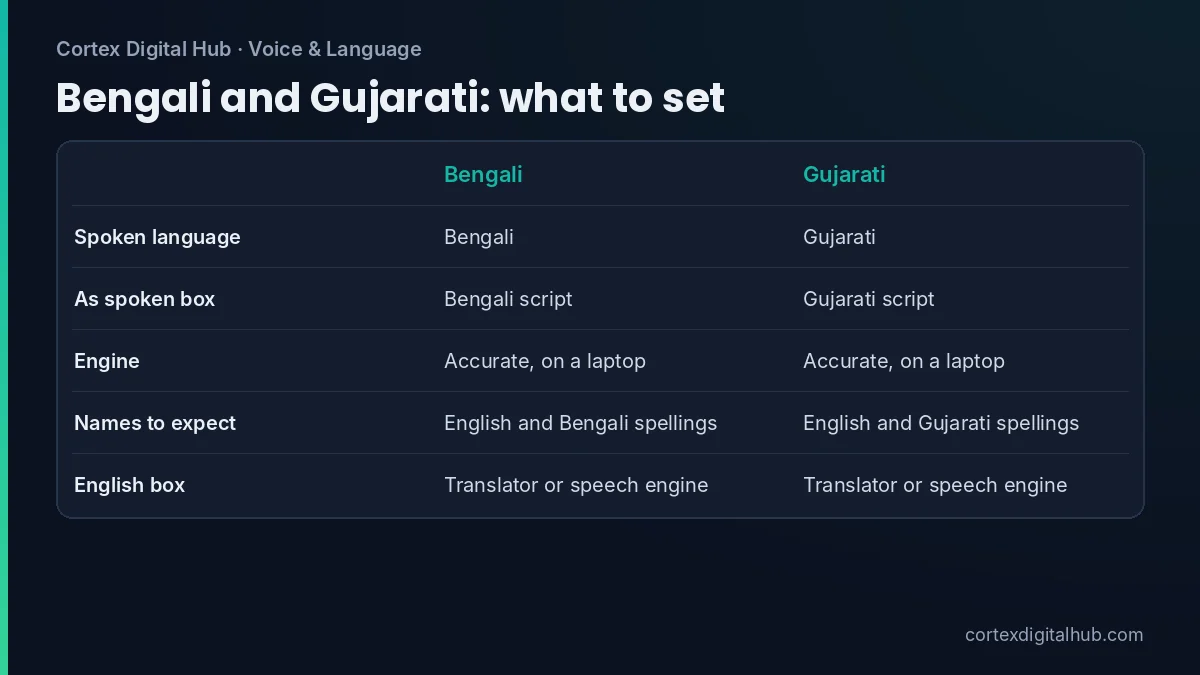 Same tool, same steps: only the spoken language and the script change.
Getting the voice notes out of WhatsApp
WhatsApp's own voice message transcripts don't help here: as of October 2026, its help page on transcripts lists no Indian languages. So you need the note as a file.
- WhatsApp Web or Desktop: download the note from the chat, or select several in the Media section as described on WhatsApp's Media help page. Files usually end in .ogg or .opus.
- Android: open the chat, tap the three dots, then More, then Export chat, and choose Include media, as in WhatsApp's export steps.
- iPhone: tap the contact or group name, then Export chat, and choose the media option you want. The export arrives as a ZIP file.
The WhatsApp voice note to text guide covers each of these in more detail.
When Bengali or Gujarati mixes with Hindi and English
Gujarati traders often switch to Hindi with outstation buyers and to English for numbers. Bengali speakers in Delhi or Bengaluru mix in English and Hindi all day. The tool cuts each recording into parts at natural pauses and, on Detect automatically, works out the language of each part. A Gujarati part is written in Gujarati script, a Hindi part in Devanagari, an English part in English, and the English box gives you the whole note in English.
Which setting to use:
- Pick Bengali or Gujarati for short notes, noisy notes, and notes in one language. Picking it helps the engine most when there is little clear speech to go on. English words inside the sentences may then appear in Bengali or Gujarati script in the first box.
- Leave Detect automatically for group recordings and calls where people genuinely switch languages, sentence by sentence.
If a result comes out in the wrong script, pick the language and run the file again.
The English box
In Chrome, the English comes from the browser's own on-device translator, where it has one for that language; the first time, it may download a language pack. Elsewhere, a button makes the English with the speech engine itself, which is direct but can be loose. Polish the English appears where the browser supports it and fixes grammar on your device, keeping names, numbers and dates.
Both boxes are editable, and what you edit is what gets copied. Download a .txt with both versions for your records, or subtitles (.srt) if the recording came from a video. Open Lines with times and click a time to hear that line again.
Review before you share the text
For an order, a payment or a delivery date, a wrong digit costs money. The tool's Before you copy checklist is short and worth following every time:
- Read the text once and fix names, numbers, amounts and dates.
- Replay unclear lines from Lines with times and correct them.
- Then copy or download.
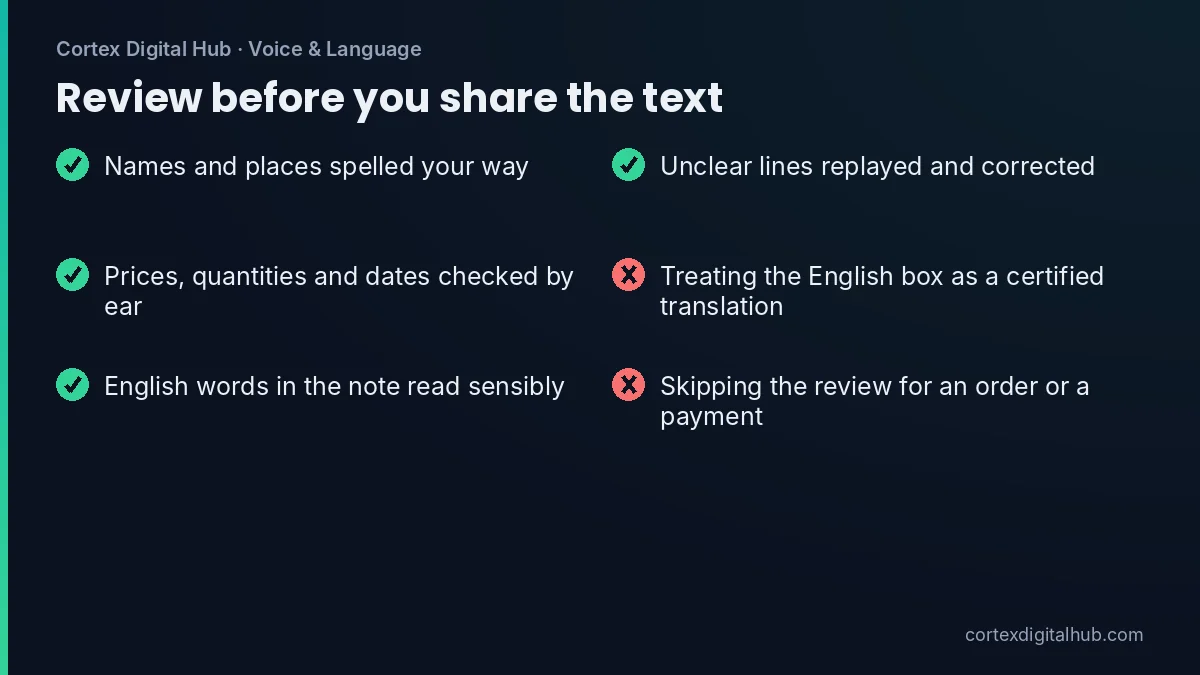 Four checks to do, two habits to avoid.
Be realistic about the audio. A clear note from one speaker comes out well; a note from a busy market, a godown with machines running, or a call on speaker is harder. Speed depends on your device: fast with graphics acceleration in the browser, slower on processor-only computers. Phones get the Light engine (about 250 MB), which suits English best, and the tool suggests switching to Accurate after a Bengali or Gujarati result.
For shops and traders
A Surat or Ahmedabad business that runs on voice-note orders can make the routine simple: download the day's notes from WhatsApp Desktop in the evening, drop up to 10 at a time, check quantities and design numbers, and paste the text into the order sheet. Long notes or call recordings can be trimmed first with Video to MP3. Textile sellers making product videos may also like AI video for saree and ethnic wear.
For families
Family voice notes carry things worth keeping: a grandmother's recipe for shukto or undhiyu, directions to the ancestral house, the list for a wedding or a pooja. Turn them into text once and they become something you can save, search and share. The original script keeps the family's own words; the English version helps a relative who grew up elsewhere follow along. For an older recording with hiss or background chatter, expect to fix a few more lines by hand.
Private, and honest about limits
The recordings stay on your device: nothing is uploaded or stored, and there is no account. Why browser-based tools are safer than upload sites explains why that matters for customer and family notes. One limit: AI Voice Over speaks English and Hindi among its 20 languages, but not Bengali or Gujarati yet. For Marathi, which shares a script with Hindi and needs one extra setting, see Marathi voice to text.
Watch the video
The voice note you can't play in a meeting · 1:19 · Watch on YouTube
Frequently asked questions
How do I convert Bengali voice to text?
Open Voice to Text, set Spoken language to Bengali, and drop the voice note, call recording or video. The words appear in Bengali script, with an English version beside them. Check names and numbers, then copy or download.
Does it work for Gujarati too?
Yes. Set Spoken language to Gujarati and the As spoken box shows Gujarati script. The English box works the same way as for Bengali.
What if the note mixes Bengali or Gujarati with Hindi and English?
Leave Spoken language on Detect automatically. The recording is cut into parts at pauses, and each part is detected on its own, so Hindi, English and Bengali or Gujarati parts are each written in their own language.
Is the English a proper translation?
It is a working English version, made by the browser's on-device translator where it has one, or by the speech engine. It is good for reading and replying, not a certified translation. Check names, amounts and dates against the original.
Can I use it on a phone?
Yes, with the Light engine, which is quick but works best for English. For Bengali and Gujarati, a laptop or desktop with Chrome or Edge and the Accurate engine gives better text.
Is anything uploaded?
No. The recording is read and turned into text on your device. Only the speech engine is downloaded, once, and kept in your browser.
Can I turn text into a Bengali or Gujarati voice?
Not yet. The AI Voice Over tool speaks 20 languages, including English and Hindi, but not Bengali or Gujarati today.
Turn Bengali or Gujarati speech into text → →