
Marathi voice to text: turn Marathi voice notes into Devanagari and English
Marathi voice to text for society notes, contractor updates and family messages: Marathi in Devanagari with an English version, made in your browser. Why picking Marathi matters when Hindi shares the script, and how to check numbers.
· 5 min read · 680 views · by the Cortex Digital Hub team
Set Spoken language to Marathi, drop the voice note or recording, and read Devanagari with an English version beside it. Free · no sign-up · runs in your browser, nothing uploaded
Convert Marathi speech to text → → Opens Voice to Text · runs in your browser
The secretary of a housing society in Pune gets twenty voice notes a day from members, mostly in Marathi: a leak in B wing, a parking complaint, a question about the maintenance bill. A contractor sends his estimate for the terrace work as a two-minute Marathi note. Nobody can act on a voice note they haven't heard. Marathi voice to text turns each one into readable text: the free Voice to Text tool writes the Marathi in Devanagari, adds an English version beside it, and does this in your browser, so members' notes stay on your device.
Where Marathi voice notes pile up
- Housing societies and offices. Complaints, bills and repair estimates arrive as voice notes. As text, they can be pasted into a register, a minutes file or a reply.
- Small businesses. A tiffin service in Nashik or a hardware shop in Kolhapur takes orders on WhatsApp. Text makes the day's orders easy to scan and share with whoever is packing.
- Families. An aaji's recipe, a pooja checklist or directions to the village house, written down once and kept, in Marathi for the family and in English for the cousin abroad.
- Students and teachers. A recorded explanation in Marathi becomes revision notes, or subtitles for a lesson video.
In each case the problem is the same: a voice note is quick to send and slow to use. Text you can read, search and forward fixes that.
Marathi voice to text: the quick way
- Open Voice to Text on a laptop or desktop in Chrome or Edge.
- Choose the Accurate engine, which is best for Indian languages. It is about 565 MB on computers with graphics acceleration in the browser, about 760 MB otherwise, downloaded once and kept in the browser. Later visits start in seconds.
- Set Spoken language to Marathi.
- Type names in Names to expect, separated by commas: "Kulkarni, Deshpande, B wing". Add the Devanagari spelling too, such as "कुलकर्णी", to fix the Marathi box as well as the English.
- Drop the files, up to 10 at a time.
- Read the Marathi, then the English, fix what is wrong, and copy or download.
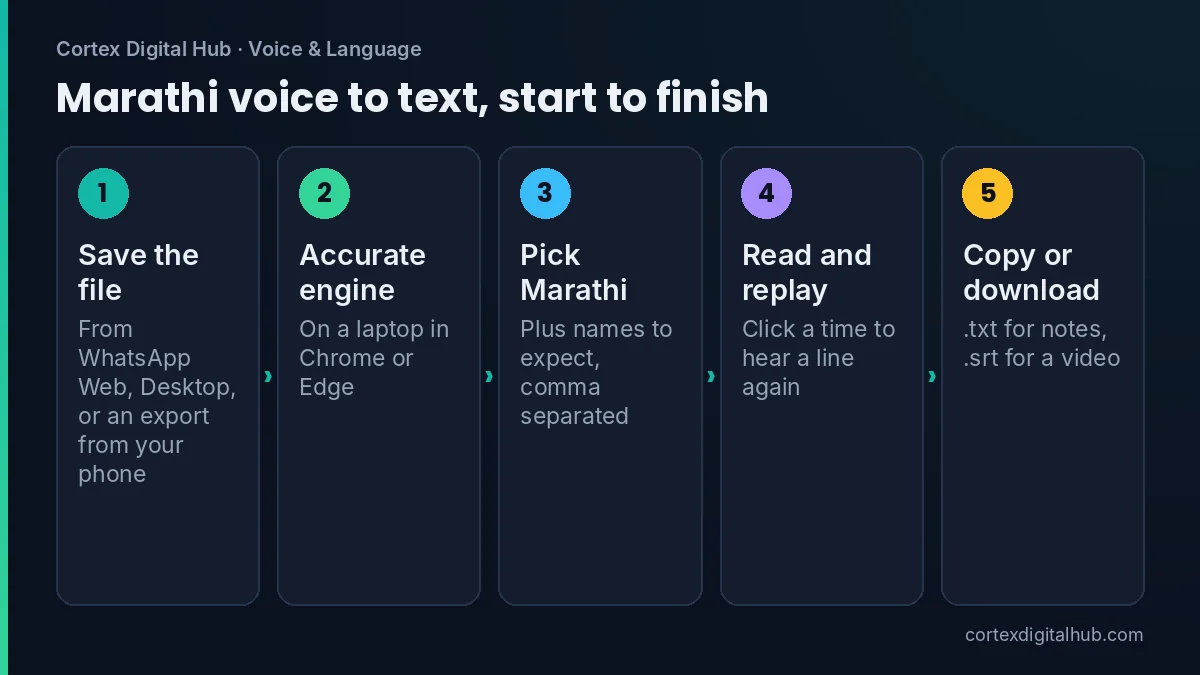 From a saved voice note to checked text, with Marathi picked and names added.
Getting the recording
WhatsApp voice notes come as .ogg or .opus files. On WhatsApp Web or Desktop you can download them from the chat, or select several from the Media section described on WhatsApp's help page. On a phone, export the chat with media. The WhatsApp voice note to text guide has every step. Call recordings (.m4a, .mp3, .amr) and videos (.mp4, .mov) work as they are.
WhatsApp's own transcripts won't cover these notes: as of October 2026, its transcripts help page lists no Indian languages.
Marathi or Hindi? Why picking the language matters
Marathi and Hindi are both written in Devanagari and share a lot of vocabulary. When the tool is left on Detect automatically, it guesses the language of each part of the recording. On a long, clear Marathi note that guess is usually right. On a short note, or one recorded on a busy road, there is less to go on, and a Marathi part can be guessed as Hindi. The text then looks plausible in Devanagari but drifts in spelling and grammar, and the English is translated from the wrong language.
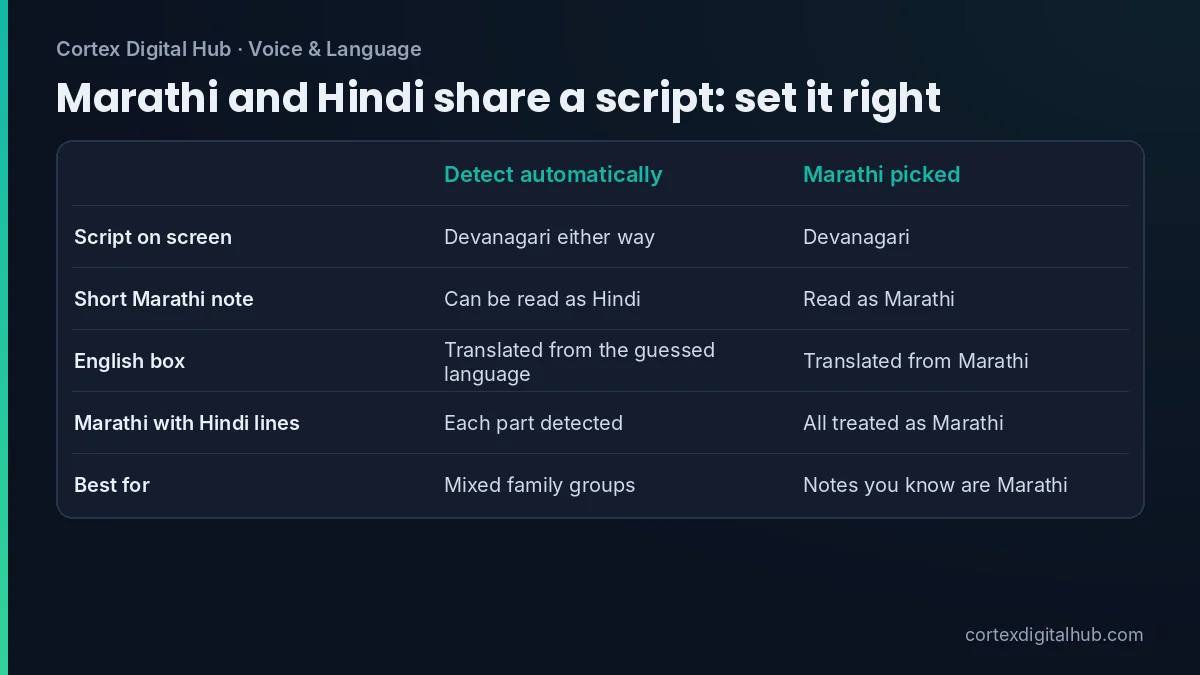 Same script on screen either way; picking Marathi removes the guess.
So for notes you know are Marathi, pick Marathi. Keep Detect automatically for a family group recording where one person speaks Marathi, another Hindi, and a cousin from Bengaluru answers in English.
Marathi with English mixed in
Pune and Mumbai Marathi borrows English freely: "उद्या meeting आहे, agenda share करतो". With Detect automatically, each part of the recording gets its own language, so full English sentences stay in English. With Marathi picked, every part is treated as Marathi, and English words inside a Marathi sentence may come out in Devanagari in the first box. The English box gives the whole note in English either way.
Check Marathi numbers twice
Money and dates are where a voice note becomes a decision, and they are where speech engines slip. Watch for:
| Marathi word | Means | Example |
|---|---|---|
| सव्वा | one and a quarter | सव्वा लाख = 1.25 lakh |
| दीड | one and a half | दीड हजार = 1,500 |
| अडीच | two and a half | अडीच वाजता = 2:30 |
| साडे | plus a half | साडे तीन = 3.5 |
| पावणे | a quarter less | पावणे पाच = 4.75 |
Also check lakh and crore amounts in the English, flat and wing numbers, and phone numbers. The tool's Before you copy checklist says the same: fix names, numbers, amounts and dates, replay unclear lines from Lines with times, then copy.
The English box
In Chrome, the English comes from the browser's own on-device translator, where it has one for Marathi; the first time, it may download a language pack. In other browsers, a button makes the English with the speech engine, which is direct but can be loose. Polish the English appears where the browser supports it and tidies grammar on your device. Both boxes are editable, and you can download a .txt with both versions or subtitles (.srt) for a video.
For a society or a small office, the English text is handy for a committee member who doesn't read Marathi; the Marathi text is the record of what the member actually said.
Honest limits
- Accuracy depends on the audio. One clear speaker comes out well; a crowded meeting hall or a call on speaker is harder.
- Speed depends on your device: fast with graphics acceleration in the browser, slower on processor-only computers.
- Phones get the Light engine (about 250 MB), which is quick and best for English. For Marathi, the tool suggests switching to Accurate, and a laptop is the better place to do it.
- AI Voice Over speaks English and Hindi among its 20 languages, but not Marathi yet.
Related tools and guides
- Trim a long recording to the useful part with Video to MP3.
- Hindi notes in the same group: Hindi audio to English text.
- Tamil speakers on the team: Tamil voice to text.
- Why nothing is uploaded: browser-based tools vs upload sites.
Watch the video
The voice note you can't play in a meeting · 1:19 · Watch on YouTube
Frequently asked questions
How do I convert Marathi voice to text?
Open Voice to Text, set Spoken language to Marathi, and drop the voice note, call recording or video. The Marathi appears in Devanagari, with an English version beside it. Check names and numbers, then copy or download.
Why should I pick Marathi instead of Detect automatically?
Marathi and Hindi share the Devanagari script and many words, so a short Marathi note can be guessed as Hindi. Picking Marathi removes that guess. Leave Detect automatically only for recordings where people really switch languages.
Does it handle Marathi mixed with English?
Yes. With Detect automatically, each part of the recording is detected on its own, so full English sentences stay in English. With Marathi picked, English words inside Marathi sentences may appear in Devanagari in the first box.
Which Marathi number words should I check?
Fractions like सव्वा, दीड, अडीच, साडे and पावणे, amounts in lakh and crore, and dates. These are where an English version most often slips.
Can I use it on my phone?
Yes, with the Light engine, which suits English best. For Marathi, use a laptop or desktop with Chrome or Edge and the Accurate engine.
Is my recording sent anywhere?
No. The speech engine runs in your browser, so the recording is read on your device. Nothing is uploaded and there is no account.
Can I get a Marathi voice from text?
Not yet. The AI Voice Over tool speaks 20 languages, including English and Hindi, but not Marathi today.
Convert Marathi speech to text → →