
AI video for fashion brands: saree and ethnic wear clips that keep the fabric true
AI video for fashion brands can show a saree's drape, a lehenga's swirl or a kurta's flow without a model or a studio day. Here is how to prompt fabric movement, keep the garment exact with your photo or references, and post to Instagram and Meesho.
· 5 min read · 562 views · by the Cortex Digital Hub team
Upload a clean garment photo as the first frame and prompt only the fabric movement and a slow camera. From ₹24 a clip · no watermark · runs in your browser
Animate a garment → → Opens AI Video Generator · runs in your browser
AI video for fashion brands works well for sarees and ethnic wear when you let your own photo fix the garment and use the prompt only for movement. Upload a clean photo to the AI Video Generator as the first frame, describe how the fabric should move, and you get a 5-second clip that shows drape and flow without a model, a studio day or a reshoot. It costs ₹57.50 on the standard model.
Photo first: the way to keep the garment exact
Fashion buyers notice when a print, a border or a colour is wrong. The safest method is image to video, because the photo becomes the first frame and the model builds the motion from it. Your saree stays your saree.
Pick a photo that shows the garment cleanly: on a mannequin, a hanger, a rail or laid out flat, in even daylight, with the border and pallu visible. Cut out a messy background with the free remove background tool and place the piece on a plain colour. Use the sharpest photo you have; fine zari work blurs if the source is soft. The product photo requirements for Amazon, Flipkart and Meesho are a good checklist for backgrounds and sizes.
Fabric words that change the motion
Silk does not move like chiffon. Name the fabric, then the movement.
| Fabric | Movement words | Example phrase |
|---|---|---|
| Silk, Kanjivaram | Heavy, slow, glossy folds | "heavy silk pallu falling in slow folds" |
| Chiffon, georgette | Light, floating, translucent | "light chiffon drifting in a soft breeze" |
| Cotton, handloom | Soft, crisp, natural | "crisp cotton pleats swaying gently" |
| Lehenga | Wide swirl, volume | "layered lehenga skirt swirling slowly" |
| Kurta set | Straight fall, small flutter | "dupatta fluttering lightly, kurta hem moving" |
Pair the fabric with one camera move: a slow pan along the drape, a gentle push-in on the border or a static frame with moving cloth.
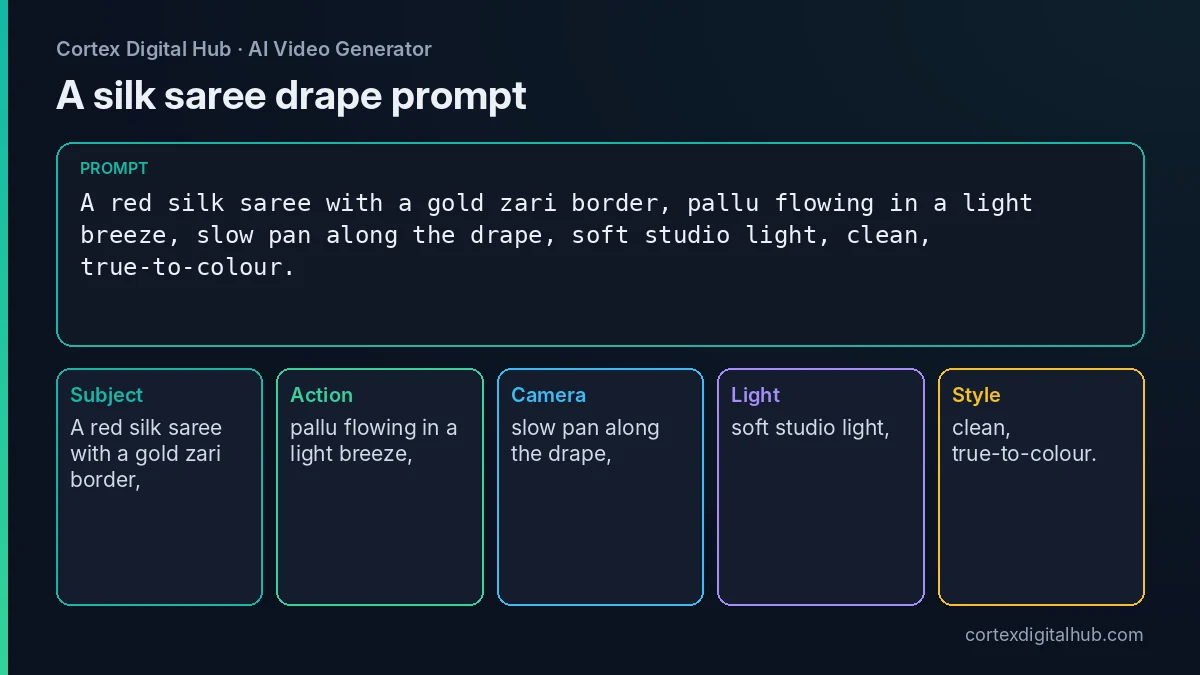 A drape prompt for a silk saree, split into the parts the model reads.
AI video for fashion brands: prompts to copy
- Silk saree on a mannequin:
A red silk saree with a gold zari border on a mannequin, pallu flowing in a light breeze, slow pan along the drape, soft studio light. - Lehenga flat to swirl:
A mirror-work lehenga on a stand, skirt swirling slowly, static camera, warm evening light. - Dupatta close-up:
Close-up of a bandhani dupatta, fabric rippling softly, slow push-in on the print, bright daylight. - Kurta on a rail:
A block-printed cotton kurta on a wooden hanger, hem swaying gently, static camera, morning window light.
Keep one garment per clip. If you want to show a full range, make one clip per piece and join them afterwards.
Photo or reference images?
Image to video keeps the garment the most exactly. Reference images (2 to 4 pictures, tagged with the @ Tag button) are for cases where you want the garment in a new setting or pose while keeping the print and cut consistent. They need a model that supports references, such as Orbit 3, Orbit 2.7, Nova 2K or Vela 2.5. The reference images guide explains the setup.
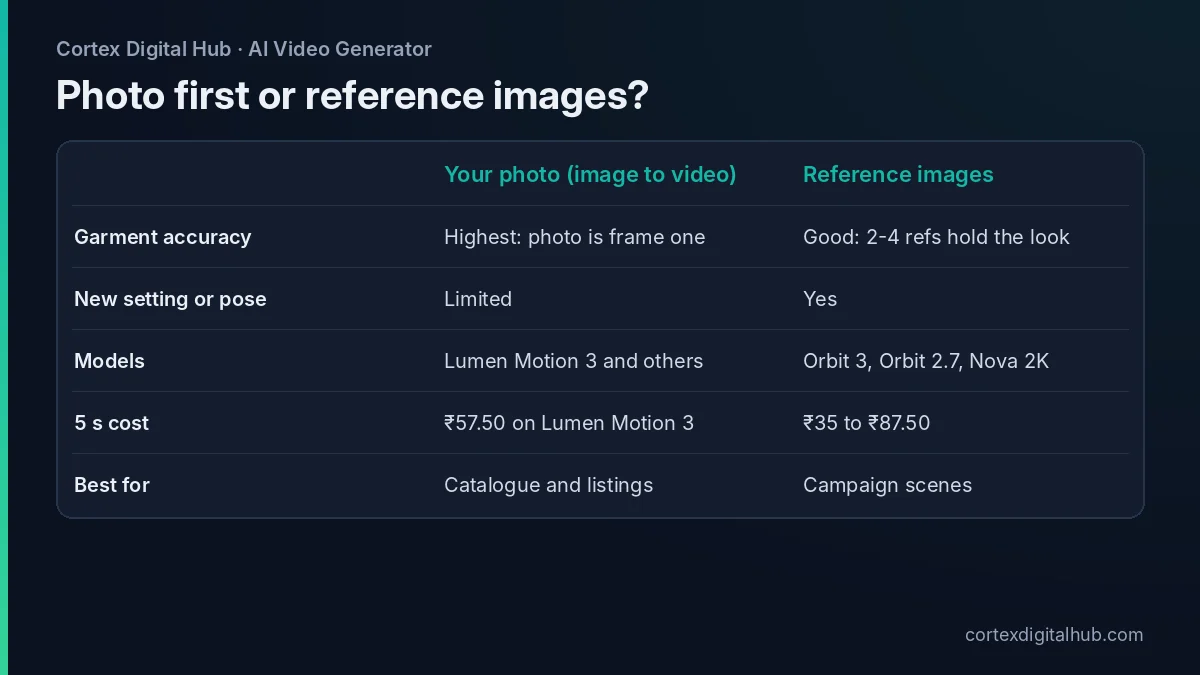 Photo first for exactness, references when you need a new setting.
What it costs
Prices are as of October 2026, at 1 credit = ₹0.50, and the total shows on the Generate button before you start.
| Setup | Credits | Price |
|---|---|---|
| Nova Lite draft, 6 s | 48 | ₹24 |
| Orbit 3, 480p, 5 s (references) | 70 | ₹35 |
| Lumen Motion 3 Standard, 5 s | 115 | ₹57.50 |
| Nova 2K, 5 s (references) | 175 | ₹87.50 |
Say a boutique in Kolkata has ten new sarees. Ten standard finals cost ₹575. Adding a ₹24 draft for each garment raises it to ₹815. For comparison, the ₹249 pack gives 520 credits, about four standard clips. The cost guide lists every model.
Model-free product motion, step by step
Many small sellers in Surat, Jaipur or Chennai do not have a studio, and hiring a model for every new design is expensive. Model-free motion is the simplest answer, and it has a real advantage: nothing distracts from the fabric.
- Photograph the garment on a mannequin or a hanger against a plain wall, in daylight near a window.
- Crop to 4:5 or 9:16, leaving space above and below.
- Upload it as the first frame and write only the fabric movement.
- Draft on Nova Lite or Orbit 3, check the border and print, then run the final.
- Trim the first or last second if the motion starts or ends awkwardly, using the free trim tool.
For a seasonal launch, shoot every piece in the same light and use the same prompt skeleton, changing only the fabric words. The clips then look like one collection.
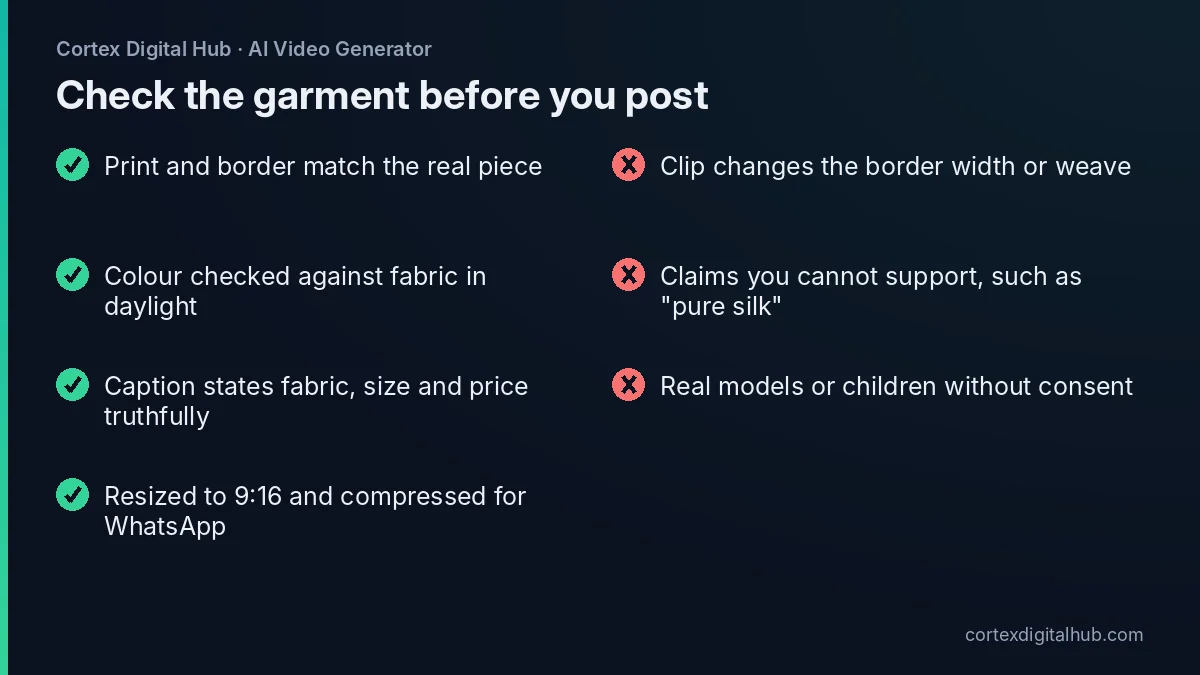 Check these before a garment clip goes on Instagram or WhatsApp.
Be accurate about colour and claims
Screens shift colour, and AI shifts it a little more. Always compare the clip with the real fabric in daylight, and reject clips that change the print, the border width or the weave. Add changing print, warped border, extra patterns to the Avoid box and keep the motion slow.
Describe the product truthfully in the caption: fabric, care, size and price. Avoid claims such as "pure silk" unless they are true and you can support them. If you show a model, use a person who has agreed, and never use children's faces. A mannequin or flat lay avoids the issue.
Seasonal ideas that sell
Festive and wedding seasons are when fashion clips earn their keep. A short clip of a new Banarasi drape for the wedding season, a bandhani dupatta before Navratri or a cotton set for summer gives your customers something to forward. Keep a small library of prompts for each fabric, change only the colour and the garment name, and you can launch a collection in an afternoon rather than a fortnight.
Post it: Instagram, WhatsApp and marketplaces
Set the Format to 9:16 for Reels, or fix the shape with the video resizer and the Reels resize guide. Compress it for WhatsApp with the video compressor. Marketplace video rules, including those for Meesho, change, so check the platform's help page as of 2026 before you upload.
Key takeaways
- Start from your own garment photo in image to video so the print stays exact.
- Name the fabric and one movement, and add one slow camera move.
- Use reference images only when you need a new setting; pick a model that supports them.
- A 5-second clip costs ₹57.50 on Lumen Motion 3 Standard; ten garments cost ₹575.
- Compare every clip with the real fabric and keep caption claims accurate.
- Resize to 9:16, compress for WhatsApp and check marketplace rules before uploading.
Frequently asked questions
Can AI make a video of a saree without a model?
Yes. Use a clean photo of the saree on a mannequin, a hanger or laid out flat as the first frame, and prompt the fabric to move gently. The photo fixes the colour and print, so no model is needed.
How do I keep the saree design exact in an AI video?
Start from your own product photo in image to video, or tag two to four reference images of the garment on a model that supports references. Then check the clip against the real piece and reject any that change the print.
What prompt shows fabric drape and flow?
Name the fabric and the movement: 'a silk saree with a gold border, pallu flowing in a light breeze, slow pan along the drape, soft studio light'. Mention the fabric type, because silk, chiffon and cotton move differently.
How much does a fashion clip cost?
A 5-second clip on Lumen Motion 3 Standard is 115 credits, which is ₹57.50. Ten garments cost ₹575. A 6-second draft on Nova Lite is ₹24. Prices are as of October 2026.
Which model should I use for ethnic wear clips?
Start with Lumen Motion 3 Standard for photo-first clips. If you need reference images, choose a model that supports them, such as Orbit 3, Orbit 2.7 or Nova 2K, and draft on the cheaper ones.
Can I use the clips on Meesho and Instagram?
Instagram Reels work well at 9:16. Marketplace video rules, including Meesho's, change often, so check the platform's help page as of 2026 before uploading. Many sellers use the clip on Reels and WhatsApp and keep photos for listings.
Will the colour match the real fabric?
Not always exactly. Screens and AI both shift colour a little. Compare the clip with the real garment under daylight, and mention accurate colour in the caption rather than promising an exact match.
Can I put a real model in the AI clip?
Only if the person has agreed, and never use children's faces. Many brands avoid the question by showing the garment on a mannequin or flat, which also keeps the focus on the fabric.
What if the AI changes the border or print?
Shorten the clip, slow the movement, add 'changing print, warped border' to the Avoid box and try another Seed. If the garment still shifts, use a simpler photo with a larger, sharper view of the border.