
Diwali greeting for clients: a short clip of your team, not another card
The corporate Diwali card with a logo and a stock lamp is forgotten in seconds. Turn one office or team photo into a short greeting clip, send it by email and WhatsApp, and keep it professional with a short checklist.
· 5 min read · 698 views · by the Cortex Digital Hub team
Pick the diyas idea for a team photo or the fireworks idea for your office building, add the photo, and the studio opens with the prompt written. 170 credits (₹85) for a 5-second clip · free account · ready in a few minutes
Make your team's greeting → → Opens Diwali video generator · runs in your browser
Every October the same envelope arrives: a firm's logo, a stock lamp, "Wishing you and your family a happy and prosperous Diwali", and a signature from someone the client has never met. It goes on the pile with forty others. A diwali greeting for clients that shows the actual people they work with, the accountant who files their return, the site engineer, the receptionist who knows their name, is the one they look at twice.
This is for service firms: CA and law practices, agencies, builders and developers, clinics, consultancies.
Why the corporate Diwali card is forgotten
The card is about the firm, not the relationship. It has no face, no place and nothing the client recognises, and it usually arrives as one image attachment or a forward, the same format every other vendor uses that week. Clients are not ungrateful; they simply have nothing to remember.
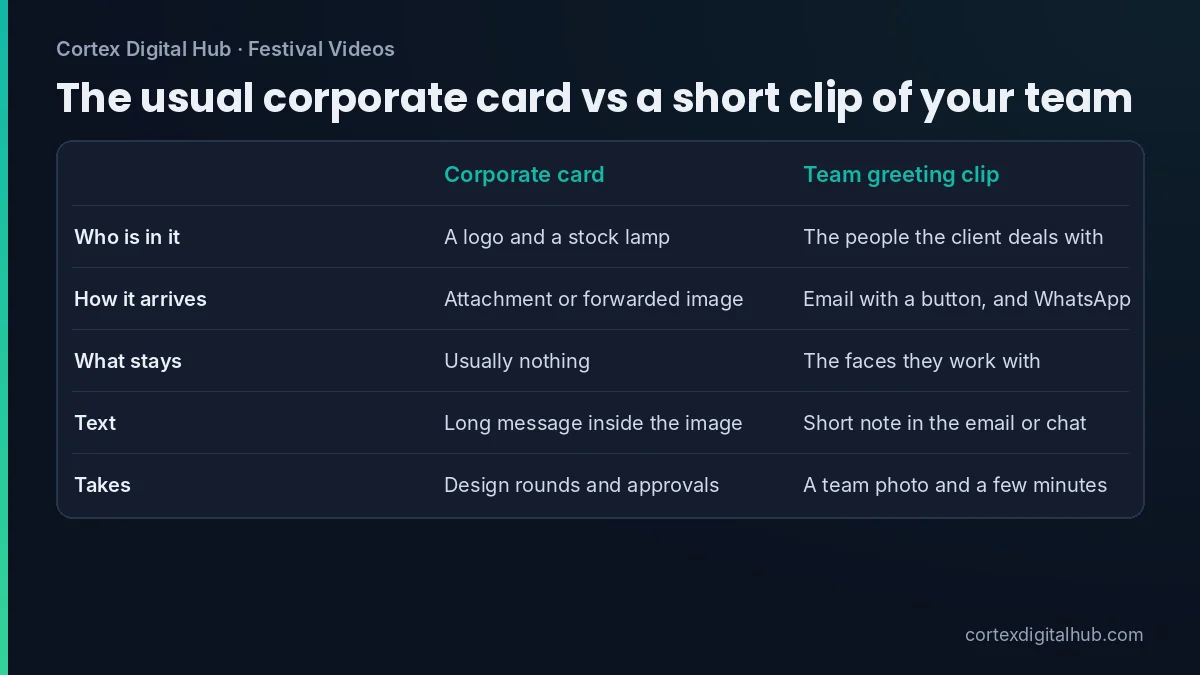 The card is about the logo. The clip is about the people the client already knows.
A Diwali greeting for clients from one team photo
The Diwali video generator turns one photo into a short clip. For a firm, two ideas fit best:
- The team, with diyas around them. Open the diyas idea and add the team photo. It was written for a family, so change "the family" to "the team" in the prompt.
- The office or building at dusk. Open the fireworks idea and add a photo of the office front or reception. For a clinic, take out the crackers and keep only the lights.
Then:
- Take the photo a few days before Diwali, in the office, everyone in festive clothes if they like. Portrait for WhatsApp; landscape if you will mostly show it in an email. Brighten or straighten it in the Photo Editor.
- Generate. A 5-second clip on the studio's default model takes 170 credits (₹85), shown on the button first. It is usually ready in two to four minutes and waits under Your videos for 7 days.
- Check every face. Each idea tells the studio to keep the faces exactly as in the photo, but look closely before you send. If anyone looks different, generate again.
Prompts to copy
Keep the faces exactly as in the photo. Small clay diyas on the desks around the team light up one by one, their warm flames flickering, a few marigold petals drift down, everyone smiles softly, the camera pushes in very gently, golden evening glow, soft sitar music.
Keep the building and any people exactly as in the photo. The sky behind the office deepens to night blue and fireworks burst softly in gold, strings of fairy lights along the entrance twinkle, slow steady push in, gentle festive music.
Keep the reception and any people exactly as in the photo. A row of diyas on the front desk glows, a marigold garland sways at the door, warm light fills the room, slow push in, calm sitar.
Send it by email and WhatsApp
By email. Email apps do not reliably play video, so send the greeting as an email and let the clip open from a button. In the free Email Composer, drop in a greeting image (the team photo itself, sized to 1080 × 1350 with the Image Resizer, works well), write a two-line message, and add one button that opens the clip where you have posted it, such as your website. The composer adds a footer with your address and an unsubscribe line; builders can add the RERA note in the legal field. Send yourself a test first, then send through Cortex Mail or the email tool you already use. If your client list has not been touched in a while, run it through the Email List Cleaner before sending.
On WhatsApp. Send the MP4 itself to each client's chat, with a short personal line from the person who handles them. A message from "Ravi, your CA" lands better than one from a broadcast list. If the file is too large, the free Video Compressor shrinks it on your phone.
Timing: Diwali falls on 8 November this year (dates vary a little by region). Send on the morning of the day before or of Diwali itself, during working hours.
What to write with the clip
The clip carries the feeling; the words carry who it is from. Keep them short and in your own voice. A few lines to adapt:
- "Wishing you and your family a bright Diwali. Thank you for trusting us with your accounts this year. From all of us at Mehta & Associates."
- "Happy Diwali from the site team. We are glad to be building your home, and we look forward to handing over the keys. Warm wishes, Ravi and the team."
- "Shubh Deepavali from everyone at the clinic. Wishing your family good health and a peaceful festival."
- "A small Diwali greeting from our studio to yours. Thank you for a year of good work together."
For email, put the same words in the text block under the image, and use a subject that names your firm, such as "Diwali wishes from the team at Mehta & Associates". On WhatsApp, the person who knows the client best should send it from their own number.
Keep the client greeting professional
A greeting is not a campaign. A few rules keep it right:
- Consent from the team. Everyone in the photo agrees before it goes to clients.
- No pitch. No offers, fee reminders or "book your consultation" lines.
- Names in text, not in the video. Video models misspell longer words, so the firm's name and the signatures go in the message.
- Quiet sound. Soft sitar or bells, not loud crackers. Many clients open it at a desk.
- Only clients who know you. Not bought lists, not every visiting card from a trade fair.
- Never a client's face in your greeting without asking them.
If your profession has its own rules about advertising, a greeting with no offer and no claims stays on the safe side.
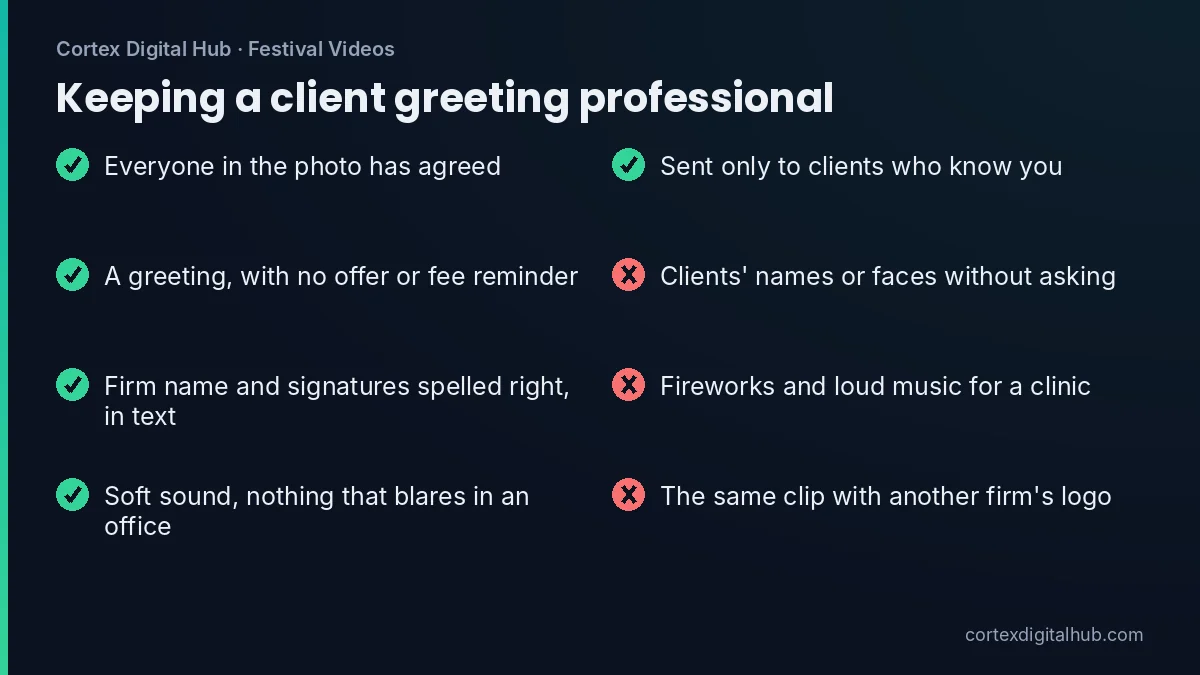 What to keep in, and what to leave out.
For subject lines and sending basics, read the Diwali offer email guide; the timing advice there works for greetings too.
Watch the video
A Diwali video for two, and a rangoli that blooms · 0:21 · Watch on YouTube
Frequently asked questions
What is a good Diwali greeting for clients?
One that shows the people your clients actually work with, keeps the message short and sincere, and asks for nothing. A few seconds of your team in lamp light, with a two-line note in the email or WhatsApp, does that.
Which photo should I use?
A recent, sharp portrait photo of the team in the office, everyone facing the camera, warm light if possible. Small groups look the most natural. For a large firm, use a photo of the office building or the reception instead.
Do I need the team's permission?
Yes. Ask everyone in the photo before you turn it into a video and send it to clients. Anyone who would rather not be in it should be left out of the photo.
Can I attach the video to the email?
Video attachments are heavy and many email apps do not play video inline. Build the email from a still greeting image in the Email Composer and add a button that opens the clip where it is posted. On WhatsApp, send the MP4 itself.
Should the greeting mention our services or fees?
No. A greeting with a sales line reads as an advertisement. Keep business for another day; a signature with the firm's name and contact details is enough.
What about clients who do not celebrate Diwali?
Send them a warm seasonal note instead, or a New Year greeting later. A short, personal line matters more than the festival.
How much does it cost?
A 5-second clip from a photo on the studio's default model takes 170 credits, which is ₹85. One clip serves the whole client list. The Email Composer is free.