
Hindi voice over for YouTube Shorts, free and in your browser
Write your Short's script in Hindi, pick an Indian voice and get a natural Hindi voice over without recording yourself. How to write Devanagari that reads well, fit the length and add it to a vertical video.
· 5 min read · 1.4K views · by the Cortex Digital Hub team
Choose Hindi in the Language menu, pick a voice, paste your Devanagari script and press Generate. Each take shows its length. Free · no sign-up · Hindi and 19 other languages
Make a Hindi voice over → → Opens AI Voice Over & Clone · runs in your browser
You run a Shorts channel on home cooking, money tips or property in your city. Your viewers want Hindi, but recording on your phone in a busy house means the pressure cooker in every take. A Hindi voice over made from a typed script solves that. Write the script in Devanagari, open AI Voice Over & Clone, choose Hindi and an Indian voice, and press Generate. It is free, there is no sign-up, and the script never leaves your browser.
How long can a YouTube Short be?
According to YouTube's help page on three-minute Shorts, you can create Shorts up to three minutes long, and videos with a square or vertical aspect ratio up to that length are treated as Shorts. Most Shorts are far shorter, and a tight script holds attention better than a long one.
Rather than guess how many words fit, let the tool tell you. Each take in the list shows its length in minutes and seconds. Generate a first take, check the time, and cut lines until it fits your clip.
Make a Hindi voice over, step by step
- Write your script in Devanagari. A Short usually needs a hook, two or three points and a closing line.
- Open AI Voice Over & Clone on a laptop with a recent Chrome or Edge.
- Choose Hindi in the Language menu and paste your script into the box.
- Pick a voice. For Hindi, start with the Indian voices: Priya, Meera, Arjun or Rohan.
- Set Expressiveness: Natural for explainers, Lively for recipes and offers.
- Press Generate voice over, play the take and check its length.
- Download the take as WAV and add it under your vertical video.
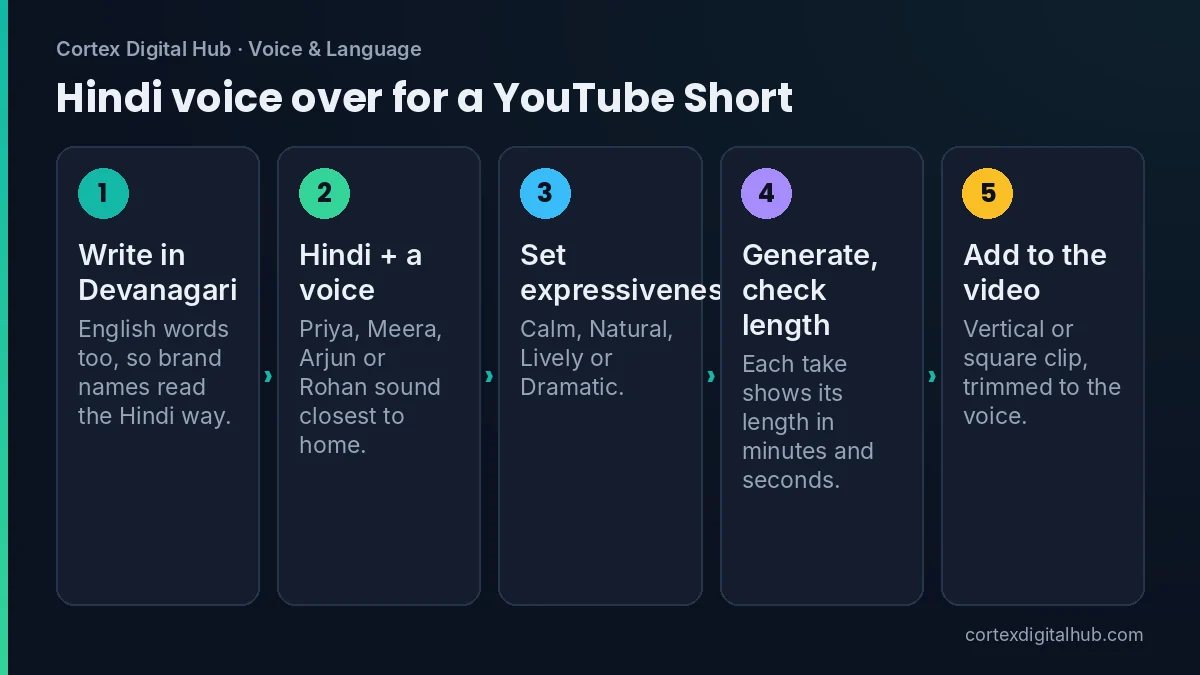 Devanagari script, Hindi and an Indian voice, expressiveness, then check the take's length against your clip.
The first time you choose Hindi, your browser downloads the all-language voice engine once, about 1.6 GB. Do it on Wi-Fi. After that it loads from the browser's cache. On older laptops each sentence can take a minute or two, so keep the tab open while it works.
Writing a Hindi script the voice reads well
A few rules make a large difference to how natural the Hindi sounds.
Use Devanagari, not Hindi typed in English letters. "आज की रेसिपी" reads cleanly; "aaj ki recipe" may be read as English.
Write English words in Devanagari too. The tool's own tip: for Hindi, write names and English words in the language's script, such as कॉर्टेक्स डिजिटल हब. So write डिस्काउंट, ऑफ़र and लिंक, not discount, offer and link.
End sentences with a danda (।). The tool splits Hindi at the danda just as it splits English at a full stop, so short sentences give the voice natural breaths.
Write numbers in words when they matter. "पाँच सौ रुपये" is safer than "₹500". Then listen to the take to make sure.
Add [pause] between points. One after the hook and one before the call to action is usually enough.
A short sample script:
दो मिनट में चाय वाला पोहा बनाइए। [pause] कढ़ाई में थोड़ा तेल गरम कीजिए। राई और करी पत्ता डालिए। फिर भीगा हुआ पोहा मिलाइए। [pause] पसंद आए तो चैनल को सब्सक्राइब कीजिए।
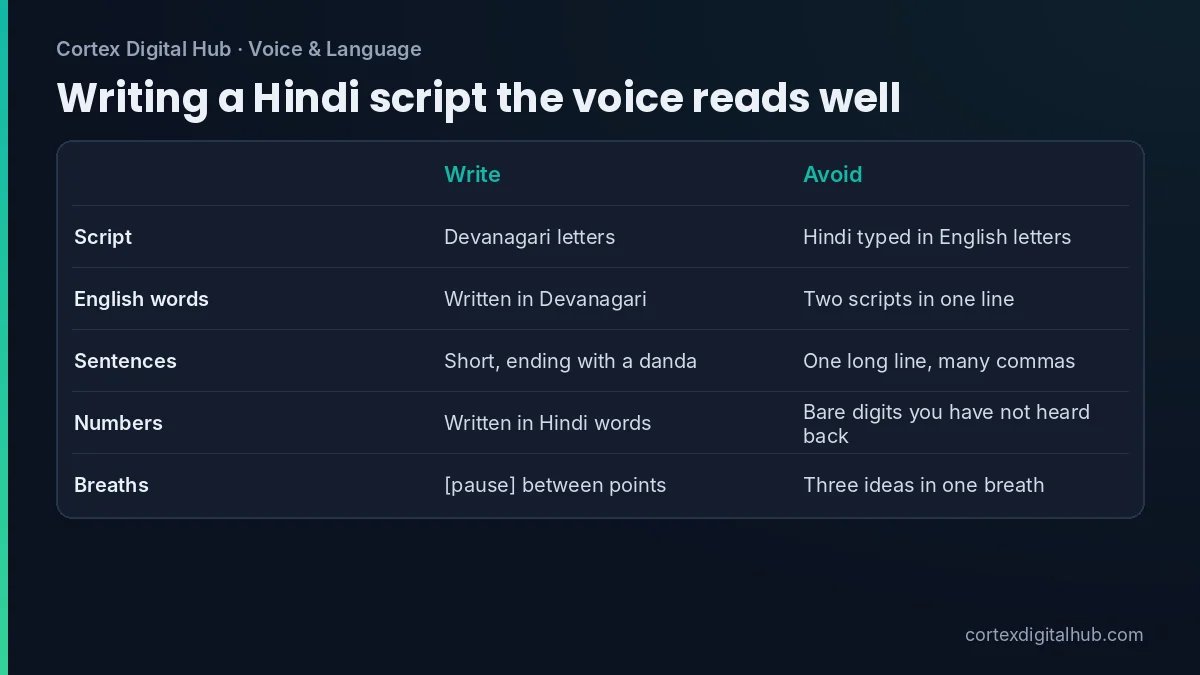 Devanagari, English words in Devanagari, short sentences with a danda, numbers in words and a pause between points.
Choosing a voice and expressiveness for Hindi
Every voice in the library can speak Hindi, and each keeps its own accent. That means an American or British voice will speak Hindi with that accent, which can sound odd to a Hindi audience. The four Indian voices are the natural place to start:
| Voice | Sound | Suits |
|---|---|---|
| Priya | Warm female | Recipes, stories, walkthroughs |
| Meera | Calm female | Explainers, finance tips |
| Arjun | Friendly male | Tutorials, tech how-tos |
| Rohan | Deep male | Promos, launches |
The Expressiveness slider appears for Hindi and other non-English languages. It moves from Calm through Natural and Lively to Dramatic. Make two takes at different settings and compare them in the takes list.
Want the Short in your own voice without recording every week? Clone your voice once from a 10 to 20 second sample in My voices, after ticking the consent box, then choose Hindi. The clone stays only in your browser.
Fitting the Hindi voice over to your Short
Once you have the take, finish the Short with free tools that run in your browser:
- No footage? Make a short vertical clip from a photo or a prompt with the AI video generator. The Hindi guide to making AI videos walks through it.
- Clip longer than the voice? Cut it with Trim video.
- Landscape clip? Turn it into a vertical 1080 × 1920 file with resize video to 1080x1920.
- Want an MP3 of the voice? Open the WAV in Video to MP3, trim the edges and even out the volume.
Then line up the voice and the clip in your video editor and upload. For more on vertical formats, read AI videos for Reels and YouTube Shorts, and for the basics of scripts and takes, see free AI voice over from a script.
Which Indian languages work today
Hindi works today. Telugu, Tamil, Kannada, Marathi and Bengali are not supported for voice overs yet, so for a Telugu or Tamil Short, record your own voice for now.
If you do record yourself, Voice to Text can turn that recording into text and subtitles (.srt) in your browser, in Hindi, Telugu, Tamil, Marathi and more. Check names and numbers in the text before you use it.
Key takeaways
- YouTube's help page says Shorts can run up to three minutes in a square or vertical format; shorter scripts usually work better.
- Write the Hindi script in Devanagari, including English words and names.
- Use the danda, short sentences and
[pause]for natural breaths. - Start with the Indian voices and try Natural and Lively on the expressiveness slider.
- Telugu, Tamil, Kannada, Marathi and Bengali voice overs are not supported yet.
Frequently asked questions
Can I make a Hindi voice over for free?
Yes. Choose Hindi in the Language menu, paste your script and press Generate. There is no sign-up and no limit on takes, and the script stays in your browser.
Should I write the script in Devanagari or in English letters?
Devanagari. The voice reads Hindi in its own script far more reliably. The page also suggests writing names and English words in Devanagari, so a brand name is read the Hindi way.
How long can a YouTube Short be?
YouTube's help page says Shorts can be up to three minutes long with a square or vertical aspect ratio. Check the page for the latest rules before you plan a long Short.
Which voice sounds best in Hindi?
Every voice speaks Hindi in its own accent, so start with the Indian voices: Priya, Meera, Arjun and Rohan. Make one take with each and keep the one that suits your channel.
Can it do Telugu, Tamil or Marathi voice overs?
Not yet. The voice over supports Hindi and 19 other languages, but not Telugu, Tamil, Kannada, Marathi or Bengali. For those, record your own voice.
Why is the Hindi download bigger than English?
Hindi uses the all-language voice engine, a one-time download of about 1.6 GB. English uses a smaller engine. After the first time, both load from your browser's cache.
How do I make the voice sound more energetic?
Move the Expressiveness slider, which appears for Hindi and other non-English languages, from Natural towards Lively or Dramatic, and generate again.