
JEE Main 2027 photo rejected? 7 reasons and the fix
JEE Main 2027 Session 1 registration closes on 22 November, and a photo that the portal refuses, or that NTA later calls doubtful, can hold up your admit card. Here are the seven reasons a JEE Main photo gets rejected under the 2027 bulletin and a phone-friendly fix for each.
· 5 min read · 1.3K views · by the Cortex Digital Hub team
Drop your photo and it is cropped and scaled to 35 × 45 mm (413 × 531 px), so your face fills the frame the way the JEE Main bulletin asks. Then compress it inside 10–200 KB. Free · fill-and-crop preset · no upload
Crop to passport size → → Opens Resize image to passport size · runs in your browser
A JEE Main photo rejected at the upload box is annoying. A JEE Main photo rejected later, during NTA's scrutiny, is worse, because the bulletin says applications with indistinct or doubtful photographs may not get an admit card. Session 1 registration for 2027 closes at 11:50 pm on 22 November 2026, and almost every photo problem traces back to one of seven causes. Here they are, with the rule from the bulletin and a fix that works on your phone. The tools linked below run in your browser; nothing you drop into them is uploaded.
What the 2027 bulletin asks for
These rules come from the JEE (Main) 2027 information bulletin dated 24 October 2026, available on jeemain.nta.nic.in. They are for the 2027 cycle; confirm them in the 2028 bulletin when it is published.
| Item | Format | Size in KB | Dimensions | Notes |
|---|---|---|---|---|
| Photograph | JPG / JPEG | 10–200 | not prescribed | Recent, colour, about 80% face with ears, no mask, white background |
| Live photo | captured in the form | — | — | Camera or webcam; QR code for a phone if no webcam; white background, proper light |
| Signature | JPG / JPEG | 10–100 | not prescribed | Clearly legible |
| Class 10 certificate | 50–300 | — | Clearly legible |
Key dates from the same bulletin: registration until 22 November, late fee of ₹500 from 23 to 26 November, correction from 27 to 29 November, and Session 1 exams on 20, 21, 22, 23, 24 and 28 January 2027.
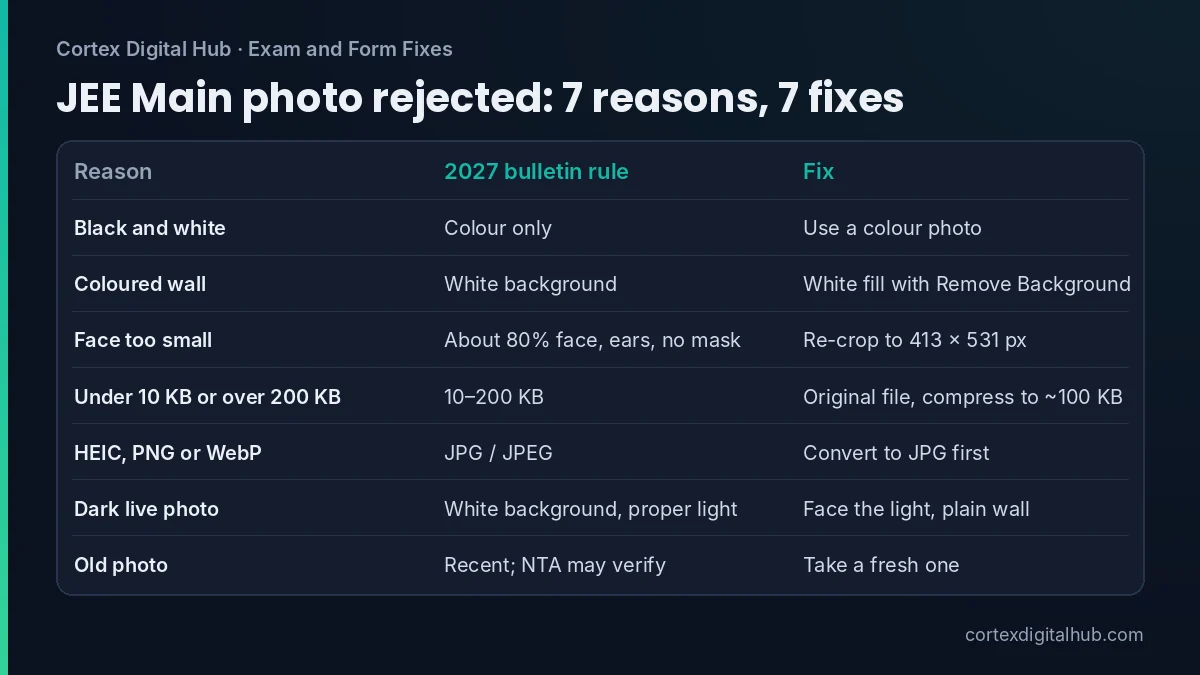 Most rejections come from the first four: colour, background, face size and file size.
Seven reasons a JEE Main photo gets rejected
1. It is black and white. The bulletin says the photo should be in colour. Some NTA exams have allowed black and white in the past, which is why old studio prints and advice from seniors cause confusion. Use colour.
2. The background is not white. A cream wall, a blue curtain or a classroom behind you breaks the rule. Ask the studio for a white background, or replace it with Remove Background, choosing a white colour fill. The cut-out runs on your phone.
3. Your face is too small. About 80% of the frame should be your face, including both ears, with no mask. A photo cropped from a full-length picture or a group shot leaves your face at a third of the frame. Re-crop so the top of your head and your shoulders just fit.
4. The file is outside 10 to 200 KB. A camera photo is often 2 to 5 MB; a photo forwarded on WhatsApp several times can fall under 10 KB. Big files are easy to fix. Tiny ones need the original.
5. The format is wrong. The upload box wants JPG or JPEG. iPhones save HEIC by default, and screenshots are PNG. Convert with HEIC to JPG or the Image Converter first.
6. The live photo was taken in bad light. The bulletin asks for a white background, proper lighting and 80% face visibility for the live capture too. A window behind you turns your face into a silhouette; a single overhead bulb throws shadows under your eyes. Face the light instead.
7. The photo does not look like you now. NTA says it may verify candidates' photographs and advises keeping your Aadhaar photo updated for verification at the exam centre. A photo from three years ago, with different glasses or a very different hairstyle, invites questions on exam day.
The fix, step by step on a phone
- Start from the best original you have: the studio JPEG or the camera photo, not a forwarded copy.
- Open the passport size resizer. It crops to 35 × 45 mm, which is 413 × 531 px, with your face centred. Download.
- If the background is not white, run the cropped photo through Remove Background with a white fill.
- Open the Image Compressor, choose To a file size and type 100. That lands well inside 10 to 200 KB.
- Check the size in your file manager and look at the photo zoomed in. Then upload.
The bulletin does not set pixel dimensions, so 413 × 531 px is a sensible choice rather than a rule. The passport photo size guide explains how centimetres turn into pixels if you want a different size.
Live photo vs uploaded photo
The two are separate steps. The uploaded photo is a file you prepare in advance. The live photo is taken through your camera or webcam while you fill the form; if your device has no webcam, the form shows a QR code you scan with a phone or tablet. You cannot prepare the live photo with a tool, but you can prepare the room: a plain white or light wall behind you, light falling on your face from the front, the camera at eye level, mask off and hair behind your ears.
Both photos should obviously be the same person, taken recently. If you wear spectacles every day, wear the same ones in both.
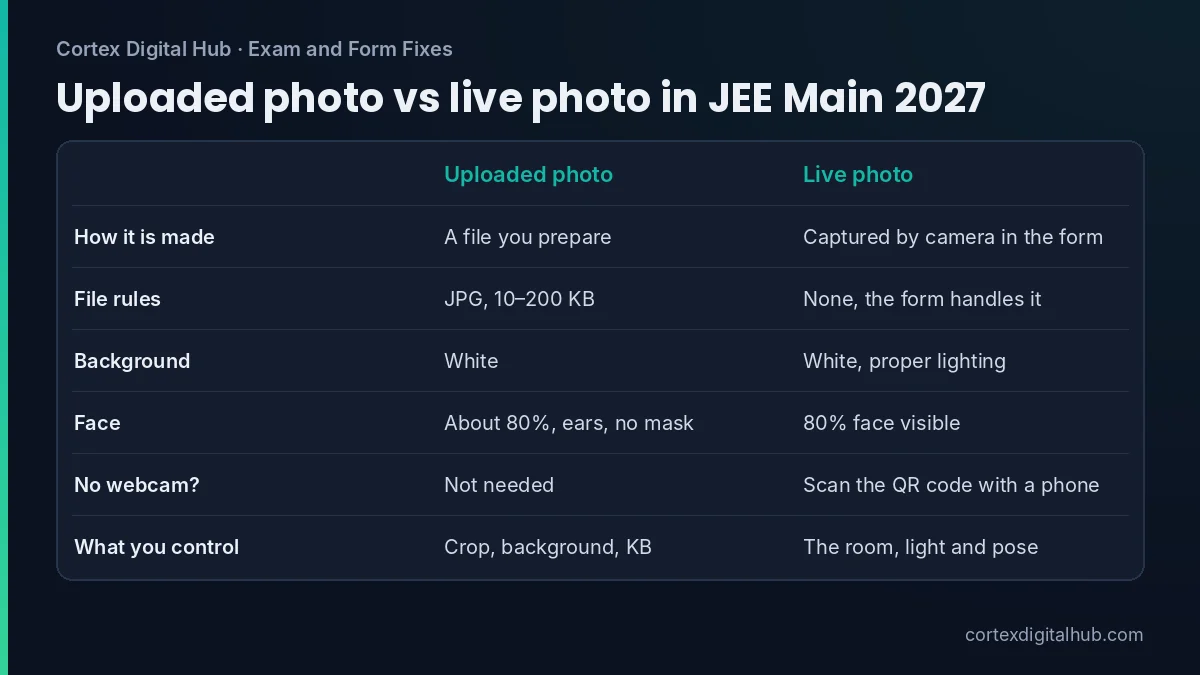 You prepare the uploaded file; you prepare the room for the live one.
Before you press submit
Look at the preview the portal shows after upload. If your face looks stretched or squashed, the crop was wrong; redo it rather than submitting. Then download the confirmation page and check the photo and signature on it. The bulletin says discrepancies in the photo or signature on the confirmation page or admit card should be raised with the NTA helpline.
Print a few copies of the same photo now, from the same file, so the prints and the upload match exactly. The bulletin asks you to bring two passport-size photos, the same as the one uploaded, to the exam, along with the printed admit card and an original photo ID.
While you are at it, check the signature too. The band is 10 to 100 KB, JPG or JPEG, and it must be clearly legible. Sign on plain white paper with a dark pen, photograph it in daylight, crop close to the ink and compress it to about 40 KB. A very tight crop of a thin signature can fall under 10 KB; if that happens, photograph it again from closer rather than enlarging the small file.
If you also need the Class 10 certificate as a 50 to 300 KB PDF, Compress PDF can bring a heavy scan down to size. The same file-size logic applies to other NTA forms; our CSIR NET photo mistakes post covers that form's bands.
Watch the video
Passport size photo: 35 × 45 mm in one click · 2:33 · Watch on YouTube
Frequently asked questions
What photo does JEE Main 2027 ask for?
A recent passport-size photograph in colour, JPG or JPEG, between 10 KB and 200 KB, with about 80% of the frame showing your face including ears, no mask, against a white background. That is from the JEE (Main) 2027 bulletin dated 24 October 2026.
Is there a pixel or cm size for the JEE Main photo?
The 2027 bulletin does not prescribe pixels or centimetres. A standard passport proportion of 3.5 × 4.5 cm, which is 413 × 531 pixels at 300 dpi, keeps the face large enough and fits easily inside the KB band.
Can I upload a black and white photo for JEE Main?
No. The bulletin says the photograph should be in colour. Use a colour photo even if an older bulletin or another NTA exam allowed black and white.
What is the difference between the uploaded photo and the live photo?
The uploaded photo is a file you choose. The live photo is captured through your camera or webcam while you fill the form, or through a phone if you scan the QR code shown. Both should show the same person clearly in good light.
What happens if NTA finds my photo doubtful?
The bulletin says applications with indistinct or doubtful photographs may not be issued an admit card. Fix the photo before you submit, and check the confirmation page afterwards.
Can I change my JEE Main photo after submitting?
Only if NTA opens the photo field in the correction window of 27 to 29 November 2026; the list of correctable fields is published when that window opens. Coverage of the 2026 cycle reported that the photograph was not editable then, so do not rely on it.
How many photos do I need on exam day?
The bulletin asks you to carry two passport-size photos, the same as the one uploaded, along with the printed admit card and an original photo ID. Print them from the same file you upload.