
Tamil voice to text: notes from voice messages, classes and your own voice
Tamil voice to text in your browser: turn a WhatsApp note, a class recording or your own spoken Tamil into Tamil script with an English version. When to pick Tamil, how Tanglish works, and how to record so the text comes out clean.
· 5 min read · 897 views · by the Cortex Digital Hub team
Drop a Tamil recording or press Record, set Spoken language to Tamil, and read Tamil script with an English version beside it. Free · no sign-up · runs in your browser, nothing uploaded
Turn Tamil speech into text → → Opens Voice to Text · runs in your browser
Amma sends a two-minute Tamil voice note about a cousin's wedding dates, and your colleague in Pune who is helping with travel bookings doesn't speak Tamil. A tuition teacher in Madurai records each evening's class and students keep asking for written notes. Tamil voice to text handles both: the free Voice to Text tool writes the words in Tamil script, places an English version beside them, and does all of it inside your browser. Here is how to set it up, when to pick Tamil, and how to get cleaner text.
Three everyday uses
- Family and client notes. Read a long Tamil voice note when you can't play it, and forward the English to someone who needs it.
- Class and lecture recordings. Turn a recorded explanation into notes, or into subtitles (.srt) for a class video.
- Speaking instead of typing. Press Record, say your message in Tamil, and copy the Tamil text into a message, a document or a form.
- Orders from customers. A caterer, a tailor or a kirana store owner gets orders as Tamil voice notes all day. Turning them into text gives a list you can search, copy into a bill book or share with the person packing the order, instead of replaying each note three times.
Each recording gets its own card, so a batch of the day's notes, up to 10 at a time, can be read one after another.
Tamil voice to text in six steps
- Open Voice to Text on a laptop or desktop in Chrome or Edge. You will find it under More Tools, then Language Tools.
- Choose Accurate, the engine that is best for Indian languages. It is about 565 MB on computers with graphics acceleration in the browser and about 760 MB otherwise. It downloads once and stays in your browser, and you can remove it any time.
- Set Spoken language to Tamil.
- Add names in Names to expect, separated by commas. Type them in English for the English box and in Tamil for the Tamil box, for example "Karthik, கார்த்திக்".
- Drop the file, up to 10 at once, or press Record.
- Read the Tamil in As spoken and the English beside it, fix what is wrong, then copy or download.
The tool reads WhatsApp voice notes (OGG, OPUS), MP3, M4A, WAV, AAC, FLAC, AMR, WebM, MP4, MOV, MKV and 3GP. To save a note from WhatsApp first, follow the WhatsApp voice note to text guide, which links WhatsApp's own help pages for Web, Desktop, Android and iPhone.
Tanglish: Tamil and English together
"Naalaikku meeting cancel aayiduchu, Monday reschedule pannalaam" is a normal Chennai sentence. The tool cuts the recording into parts at natural pauses and detects the language of each part. A mostly Tamil part is written in Tamil script, a full English part in English, and the English box gives the whole recording in English.
That behaviour changes when you pick a language, which is why the choice matters. The tool remembers your last choice in the browser, so if most of your notes are Tamil, set it once and it stays; switch back to Detect automatically when a mixed-language recording comes in.
Detect automatically or pick Tamil?
Picking Tamil tells the engine what to expect, which helps most with short or noisy recordings, where there is too little clear speech to guess from. Detect automatically is better when several people use different languages in the same recording.
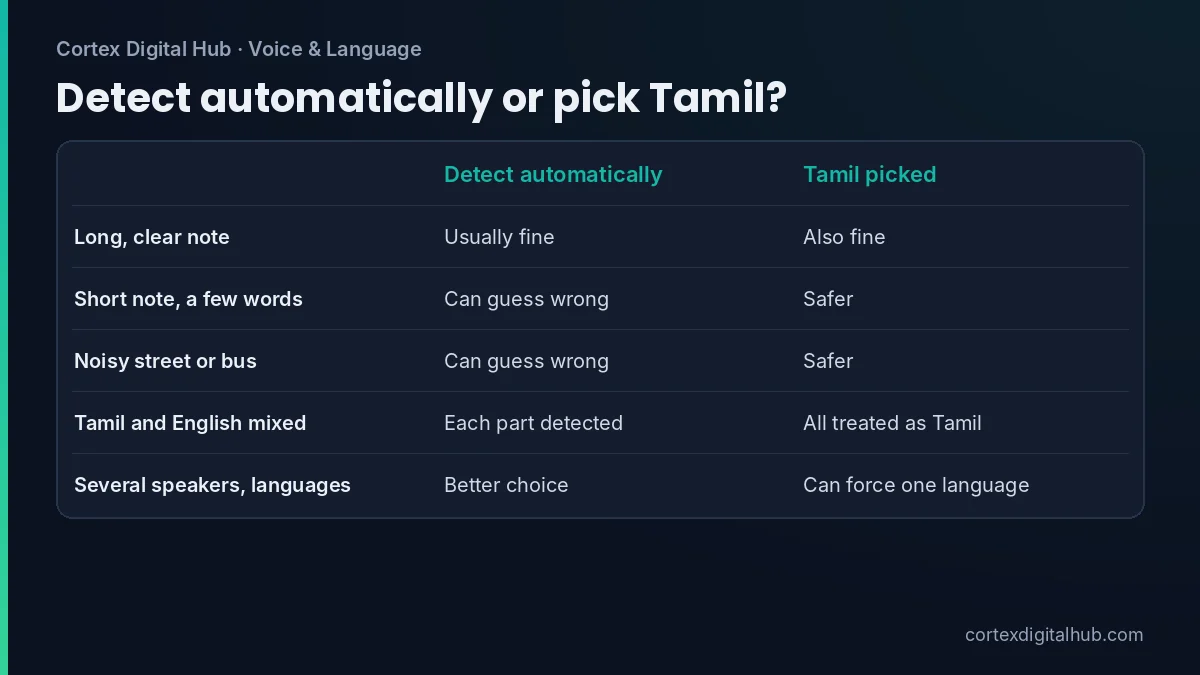 Pick Tamil for short or noisy notes; leave Detect automatically for mixed-language groups.
A simple rule: if the first result comes out in the wrong language or script, set Tamil and run the file again. With Tamil picked, English words inside Tamil sentences may be written in Tamil script in the first box; the English box usually reads fine.
Record your own Tamil so the text comes out clean
When you use Record, you control the audio quality, and audio quality decides most of the result. A few habits help:
- Hold the phone or sit close to the laptop microphone.
- Switch off the fan and the TV, and close the door.
- Say names and numbers slowly; spell an unusual name if you need to.
- Let one person speak at a time.
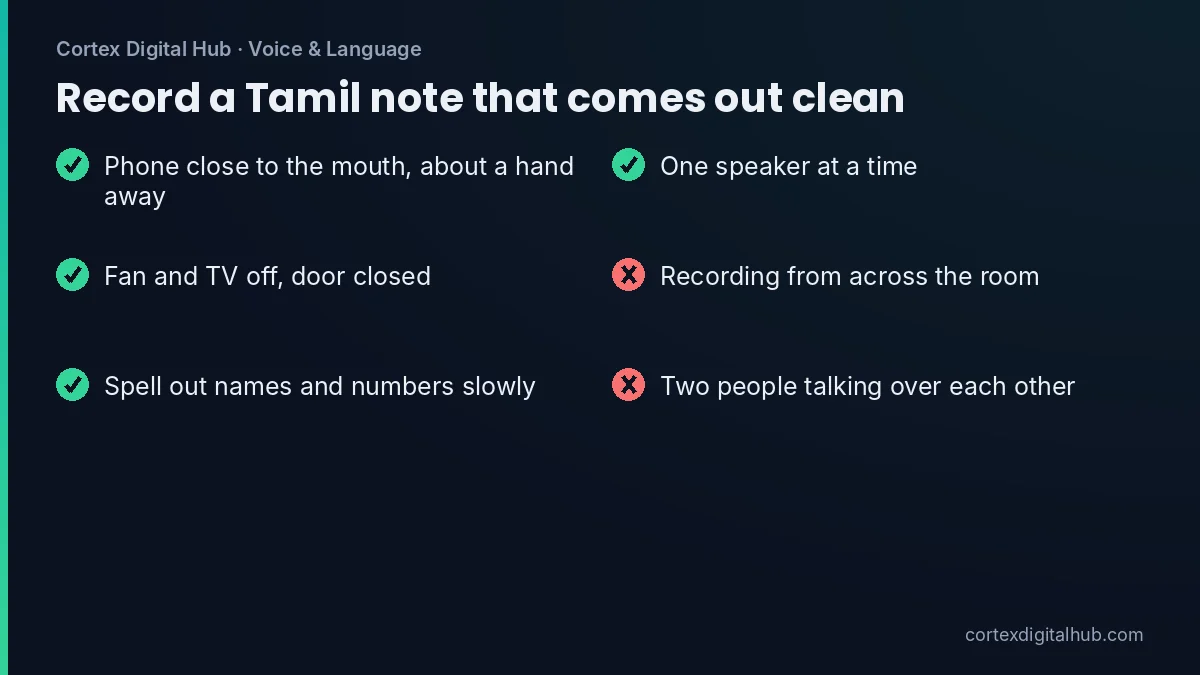 Close, quiet and one speaker at a time: the three things that matter most.
For a long class recording, trim it to the part you need with Trim Video or Video to MP3, which also evens out the volume when the teacher walks away from the phone.
The English box and subtitles
In Chrome, the English comes from the browser's on-device translator where it has one for Tamil; the first time it may fetch a language pack. Elsewhere, a button makes the English with the speech engine, which is direct but can be loose. Polish the English appears in browsers that support it and fixes grammar on your device.
For a class video, download subtitles (.srt) once you have checked the text. Subtitles show every slip on screen, so read them first. Coaching institutes making short promo or lesson videos may also like AI video for coaching institutes.
Review before you share
The Before you copy checklist on every result is the honest part of this tool:
- Fix names, numbers, amounts and dates first. That is where speech engines slip most.
- Click a time in Lines with times to hear an unclear line again.
- Expect weaker text from crowded rooms, phone calls on speaker, or old recordings with hiss.
- Speed depends on your device: fast with graphics acceleration, slower on processor-only computers. Phones should use the Light engine, which suits English more than Tamil.
For anything official, such as a statement or an agreement, have a person who reads Tamil confirm the text.
Private by default, and what it can't do yet
The recording is read on your device and never uploaded, which matters for family and student recordings; why browser-based tools are safer than upload sites explains why. One honest limit: the AI Voice Over tool speaks 20 languages, including English and Hindi, but not Tamil yet, so for now this works from Tamil speech to text, not from text to a Tamil voice. Telugu speakers can see the Telugu voice to text guide.
Watch the video
The voice note you can't play in a meeting · 1:19 · Watch on YouTube
Frequently asked questions
How do I convert Tamil voice to text for free?
Open Voice to Text, set Spoken language to Tamil, and drop a recording or press Record. The words appear in Tamil script, with an English version beside them. It is free, needs no sign-up and runs in your browser.
Will it write Tamil in Tamil script or in English letters?
In Tamil script, in the As spoken box. The English box beside it gives an English version, not Tamil written in English letters.
Does it understand Tanglish?
Yes. The recording is cut into parts at pauses and the language of each part is detected, so Tamil and English parts are both written down. If you pick Tamil, every part is treated as Tamil, and English words may appear in Tamil script.
Can I speak Tamil and get text, instead of typing?
Yes. Press Record, speak, then press Stop recording. The recording is turned into text like any other file. Speak close to the microphone in a quiet room for the best result.
Can I make Tamil subtitles for a class video?
Yes. Drop the video and download subtitles (.srt) after you have checked the text. Review the lines first, since subtitles show every mistake on screen.
Does it work on a phone?
It does, with the Light engine, which is best for English. For Tamil, the Accurate engine on a laptop or desktop with Chrome or Edge gives better results.
Is my recording uploaded?
No. The speech engine runs on your device inside the browser. Nothing is uploaded or stored on a server, and there is no account.
Turn Tamil speech into text → →