
One finished property creative, one Reel: how to turn an ad creative into a video ad without changing a pixel
A marketing lead had a finished 4:5 property creative and a Monday deadline for a Reel. How to turn an ad creative into a video ad in the browser: the piece-by-piece build, PNG layers for a cleaner result, voice speed, shapes, the price, and the limits.
· 5 min read · 757 views · by the Cortex Digital Hub team
Upload your finished creative, add its PNG layers if you have them, pick the voice and music, and download a video that builds itself up and lands on your exact design. Your first video is free. First video free · then ₹500 per 15 seconds
Make your creative move → → Opens Motion Video · runs in your browser
Riya handles marketing for a mid-sized residential project. On Friday evening the creative was signed off: a 4:5 post with the tower photo, a headline, a possession badge, three figures and a "Book a site visit" button. On Saturday the sales head asked for a Reel by Monday. The agency was closed for the weekend, she had no video editor installed, and the brand team's one rule was clear: nothing on the creative could change, not a word, not a colour, not the RERA number. This is how she managed to turn an ad creative into a video on her laptop, and what she learned about doing it well.
Why a moving version of the same creative
A static post and a Reel are judged differently. In a Reel, the eye follows movement, so a creative that builds itself up piece by piece gives every line its own moment: the headline lands, then the badge, then each figure, then the call to action. The content stays exactly what legal and the brand team approved. Only the order and timing are new.
That is the idea behind From your creative in Motion Video. It does not redesign anything. It takes the finished image apart and puts it back together on camera.
How to turn an ad creative into a video
Riya's steps, start to finish:
- Choose From your creative and drop the image: JPG, PNG or WebP, one image, the sharper the better.
- Check the voice lines. The tool reads the creative and writes voice lines using only the words printed on it. She removed one line she did not want read aloud.
- Add the layers, if you have them (more on this below).
- Style it. Shape, quality, voice, music and captions.
- Make it, watch it, and either download it or press Revise to change a line or a motion and make it again.
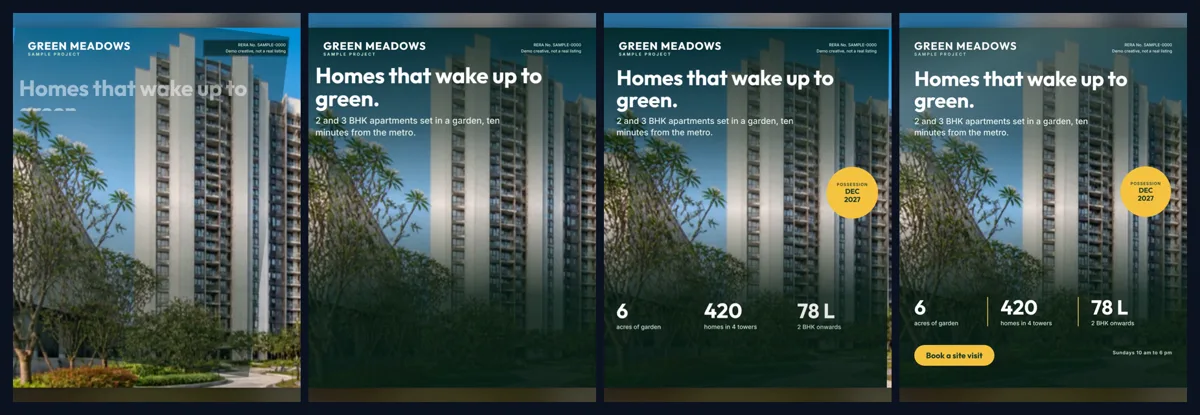
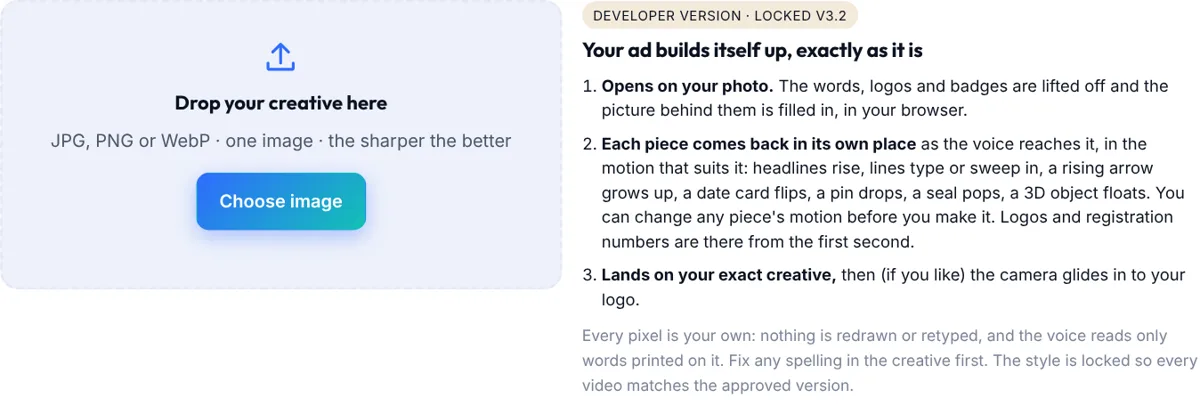
The video opens on the photo with the words lifted off and the picture behind them filled in. Then each piece returns to its exact position as the voice reaches it, in a motion that suits it: headlines rise, lines sweep in, a date card pops. The figures can count up to their value. At the end the video lands on the exact creative, pixel for pixel.
Cleaner with PNG layers
Lifting words off a flat picture works, but the cleanest result comes from the design file. Riya asked the designer for two minutes on a call, and he exported:
- the background photo on its own,
- each line of text, the logo and the RERA line,
- the badge, the button and each figure,
- the dark see-through tint over the photo.
All as transparent PNGs, any names, any order. She selected them all at once (Ctrl+A in the file window) and added them. Each layer is placed exactly where it sits on the creative, the background becomes the opening shot, and every piece comes in from its own layer. See-through overlays such as the tint come in last, so they never sit behind the figures.
Logos, legal text and figures
Three details mattered to her brand team, and all three are handled:
| What | How it behaves |
|---|---|
| Logos | On screen from the first second, in their exact place, never moving with the camera |
| RERA and permission numbers | Same as logos: fixed, readable, from the first frame |
| Figures (acres, homes, price) | Count up to their value, or appear whole if you prefer |
The voice reads only what is printed, so a figure is never said differently from how it is shown. If a number on the creative is wrong, the fix belongs in the creative, before the video.
Voice, speed and pauses
The default voice is Cortex Female NW, a calm documentary voice. Other voices in the library each have a Listen button, and you can clone a voice from a 10 to 20 second recording or upload a voice over you recorded yourself.
The speed can be set from 0.8× to 1.2× without changing the pitch: slower for a calm property film, faster for a countdown. The voice also pauses like a person, with a short breath at each comma and a longer pause at each full stop. The same voices, speeds and pauses are in AI Voice for a voice over on its own.
Shapes, quality and price
One creative can become several videos:
- 9:16 for Reels, Shorts and WhatsApp Status
- 16:9 for YouTube
- 4:5 and 3:4 for portrait posts, 1:1 for the feed
A creative of another shape sits on a soft blur of its own photo, so nothing is cropped. Quality runs from Full HD to 2K and 4K, and 8K where the browser supports it; text is drawn fresh at that size, so it stays sharp. Which format suits Status and Reels goes deeper on sizes.
Your first Motion Video is free. After that each video costs 1,000 credits, which is ₹500, for every started 15 seconds. Riya's 30-second Reel would have cost ₹1,000; as her first video, it was free.
Where it needs care
- Spelling. The voice reads what is printed. Fix the creative first.
- Very busy creatives. Many tiny lines over a busy photo are harder to lift off cleanly. Layers solve most of this.
- Low-resolution files. A blurry creative gives a blurry video. Export at full size, or sharpen it with Image Upscaler first.
- Length. From a creative, the voice sets the length, up to 60 seconds.
The voice engine downloads once into the browser (about 500 MB), and after that each voice takes a minute or two on a laptop. Only a smaller copy of the creative is sent so its pieces can be found; the voice, music and video are made on the device.
Other ways in
From your creative is one of three starting points. From a topic writes the scenes and voice for you from one line, which suits a quick offer. From your script keeps your words exactly as written and uses your own photos. For real-estate teams, AI video for real-estate marketing covers walkthroughs and site-visit clips, and Video Effects adds trending effects to a talking clip.
Riya's Reel went out on Monday morning. The brand team checked it frame by frame, and found nothing to change.
Watch the video
Type one line, get a motion video with voice and music · 0:43 · Watch on YouTube
Frequently asked questions
Will my creative be changed?
No. The video opens on your own photo, every piece comes back in its own place cut from your own image, and the video lands on your exact creative. Nothing is redrawn or retyped.
What does the voice say?
Only words printed on the creative. You can edit or remove any voice line before the video is made, so fix any spelling in the creative first.
Do I need the layers?
No. One flat JPG or PNG works. If you have the design file, exporting the background and each piece as transparent PNGs gives a cleaner build, because every piece comes from its own layer.
How much does it cost?
Your first Motion Video is free. After that each video costs 1,000 credits (₹500) for every started 15 seconds, so a 30-second video is ₹1,000.
Which sizes can I make?
9:16 for Reels, Shorts and Status, 16:9 for YouTube, 4:5 and 3:4 for portrait posts and 1:1 for the feed, in Full HD, 2K or 4K (8K where the browser supports it).
Can I use my own voice?
Yes. Pick a voice from the library, clone one from a 10 to 20 second recording of a voice you have permission to use, or upload your own voice over.
What is uploaded?
Only a smaller copy of the creative so its pieces can be found. The voice, the music and the video itself are made in your browser.